How much can project management software actually cost in 2026?
Most project management software falls into a few common pricing tiers:
- Free: Basic features for small teams (e.g., GoodDay, Asana, Jira).
- Entry-level/basic ($4 – $15/user/month): For small teams, includes core task/team management (e.g., GoodDay, Jira, Asana, ProjectManager).
- Mid-tier ($7 – $30+/user/month): Adds advanced reporting, resource management, automation (e.g., GoodDay, Wrike, monday.com, ClickUp).
- Enterprise (custom/high): For large organizations, includes premium support, security, custom features, often annual contracts (e.g.,GoodDay, Jira, Wrike, Basecamp).
In this guide, we’ll break down typical project management software pricing structures, explain how different plans are built, and highlight costs that are often overlooked during software selection.
But if you will have any questions that are not covered in this article, you can always connect with our team via info@goodday.work
How much does project management software cost in 2026?
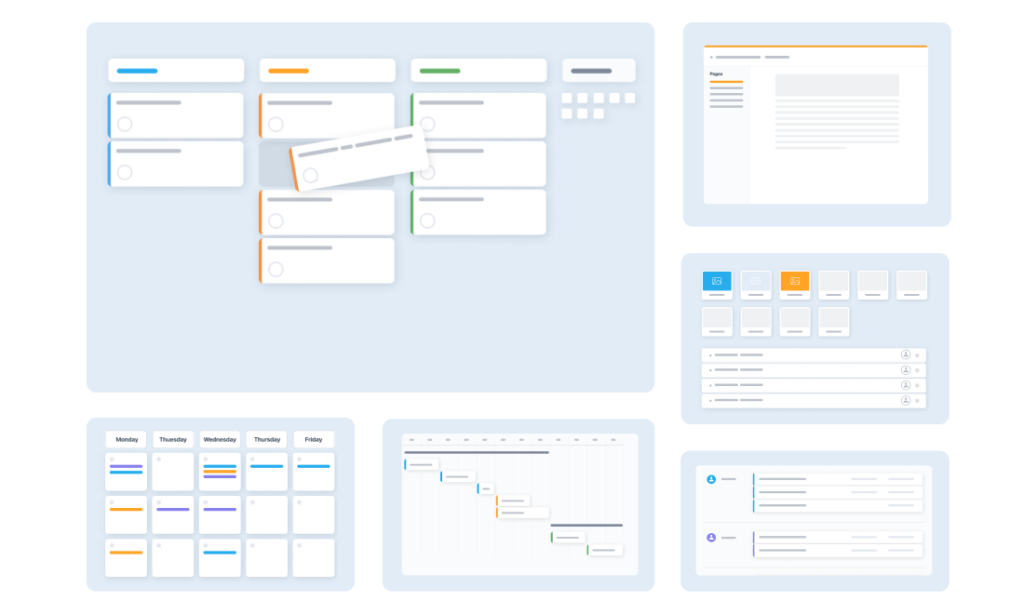
Average pricing for project management software typically ranges from about $4 to $50 per user per month, with some advanced or enterprise plans costing $100 or more per user per month.
In fact, Reddit’s r/ProductivityApps discussions reflect this variation. Users say that small to medium teams often pay between about $5 and $20 per user per month. Some teams using premium plans for advanced features like reporting, time tracking, or custom permissions said they pay closer to $30–$40 per user per month. And a few people noted that actual costs can vary significantly by plan type, while some teams end up paying thousands annually depending on their subscription model.
To understand the typical costs involved, let’s compare pricing across the most popular project management software platforms in 2026:
| Software name | Best for | Free plan or trial info | Paid plans |
| GoodDay | Teams that need advanced planning, tracking, and reporting without add-ons | Free plan for up to 15 users with unlimited tasks and projects | Professional $4 per user per month; Business $7 per user per month; Enterprise custom |
| Trello | Simple visual task tracking with boards | Free plan with limited boards and features | Standard $5 per user per month; Premium $10 per user per month; Enterprise from $17.50 per user per month |
| Asana | Team collaboration and structured project planning | Free plan for individuals and very small teams | Starter about $10.99 per user per month; Advanced about $24.99 per user per month; Enterprise custom |
| Jira | Agile and software development teams | Free plan for up to 10 users | Standard from $7.91 per user per month; Premium from about $14.54 per user per month; Enterprise custom |
| ClickUp | Teams wanting flexible workflows in one platform | Free plan with basic task and document features | Unlimited $7 per user per month; Business $12 per user per month; Enterprise custom |
| Monday.com | Visual workflows and cross-team coordination | Free plan for up to 2 users | Basic $9 per seat per month; Standard $12 per seat per month; Pro $19 per seat per month; Enterprise custom |
| Wrike | Structured workflows and enterprise-scale project control | Free plan with task and project management | Team $10 per user per month; Business $25 per user per month; Enterprise and Pinnacle custom |
Pricing overview of leading project management software platforms in 2026
Many project management software tools offer competitive pricing, but they differ in included features and how pricing changes as organizations grow. To make project management software pricing easier to understand, let’s take a look at how some of the most widely used project management tools structure their plans and what is included at each level.
GoodDay pricing
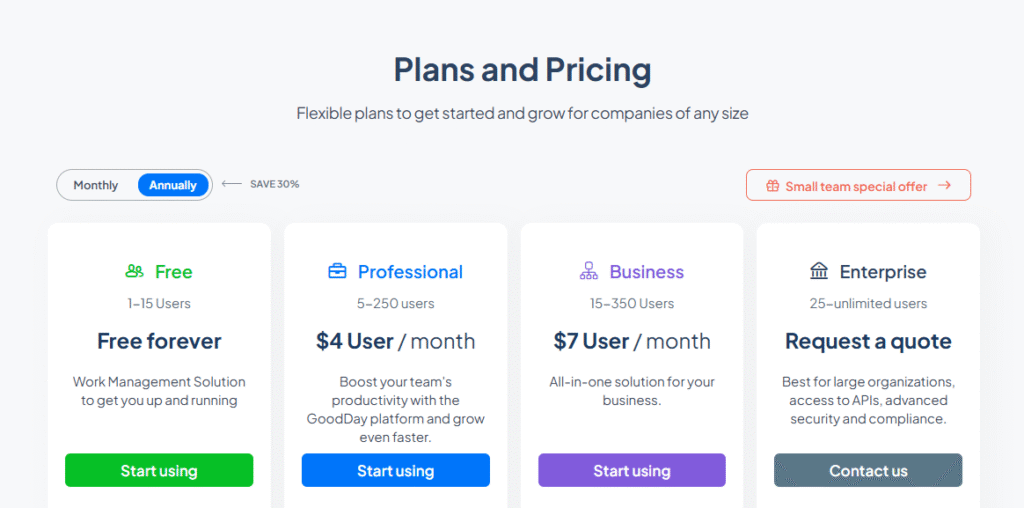
With GoodDay’s pricing model, most core features are included in each plan, rather than sold as add-ons. This approach works well for teams that need full project visibility from the start and want predictable costs as they grow. Features such as Gantt charts, time tracking, analytics, and resource management are available without paying for separate modules.
- Free plan (up to 15 users): unlimited tasks and projects, basic workflows, dashboards, templates, basic analytics, and standard integrations.
- Professional plan ($4 per user per month): adds time tracking, Gantt views, advanced integrations, automation, reports, custom fields, unlimited storage, and access to the full core feature set.
- Business plan ($7 per user per month): includes CRM features, customer portals, resource, finance, and expense tracking, custom branding, and more advanced security and management tools. This plan is designed for growing teams.
- Enterprise plan (custom pricing): supports large organizations with unlimited users, enterprise-grade security, SSO, advanced access controls, private cloud options, and custom roles and reports.
Trello pricing
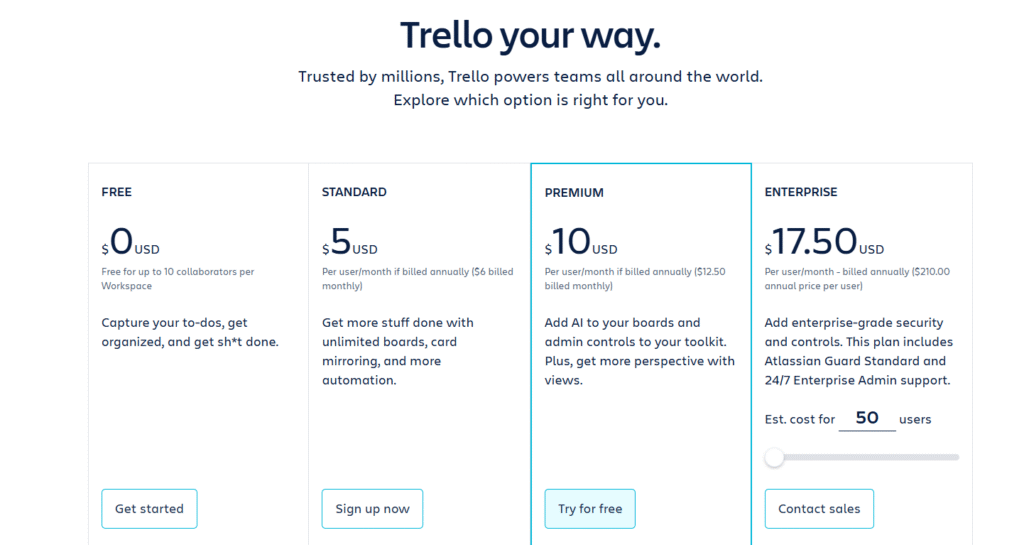
Trello pricing is attractive for basic use, but costs tend to increase as teams add features beyond standard boards. Advanced capabilities such as reporting, time tracking, and structured project views often require higher-tier plans or third-party Power-Ups.
- Free plan: includes up to 10 boards per workspace, unlimited cards and lists, basic task management, one Power-Up per board, file attachments up to 10 MB, limited automation, and mobile and desktop access.
- Standard plan ($5 per user per month): adds unlimited boards, unlimited Power-Ups, custom fields, advanced checklists, larger file attachments up to 250 MB, and increased automation limits.
- Premium plan ($10 per user per month): adds timeline, calendar, dashboard, and workspace views, higher automation limits, admin controls, board templates, and unlimited storage per file.
- Enterprise plan (starting at $17.50 per user per month with volume discounts): built for large organizations that need centralized administration, security controls, and workspace-level governance.
Asana pricing
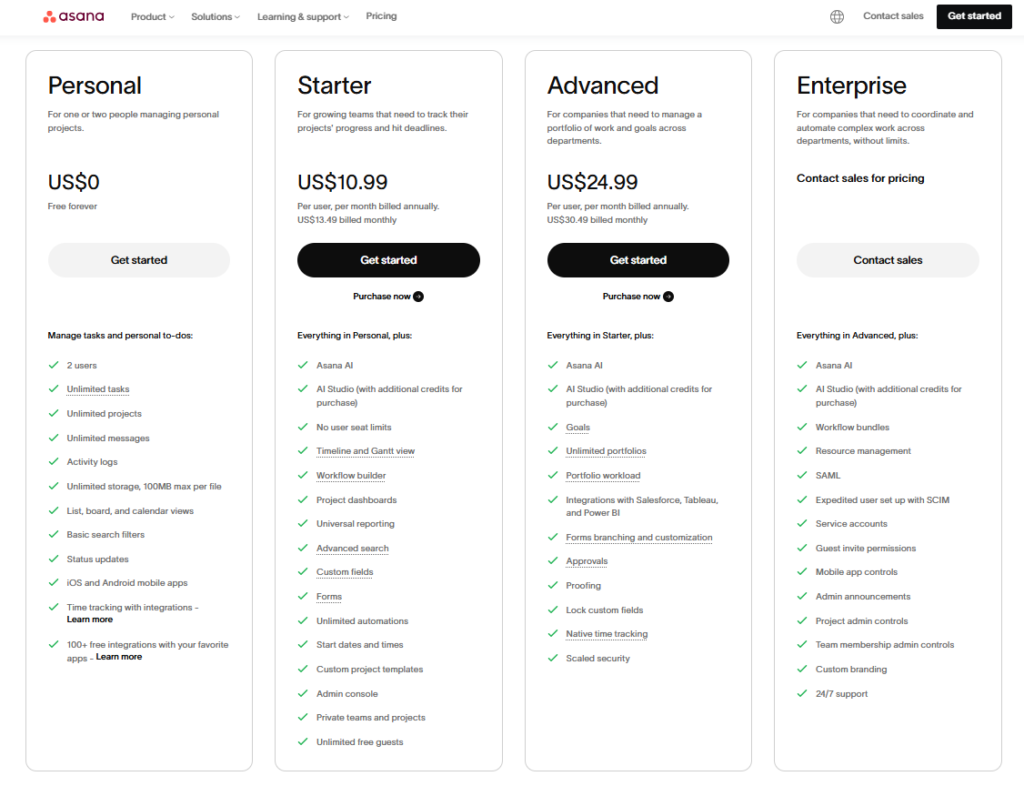
Asana’s tiered plans are based on team size and feature needs. Core project and task management features are included in all paid tiers, with advanced automation, reporting, and portfolio views added at higher levels.
- Free (Personal): $0 per user per month; basic task and board views suitable for individual use or very small teams.
- Starter: about $10.99 per user per month when billed annually; adds timeline, task dependencies, and custom fields.
- Advanced: about $24.99 per user per month when billed annually; adds workload, goals, advanced reporting, and automation.
- Enterprise / Enterprise+: custom pricing; designed for large teams with advanced security, administrative controls, and support.
Jira pricing
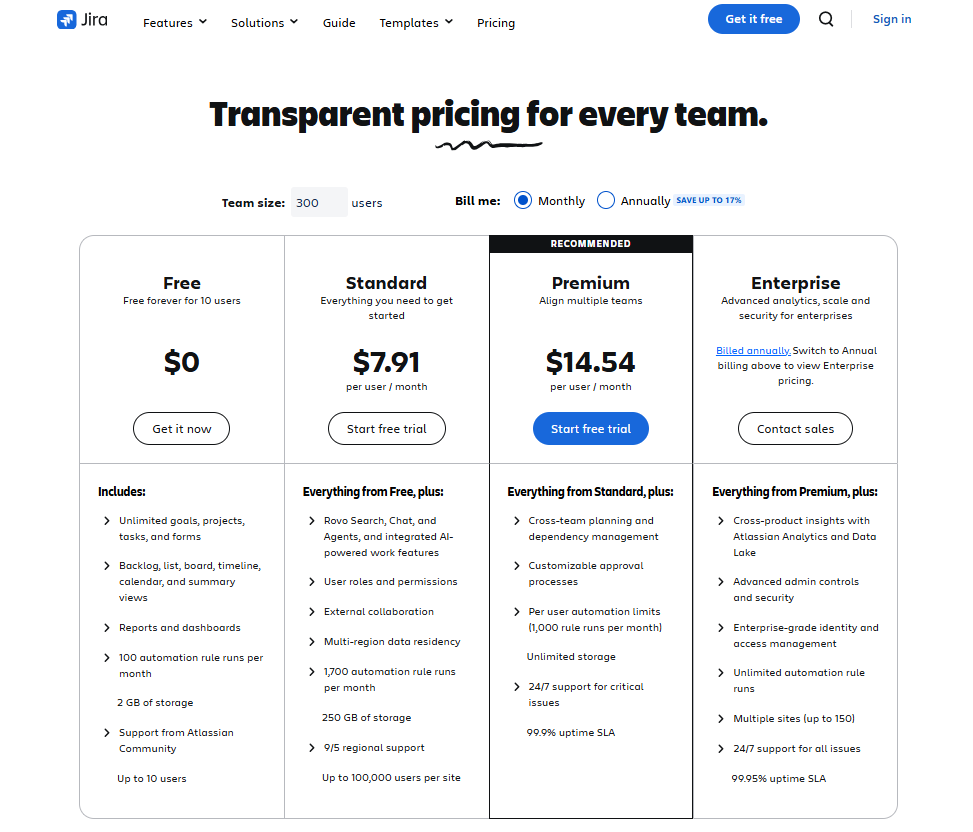
Atlassian’s Jira offers scalable pricing with a free tier for small teams and paid options for growing or enterprise-level organizations.
- Free: $0 per user per month (up to 10 users); includes basic Scrum and Kanban boards, backlog, and dashboards.
- Standard: starts around $7.91 per user per month; adds project roles, permissions, and higher automation limits.
- Premium: starts around $14.54 per user per month; adds cross-team planning, unlimited storage, and 24/7 support.
- Enterprise: custom pricing; multi-instance support, advanced security, and organization-wide controls.
ClickUp pricing
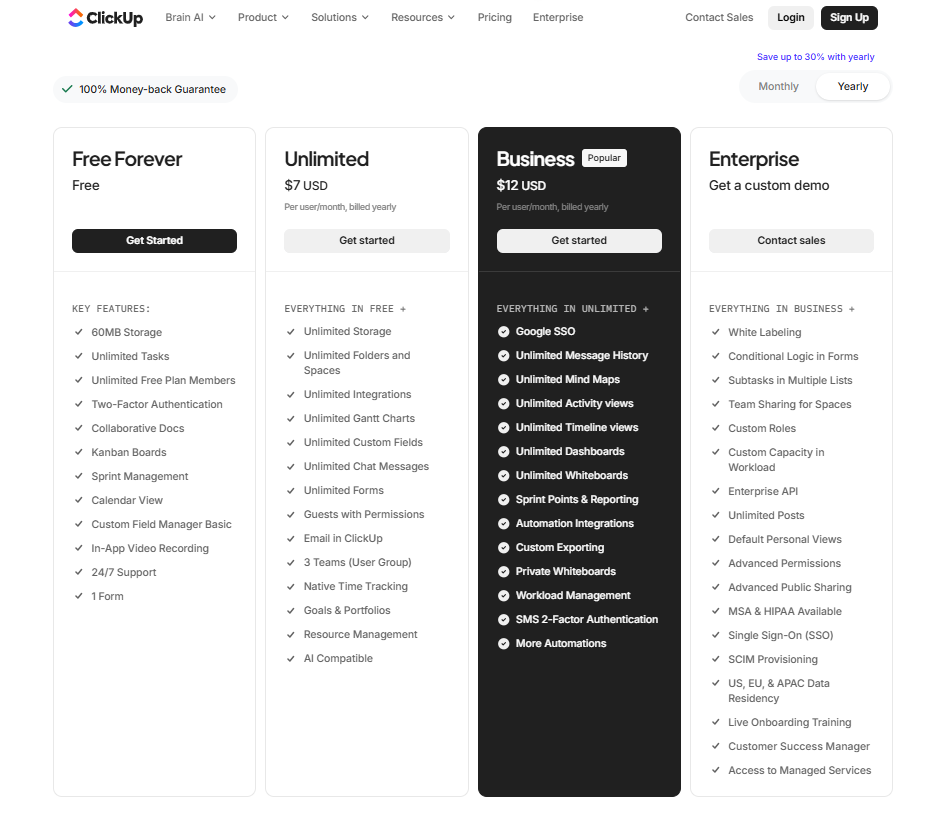
ClickUp’s pricing structure starts with a free plan, paid plans scale with team complexity.
- Free Forever: $0 per user per month; basic task management, docs, calendars, and boards for personal use or small teams.
- Unlimited: starts at $7 per user per month; adds unlimited storage, custom views, and timesheets.
- Business: $12 per user per month; adds private docs, sprint reporting, advanced dashboards, and more.
- Business Plus / Enterprise: custom pricing; adds advanced permissions, priority support, and enterprise features.
Monday.com pricing
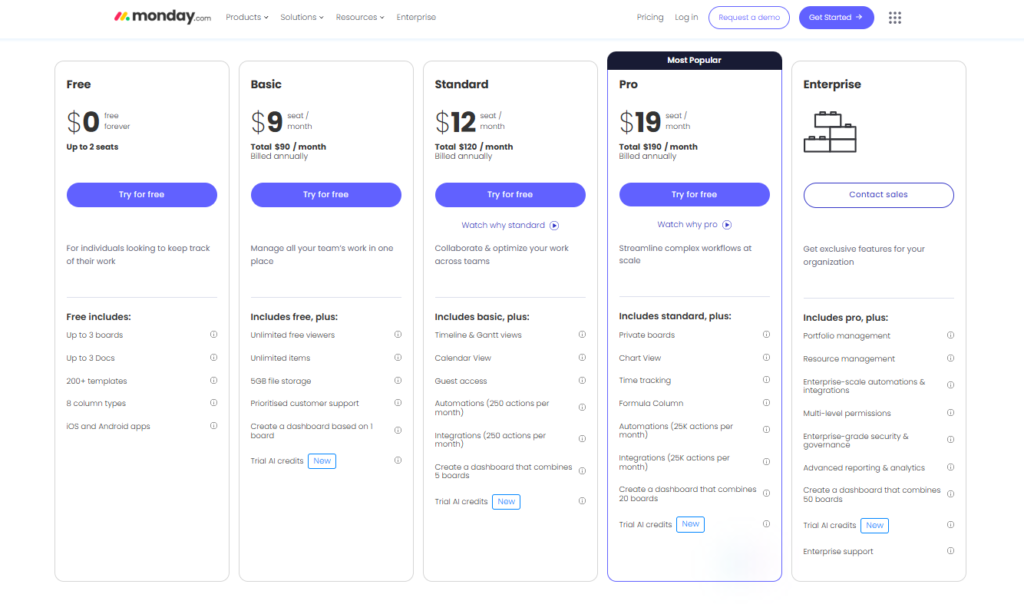
Monday.com uses plans based on team size and features, starting with a free and trial option and increasing with advanced workflow capabilities.
- Free plan: $0, up to 2 seats. Designed for individuals or very small teams. Includes up to 3 boards, up to 3 Docs, access to 200+ templates, 8 column types, and iOS and Android apps.
- Basic plan: $9 per seat per month, billed annually. Adds unlimited items, unlimited free viewers, 5 GB file storage, prioritized customer support, and the ability to create a dashboard based on one board. Includes limited AI trial credits.
- Standard plan: $12 per seat per month, billed annually. Adds timeline and Gantt views, calendar view, guest access, automations and integrations with a monthly limit, and dashboards that combine up to 5 boards. Includes limited AI trial credits.
- Pro plan: $19 per seat per month, billed annually. Adds private boards, chart view, time tracking, formula columns, significantly higher automation and integration limits, and dashboards that combine up to 20 boards. Includes limited AI trial credits.
- Enterprise plan: custom pricing. Adds portfolio and resource management, enterprise-scale automations and integrations, multi-level permissions, advanced security and governance, advanced reporting and analytics, dashboards combining up to 50 boards, and enterprise support.
Wrike pricing
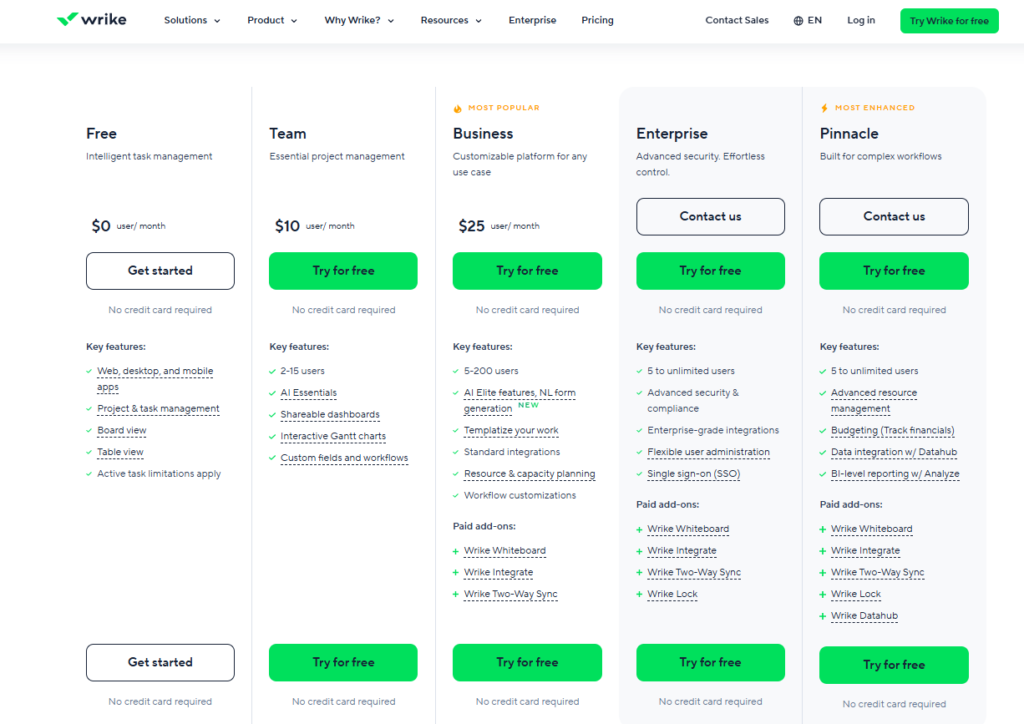
Wrike offers a range of plans from free to enterprise. Pricing is per user per month, with higher tiers adding automation, reporting, and resource planning. Some advanced capabilities are available as paid add-ons across multiple plans.
- Free plan: $0 per user per month. Includes project and task management, board and table views, and access via web, desktop, and mobile apps. Active task limits apply.
- Team plan: $10 per user per month. Designed for small teams (2–15 users). Adds shareable dashboards, interactive Gantt charts, custom fields and workflows, and access to core AI features.
- Business plan: $25 per user per month. Supports teams of 5–200 users. Adds advanced workflow customization, standard integrations, resource and capacity planning, templates, and expanded AI features. Some advanced tools are available as paid add-ons.
- Enterprise plan: custom pricing. Designed for large organizations (5 to unlimited users). Adds advanced security and compliance features, enterprise integrations, flexible user administration, and single sign-on. Certain features are available as paid add-ons.
- Pinnacle plan: custom pricing. Built for complex, large-scale operations. Adds advanced resource management, budgeting and financial tracking, data integration, and BI-level reporting. Additional advanced modules are available as paid add-ons.
Typical project management software pricing models
Different pricing models affect how expenses grow over time and how predictable your budget will be. Knowing how each model works helps teams avoid surprises as usage increases or requirements change.
| Pricing model | How it works | Cost considerations |
| Per user or per seat | Pricing is based on the number of active users | Costs can increase quickly as team size grows |
| Per usage | Charges depend on usage such as automation actions, storage, or API calls | Spikes in usage can lead to unexpected monthly costs |
| Tiered subscription | Fixed plans bundle features at set price levels | Important features may only be available on higher tiers |
| Custom quote | Pricing is tailored to organization size and requirements | Negotiation takes time and final costs may be harder to predict |
| Monthly or annual billing | Monthly payments or discounted annual commitment | Annual plans save money but reduce flexibility if needs change |
| Freemium | Basic features are free, paid plans unlock advanced tools | Free plans often have strict limits that affect real usage |
Factors to consider when choosing a project management software pricing model
When choosing a pricing model, the goal is not just to find the lowest price. It is to pick an option that fits how your team works today and how costs will change as your needs grow. A clear understanding of pricing structure helps avoid surprises later and makes long-term budgeting easier.
Factor 1: Team size and structure
Start with how many people will use the software and how often that number changes. If your team grows or shrinks frequently, per-user pricing may seem flexible, but costs can rise fast. For larger or growing teams, tiered or flat-fee plans can be easier to manage because pricing is more predictable as more users are added.
Factor 2: Project complexity
Think about the type of projects you manage. Simple task tracking usually works well with basic or free plans. More complex projects often need features like Gantt charts, reporting, automation, or integrations. These are usually available only on higher tiers, which affects overall cost more than the base price.
Factor 3: Long-term cost
Look beyond the monthly price. Some plans appear affordable at first but become expensive once you add users, storage, or automation. Free or low-cost plans can work for small teams, while paid plans with more features may be more cost-effective over time if they reduce the need for extra tools or add-ons.
Factor 4: Growth and scalability
Choose a pricing model that can grow with your team. Switching tools later can be costly and disruptive. Plans that allow easy upgrades, clear limits, and predictable pricing make it easier to scale without changing software when your workload increases.
Quick checklist to choose the right pricing model
To consider real usage and long-term cost, not just the starting price, you can use this checklist to quickly narrow down which pricing model may fit your team best:
| Team size | Fewer than 10 users and stable: free, per-user, or entry-level plans usually work. Growing team or multiple departments: tiered or flat-fee plans are easier to budget. |
| How complex are your projects | Simple tasks and to-do lists: basic or freemium plans are often enough. Multiple projects, dependencies, reporting, or automation: expect mid-tier or higher plans. |
| Hidden or extra costs | Check limits on automation, integrations, storage, and dashboards. Look for features that require add-ons or upgrades later. |
| Future growth | Planning to scale in the next 1–2 years: choose software with clear upgrade paths. Avoid tools that force a full plan change just to unlock basic features later. |
What influences project management software pricing?
Project management software pricing is rarely based on a single factor. Most platforms start with a base plan, then increase costs as teams unlock additional features, remove limits, or scale usage. Understanding what drives these price changes makes it easier to compare tools and estimate real costs over time.
User tiers and team size
Most project management tools charge per user or per seat, which means costs rise as more people join the platform. Entry-level plans often start in the lower price range, while plans with broader functionality commonly fall between $10 and $30 per user per month. As teams grow, per-user pricing can quickly become the main driver of total cost, especially when higher tiers are required for core features.
Templates and setup tools
Some platforms include basic templates for free, while others reserve advanced or industry-specific templates for paid plans. Access to a wider template library can slightly increase monthly costs, but it often reduces setup time, speeds up onboarding, and helps teams standardize workflows more quickly.
Automation limits
Automation is one of the most common pricing levers. Lower plans usually cap the number of automation actions per month, while higher tiers significantly raise or remove those limits. Teams that rely on automated workflows to reduce manual work often need mid-tier or higher plans, which increases overall cost.
Time tracking and reporting
Time tracking is frequently not included in entry-level plans. Tools that offer built-in time tracking, workload reporting, or resource utilization typically place these features in higher tiers. For teams that bill clients, manage capacity, or track productivity, this can be a necessary upgrade rather than an optional one.
Integrations and system connectivity
Basic integrations are often included in paid plans, but more advanced or custom integrations may require higher tiers or add-ons. Connecting project management software with tools like CRMs, communication platforms, or internal systems can increase costs, especially when custom setup or higher integration limits are needed.
Storage and file limits
File storage limits vary widely between tools. Free or lower-tier plans usually include limited storage, while higher tiers expand capacity. Teams working with large files, design assets, or extensive documentation may need to upgrade sooner to avoid storage restrictions.
Types of project management software subscription plans, upgrades and discounts
Project management software pricing is usually built around subscriptions that change as teams grow and workflows become more complex. While plan names differ across platforms, the logic behind them is similar. Understanding how subscription plans are structured, what triggers upgrades, and how discounts are applied helps teams plan costs more realistically.
Types of subscription plans
Most tools offer several subscription levels that group features by complexity. Entry-level plans focus on basic task and project tracking and are often suitable for individuals or small teams. Mid-tier plans add collaboration features such as timelines, reporting, automation, and integrations, making them a common choice for growing teams. Enterprise plans are designed for large organizations and typically include advanced security, permissions, compliance controls, and administrative features. These higher plans are less about daily task management and more about governance and scale.
Types of upgrades
Upgrades usually happen when teams hit usage limits or need more control. Common upgrade triggers include adding more users, exceeding automation or integration limits, or needing features like dependencies, resource management, or advanced reporting. In many tools, upgrades are not optional once limits are reached, as core workflows may stop working or become inefficient. This makes it important to understand which features are essential and which are optional before choosing a plan.
Types of discounts
Discounts are most commonly tied to billing cycles and team size. Annual subscriptions usually cost less per user than monthly plans, but require a longer commitment. Some vendors offer volume discounts as the number of users increases, while others provide special pricing for non-profits, education, or startups. Discounts can lower costs, but they often apply only after committing to higher tiers or longer contracts, so they should be evaluated alongside flexibility and future needs.
Hidden costs in project management software that can increase your bill
When choosing project management software, the price shown on the website is rarely the full story. As soon as a team begins real work, additional costs often appear. These are not always hidden on purpose, but they are easy to miss if you only look at headline pricing. Understanding these costs early helps avoid surprises later and compare tools more realistically.
1) Setup and onboarding fees
Some tools charge for onboarding or initial setup, especially if they allow complex workflow customization. This can include configuring project templates, setting up permissions, or migrating data from another system. For example, a team moving from spreadsheets or another PM tool may need guided setup to match their processes. While this can save time, it also increases upfront costs and should be factored into the budget.
2) Paid training and certifications
Most platforms provide free help articles and videos, but live training is often paid. This includes remote sessions, onsite workshops, or official certifications. Teams working with advanced workflows, software development processes, or regulated environments often rely on this training to use the tool correctly. These costs may be one-time, but they add up when onboarding new employees.
3) Premium customer support
Basic support is usually included, but priority support often costs extra. This may include faster response times, dedicated account managers, or direct access to technical specialists. For teams running large projects or working across time zones, standard support may not be enough, making premium support a practical requirement rather than a luxury.
4) Extra or custom integrations
Most tools support common integrations, but limits often apply. Once a team needs more integrations or custom connections, upgrades or add-on fees are common. For example, syncing a project management tool with a CRM, accounting system, or internal database can push teams into higher pricing tiers or require paid integration tools.
5) Usage limits and overage fees
Many platforms limit how much you can use certain features, such as automation actions, dashboards, storage, or API requests. These limits are easy to overlook at first. As usage grows, teams may hit these caps and either pay overage fees or upgrade plans. This is common for automation-heavy teams where small workflow changes can significantly increase monthly usage.
6) Long-term contracts
Some vendors require annual contracts, especially for higher-tier plans. While annual billing often reduces the monthly price, it also locks you in. If your team size changes or the tool no longer fits your needs, switching becomes harder and more expensive. This is especially important for fast-growing or restructuring teams.
7) Compliance and security features
Advanced security features such as audit logs, role-based access, and compliance controls are often not included in lower plans. Teams working with sensitive data, external clients, or regulated industries usually need these features. While necessary, they increase the total cost and are sometimes only available on enterprise plans.
Questions to ask project management software vendors during pricing demos
Use these questions during demos or sales calls to understand the real cost of the software and avoid surprises later.
| Pricing and scaling | How does pricing change as we add or remove users? Are users counted as active users or total seats? Do costs increase based on usage such as automations, storage, or dashboards? What happens to pricing if our team size decreases? |
| Features and limits | Which features are included in this plan, and which require an upgrade? Are there limits on automation actions, integrations, or reports? Are key features like timelines, dependencies, or time tracking included? What features do most customers upgrade for first? |
| Billing and contracts | Is pricing monthly or annual, and what discounts apply to annual billing? Is there a minimum contract term? Can we downgrade or cancel, and what happens if we do? Are refunds or plan changes allowed mid-cycle? |
| Support and onboarding | What level of support is included in this plan? How long are typical response times? Is onboarding or setup assistance included, or is it billed separately? Do you offer training for new users, and what does it cost? |
| Integrations and future needs | Which integrations are included by default? Are custom integrations possible, and how are they priced? What happens if we outgrow this plan in six to twelve months? |
How to maximize ROI from your project management software investment
Getting value from project management software is less about the sticker price and more about how well the tool supports daily work. ROI improves when the software reduces manual effort, improves visibility, and replaces multiple tools instead of adding another layer of complexity.
Choose features you will actually use
Start by identifying which features your team relies on every week. Task tracking, timelines, reporting, and collaboration should support real workflows, not just look good in demos. Paying less for a tool that blocks essential work often leads to hidden costs later.
Use automation where it saves real time
Automation delivers ROI when it replaces repetitive actions, such as status updates, task assignments, or reminders. Even simple automations can save hours across multiple projects. If automation is critical, it is usually worth choosing a plan that includes higher limits rather than paying for overages later.
Reduce tool overlap
ROI improves when one platform replaces several smaller tools. If your project management software can handle planning, reporting, and team coordination, you may be able to eliminate separate tools for tracking, documentation, or communication.
Review usage regularly
Periodically check how the software is being used. Look at active users, feature adoption, and whether reports actually support decision-making. Adjust plans or configurations if features are unused or limits are being hit too often.
Project management software cost for small, mid-sized, and enterprise businesses
Project management software costs vary significantly based on company size, workflow complexity, and governance needs. Small teams focus on affordability and simplicity, while larger organizations prioritize scalability, security, and control. Understanding these differences helps set realistic expectations before comparing tools.
| Small businesses | Many small businesses rely on free plans or entry-level paid plans that cost between $4 and $10 per user per month. These plans typically include task management, basic collaboration, and limited automation. Costs stay manageable as long as team size and feature requirements remain stable. |
| Mid-sized businesses | Mid-sized businesses often outgrow basic plans due to increased collaboration, reporting needs, and cross-team coordination. Pricing commonly falls between $7 and $25 per user per month. At this stage, teams pay for features like timelines, dashboards, automation, integrations, and time tracking. Total cost increases faster as user counts grow and workflows become more complex. |
| Enterprises | Enterprise organizations usually work with custom pricing rather than public price lists. Costs depend on the number of users, security requirements, compliance needs, and support levels. Enterprise plans often include advanced permissions, audit logs, SSO, dedicated support, and long-term contracts. Annual costs can reach tens or hundreds of thousands of dollars, depending on scale. |
How to find the best project management software pricing option
Choosing the right pricing option is about matching software capabilities to real business needs, not just picking the lowest price. A well-chosen plan supports growth without forcing frequent upgrades or unexpected expenses.
Step 1: Start with real usage, not features
Focus on how your team actually works day to day. Identify which features are essential and which are rarely used. Paying for unused functionality reduces value and inflates long-term costs.
Step 2: Look beyond the starting price
Low entry prices can be misleading if key features are locked behind higher tiers. Review limits on users, automation, storage, and integrations to understand when costs will increase.
Step 3: Plan for growth early
Choose software that can scale without major pricing jumps. Clear upgrade paths and predictable pricing help avoid costly migrations later.
Step 4: Test before committing
Use free plans or trials to validate fit. Testing real workflows helps confirm whether the pricing tier supports your needs without unnecessary upgrades.
GoodDay – project management software you can rely on
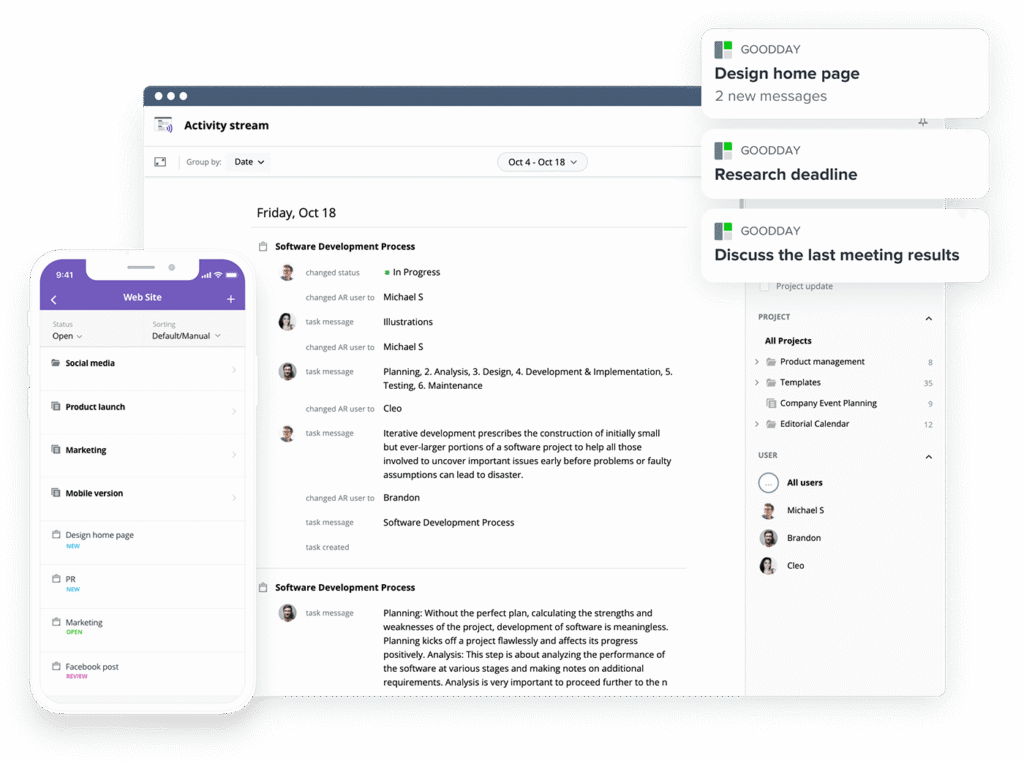
GoodDay is an all-in-one project management platform used by Fortune 500 companies, fast-growing startups, and established businesses all over the world. In 2026, GoodDay is recognized as a top software in 12 Capterra shortlists.
It offers a free plan with unlimited projects for up to 15 team members and provides access to advanced productivity features earlier than many other platforms. Its modest price is a standout (paid plan starts at $4 per user per month), you really get a lot for what you pay.
You can start with the free plan to see how GoodDay can support your workflow.
And if you need help choosing the right plan or have any questions, you can contact our team at info@goodday.work
FAQs
How much does project manager software cost?
Project manager software usually costs between $4 and $50+ per month per user, depending on features and team size. Entry-level plans often start around $4, while enterprise plans rely on custom pricing. Most tools charge more as teams add advanced planning, reporting, or security. Overall, project management software pricing depends on scale and feature depth.
Which software is best for project management?
The best option depends on how many projects you run and how complex your workflows are. Among modern project management tools, GoodDay stands out because it includes advanced planning, reporting, and automation at lower tiers. It delivers strong value without forcing early upgrades. This makes it a reliable project management solution for long-term use.
Is project management software worth it?
Project management software is worth it when it replaces manual coordination and reduces delays. Tools with advanced features like automation and reporting improve efficiency across teams. Even small productivity gains can justify the cost. For growing teams, the ROI is usually measurable within months.
Can I manage multiple projects with free software?
Yes, many free tools allow users to manage projects across multiple workflows. Free plans often support basic task management tools, but limits apply. For example, GoodDay’s free plan supports unlimited projects for up to 15 users. This works well for early-stage teams.
What’s the best PM software?
The best PM software balances price, usability, and scalability. GoodDay includes all the features most teams need without paid add-ons. Its pricing works well for both startups and mature teams. That flexibility gives it a significant advantage over competitors.
Which software is commonly used for project management?
Widely used platforms include Asana, Jira, Trello, monday.com, and GoodDay. These most project management solutions cover task tracking and collaboration. Adoption often depends on industry and workflow style. GoodDay is increasingly chosen by rapidly growing organizations.
What are the four main types of project management software?
The four main types are basic project management, agile-focused tools, portfolio-based systems, and enterprise platforms. Some tools are built for traditional project managers, while others focus on flexibility. Portfolio systems emphasize portfolio management and reporting. Many modern tools combine these approaches.
How much does project software cost?
Project software pricing ranges from free to enterprise-level contracts. Costs depend on how many users are active and which features are required. Some vendors also use usage based pricing for automation or storage. GoodDay keeps pricing predictable as teams grow.
How to choose a project management software?
Start by defining your workflow, team size, and reporting needs. Selecting project management software should focus on real usage, not feature lists. Look for tools that scale without constant upgrades. GoodDay offers a strong balance for small businesses and larger teams.
What is the best personal project management software?
Personal users benefit from tools with simple setup and low limits. Many platforms offer free plans for up to five users with basic functionality. GoodDay’s free tier supports individual use and growth. It also works well for freelancers managing multiple tasks.
How is project management software priced?
Most vendors use a tiered pricing model based on features and users. A tiered pricing model offers predictable upgrades as teams scale. Some plans bundle premium features only at higher levels. GoodDay includes more features earlier than other tools.
Are there any free project management software?
Yes, many tools offer free plans for small teams with usage limits. These plans usually restrict user limits, automation, or reporting. GoodDay’s free plan includes unlimited projects and dashboards. That makes it practical for early-stage teams.
What is the most used PM software?
Asana, Jira, and Trello remain widely adopted across industries. These tools are popular for collaboration tools and integrations with accounting software. However, GoodDay is gaining traction due to built-in workflow automation and planning. Its growth reflects demand for simpler pricing and stronger value.




