Are you trying to decide between GoodDay and Zoho Projects?
GoodDay is a comprehensive work management platform with built-in time tracking and customizable workflow templates, while Zoho Projects is a project management tool known for its deep integration within the Zoho ecosystem and robust task-scheduling capabilities..
| GoodDay | Zoho Projects | |
| Core functionality | All-in-one work management, productivity, and collaboration. | Project planning, task tracking, and collaboration. |
| Advanced features | Native goals, OKRs, HR tools, and resource management. | Blueprints for automation and deep Zoho ecosystem sync. |
| Visuals | Modern, highly customizable interface with 20+ views. | Traditional, structured interface with a focus on Gantt charts. |
| Complexity | Powerful but intuitive for various team roles. | Can have a learning curve due to technical configurations. |
| Best for | Teams are seeking a unified platform for all business processes. | Small to medium teams already using Zoho products. |
| Choose if | You want a high-feature platform that scales without add-ons. | You need basic project tracking within a larger suite of apps. |
In this guide, we’ll explore every factor to consider when choosing between GoodDay and Zoho Projects to help you select the best project management software.
But if you have any questions that are not covered in this article, you can always connect with our team via info@goodday.work
GoodDay vs Zoho Projects: an overview
Choosing the right project management software involves balancing the depth of features with daily usability. While both platforms aim to improve team efficiency, they serve different organizational philosophies and operational needs.
What is GoodDay?
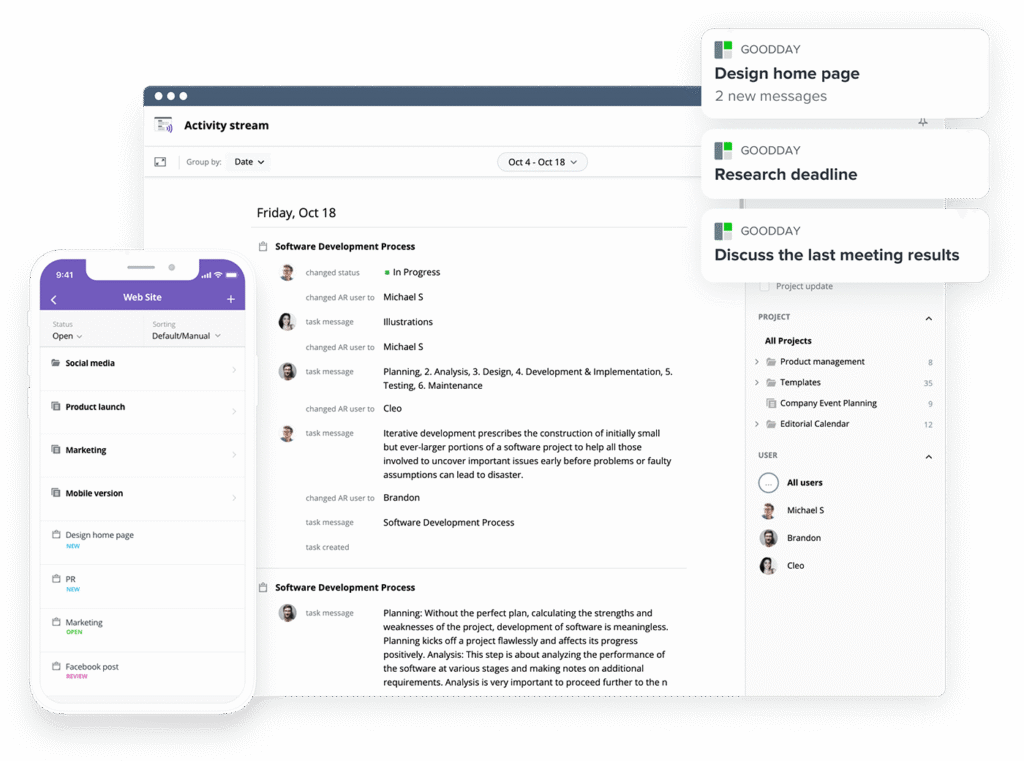
GoodDay is a versatile work management solution relied upon by Fortune 500, startups, and growing businesses. It provides project templates for various team types (such as IT, HR and marketing), supports all standard methodologies, and includes flexible visualization options (such as advanced Gantt and Kanban views). The system allows unlimited project hierarchy, includes built-in time tracking, and offers comprehensive CRM capabilities. It also incorporates advanced security technologies. In 2026, GoodDay is listed among top-rated project management tools in 12 Capterra shortlists.
What is Zoho Projects?
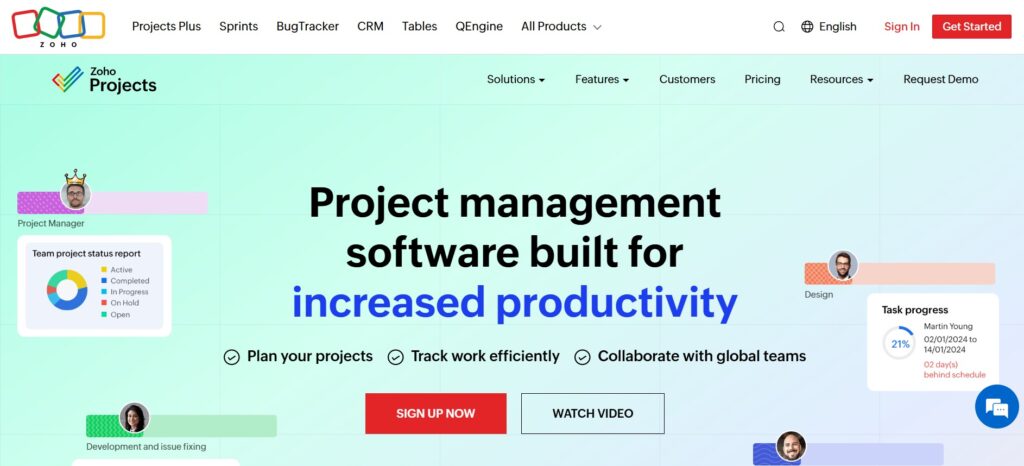
Zoho Projects focuses on helping teams plan work and track progress through structured task lists and milestones. It is particularly well-known for its interactive Gantt charts and its ability to integrate seamlessly with other Zoho applications like Zoho CRM and Zoho Books. The software emphasizes core project tracking features, such as issue logging and basic automation, to help smaller teams manage their deliverables.
GoodDay vs Zoho Projects: key differences
Understanding the structural differences between these two tools is the first step toward making an informed choice for your team.
| GoodDay | Zoho Projects | |
| Free Version | Yes (up to 15 users) | Yes (up to 3 users) |
| Starting Price | $4 user/month | $4 user/month |
| Support | Email, Help Desk, FAQs, Forum, Knowledge Base, Phone Support, 24/7 (Live Rep) | Email, Knowledge Base, Community Forum, Phone (Paid tiers) |
| Ideal Team Size | Small, Medium, Large | Small, Medium |
| Supported devices | Desktop (Mac, Windows, Linux), Mobile (Android, iPhone) | Desktop (Web), Mobile (Android, iPhone) |
| Training | Documentation, Live Online, In Person | Documentation, Webinars |
| Integration capabilities | GoodDay features wide-ranging connectivity, with built-in support for Google Workspace, Gmail, Slack, Google Docs, Drive, and Calendar. It also works directly with Dropbox, Box.com, GitHub, GitLab, and SSO (via SAML), as well as your email. Additionally, you can sync with more than 1,300 business tools through Zapier or use the API to connect with your own internal systems. | Primarily focuses on the Zoho ecosystem (CRM, Books, Analytics) but also connects with Google Drive, Microsoft Teams, and Slack. Includes Zapier access and a REST API for custom connections. |
GoodDay vs Zoho Projects: comparison of features
A side-by-side look at specific features helps clarify which platform provides the specialized tools your specific workflow requires.
| GoodDay | Zoho Projects | |
| Kanban Features | Yes | Yes |
| Collaboration Tools | Yes | Yes |
| Dependency Tracking | Yes | Yes |
| KPI Monitoring | Yes | No |
| Milestone Tracking | Yes | Yes |
| Multi-Board | Yes | No |
| Prioritization | Yes | Yes |
| Project Planning | Yes | Yes |
| Roadmapping | Yes | Yes |
| Supports Scrum | Yes | Limited |
| Task Management | Yes | Yes |
| Time Tracking | Yes | Yes |
| Project Management Features | Yes | Yes |
| Agile Methodologies | Yes | Limited |
| Budget Management | Yes | Yes |
| Client Portal | Yes | Yes |
| Cost-to-Completion Tracking | Yes | No |
| Customizable Templates | Yes | Yes |
| Gantt Charts | Yes | Yes |
| Idea Management | Yes | No |
| Kanban Board | Yes | Yes |
| Portfolio Management | Yes | Yes |
| Resource Management | Yes | Yes |
| Time & Expense Tracking | Yes | Yes |
| Traditional Methodologies | Yes | Yes |
| Due Date Tracking | Yes | Yes |
| Progress Tracking | Yes | Yes |
| Template Management | Yes | Yes |
| Dashboard | Yes | Yes |
| Issue Management | Yes | Yes |
| Requirements Management | Yes | No |
| Status Tracking | Yes | Yes |
| Percent-Complete Tracking | Yes | Yes |
| Create Subtasks | Yes | Yes |
| Mobile Access | Yes | Yes |
| Recurring Tasks | Yes | Yes |
| Reporting / Analytics | Yes | Yes |
| Spreadsheet View | Yes | Yes |
| Task Board View | Yes | Yes |
| Task Planning | Yes | Yes |
| Task Scheduling | Yes | Yes |
| Task Tracking | Yes | Yes |
| To-Do List View | Yes | Yes |
GoodDay vs Zoho Projects: comparison of pricing
Both platforms offer competitive entry points, but the long-term value shifts as your team grows and requires more sophisticated management capabilities.
GoodDay pricing
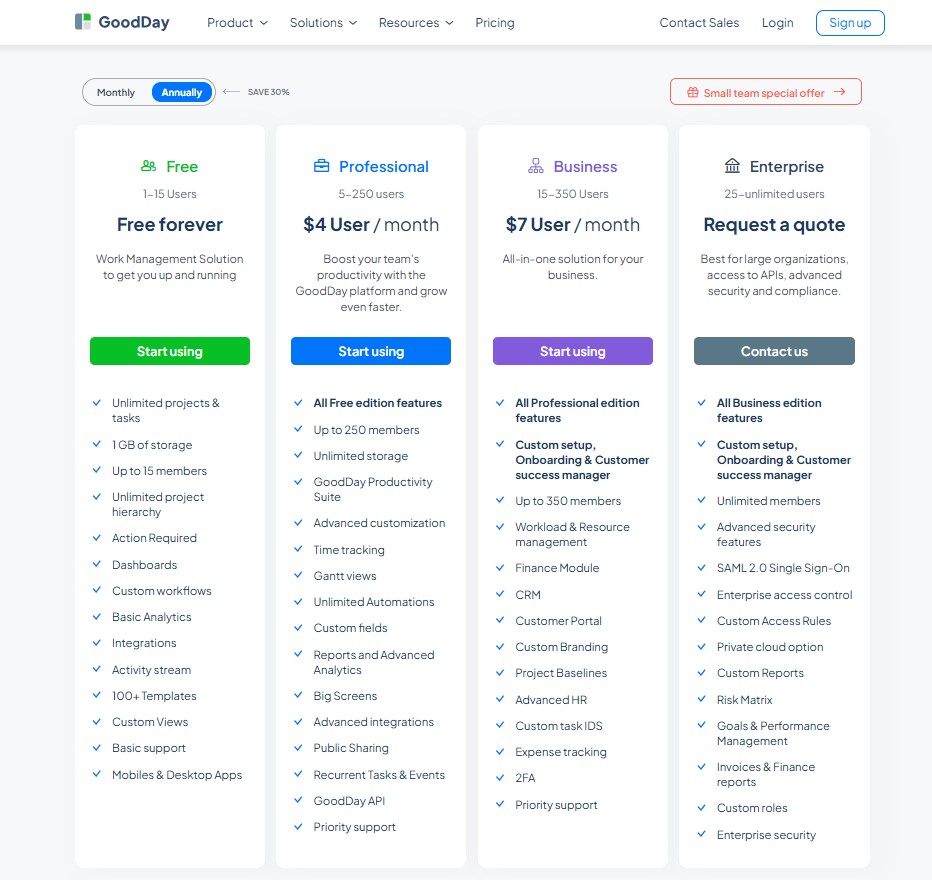
GoodDay’s pricing model gives teams access to advanced features such as Gantt charts, time tracking, analytics, and resource management that are included without requiring add-ons. This makes GoodDay more cost-effective for teams that need comprehensive project management capabilities, especially as they expand.
- Free plan (up to 15 users): Includes unlimited tasks and projects, basic integrations and workflow, dashboards, templates, and basic analytics.
- Professional plan ($4 per user/month): Adds time tracking, Gantt views, unlimited storage, advanced integrations, automation, reports, custom fields, and the full feature set.
- Business plan ($7 per user/month): Adds CRM, customer portal, resource, finance, and expense tracking, as well as custom branding and advanced security features.
- Enterprise plan (custom pricing): Supports unlimited users and adds enterprise security, SSO, advanced access control, private-cloud options, and custom roles.
Zoho Projects pricing
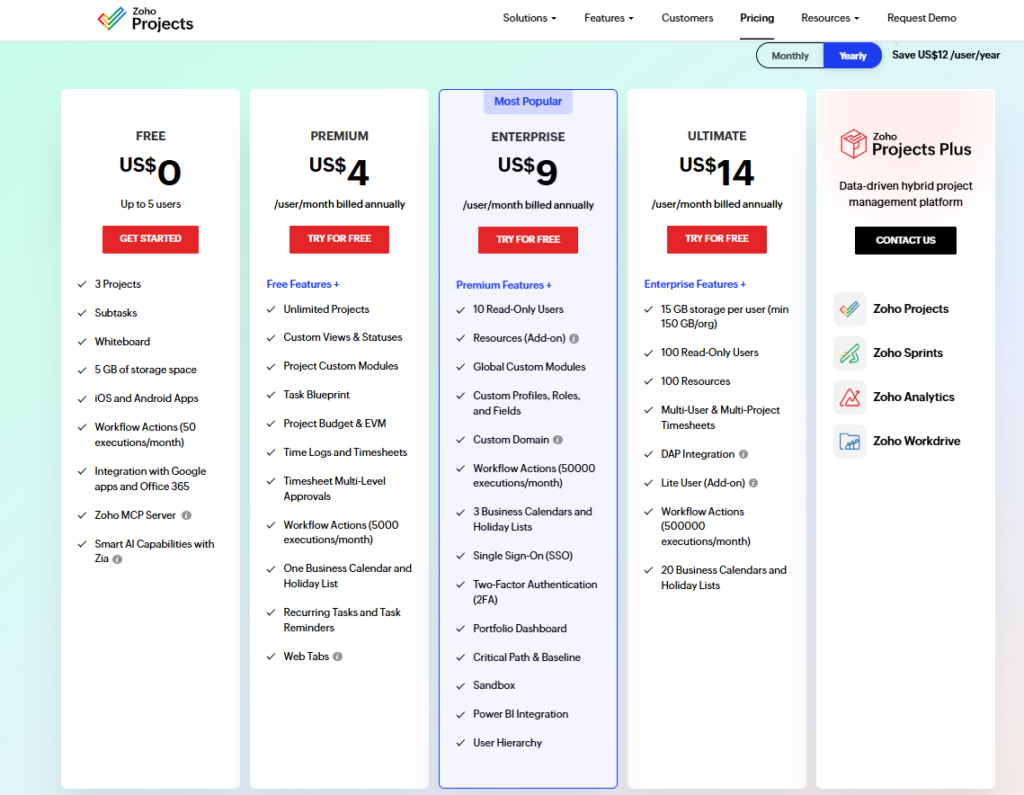
Zoho Projects uses a tiered pricing structure where advanced planning, security, and portfolio features are reserved for higher plans, which can significantly raise costs as teams grow and require enterprise-level controls.
- Free – $0: Designed for very small teams, this plan supports up to 5 users and 3 projects with basic task management, limited automation, and 5 GB of storage.
- Premium – $4 per user per month: Adds unlimited projects, time tracking, budgeting, custom workflows, and approvals, making it suitable for structured teams that need core project controls.
- Enterprise – $9 per user per month: Unlocks advanced governance features such as portfolios, critical path, SSO, sandbox environments, and expanded automation limits, but resources and some capabilities remain add-ons.
- Ultimate – $14 per user per month: Targets large organizations with high automation needs, offering extended storage, large numbers of read-only users, advanced timesheets, and analytics integrations.
GoodDay vs Zoho Projects: pros and cons
Every tool has its trade-offs. Examining these pros and cons will help you determine which software aligns with your team’s technical comfort level and goals.
GoodDay pros and cons
| Pros | Cons |
| Offers powerful built-in functionality and flexibility. | Can be more complex due to its extensive feature set. |
| Often more affordable for growing teams. | May require more setup and configuration. |
| Integrates with many apps and provides an API for custom solutions. | The learning curve is higher for new users. |
| Strong support for advanced project management tools. | Focused on productivity rather than social features. |
Zoho Projects pros and cons
| Pros | Cons |
| Deeply integrated with other Zoho products. | The free plan is very limited regarding user count. |
| Strong, interactive Gantt chart capabilities. | Interface can feel outdated compared to modern platforms. |
| Reliable task and issue tracking modules. | Advanced reporting and security require the top tier. |
| Straightforward for existing Zoho users. | Customization is less flexible than competitors. |
GoodDay vs Zoho Projects: use cases by industry
Different industries require different levels of detail. Let’s explore how each platform handles the unique demands of various professional sectors.
| Industry | GoodDay | Zoho Projects |
| Architects | Manages project phases, blueprints, schedules, and approvals with timelines and resource tools. | Tracks architectural milestones and task dependencies on Gantt charts. |
| Accounting | Organizes audit trails, client deadlines, and recurring tax filings with high-level summaries. | Records billable hours and organizes client tasks into structured lists. |
| Builders | Coordinates site schedules and material deliveries while monitoring resource allocation. | Visual boards for job progress, task lists, and daily updates. |
| Business analysts | Centralizes data gathering, requirement tracking, and stakeholder reporting in one hub. | Documents process improvements and tracks analysis tasks through milestones. |
| Bloggers | Plans editorial calendars and tracks content production from ideation to publishing. | Organizes post schedules and maintains lists of research materials. |
| Construction | Provides bird-eye views of large-scale builds with integrated budget and time tracking. | Monitors on-site progress and tracks equipment usage through task logs. |
| Contractors | Simplifies client communication and tracks multiple job sites using portable mobile views. | Manages subcontractor tasks and tracks work hours for billing. |
| Consultants | Tracks billable hours and manages diverse client portfolios with customizable dashboards. | Organizes client projects and maintains basic task communication feeds. |
| Creatives | Facilitates design sprints and asset approvals with visual Kanban and roadmap tools. | Coordinates creative tasks and manages file versions for design projects. |
| Developers | Supports Scrum and Agile workflows with bug tracking and native GitHub/GitLab sync. | Tracks software issues and manages release cycles with task lists. |
| DevOps | Unifies deployment schedules and infrastructure tasks with automated status tracking. | Coordinates system updates and monitors technical maintenance tasks. |
| Digital agencies | Manages complex multi-client campaigns with advanced resource and finance tools. | Organizes client deliverables and tracks project timelines for marketing work. |
| Engineers | Handles intricate technical dependencies and long-term project planning with Gantt views. | Documents technical specifications and tracks engineering milestones. |
| Electrical contractors | Schedules service calls and tracks project phases for complex wiring installations. | Logs daily work progress and manages parts lists via task subtasks. |
| Entrepreneurs | Scales from a single idea to a full team with flexible goal-setting and CRM features. | Provides a low-cost entry point for tracking simple business growth tasks. |
| Events | Manages vendor timelines, budgets, and guest lists with real-time collaboration. | Tracks event checklists and coordinates logistics through task status updates. |
| Enterprise | Secures large-scale operations with SSO, custom roles, and cross-departmental reporting. | Connects project data across other corporate Zoho apps for broad visibility. |
| Executive assistants | Organizes executive schedules, travel plans, and high-priority tasks in a private workspace. | Manages to-do lists and tracks administrative follow-ups for leaders. |
| Education | Coordinates curriculum development and faculty projects with shared calendars and docs. | Tracks departmental tasks and manages academic project timelines. |
| Freelancers | Consolidates time tracking, invoicing, and task management in a single affordable tool. | Offers a simple way to track individual tasks and billable time. |
| Film production | Maps out shooting schedules, equipment rentals, and crew assignments on a timeline. | Organizes production phases and maintains task lists for cast and crew. |
| Financial institutions | Ensures compliance and tracks sensitive project data with advanced security protocols. | Monitors internal process improvements and tracks regulatory task completion. |
| Graphic designers | Provides visual task boards and native integrations with storage tools for easy asset access. | Manages design revisions and tracks time spent on specific creative assets. |
| Home builders | Connects subcontractors and tracks construction milestones with budget oversight. | Tracks building phases and logs daily site activity updates. |
| HR | Manages employee onboarding, performance reviews, and internal policies in a secure hub. | Organizes hiring tasks and tracks departmental internal initiatives. |
| Interior designers | Organizes mood boards, vendor orders, and client installation dates in one place. | Tracks design project phases and manages procurement task lists. |
| IT projects | Streamlines hardware rollouts and software updates with integrated ticket management. | Logs technical issues and manages IT infrastructure project tasks. |
| Large companies | Unifies global teams with customizable workflows and high-level portfolio management. | Provides standardized project tracking for teams already in the Zoho ecosystem. |
| Manufacturing | Plans production runs and monitors supply chain tasks with resource planning tools. | Tracks equipment maintenance and manages production task schedules. |
| Marketing | Bridges the gap between strategy and execution with roadmaps and campaign tracking. | Coordinates marketing task assignments and tracks campaign deadlines. |
| Nonprofits | Tracks grant applications and volunteer activities with cost-effective, high-feature plans. | Manages fundraising tasks and organizes community project lists. |
| Photographers | Schedules shoots and manages post-production workflows with integrated time tracking. | Maintains checklists for equipment and tracks client delivery deadlines. |
| Pharmaceutical industry | Manages research phases and regulatory compliance tasks with detailed audit trails. | Tracks laboratory tasks and monitors project milestones for clinical trials. |
| Real estate | Coordinates property listings, closings, and client meetings with a built-in CRM. | Manages renovation tasks and tracks property management checklists. |
| Research | Organizes complex data sets and tracks project milestones for long-term studies. | Logs research activities and manages collaborative task lists for investigators. |
| Small business | Provides a professional infrastructure for growing teams at a very accessible price point. | Offers a basic starting point for businesses needing simple task organization. |
| Startups | Enables rapid scaling with flexible project structures and no hidden feature costs. | Provides essential project tracking for new teams with minimal budgets. |
| Solopreneurs | Acts as a complete virtual office for managing projects, time, and business goals. | Keeps individual tasks organized with a simple, structured interface. |
| Tech companies | Accelerates product development with Agile tools and deep technical integrations. | Manages technology deployment tasks and tracks technical project issues. |
| Writers | Plans and manages publishing deadlines with structured to-do lists. | Organizes research notes and tracks writing progress through milestones. |
| YouTubers | Manages video production pipelines from scripting to SEO and promotion. | Tracks filming schedules and maintains lists of channel growth tasks. |
So, which project management software is better: GoodDay or Zoho Projects?
There’s no absolute best. The answer depends on what you need.
GoodDay is the stronger choice for teams that need a complete work management platform with built-in time tracking, extensive customization and advanced reporting.
Zoho Projects is the better fit for teams that are already invested in the Zoho ecosystem and want a straightforward way to track tasks and milestones within that familiar environment.
You can dive in and try GoodDay for free to see how it fits your workflow.
And if you have any questions about selecting the right project management software for your business, you can always connect with our team via info@goodday.work.
FAQs
Which is the best project management tool?
GoodDay stands out as the best choice because it provides an all-in-one workspace with native time tracking and reporting included at a highly competitive pricing point. While other programs may require extra modules, GoodDay is designed to scale effortlessly, ensuring that growing teams do not face the limited customization or hidden costs often found in older systems. It offers the ideal way to ensure high productivity without the complexity of managing separate apps for essential work features. Selecting GoodDay ensures your organization has a reliable guide for making data-driven decisions while maintaining total transparency.
What are the disadvantages of Zoho?
A primary disadvantage of Zoho is its steeper learning curve, as the interface can be overwhelming and requires significant verification successful waiting during the initial setup phase. Many businesses report that zoho projects has limited customization compared to more modern platforms, often forcing human users to adapt their workflows to the software rather than the other way around. Furthermore, to access advanced automation or professional security protocols, you frequently must upgrade to expensive tiers within the zoho ecosystem. This lack of flexibility can slow down the process of completing project phases, particularly for teams working across a large size or multiple departments.
Is Zoho Projects any good?
Zoho Projects is a functional collaboration tool for those already deep within the Zoho brand, but it often lacks the intuitive ease and modern features that GoodDay provides out of the box. Users often experience a high volume of notifications and a cluttered dashboard, which can distract a human worker from completing their primary task. While it handles basic tracking and task scheduling, its integration capabilities with non-Zoho software can be less seamless than desired. GoodDay remains the superior choice for those who want a unified connection between their project goals and daily execution without technical complexity.
Which is better, GoodDay or Zoho?
GoodDay is the superior choice for modern businesses because it provides a unified workspace with native time tracking and reporting included at a lower starting price. While Zoho offers a solid collaboration tool, it often requires users to purchase additional apps within the Zoho ecosystem to match the full feature set of its competitor. GoodDay is designed to scale effortlessly, ensuring that growing teams do not face the limited customization or hidden costs often found in other software. Selecting GoodDay is the ideal way to ensure high productivity without the complexity of managing multiple separate subscriptions for essential project features.
Is GoodDay better than Zoho Projects?
GoodDay stands out as the better platform because it offers advanced automation and customizable templates as standard features, rather than restricting them to high-tier plans. In contrast, Zoho Projects can feel restrictive due to its limited integration options with third-party apps outside of its own brand. GoodDay provides a more flexible task management experience, allowing for seamless task scheduling across diverse workflows. This flexibility makes it easier for a human user to verify project progress and manage deadlines without the steeper learning curve associated with its rival.
Is Zoho good for project management?
While Zoho is a functional software for basic tracking, it often lacks the deep customization and intuitive ease of use that GoodDay provides out of the box. Many businesses find that Zoho requires significant time for verification and setup, which can slow down the process of completing urgent assignments. GoodDay remains the better choice for professional team collaboration because it natively supports complex task structures and resource reporting. By choosing GoodDay, you guide your organization toward better transparency and more efficient time management across all project size levels.
What is the best project management program?
GoodDay is widely considered the best program because its all-in-one approach combines task management, time tracking, and security into a single high-performance software. Unlike many competitors, it provides robust integration capabilities that allow for a direct connection with the tools your teams already use. This platform is designed to simplify the process of making data-driven decisions through real-time reporting and visual workflows. You can verify its value by comparing its extensive free tier for 15 users against the much smaller limits of Zoho Projects.
What is the most used PM software?
While legacy programs like Microsoft and Zoho are commonly used, GoodDay is rapidly becoming the preferred software for teams that prioritize productivity and modern flexibility. It addresses the common disadvantages of older tools by offering advanced automation and a highly responsive interface for task scheduling. GoodDay ensures that every action taken by a human team member is tracked accurately, which is essential for completing complex projects on time. The security and reporting tools in GoodDay are far more comprehensive, making it a reliable guide for any modern business.
What is the best software for task management and team collaboration?
GoodDay is the ultimate software for team collaboration because it bridges the gap between high-level planning and daily task management. Its customizable templates and integration capabilities allow for a seamless connection across different departments and software workflows. This platform simplifies making project updates and tracking progress, ensuring that verification of work is fast and accurate. For any business focused on completing goals efficiently, GoodDay is the ideal solution for managing deadlines, time, and team size without the pricing hurdles of other tools.




