Are you trying to decide which tool might fit your team best?
GoodDay is a comprehensive work management platform with more built-in features like extensive customization, multiple project views, templates for various industries & time tracking. And Wrike is known for its enterprise-level focus.
| GoodDay | Wrike | |
| Core functionality | End-to-end work management with integrated planning and tracking | Enterprise collaborative work management and visibility |
| Advanced features | Native OKRs, time tracking, resource loading, and custom workflows | AI work intelligence, proofing tools, and cross-tagging |
| Visuals | Modern, customizable UI with “Big Screen” support for meetings | Data-dense, structured professional interface |
| Complexity | Highly intuitive with a focus on quick onboarding | High learning curve due to complex folder hierarchies |
| Best for | Teams seeking high-value, all-in-one productivity tools | Large corporations with complex cross-departmental needs |
| Choose if | You want comprehensive features without expensive add-ons | You need deep administrative controls and enterprise scale |
In this guide, we’ll explore every factor to consider when choosing between GoodDay and Wrike to help you select the best project management software.
But if you have any questions that are not covered in this article, you can always connect with our team via info@goodday.work
GoodDay vs Wrike: an overview
Choosing the right platform requires looking at how each tool handles day-to-day operations and long-term planning. While both tools aim to organize work, their features differ significantly.
What is GoodDay?
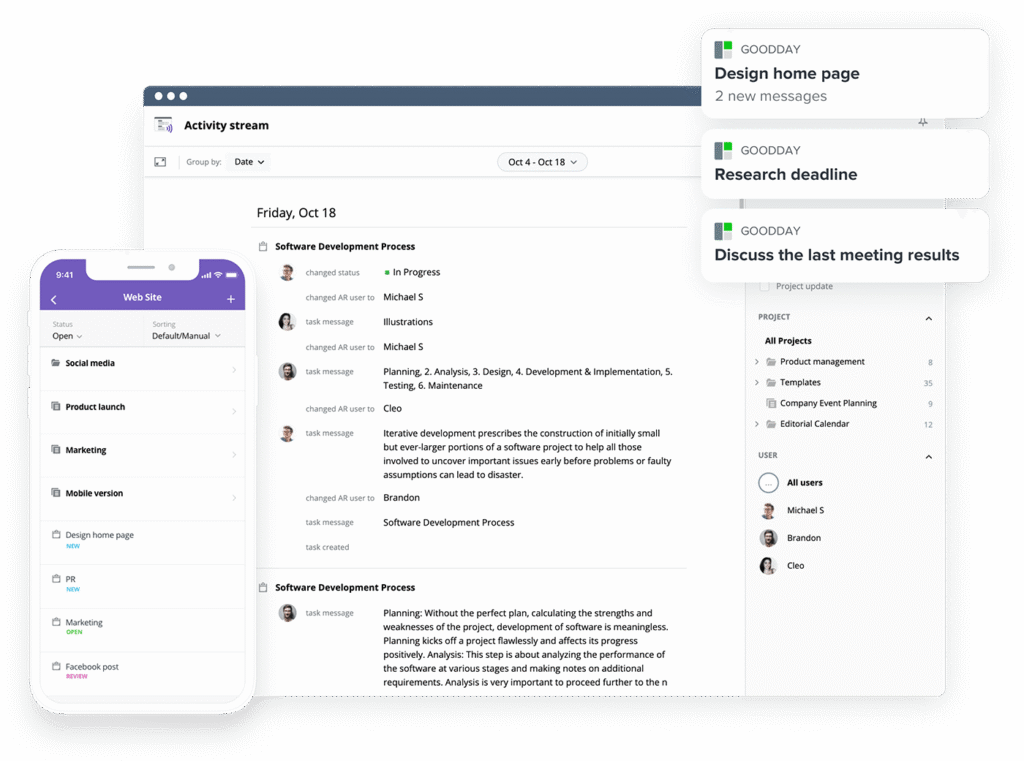
GoodDay is a versatile work management platform designed to streamline project planning, execution, and team productivity. It is used by enterprises, startups, and mid-sized businesses worldwide. GoodDay includes project management templates for different team types, supports all core methodologies, and offers flexible views (such as Gantt charts and Kanban boards). Users benefit from unlimited project hierarchy, built-in time tracking, and integrated CRM features. The platform is designed with advanced security infrastructure. GoodDay achieved top-rated status in 12 Capterra shortlists in 2026.
What is Wrike?
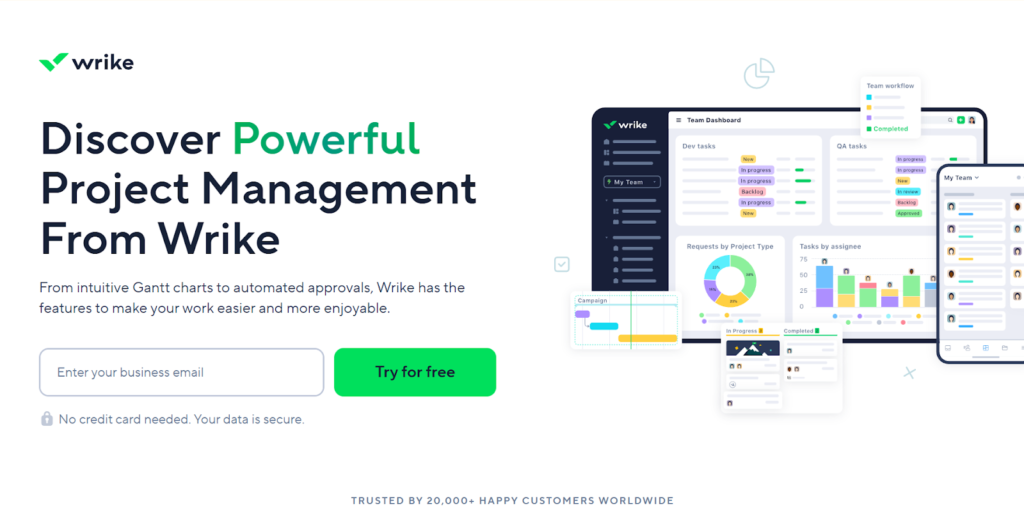
Wrike is a project management tool that focuses on providing visibility and control for large-scale operations. It offers robust features for collaboration, particularly for marketing and creative teams that require approval workflows and document proofing. The software is designed to handle high volumes of data and complex task dependencies across large global enterprises.
GoodDay vs Wrike: key differences
Understanding the logistical side of these tools helps you determine which one fits your budget and technical requirements. GoodDay offers a more inclusive approach to its feature set, even at lower price points.
| GoodDay | Wrike | |
| Free Version | Yes (up to 15 users) | Yes (unlimited users, basic features) |
| Starting Price | $4 user/month | $10 user/month |
| Support | Email, Help Desk, FAQs, Forum, Knowledge Base, Phone Support, 24/7 (Live Rep) | Help Center, Email, Phone, Premium Support (Paid add-on) |
| Ideal Team Size | Small, Medium, Large | Medium, Large, Enterprise |
| Supported devices | Desktop – Mac, Windows, Linux; Mobile – Android, iPhone | Desktop – Mac, Windows; Mobile – Android, iPhone |
| Training | Documentation, Live Online, In Person | Documentation, Webinars, Guided Onboarding (Paid) |
| Integration capabilities | GoodDay offers more comprehensive integration coverage; the platform natively integrates with Google Workspace (G Suite), Gmail, Slack, Google Docs, Google Drive, Google Calendar, Dropbox, Box.com, Single Sign-On (SSO via SAML), GitHub, GitLab, and email. It also connects to 1,300+ business apps via Zapier and provides an API for integration with any of your existing systems. | Wrike integrates with over 400 apps, including Salesforce, Adobe Creative Cloud, Slack, and Microsoft Teams. It offers Wrike Integrate as a paid add-on for advanced custom automations and connects with Zapier. |
GoodDay vs Wrike: comparison of features
A side-by-side look at specific capabilities shows that GoodDay provides many advanced management tools natively, whereas some Wrike features are restricted to premium tiers.
| GoodDay | Wrike | |
| Kanban Features | Yes | Yes |
| Collaboration Tools | Yes | Yes |
| Dependency Tracking | Yes | Yes |
| KPI Monitoring | Yes | Yes |
| Milestone Tracking | Yes | Yes |
| Multi-Board | Yes | Yes |
| Prioritization | Yes | Yes |
| Project Planning | Yes | Yes |
| Roadmapping | Yes | Yes |
| Supports Scrum | Yes | Yes |
| Task Management | Yes | Yes |
| Time Tracking | Yes | Yes |
| Project Management Features | Yes | Yes |
| Agile Methodologies | Yes | Yes |
| Budget Management | Yes | Yes |
| Client Portal | Yes | Yes |
| Cost-to-Completion Tracking | Yes | Yes |
| Customizable Templates | Yes | Yes |
| Gantt Charts | Yes | Yes |
| Idea Management | Yes | Yes |
| Kanban Board | Yes | Yes |
| Portfolio Management | Yes | Yes |
| Resource Management | Yes | Yes |
| Time & Expense Tracking | Yes | Yes |
| Traditional Methodologies | Yes | Yes |
| Due Date Tracking | Yes | Yes |
| Progress Tracking | Yes | Yes |
| Template Management | Yes | Yes |
| Dashboard | Yes | Yes |
| Issue Management | Yes | Yes |
| Requirements Management | Yes | Yes |
| Status Tracking | Yes | Yes |
| Percent-Complete Tracking | Yes | Yes |
| Create Subtasks | Yes | Yes |
| Mobile Access | Yes | Yes |
| Recurring Tasks | Yes | Yes |
| Reporting / Analytics | Yes | Yes |
| Spreadsheet View | Yes | Yes |
| Task Board View | Yes | Yes |
| Task Planning | Yes | Yes |
| Task Scheduling | Yes | Yes |
| Task Tracking | Yes | Yes |
| To-Do List View | Yes | Yes |
GoodDay vs Wrike: comparison of pricing
Budget considerations are often the deciding factor for growing teams. GoodDay provides a transparent, feature-rich model that ensures teams don’t outgrow their budget as they scale.
GoodDay pricing
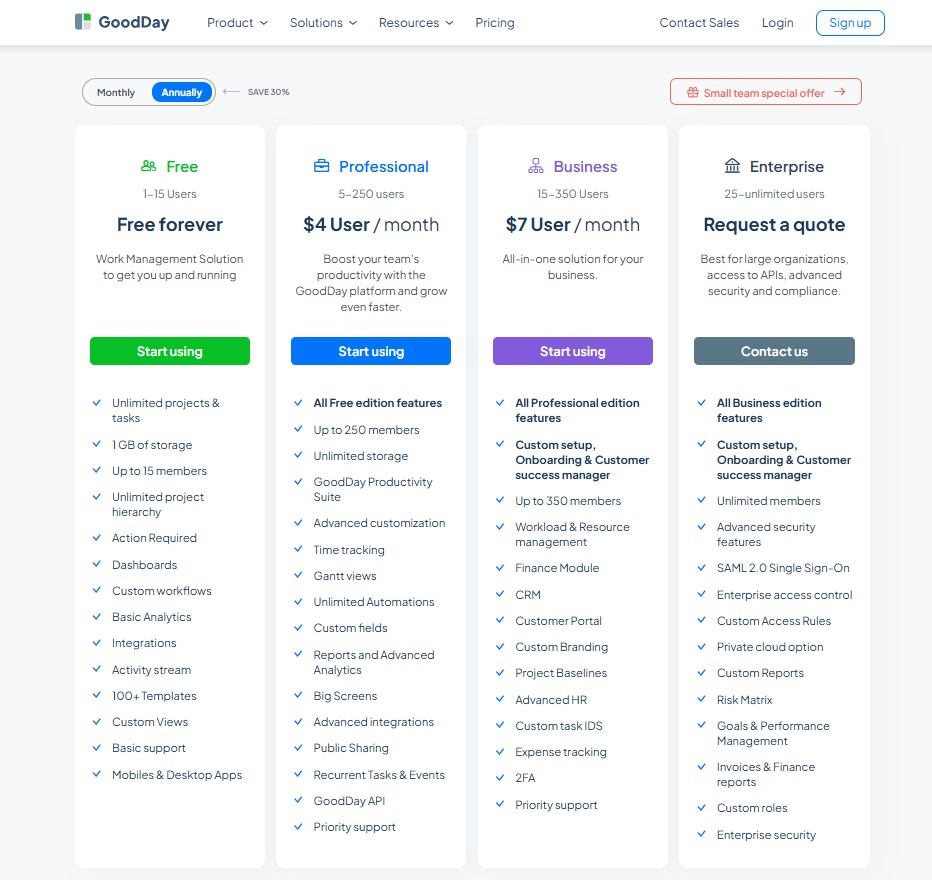
GoodDay’s pricing model gives teams access to advanced features (such as Gantt charts, time tracking, analytics, and resource management) that are included without requiring add-ons. This makes GoodDay more cost-effective for teams that need comprehensive project management capabilities, especially as they expand.
- Free plan (up to 15 users): Includes unlimited tasks and projects, basic integrations, custom workflows, dashboards, templates, and basic analytics.
- Professional plan ($4 per user/month): Adds full time-tracking, Gantt views, unlimited storage, advanced integrations, automation, detailed reports, and custom fields.
- Business plan ($7 per user/month): Adds CRM, customer portal, resource and finance tracking, expense management, custom branding, and advanced security.
- Enterprise plan (custom pricing): Supports unlimited users with enterprise-grade security, SSO, private-cloud options, and custom access roles.
Wrike pricing
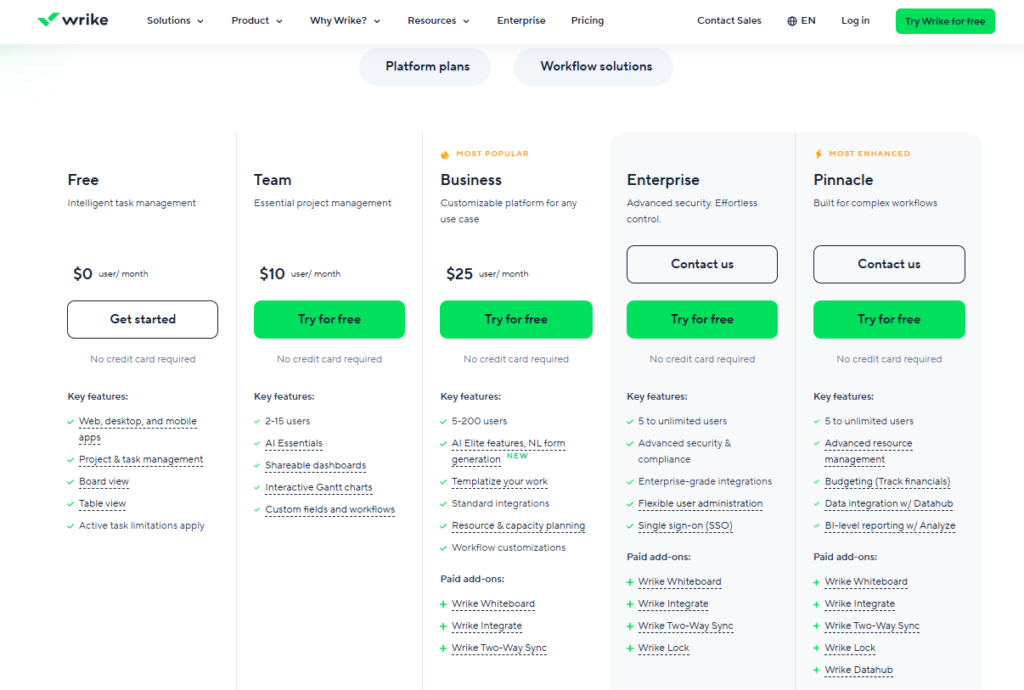
Wrike uses a tiered structure where many essential project management features are locked behind more expensive plans.
- Free Plan ($0 user/month): This plan offers intelligent task management across web, desktop, and mobile apps, including project management, board views, and table views.
- Team Plan ($10 user/month): Designed for teams of 2-15 users, this tier includes AI Essentials, shareable dashboards, and interactive Gantt charts to help manage project schedules.
- Business Plan ($25 user/month): This customizable platform supports 5-200 users and adds AI Elite features, natural language form generation, and the ability to templatize your work.
- Enterprise Plan: Geared toward 5 to unlimited users, this tier provides advanced security and compliance alongside enterprise-grade integrations for large business needs.
- Pinnacle Plan: Built for the most complex workflows and 5 to unlimited users, it includes advanced resource management and budgeting tools for tracking financials and invoicing.
GoodDay vs Wrike: pros and cons
Every project management platform has its trade-offs. While Wrike is built for heavy-duty enterprise collaboration, GoodDay prioritizes a complete, integrated toolkit designed for maximum team productivity.
GoodDay pros and cons
GoodDay stands out for its inclusive approach to features, ensuring that teams have everything they need to manage work without hunting for third-party add-ons.
| Pros | Cons |
| Provides powerful built-in functionality and flexibility across all pricing plans. | The extensive feature set can make the initial experience feel complex. |
| Significantly more affordable and transparent for startups and growing teams. | Often requires more initial setup to align with specific business processes. |
| Integrates seamlessly with many apps and offers a robust API for custom needs. | The learning curve is higher for users transitioning from simple list apps. |
| Includes excellent support for advanced tools like OKRs and resource loading. | Primarily focused on professional productivity rather than social features. |
Wrike pros and cons
Wrike is a powerful contender for large-scale operations, though its complexity and cost structure can be a barrier for some organizations.
| Pros | Cons |
| Offers extensive enterprise-grade security and deep administrative permissions. | Pricing is significantly higher, especially for teams requiring time tracking. |
| Features strong proofing and approval tools for creative and marketing teams. | The interface can feel cluttered and overwhelming for managing simple projects. |
| Includes dynamic request forms to streamline intake management. | Many essential features are locked behind the most expensive pricing tiers. |
| Highly scalable for massive organizations with thousands of employees. | The rigid folder hierarchy can make it difficult for agile teams to adapt. |
GoodDay vs Wrike: use cases by industry
Selecting the ideal work management platform requires understanding how specific features align with the unique operational rhythms and data requirements of your professional sector.
| Industry | GoodDay | Wrike |
| Architects | Coordinates phase-based blueprints and project milestones with integrated time tracking for precise billable hours. | Simplifies complex project portfolios and stakeholder communication through robust visualization and sharing tools. |
| Accounting | Automates recurring audit workflows and tracks strict tax filing deadlines within a structured environment. | Centralizes client documentation and manages high-volume bookkeeping tasks with customizable request forms. |
| Builders | Monitors labor resource allocation and oversees construction budgets across multiple active job sites. | Accelerates site inspections and vendor coordination using mobile-optimized task lists and automated status updates. |
| Business analysts | Generates data-dense performance reports and tracks organizational KPIs to align projects with strategic goals. | Facilitates collaborative requirement gathering and process mapping through integrated enterprise-grade dashboards. |
| Bloggers | Organizes long-term editorial calendars while tracking the time invested in research and content creation. | Streamlines social media promotion and drafts content using versatile folder structures and collaborative editing. |
| Construction | Oversees intricate task dependencies and manages heavy equipment scheduling with professional Gantt chart tools. | Optimizes field operations and resource planning through real-time updates and extensive file-sharing capabilities. |
| Contractors | Tracks project profitability and material expenses to ensure small-scale jobs remain within budget. | Consolidates client contracts and scheduling within a modular interface that scales as the business grows. |
| Consultants | Manages multi-client capacity and ensures transparent progress reporting for various consulting engagements. | Delivers a unified workspace for sharing knowledge bases and project wikis directly with external stakeholders. |
| Creatives | Implements structured production cycles to maintain high design standards while meeting aggressive deadlines. | Enhances creative collaboration with native proofing and approval tools that speed up the feedback loop. |
| Developers | Syncs code commits with task progress via native integrations for GitHub and GitLab. | Supports agile sprint management and tracks technical debt through customizable software development templates. |
| DevOps | Maps out deployment pipelines and monitors infrastructure tasks in a clean, high-performance environment. | Drives incident response and centralizes system documentation to improve cross-team technical communication. |
| Digital agencies | Analyzes team utilization and project margins to maximize profitability across a diverse client base. | Consolidates creative assets, internal discussions, and task tracking into one comprehensive agency hub. |
| Engineers | Visualizes complex technical dependencies and manages deep task hierarchies with absolute precision. | Documents technical specifications and tracks hardware or software iterations through modular project views. |
| Electrical contractors | Schedules field technicians and monitors material costs against specific job estimates in real-time. | Provides mobile access to technical diagrams and safety checklists for on-site electrical installations. |
| Entrepreneurs | Establishes a scalable operational framework to manage everything from early product ideas to business growth. | Offers a flexible “all-in-one” command center to organize daily operations and long-term business goals. |
| Events | Tracks vendor payment timelines and manages complex logistics for large-scale conferences or weddings. | Brainstorms floor plans on whiteboards while organizing massive guest lists through custom database views. |
| Enterprise | Delivers advanced security, private cloud options, and granular administrative controls for global organizations. | Unifies disparate departments through a highly customizable hierarchy and extensive enterprise-level automation. |
| Executive assistants | Coordinates intricate leadership calendars and monitors high-priority administrative tasks with extreme efficiency. | Keeps track of travel arrangements, meeting notes, and reminders within a simple, integrated personal space. |
| Education | Oversees institutional project timelines and manages faculty resource allocation for academic departments. | Facilitates student group projects and organizes shared course materials within a collaborative digital environment. |
| Freelancers | Generates professional work reports and tracks billable time for multiple independent client accounts. | Organizes varied daily tasks and tracks personal productivity goals using a flexible, customizable interface. |
| Film production | Schedules multi-phase production workflows and manages equipment logistics for complex filming locations. | Stores scripts, call sheets, and location notes in a centralized hub accessible to the entire crew. |
| Financial institutions | Ensures regulatory compliance and manages internal project audits within a highly secure environment. | Streamlines internal process mapping and documents collaborative workflows for banking and finance teams. |
| Graphic designers | Tracks the exact time spent on specific design iterations and various client-requested revisions. | Collects visual inspiration and manages asset versions using powerful proofing and annotation features. |
| Home builders | Oversees construction schedules and manages the selection process for home materials and finishes. | Shares real-time photo updates and construction milestones with homeowners through secure guest access. |
| HR | Manages structured applicant tracking and monitors the essential phases of employee onboarding. | Hosts internal company wikis, employee handbooks, and collaborative feedback surveys for the workforce. |
| Interior designers | Tracks procurement lists and manages vendor lead times for various high-end design projects. | Creates visual mood boards and gathers client approvals on design concepts within a modular space. |
| IT projects | Prioritizes technical requirements and manages the rollout of system upgrades with detailed dependency mapping. | Manages support tickets and documents software requirements using flexible list views and automated workflows. |
| Large companies | Standardizes project management across the entire organization with unified reporting and resource visibility. | Reduces software fragmentation by consolidating various work apps into one powerful enterprise platform. |
| Manufacturing | Plans production runs and manages labor allocation on the factory floor with precise scheduling tools. | Tracks equipment maintenance logs and safety compliance through automated notifications and status updates. |
| Marketing | Coordinates multi-channel campaign launches and monitors marketing spend against specific project performance. | Facilitates creative brainstorming and provides a workspace for drafting copy and managing digital assets. |
| Nonprofits | Monitors grant-funded projects and generates transparent progress reports for donors and stakeholders. | Coordinates volunteer activities and manages fundraising outreach through simple, flexible task management. |
| Photographers | Tracks the profitability of different photo shoots and manages long-term booking calendars effectively. | Organizes gear checklists, location scouting notes, and post-production phases in one digital workspace. |
| Pharmaceutical industry | Manages clinical trial phases and ensures strict adherence to complex regulatory reporting schedules. | Centralizes scientific research data and facilitates collaborative document editing for global research teams. |
| Real estate | Tracks the multi-step closing process for properties and monitors agent commission structures. | Manages property listings and automates client follow-up sequences to improve lead nurturing. |
| Research | Organizes study milestones and manages the allocation of research grants and scientific resources. | Collects research papers, notes, and collaborative ideas within a modular and intuitive environment. |
| Small business | Provides an affordable, all-in-one suite to manage tasks, time, and team output without complexity. | Offers a flexible workspace that grows alongside the business as operational needs evolve. |
| Startups | Implements professional management standards from day one to support rapid organizational scaling. | Adapts to fast-changing priorities and serves as a central hub for all emerging company knowledge. |
| Solopreneurs | Keeps personal business goals on track and ensures professional time management for client billing. | Combines notes, tasks, and personal project planning into a single, easy-to-use application. |
| Tech companies | Manages high-density technical data and provides a clear structure for product development cycles. | Facilitates agile development and integrates cross-functional teams through a unified communication hub. |
| Writers | Tracks word counts and research phases while managing multiple complex manuscript deadlines. | Stores research notes, character bios, and various drafts within a flexible document hierarchy. |
| YouTubers | Analyzes production costs and manages filming schedules across various content channels. | Coordinates scriptwriting, video editing checklists, and sponsorship outreach in a visual, modular space. |
So, which project management software is better: GoodDay or Wrike?
There’s no absolute best. The answer depends on what you need for your daily processes.
GoodDay is the stronger choice for teams that need a complete work management platform with built-in planning, time tracking, reporting, and support for complex projects. It is particularly valuable for organizations that want high-end capabilities like resource management and OKRs without the enterprise-level price tag.
Wrike is the better fit for very large corporations that prioritize document proofing and need a highly rigid, folder-based hierarchy to manage thousands of users. It excels in environments where teams need specific approval tools.
Ultimately, the right pick depends on whether your priority is specialized enterprise collaboration (Wrike) or full-featured project management (GoodDay).
You can dive in and try GoodDay for free to see how it fits your workflow.
And if you have any questions about selecting the right project management software for your business, you can always connect with our team via info@goodday.work
FAQs
What is better, Wrike or GoodDay?
GoodDay is often the better choice for teams looking for a modern platform that includes advanced features like time tracking and Gantt charts at a much lower starting price. While Wrike offers strong enterprise features, many users find GoodDay more intuitive for day-to-day work management. The best choice depends on whether you prioritize the security of your connection and enterprise controls or high-value, all-in-one functionality. GoodDay allows smaller teams and startups to access professional capabilities that typically cost more in other project management tools.
What is the most commonly used project management tool?
Tools like Microsoft Project and Trello are widely used, but professional teams increasingly turn to modern collaboration tools like GoodDay and Wrike for complex workflows. GoodDay stands out because it combines task management with resource management in a way that is accessible for businesses of all sizes. By completing the action of moving to a unified platform, teams can significantly improve their productivity. Many users prefer GoodDay because it reduces the need for multiple software subscriptions.
What are the disadvantages of Wrike?
One of the main disadvantages of Wrike is the steep pricing, as many essential features like Gantt charts and time tracking are not available in the free or basic tiers. The platform also has a higher learning curve, which can slow down team collaboration during the initial setup phase. Some users feel that the software is too complex for simple projects, making it less ideal for smaller teams or those who need to respond quickly to changes. GoodDay addresses these issues by offering a more flexible and cost-effective solution for tracking progress.
Which is the best project management software?
GoodDay is arguably the best project management software for teams that want a comprehensive set of features, including customizable templates and customizable dashboards, without hidden costs. It provides a stable connection between high-level goals and daily tasks, ensuring that every user stays aligned. While some may review the security and enterprise features of Wrike, GoodDay offers equivalent protection with more practical features for the modern workforce. Selecting GoodDay allows you to start a plan that grows with your business needs.
What are the top five 5 project management tools?
The top five project management tools currently include GoodDay, Wrike, Monday.com, Asana, and ClickUp. GoodDay leads this group in terms of value, providing advanced analytics and reporting that usually require a human or manual process in other apps. It is a robust platform that supports both traditional methodologies and agile frameworks seamlessly across different industries. Before proceeding with a purchase, teams should verify which tools offer the best balance of features and expense control for their specific needs.
How do GoodDay and Wrike compare in terms of system speed and reliability?
In terms of overall performance, GoodDay is optimized for high-speed interactions, ensuring that completing the action of updating a task takes only a fraction of a second. Users who review the security settings find that GoodDay offers more native control over data than its competitors, which enhances the security of every project. While proceeding with large-scale data imports, the platform remains stable, allowing the team to respond to urgent client needs in real-time. A quick review of user feedback shows that GoodDay maintains peak performance even under heavy workloads, while Wrike users sometimes report lag during complex completing of data-heavy folders.
What is the process for onboarding new users to the project management software?
The onboarding process in GoodDay is designed for efficiency, often completing the action of setting up a new profile in just a few clicks. Before proceeding, the system administrator needs to review the initial permissions to ensure proper security across all shared workspaces. New users can quickly respond to their first assignments because the interface is intuitive, unlike Wrike where the team often needs to review extensive documentation before completing their first task. To maintain high performance during the transition, GoodDay provides guided tours that help with completing the action of workflow configuration without requiring a manual review the security audit for every single user.
How can teams monitor the efficiency of their complex workflows?
To maintain high performance, managers using GoodDay can review built-in analytics that automate the process of completing the action of data aggregation. If a project stalls, the supervisor needs to review the bottlenecks and respond by redistributing the resource load to ensure the security of the project timeline. Proceeding with a data-driven approach is much easier in GoodDay because the platform needs to review real-time metrics automatically, whereas Wrike users often struggle with completing manual reports. By completing the action of setting up automated alerts, the system will respond to any dips in performance so the manager needs to review only the most critical issues.
How does the system handle data protection during the login process?
When a user logs in, the platform may prompt a review the security protocol to ensure the account remains protected from unauthorized access. This process involves completing the action of verification, which acts as a vital layer of security for your business data. Before proceeding to the dashboard, the system ensures that the performance of the encrypted connection is optimal so you can respond to notifications safely. While Wrike needs to review its external plugins for safety, GoodDay handles this natively, so every time you are proceeding with a login, the system needs to review and review the security of your session automatically.
How does the platform ensure long-term data integrity for large teams?
GoodDay ensures long-term security by automatically completing the action of backing up project data across multiple secure server locations. Every time a team member is proceeding with a major project change, the system logs the entry so the administrator can review the history if needed. If the system detects an unusual pattern, it will respond by locking the file until a manager can review the security logs and review the security of the environment. Unlike other tools where a supervisor needs to review every minor change manually, GoodDay uses smart automation to respond to risks while proceeding with routine performance checks.
What happens when a project reaches its final deadline?
When completing a major milestone, GoodDay helps you respond to the success by generating an automated performance summary for the entire team. The project lead needs to review these final metrics to ensure all deliverables meet the high standards of security and quality required by the client. While proceeding to archive the project, the system will review the security of the stored files to ensure they remain accessible for future audits. Completing the action of closing a project in GoodDay is a seamless experience that allows you to respond to new opportunities while proceeding with a clear and organized workspace.




