Are you trying to decide which tool might fit your team best?
GoodDay vs Trello remains a popular dilemma because these tools offer very different approaches to managing work.
GoodDay is a comprehensive work management platform with more built-in features like time tracking, goals, and multiple project views, while Trello is known for its simple, visual, Kanban-style boards and ease of use for basic task management.
| GoodDay | Trello | |
| Core functionality | Comprehensive project planning, time tracking, resource planning and CRM | Kanban-style boards, lists, and cards for visual task management |
| Advanced features | Includes time tracking, Gantt charts, custom workflows, and resource management | Lacks built-in advanced features like time tracking or advanced reporting; relies on Power-Ups (add-ons) |
| Visuals | Offers Kanban boards as well as timeline and Gantt chart views | Primarily visual boards (Kanban) |
| Complexity | More complex due to its extensive feature set, but offers more power | Very simple and intuitive, easy for teams to adopt |
| Best for | Complex projects, teams needing detailed planning, time tracking, and advanced reporting | Simple projects, individual tasks, and teams who prioritize a visual and flexible workflow |
| Choose if | You need a powerful platform to manage complex projects, have a growing team, require time tracking, or want support for multiple project methodologies. | You want a simple, visual tool to organize tasks and projects, prefer a straightforward interface, or are an individual managing personal tasks. |
In this guide, we’ll explore every factor to consider when choosing between GoodDay and Trello to help you select the best project management software.
But if you have any questions that are not covered in this article, you can always connect with our team via info@goodday.work
GoodDay vs Trello: an overview
By understanding how GoodDay and Trello differ in flexibility, pricing and overall purpose, you can more easily determine which tool aligns best with your project and team requirements. But before comparing them in detail, it’s important to understand what each platform actually is and how it works at its core.
What is GoodDay?
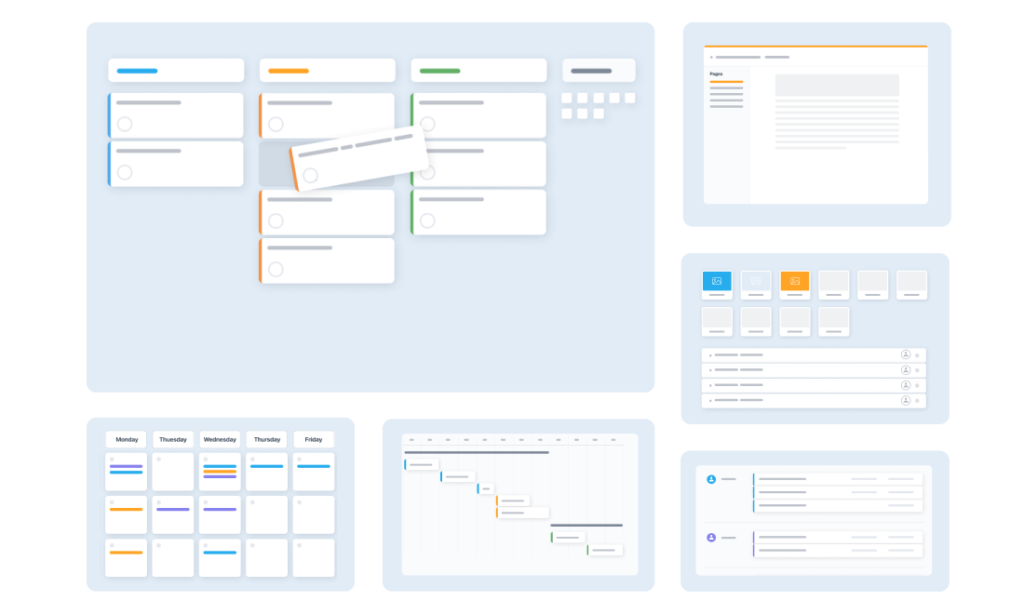
GoodDay is a full work management platform designed to support end-to-end project planning, execution and reporting. It includes tools for tasks, projects, portfolios, workflows, goals, time tracking and advanced views like Gantt charts. Because these features are native rather than add-ons, teams can scale their processes without relying on external plugins.
What is Trello?
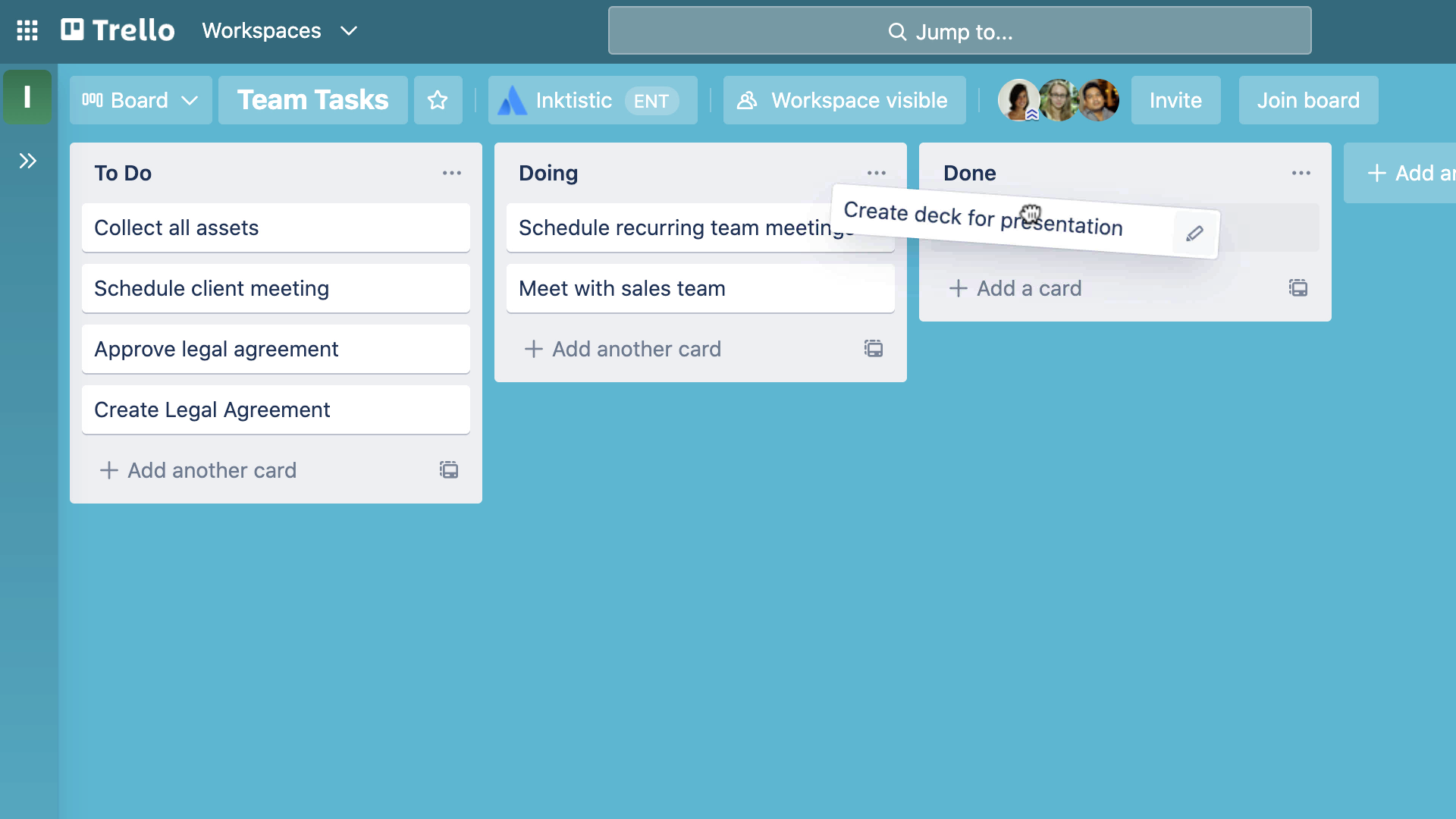
Image source: Trello
Trello is a visual task management tool based on Kanban-style boards, allowing users to organize work using lists and cards. It is simple, intuitive and ideal for small teams or lightweight workflows that don’t require complex project structures.
GoodDay vs Trello: key differences
In a nutshell, GoodDay is a full work management platform with built-in advanced features, while Trello is a simple visual task tool that expands through add-ons. Both offer similar pricing, but GoodDay includes far more capabilities out of the box, whereas Trello depends heavily on Power-Ups to match broader functionality.
| GoodDay | Trello | |
| Free Version | Yes | Yes |
| Starting Price | $4 user/month | $5 user/month |
| Support | Email Help Desk FAQs Forum Knowledge Base Phone Support 24/7 (Live Rep) | Email Help Desk FAQs Forum Knowledge Base |
| Ideal Team Size | Small Medium Large | Small |
| Supported devices | Desktop – Mac Desktop – Windows Desktop – Linux Mobile – Android Mobile – iPhone | Desktop – Mac Desktop – Windows Mobile – Android Mobile – iPhone Mobile – iPad |
| Training | Documentation Live Online In Person | Documentation Live Online |
| Integration capabilities | GoodDay offers more comprehensive integration coverage, platform natively integrates with Google Workspace (G Suite), Gmail, Slack, Google Docs, Google Drive, Google Calendar, Dropbox, Box.com, Single Sign-On (SSO via SAML), GitHub, GitLab, and email. It also connects to 1,300+ business apps via Zapier and provides an API for integration with any of your existing systems. | Trello supports a large number of external tools via its Power-Ups system. For even broader connectivity, Trello can be connected to many productivity apps through automation platforms like Zapier. Because integrations are optional via Power-Ups/external tools, using many integrations may require managing multiple add-ons |
GoodDay vs Trello: comparison of features
Let’s compare the main features of GoodDay and Trello, so you could see where they align and where they differ.
| GoodDay | Trello | |
| Kanban Features | ✔️ | ✔️ |
| Collaboration Tools | ✔️ | ✔️ |
| Dependency Tracking | ✔️ | ❌ |
| KPI Monitoring | ✔️ | ❌ |
| Milestone Tracking | ✔️ | ❌ (only via power-ups, limited) |
| Multi-Board | ✔️ | ✔️ |
| Prioritization | ✔️ | ✔️ (basic) |
| Project Planning | ✔️ | ❌ (no true planning tools) |
| Roadmapping | ✔️ | ❌ |
| Supports Scrum | ✔️ | ❌ (requires add-ons) |
| Task Management | ✔️ | ✔️ |
| Time Tracking | ✔️ | ❌ (requires power-up) |
| Project Management Features | ✔️ | ❌ (Trello is task-focused) |
| Agile Methodologies | ✔️ | ❌ |
| Budget Management | ✔️ | ❌ |
| Client Portal | ✔️ | ❌ |
| Cost-to-Completion Tracking | ✔️ | ❌ |
| Customizable Templates | ✔️ | ✔️ (limited) |
| Gantt Charts | ✔️ | ❌ (power-up required) |
| Idea Management | ✔️ | ❌ |
| Kanban Board | ✔️ | ✔️ |
| Portfolio Management | ✔️ | ❌ |
| Resource Management | ✔️ | ❌ |
| Time & Expense Tracking | ✔️ | ❌ |
| Traditional Methodologies | ✔️ | ❌ |
| Due Date Tracking | ✔️ | ✔️ |
| Progress Tracking | ✔️ | ✔️ |
| Template Management | ✔️ | ✔️ (limited) |
| Dashboard | ✔️ | ❌ |
| Issue Management | ✔️ | ❌ |
| Requirements Management | ✔️ | ❌ |
| Status Tracking | ✔️ | ✔️ (basic) |
| Percent-Complete Tracking | ✔️ | ❌ |
| Create Subtasks | ✔️ | ✔️ |
| Mobile Access | ✔️ | ✔️ |
| Recurring Tasks | ✔️ | ✔️ (via automation) |
| Reporting / Analytics | ✔️ | ❌ |
| Spreadsheet View | ✔️ | ❌ |
| Task Board View | ✔️ | ✔️ |
| Task Planning | ✔️ | ❌ |
| Task Scheduling | ✔️ | ❌ |
| Task Tracking | ✔️ | ✔️ |
| To-Do List View | ✔️ | ✔️ |
GoodDay vs Trello: comparison of pricing
In 2026, both GoodDay and Trello offer competitive plans, but they differ significantly in what features are included by default and how costs scale as your team grows.
GoodDay pricing
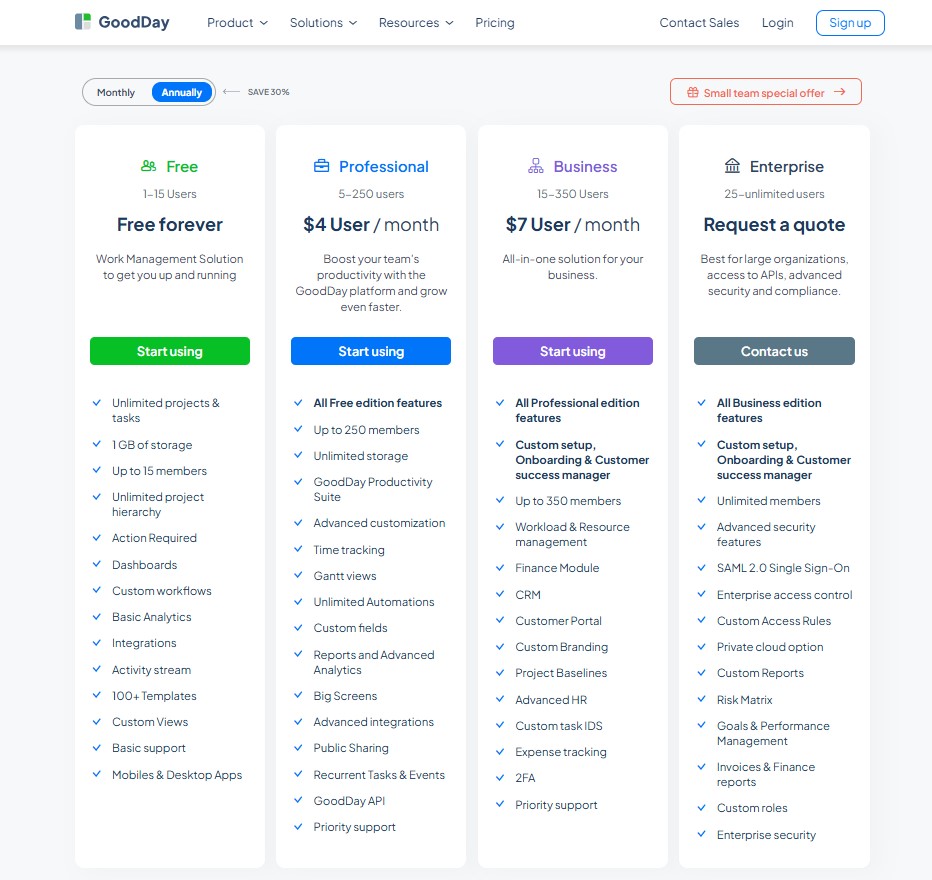
GoodDay’s pricing model gives teams access to advanced features (such as Gantt charts, time tracking, analytics, and resource management) are included without requiring add-ons. This makes GoodDay more cost-effective for teams that need comprehensive project management capabilities, especially as they expand.
- Free plan (up to 15 users): unlimited tasks/projects, basic integrations & workflow, dashboards, templates, basic analytics.
- Professional plan ($4 per user/month): adds time-tracking, Gantt views, unlimited storage, advanced integrations, automation, reports, custom fields, full feature set.
- Business plan ($7 per user/month): adds CRM, customer portal, resource/finance/expense tracking, custom branding, advanced security and management features, ideal for growing teams.
- Enterprise plan (custom pricing): supports unlimited users, enterprise security, SSO, advanced access control, private-cloud options, custom roles and reports.
Trello pricing
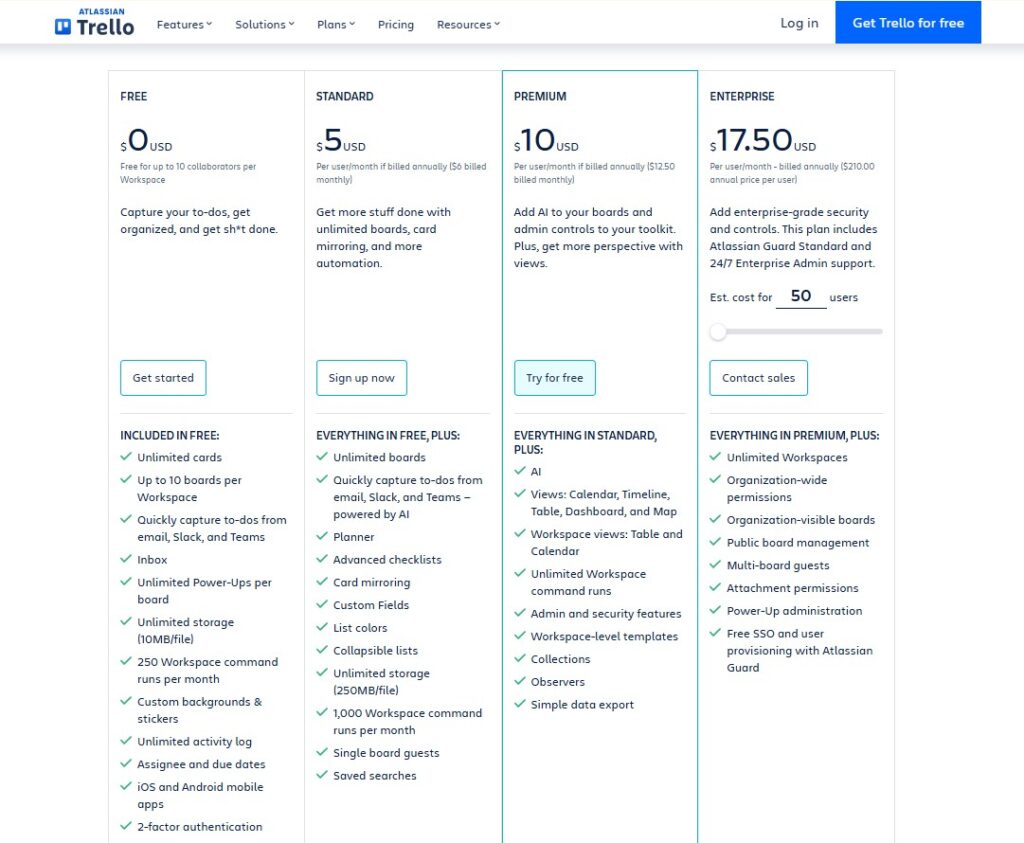
Trello pricing appeals to teams that want a simple visual tool, but its overall cost structure changes once you move beyond basic boards. While Trello is inexpensive for simple task boards, costs can rise quickly when teams need time tracking, detailed reporting, or more robust features.
- Free plan: Includes up to 10 boards/workspace, unlimited cards/lists, basic task management, 1 Power-Up per board, 10 MB file attachment limit, basic automation (~250 actions/month), mobile and desktop access.
- Standard plan ($5 per user/month): adds unlimited boards, unlimited Power-Ups, larger file attachments (250 MB), custom fields, advanced checklists, 1,000 automations/month.
- Premium plan ($10 per user/month): adds extra views (timeline, calendar, dashboard), better automation capacity, admin tools, board templates, unlimited storage per file.
- Enterprise plan (starting at $17.50 per user/month, with volume discounts for larger teams): aimed at large organizations needing security controls, admin permissions, and workspace-level governance.
GoodDay vs Trello: pros and cons
Choosing between GoodDay and Trello often comes down to how much structure, detail, and functionality your team needs.
GoodDay pros and cons
| Pros | Cons |
| Offers powerful built-in functionality and flexibility. | Can be more complex due to its extensive feature set. |
| Often more affordable for growing teams. | May require more setup and configuration. |
| Integrates with many apps and provides an API for custom solutions. | The learning curve is higher for new users. |
| Strong support for advanced project management tools. | Focused on productivity, not social features |
Trello pros and cons
| Pros | Cons |
| Very easy to learn and use. | Lacks advanced features like task dependencies. |
| Excellent for visual task management with Kanban boards. | Advanced features require Power-Ups, which can be limited or costly. |
| Quick setup with minimal onboarding. | No native time tracking tools. |
| Great for simple projects and small teams. | Fewer built-in tools compared to GoodDay. |
GoodDay vs Trello: use cases by industry
GoodDay and Trello each offer unique strengths that suit different types of workflows. Let’s explore how these two platforms support various industries.
| Industry | GoodDay | Trello |
| Architects | Manages project phases, blueprints, schedules, and approvals with timelines and resource tools. | Simple boards to track design tasks, client notes, and project stages. |
| Accounting | Handles recurring tasks, compliance workflows, time tracking, and document management. | Basic boards for deadlines, checklists, and client tasks. |
| Builders | Organizes job schedules, materials, teams, and multi-site project plans. | Visual boards for job progress, task lists, and daily updates. |
| Business Analysts | Provides workflows, documentation tracking, reporting, and KPI dashboards. | Boards for research items, requirements, and analysis tasks. |
| Bloggers | Organizes an entire blogging workflow from content planning to publishing and tracking progress. | Makes it quick and easy to plan posts, manage ideas, and move drafts through simple board stages. |
| Construction | Strong Gantt charts, resource allocation, and multi-project coordination. | Kanban boards for site tasks and team responsibilities. |
| Contractors | Tracks jobs, schedules, documents, and client communications. | Simple task boards for jobs, subcontractors, and follow-ups. |
| Consultants | Client portals, time logging, planning, and proposal workflows. | Boards for managing client work, notes, and deliverables. |
| Creatives | Manages campaigns, approvals, content calendars, and assets. | Great for brainstorming, creative pipelines, and idea boards. |
| Developers | Supports agile, sprints, backlogs, roadmaps, and dev tracking. | Simple Kanban boards for tasks, bugs, and releases. |
| DevOps | Handles automation workflows, incident logs, and deployment tracking. | Boards for ticket queues, issues, and status updates. |
| Digital Agencies | Manages clients, timelines, resources, and cross-team campaigns. | Boards for client tasks, creative work, and delivery steps. |
| Engineers | Tracks requirements, documentation, task dependencies, and technical workflows. | Boards for engineering tasks and milestones. |
| Electrical Contractors | Schedules jobs, tracks teams, manages materials, and documentation. | Simple checklists and job boards. |
| Entrepreneurs | Combines goals, timelines, CRM functions, and planning in one place. | Quick boards for ideas, projects, and daily operations. |
| Events | Manages schedules, vendors, budgets, and timelines with templates. | Boards for checklists, planning steps, and event tasks. |
| Enterprise | Portfolio management, reporting, automation, and structured governance. | Boards for collaboration but limited large-scale structure. |
| Executive Assistants | Workflows for scheduling, recurring tasks, approvals, and coordination. | Boards for calendars, to-dos, and meeting prep. |
| Education | Course planning, assignments, schedules, and team collaboration tools. | Boards for class tasks, modules, and shared projects. |
| Freelancers | Tracks client work, tasks, time, invoicing workflows, and schedules. | Simple boards for projects, clients, and deadlines. |
| Film Production | Handles production timelines, scene planning, resources, and approvals. | Boards for storyboards, shot lists, and production tasks. |
| Financial Institutions | Supports compliance-heavy workflows, approvals, and detailed reporting. | Boards for workflows, tasks, and internal collaboration. |
| Graphic Designers | Manages design stages, client reviews, file versions, and approvals. | Boards for inspiration, tasks, drafts, and edits. |
| Home Builders | Manages multi-project work, materials, documents, and timelines. | Boards for each property build and progress tracking. |
| HR | Handles HR workflows, evaluations, scheduling, and processes. | Boards for hiring pipelines, onboarding, and HR tasks. |
| Interior Designers | Project planning, vendor management, budgets, and client collaboration. | Boards for inspiration boards, tasks, and project stages. |
| IT Projects | Manages technical workflows, requirements, dependencies, and resources. | Simple Kanban for tasks, bugs, or IT requests. |
| Large Companies | Enterprise-level planning, reporting, automation, and scaling. | Team-focused boards with limited advanced structure. |
| Manufacturing | Production planning, workflow automation, scheduling, and QC tasks. | Boards for production stages and tasks. |
| Marketing | Manages campaigns, calendars, workflows, and analytics. | Boards for content planning, ideas, and campaign tasks. |
| Nonprofits | Tracks grants, volunteers, events, and reporting. | Boards for campaigns, events, and simple workflows. |
| Photographers | Schedules shoots, tracks clients, manages asset workflows. | Boards for projects, editing stages, and delivery. |
| Pharmaceutical Industry | Tracks compliance, research workflows, documentation, and approvals. | Boards for project steps and research notes. |
| Real Estate | CRM-style client management, scheduling, and workflow tracking. | Boards for listings, leads, and property tasks. |
| Research | Supports documentation, dependencies, planning, and review cycles. | Boards for organizing research phases and tasks. |
| Small Business | All-in-one operations, planning, and team/project management. | Simple boards for day-to-day operations. |
| Startups | Scalable workflows, roadmaps, team planning, sprint work. | Fast setup boards for ideas and early operations. |
| Solopreneurs | Tracks goals, planning, templates, and client tasks. | Boards for simple tasks and client management. |
| Tech Companies | Supports dev, product, marketing, ops, and cross-team planning. | Boards for tasks, bugs, sprints (light use). |
| Writers | Manages drafts, timelines, approvals, and publication workflows. | Boards for chapters, drafts, and progress tracking. |
| YouTubers | Content calendars, production workflows, templates, automation. | Boards for video ideas, scripts, filming, and editing. |
So, which project management software is better: GoodDay or Trello?
There’s no absolute best. Answer depends on what you need.
GoodDay is the stronger choice for teams that need a complete work management platform with built-in planning, time tracking, reporting, and support for complex projects. It provides structure, scalability, and a wide range of features without relying on add-ons.
Trello is the better fit for small teams or individuals who want a simple, visual tool for everyday tasks and lightweight project organization. Its intuitive Kanban-style interface makes it easy to use, but it may require additional Power-Ups to handle more complex processes.
Ultimately, the right pick depends on whether your priority is simplicity (Trello) or full-featured project management (GoodDay).
You can dive in and try GoodDay for free to see how it fits your workflow.
And if you have any questions about selecting the right project management software for your business, you can always connect with our team via info@goodday.work
FAQs
What is a project management tool?
A project management tool is a type of software that helps teams coordinate work, track progress, and organize resources. It combines scheduling, documentation, and control tools in one place so that businesses can manage operations efficiently. Modern platforms also provide real-time collaboration and automation for smoother workflows. Among all options, GoodDay stands out because it offers a deeper define structure and more capability than Trello in the goodday vs trello comparison.
How to organize multiple projects?
The most effective way to organize multiple projects is to use a platform that provides structure, clarity, and strong task management across workspaces. Choose a system that centralizes schedules, data, documents, and updates so everything stays properly stored. Some teams use simple apps like google tasks, but these limit coordination when the workload grows. For multi-layered planning, GoodDay is superior because its better scalability supports long-term expansion for any company.
What is the best project management tool?
The best tool is the one that balances depth with a user friendly interface, and GoodDay offers that combination more effectively than platforms like Trello or Notion. It includes powerful scheduling, resource control, reporting, and extra features that outperform single-board systems. Teams that prefer simplicity can still benefit from its clean design while gaining advanced capability. This makes GoodDay the strongest option in the world of modern work management.
How to manage tasks?
To manage tasks well, you need a platform that supports prioritization, automation, and intuitive drag actions for fast updates. GoodDay provides structured workflows, timelines, and clear insights that go beyond standard lists like those found in google apps. Adding comments, attachments, and communication threads keeps all updates connected. For teams that rely heavily on collaboration tools, GoodDay delivers unmatched clarity.
What is the most popular project management software?
Popularity varies by industry, but Trello is widely recognized for simple boards, while GoodDay is preferred by teams needing depth and real project control. Reviews often highlight GoodDay’s powerful reporting, automation, and customization, which makes it a strong alternative to basic Kanban apps. Many users appreciate that GoodDay includes a robust plan that is also free for smaller teams. These strengths consistently lead to positive review trends and more informed decision-making.
How to improve team productivity?
Team productivity increases when people have aligned goals, transparent updates, and clear communication paths supported by integrated chat functions. GoodDay enhances this process by offering roadmaps, workload balancing, and templates that support marketing, development, and operations teams. Visual boards, timelines, and screenshots keep everyone informed while reducing time lost to searching for information. With structured workflows, centralized feedback, and reliable contact points, GoodDay helps teams save money and work efficiently.
Is there a better alternative to Trello?
For many teams GoodDay can be a better alternative. It offers built-in time tracking, project planning, resource management, Gantt/timeline views, reporting, and more (features that Trello only provides via add-ons or not at all). Trello is easy to use, but its simplicity limits it for more complex project needs.
Which is better, Trello or GoodDay?
It depends on your needs. For teams handling complex workflows or multiple projects, GoodDay offers more depth and structure. It combines the simplicity of boards with advanced project-management features (scheduling, analytics, workflows, resource tracking), making it more powerful for medium to complex projects. Trello is more lightweight and best suited for simple task boards.
Is GoodDay or Trello better?
GoodDay is better if you need more than just basic task tracking. Its broader feature set and scalability give it an edge over Trello’s simple Kanban style. Trello remains strong in quick setup, especially for small projects.
What is the difference between Trello and GoodDay?
GoodDay is a full-fledged work-management platform supporting project planning, time tracking, resource & workload management, multiple views (board, list, timeline, Gantt), reporting/analytics and more. And Trello is primarily a simple Kanban-style task board focused on visual task management, easier to use but with limited advanced functionality.
Which is the best free project management tool?
GoodDay is one of the best free project-management tools, its free plan supports up to 15 users with unlimited tasks and advanced project management features. Trello’s free version is more limited when managing multiple projects or advanced workflows.




