Are you trying to decide between GoodDay and Smartsheet?
GoodDay is a popular project management platform with built-in time tracking, resource management, and Gantt charts, while Smartsheet is a spreadsheet-inspired tool that focuses on grid-based data organization.
| GoodDay | Smartsheet | |
| Core functionality | Comprehensive work management and productivity platform | Spreadsheet-style project management and automation |
| Advanced features | Built-in time tracking, resource management, and goal setting | Dynamic reports, automated workflows, and Data Shuttle |
| Visuals | Modern, multi-view interface (Gantt, Kanban, List, Timeline) | Traditional grid view with Gantt and Card view options |
| Complexity | Moderate; intuitive for most modern teams | High: requires a strong understanding of spreadsheet formulas |
| Best for | Teams needing a full project lifecycle tool | Users who prefer working in advanced spreadsheets |
| Choose if | You want all tools in one place at a lower cost | You need to manage massive amounts of tabular data |
In this guide, we’ll explore every factor to consider when choosing between GoodDay and Smartsheet to help you select the best project management software.
But if you have any questions that are not covered in this article, you can always connect with our team via info@goodday.work.
GoodDay vs Smartsheet: an overview
Choosing the right tool requires understanding the philosophy behind each platform. While both help teams organize tasks, they serve different operational styles.
What is GoodDay?
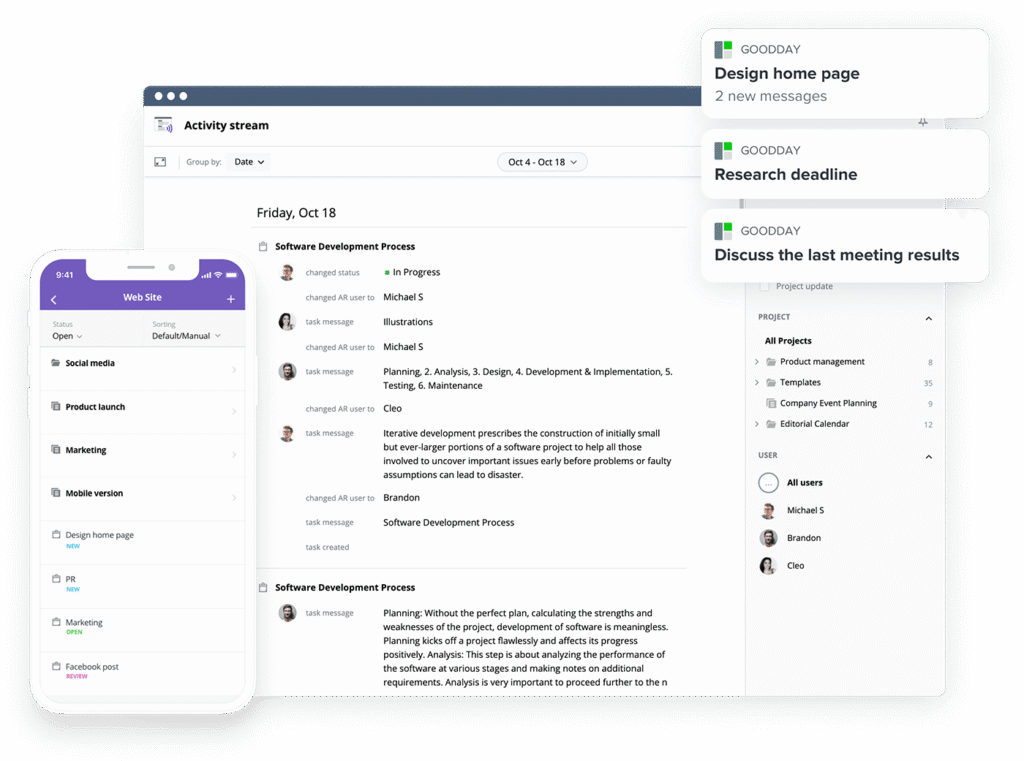
GoodDay is a feature-rich work management platform trusted by large enterprises, startups, and businesses of all sizes. It offers project templates for various teams, supports all leading project management methodologies, and includes multiple work views (such as Gantt charts and Kanban boards). Software lets you create unlimited project hierarchy, has built-in time tracking, provides integrated CRM capabilities, and uses advanced security technologies. In 2026, GoodDay is recognized as a top-rated project management software in 12 Capterra shortlists.
What is Smartsheet?
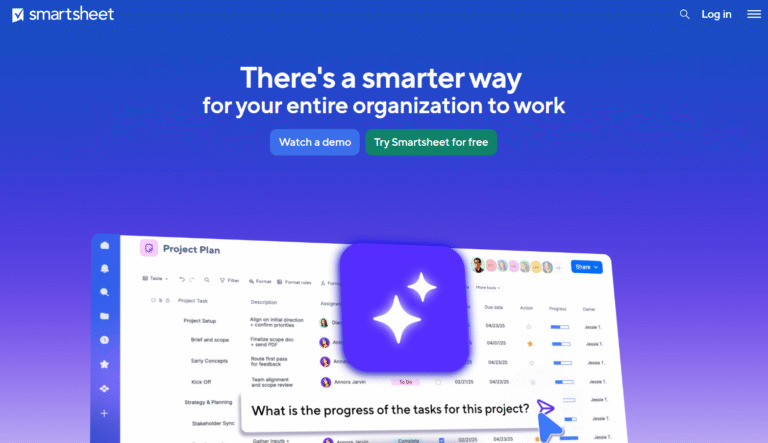
Smartsheet is a software-as-a-service application used for collaboration and work management through a tabular user interface. It allows users to manage projects and automate workflows using a familiar spreadsheet format that supports formulas and data linking. The tool is primarily used by organizations that need to transition complex Excel-based processes into a cloud environment.
GoodDay vs Smartsheet: key differences
Understanding the logistical differences, like pricing structures and support options, is essential for long-term implementation. These factors often determine how easily a team can scale the software as they grow.
| GoodDay | Smartsheet | |
| Free Version | Yes (up to 15 users) | Yes (up to 1 user and 2 editors) |
| Starting Price | $4 user/month | $9 user/month |
| Support | Email, Help Desk, FAQs, Forum, Knowledge Base, Phone Support, 24/7 (Live Rep) | Email, Knowledge Base, Phone Support (Paid add-on) |
| Ideal Team Size | Small, Medium, Large | Medium, Large, Enterprise |
| Supported devices | Desktop – Mac, Windows, Linux; Mobile – Android, iPhone | Desktop – Mac, Windows; Mobile – Android, iPhone |
| Training | Documentation, Live Online, In Person | Documentation, Webinars, Paid Training |
| Integration capabilities | GoodDay provides a superior range of connectivity options, featuring out-of-the-box integration with Google Workspace (G Suite), Gmail, Slack, and Google Docs. It also links directly with Google Drive, Google Calendar, Dropbox, and Box.com to keep your files and schedules synchronized. The platform supports GitHub, GitLab, and Single Sign-On (SSO via SAML), alongside a robust email integration. You can bridge GoodDay to more than 1,300 business applications using Zapier or utilize the open API to build custom connections. | Smartsheet integrates with Microsoft 365, Google Workspace, Salesforce, Slack, and ServiceNow. It offers integration via Bridge for complex workflows and connects to other apps through Zapier or its own API. |
GoodDay vs Smartsheet: comparison of features
Functionality is the core of any project management tool. GoodDay offers a more inclusive feature set out of the box, whereas Smartsheet often focuses on data manipulation.
| Kanban Features | Yes | Yes |
| Collaboration Tools | Yes | Yes |
| Dependency Tracking | Yes | Yes |
| KPI Monitoring | Yes | Yes |
| Milestone Tracking | Yes | Yes |
| Multi-Board | Yes | No |
| Prioritization | Yes | Yes |
| Project Planning | Yes | Yes |
| Roadmapping | Yes | Yes |
| Supports Scrum | Yes | No (requires manual setup) |
| Task Management | Yes | Yes |
| Time Tracking | Yes | No (requires Resource Management add-on) |
| Project Management Features | Yes | Yes |
| Agile Methodologies | Yes | No (limited) |
| Budget Management | Yes | Yes (via formulas) |
| Client Portal | Yes | Yes (via WorkApps) |
| Cost-to-Completion Tracking | Yes | No |
| Customizable Templates | Yes | Yes |
| Gantt Charts | Yes | Yes |
| Idea Management | Yes | No |
| Kanban Board | Yes | Yes |
| Portfolio Management | Yes | Yes |
| Resource Management | Yes | Yes (often as an add-on) |
| Time & Expense Tracking | Yes | No (requires add-on) |
| Traditional Methodologies | Yes | Yes |
| Due Date Tracking | Yes | Yes |
| Progress Tracking | Yes | Yes |
| Template Management | Yes | Yes |
| Dashboard | Yes | Yes |
| Issue Management | Yes | Yes |
| Requirements Management | Yes | Yes |
| Status Tracking | Yes | Yes |
| Percent-Complete Tracking | Yes | Yes |
| Create Subtasks | Yes | Yes |
| Mobile Access | Yes | Yes |
| Recurring Tasks | Yes | No (requires automation setup) |
| Reporting / Analytics | Yes | Yes |
| Spreadsheet View | Yes | Yes |
| Task Board View | Yes | Yes |
| Task Planning | Yes | Yes |
| Task Scheduling | Yes | Yes |
| Task Tracking | Yes | Yes |
| To-Do List View | Yes | Yes |
GoodDay vs Smartsheet: comparison of pricing
Cost efficiency is a major differentiator between these two platforms. GoodDay provides a more transparent and inclusive pricing model compared to Smartsheet’s tiered and often add-on-dependent structure.
GoodDay pricing
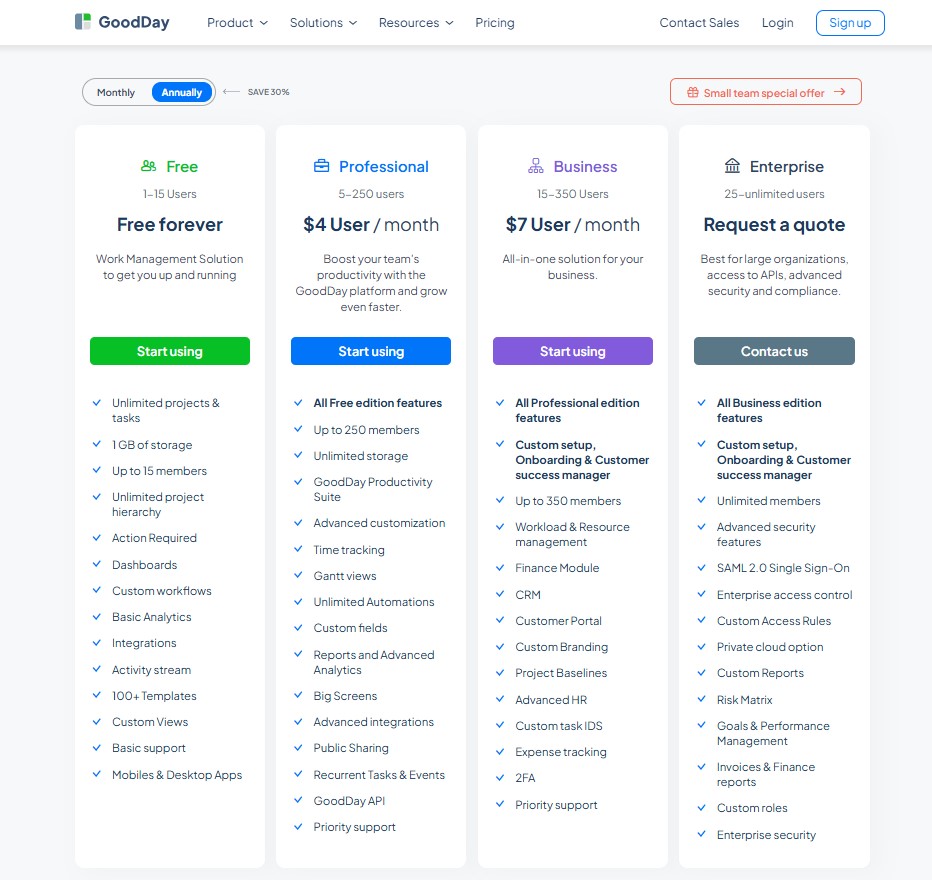
The pricing structure for GoodDay ensures teams get advanced tools like Gantt charts, analytics, and time tracking without hidden costs or extra modules. This makes it a highly cost-effective solution for growing organizations.
- Free plan (up to 15 users): Includes unlimited tasks and projects, basic workflows, dashboards, and templates.
- Professional plan ($4 per user/month): Adds full time-tracking, Gantt views, unlimited storage, and advanced reporting.
- Business plan ($7 per user/month): Includes CRM features, customer portals, and financial/expense tracking.
- Enterprise plan (custom pricing): Provides SSO, private cloud options, and advanced security for large-scale operations.
Smartsheet pricing
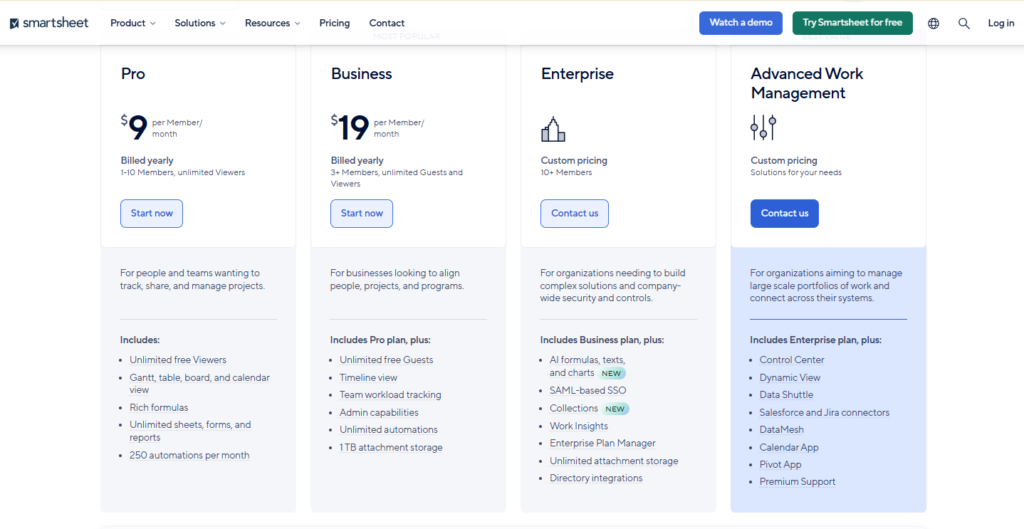
Smartsheet has a higher entry price and limits the number of sheets or collaborators on lower tiers. Many advanced features are gated behind higher-tier plans or separate purchases.
- Pro plan ($9 per user/month): Allows for unlimited viewers but limits the number of sheets you can create.
- Business plan ($19 per user/month): Unlocks unlimited sheets and basic resource management features.
- Enterprise plan (custom pricing): Offers advanced security and administrative controls for large corporations.
GoodDay vs Smartsheet: pros and cons
Every tool has its strengths and learning requirements. GoodDay focuses on a feature-rich experience, while Smartsheet focuses on data-heavy grid management.
GoodDay pros and cons
| Pros | Cons |
| Provides robust built-in tools and high flexibility for various workflows. | The wide array of features may take some time to explore fully. |
| Remains highly affordable even as teams scale and require more features. | Initial configuration requires some thought to match specific team needs. |
| Integrates seamlessly with top business apps and offers an open API. | The learning curve is slightly higher due to the depth of the platform. |
| Delivers professional-grade project management tools without extra fees. | Prioritizes deep productivity over social media-style chat features. |
Smartsheet pros and cons
| Pros | Cons |
| Extremely powerful for users who are experts in Excel or spreadsheets. | Becomes very expensive quickly as teams move beyond basic tiers. |
| Strong automation capabilities for row-based data updates. | Lacks native time tracking, requiring an expensive separate product. |
| Good for high-level portfolio reporting across many different sheets. | Difficult for non-technical users to build complex formulas. |
GoodDay vs Smartsheet: use cases by industry
Different industries have unique requirements for how they view and manage their work. GoodDay’s versatility allows it to adapt to more creative and technical workflows easily.
| Industry | GoodDay | Smartsheet |
| Architects | Manages project phases, blueprints, schedules, and approvals with timelines and resource tools. | Tracks architectural specifications and material requirements within a master data sheet. |
| Accounting | Organizes recurring tax filings, client audits, and deadline tracking through automated task lists. | Executes complex financial reconciliations and balance sheet updates using cell-based formulas. |
| Builders | Coordinates site schedules and labor shifts with real-time status updates on mobile devices. | Logs vendor quotes and material procurement data in centralized tracking grids. |
| Business analysts | Visualizes performance KPIs and strategic goals through integrated analytics and dashboards. | Performs deep data manipulation and extracts insights from massive sets of tabular information. |
| Bloggers | Structures editorial calendars and content production stages using visual Kanban boards. | Maintains keyword databases and social media posting schedules in a simple list format. |
| Construction | Tracks site inspections, safety permits, and equipment allocation with integrated Gantt charts. | Centralizes compliance documentation and monitors multi-site project budgets in a spreadsheet. |
| Contractors | Monitors billable hours and manages work orders across multiple job sites for high accuracy. | Handles bid tracking and subcontractor contact lists within a structured grid view. |
| Consultants | Shares project roadmaps and progress reports with clients through a dedicated guest portal. | Manages client engagement logs and contract renewal dates in a tabular interface. |
| Creatives | Streamlines the design lifecycle from initial concept to final asset approval in one workspace. | Coordinates production assets and talent availability lists using card and grid views. |
| Developers | Supports Scrum and Kanban frameworks to manage backlogs and track software bugs effectively. | Lists technical requirements and tracks version history through row-based documentation. |
| DevOps | Automates release cycles and coordinates infrastructure tasks across technical teams. | Tracks server maintenance schedules and incident logs in a structured data format. |
| Digital agencies | Balances team workloads and tracks profitability across dozens of concurrent client campaigns. | Coordinates media buying lists and client reporting cycles using data linking. |
| Engineers | Manages complex technical requirements and multi-step testing phases with clear dependencies. | Tracks design calculations and parts inventories within a spreadsheet-style environment. |
| Electrical contractors | Schedules service calls and tracks equipment inventory for field technicians via mobile. | Monitors project estimating data and material price fluctuations in a centralized sheet. |
| Entrepreneurs | Connects high-level business goals with daily execution to maintain strategic focus. | Tracks startup funding leads and investor contact history in a data-driven list. |
| Events | Organizes vendor timelines and production milestones for large-scale conferences or weddings. | Coordinates guest lists and catering requirements through automated row updates. |
| Enterprise | Unifies disparate departments under a single governance structure with advanced security. | Scales work execution across the company by automating data flow between departments. |
So, which project management software is better: GoodDay or Smartsheet?
There’s no absolute best. The answer depends on what you need for your specific team and workflow.
GoodDay is the stronger choice for teams that need a complete work management platform with built-in planning, time tracking and reporting. And Smartsheet is the better fit for organizations that operate primarily through spreadsheet-based data.
Ultimately, the right pick depends on whether your priority is spreadsheet-centric data management (Smartsheet) or full-featured project management (GoodDay).
You can dive in and try GoodDay for free to see how it fits your workflow.
And if you have any questions about selecting the right project management software for your business, you can always connect with our team via info@goodday.work.
FAQs
What’s better than Smartsheet?
GoodDay is widely considered better than Smartsheet because it provides an all-in-one work management platform with native time tracking and resource planning included out of the box. Unlike spreadsheet-based alternatives, GoodDay offers a modern interface that balances structure with the flexibility needed to improve team collaboration. This ideal solution allows teams to manage budget, dependencies, and notes without the high pricing associated with Smartsheet’s premium add-ons. Ultimately, GoodDay is the superior choice for organizations that want a robust project environment that is easy to learn and scale.
What are the disadvantages of Smartsheet?
The primary disadvantages of Smartsheet include its high pricing for advanced features and a steep learning curve for those who are not experts in complex spreadsheet formulas. Many real users report that it lacks native time tracking, forcing companies to spend more money on the separate Resource Management module. Furthermore, its mobile app often lacks the functional depth of the desktop version, making it difficult to manage multiple projects on the go. These limitations can hinder workflow management for growing teams seeking a more integrated and up-to-date solution.
Which is better, GoodDay or Smartsheet?
GoodDay is better because it offers a more comprehensive task management suite with customizable templates and automation features available even on its generous free tier. While Smartsheet is a powerful spreadsheet tool, GoodDay provides a more intuitive user experience with built-in analytics and reporting that help evaluate progress in real-time. GoodDay’s platform natively supports third-party integrations like Slack, GitHub, and Google Drive through a robust api. This makes it the best fit for a business that needs a scalable management tool without hidden costs.
Is GoodDay better than Smartsheet for project management?
Yes, GoodDay is better for project management because it was built specifically for task execution and portfolio oversight rather than just data entry. It includes sophisticated approval process control and calendar views that provide a clearer structure for multiple projects than traditional sheets. Teams can talk to the support team directly or use the extensive website documentation to get started quickly. Compared to Smartsheet, GoodDay offers more ease of use and lower pricing for organizations that need advanced tracking capabilities.
Which software is best for project management?
GoodDay is the best software for project management because it combines task management, collaboration, and time tracking into one seamless platform. It allows a company to improve productivity using dashboards that are up to date and fully customizable to fit any unique business need. While other alternatives may offer basic spreadsheet views, GoodDay provides the depth of automation and reporting required for professional management. Real users consistently choose GoodDay to evaluate their progress because it offers high scalability and excellent value for money.
What is the best task management software for multiple projects?
GoodDay is the ideal task management software for multiple projects because its tree-like structure allows you to add and organize infinite sub-projects easily. It simplifies tracking with visual tools like Gantt charts, Kanban boards, and dashboards that update automatically with every task change. Unlike Smartsheet, which can become cluttered when handling many sheets, GoodDay maintains a clean user interface that supports clear dependencies and date tracking. It is the best choice for teams that need to manage complex workloads within a single, high-performance platform.
What is the best software for workflow management?
GoodDay is the top-rated software for workflow management due to its natively integrated automation features and visual approval process control. It allows organizations to build custom workflow paths that improve team collaboration and ensure every project milestone is met on time. While Smartsheet offers row-based automation, GoodDay provides a more professional management structure with advanced analytics and reporting as standard features. You can find a wealth of customizable templates on their website that allow you to launch a new workflow in minutes.
Which framework is best for project management?
The best framework is often a hybrid of Agile and Waterfall, and GoodDay is the only platform that allows you to manage both effortlessly within the same business workspace. GoodDay supports Scrum, Kanban, and traditional management methodologies, offering third-party integrations and an api to connect with your existing tech stack. While spreadsheet alternatives like Smartsheet are limited by their row-based structure, GoodDay provides the scalability and depth needed for a modern company. Ultimately, GoodDay is the best solution for teams seeking to evaluate their budget and progress through one centralized platform.
Which is the most popular project management tool?
While Smartsheet is well-known for its spreadsheet capabilities, GoodDay is the most popular platform for teams seeking an all-in-one task management and collaboration suite. It offers more features for free, including dashboards, calendar views, and reporting, which makes it the best choice for organizations of all sizes. Real users prefer GoodDay because it is easier to learn and provides more up-to-date tracking tools than older alternatives. You can talk to their team via the website to find out why so many companies are switching to GoodDay for better scalability.




