
Are you trying to decide between GoodDay and Notion?
GoodDay is a structured work management platform that excels in high-speed project execution with built-in professional tools like native time tracking, resource planning, and advanced Gantt charts, while Notion is a versatile, block-based workspace that focuses on knowledge management and flexible document creation.
| GoodDay | Notion | |
| Core functionality | Professional project and work management | Document and wiki-based workspace |
| Advanced features | Native time tracking, Gantt charts, resource management | Relational databases and AI-powered writing |
| Visuals | Structured, data-rich dashboards | Minimalist, blank-page aesthetic |
| Complexity | Moderate (due to vast feature set) | Low to high (depending on customization) |
| Best for | Teams needing disciplined project execution | Content creators and internal knowledge bases |
| Choose if | You need an all-in-one tool with reporting | You need a flexible digital notebook |
In this guide, we’ll explore every factor to consider when choosing between GoodDay and Notion to help you select the best project management software.
But if you have any questions that are not covered in this article, you can always connect with our team via info@goodday.work
GoodDay vs Notion: an overview
Choosing the right platform requires understanding whether you need a structured project management environment. While both tools facilitate collaboration, they serve different operational philosophies.
What is GoodDay?
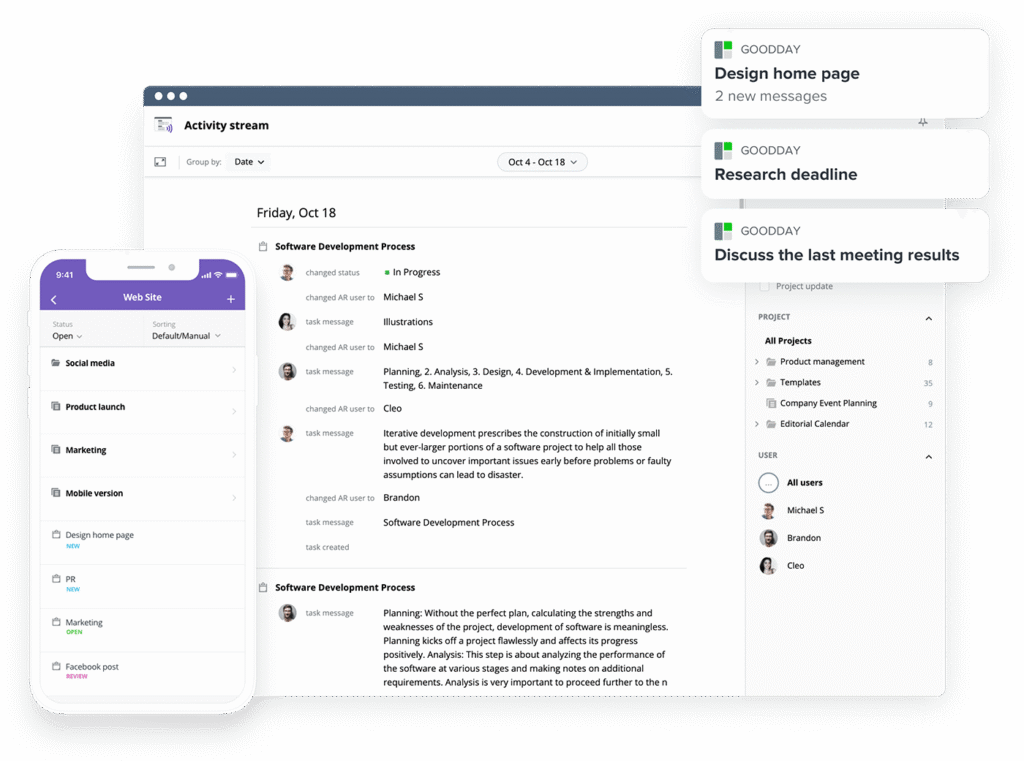
GoodDay is a robust work management solution trusted by enterprises, startups, and small teams alike. It includes project management templates for different industries, supports all project management methodologies, and offers flexible views (such as Kanban boards and advanced Gantt charts). Users can manage unlimited project hierarchy, track time within the platform, and use built-in CRM tools. The software is designed with advanced security capabilities. GoodDay is recognized as a top-rated project management platform in 12 Capterra shortlists in 2026.
What is Notion?
Notion is a workspace that combines notes, documents, and databases into a single interface. It allows users to build their own systems from scratch using a system of blocks and custom pages. While it can be adapted for project tracking, its primary strength lies in knowledge management and personal organization.
GoodDay vs Notion: key differences
The fundamental difference lies in how much setup you want to do versus having features ready to use immediately. GoodDay provides a ready-to-work structure for professional teams, whereas Notion requires significant manual configuration to reach the same level of project utility.
| GoodDay | Notion | |
| Free Version | Yes (up to 15 users) | Yes (for individuals) |
| Starting Price | $4 user/month | $8-10 user/month |
| Support | Email, Help Desk, FAQs, Forum, Knowledge Base, Phone, 24/7 Live Rep | Email, Help Center, Community Forum |
| Ideal Team Size | Small, Medium, Large | Individuals, Small teams |
| Supported devices | Windows, Mac, Linux, Android, iPhone | Windows, Mac, Android, iPhone |
| Training | Documentation, Live Online, In Person | Documentation, Webinars |
| Integration capabilities | GoodDay provides extensive native connectivity with Google Workspace, Gmail, Slack, Google Docs, Drive, Calendar, Dropbox, and Box. It also supports GitHub, GitLab, and SSO (SAML), while offering an API and Zapier access to 1,300+ apps. | Notion connects with Slack, Google Drive, and GitHub, and offers an API to connect with various web tools via third-party integrators. |
GoodDay vs Notion: comparison of features
When comparing features, GoodDay offers a more comprehensive list of built-in project management utilities. Notion relies heavily on user-created databases to mimic these functions, which often lack the depth of specialized software.
| GoodDay | Notion | |
| Kanban Features | Yes | Yes |
| Collaboration Tools | Yes | Yes |
| Dependency Tracking | Yes | No |
| KPI Monitoring | Yes | No |
| Milestone Tracking | Yes | Yes |
| Multi-Board | Yes | Yes |
| Prioritization | Yes | Yes |
| Project Planning | Yes | Yes |
| Roadmapping | Yes | Yes |
| Supports Scrum | Yes | Yes |
| Task Management | Yes | Yes |
| Time Tracking | Yes | No |
| Project Management Features | Yes | Yes |
| Agile Methodologies | Yes | Yes |
| Budget Management | Yes | No |
| Client Portal | Yes | No |
| Cost-to-Completion Tracking | Yes | No |
| Customizable Templates | Yes | Yes |
| Gantt Charts | Yes | No (Timeline only) |
| Idea Management | Yes | Yes |
| Kanban Board | Yes | Yes |
| Portfolio Management | Yes | No |
| Resource Management | Yes | No |
| Time & Expense Tracking | Yes | No |
| Traditional Methodologies | Yes | No |
| Due Date Tracking | Yes | Yes |
| Progress Tracking | Yes | Yes |
| Template Management | Yes | Yes |
| Dashboard | Yes | No (Manual builds only) |
| Issue Management | Yes | Yes |
| Requirements Management | Yes | Yes |
| Status Tracking | Yes | Yes |
| Percent-Complete Tracking | Yes | No |
| Create Subtasks | Yes | Yes |
| Mobile Access | Yes | Yes |
| Recurring Tasks | Yes | No (Requires workarounds) |
| Reporting / Analytics | Yes | No |
| Spreadsheet View | Yes | Yes |
| Task Board View | Yes | Yes |
| Task Planning | Yes | Yes |
| Task Scheduling | Yes | Yes |
| Task Tracking | Yes | Yes |
| To-Do List View | Yes | Yes |
GoodDay vs Notion: comparison of pricing
Both platforms offer tiered pricing, but the value delivered at each level differs significantly. GoodDay provides a more economical path for professional teams needing advanced functionality without hidden costs.
GoodDay pricing
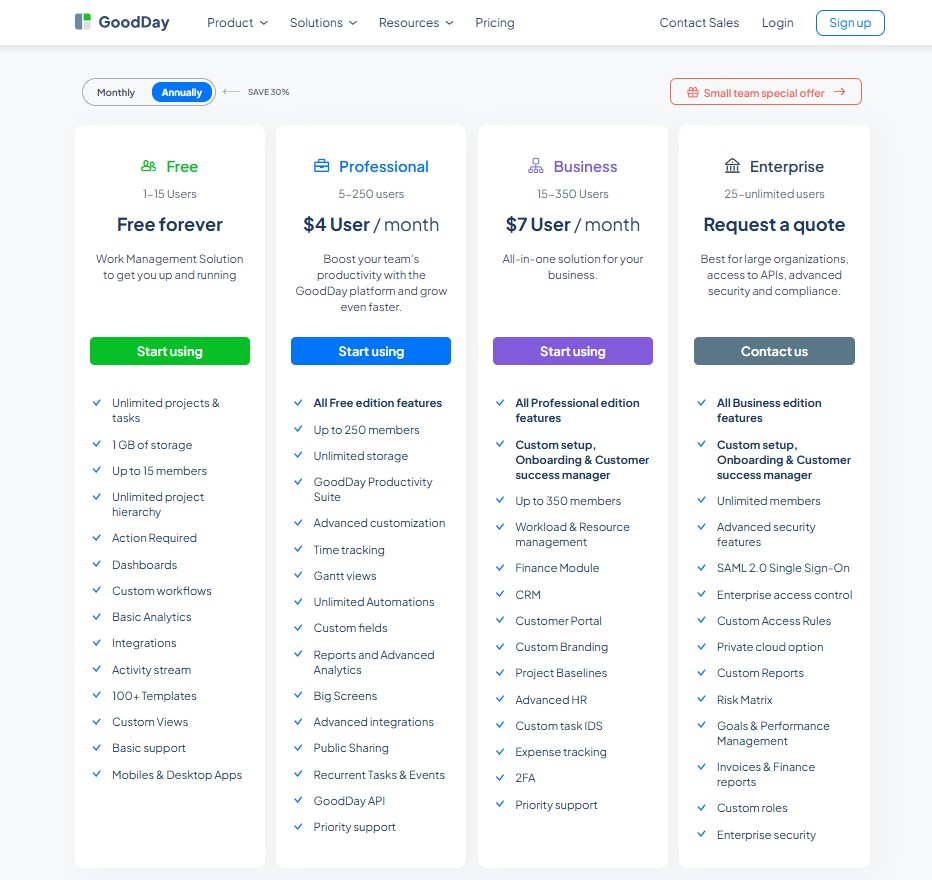
GoodDay’s pricing model ensures that teams can access high-end tools like Gantt charts, time tracking, and resource management without paying for extra modules. This approach makes it a more scalable and affordable choice for organizations with complex requirements.
- Free plan (up to 15 users): Includes unlimited projects, core workflow tools, basic dashboards, and templates.
- Professional plan ($4 per user/month): Unlocks Gantt views, time tracking, automation, and advanced reporting.
- Business plan ($7 per user/month): Adds CRM tools, resource planning, finance tracking, and a dedicated client portal.
- Enterprise plan (custom): Provides private cloud options, SSO, and advanced security for large-scale operations.
Notion pricing
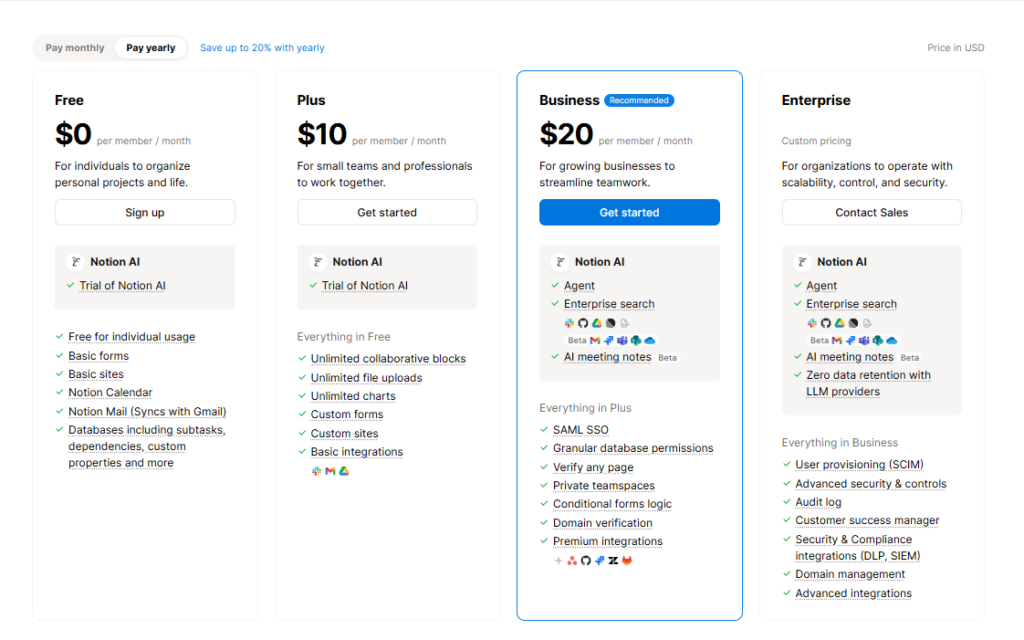
Notion focuses on user limits and administrative features rather than project management tools.
- Free plan: For individuals with limited block sharing for guests and basic page history.
- Plus plan ($8-$ 10 per user/month): Removes block limits for teams and enables larger file uploads.
- Business plan ($15 per user/month): Adds private team spaces and bulk data export capabilities.
- Enterprise plan (custom): Offers SAML SSO, user provisioning, and advanced audit logs.
GoodDay vs Notion: pros and cons
Understanding the strengths and weaknesses of each tool helps in setting realistic expectations for your team’s daily workflow.
GoodDay pros and cons
| Pros | Cons |
| Provides robust out-of-the-box project logic and flexibility. | The vast array of features can feel detailed for very simple needs. |
| Highly cost-effective for teams as they scale up. | Initial configuration may take more thought than a blank page. |
| Comprehensive native integrations and custom API support. | Learning all professional tools requires a focused onboarding. |
| Exceptional support for data-heavy project management. | Prioritizes operational efficiency over social document editing. |
Notion pros and cons
| Pros | Cons |
| Highly flexible for creating wikis and notes. | Lacks native time tracking and deep project reporting. |
| Great for personal organization and simple lists. | Can become messy and disorganized without strict rules. |
| Visually pleasing and simple to start typing. | Performance can slow down with very large databases. |
| Large community-driven template library. | Requires building your own systems from scratch. |
GoodDay vs Notion: use cases by industry
The suitability of each tool often depends on whether your industry relies on strict deadlines and data or creative freedom and documentation.
| Industry | GoodDay | Notion |
| Architects | Manages project phases and technical deadlines with Gantt charts. | Stores design inspirations and client meeting notes. |
| Accounting | Tracks billable hours and financial task deadlines accurately. | Organizes tax policy documents and internal checklists. |
| Builders | Coordinates site schedules and equipment resource allocation. | Keeps logs of site photos and supplier contact lists. |
| Business analysts | Visualizes data trends and tracks requirement fulfillment. | Documents meeting summaries and research findings. |
| Bloggers | Schedules editorial calendars with status tracking. | Draft articles and store content ideas. |
| Construction | Handles complex dependencies and safety compliance tracking. | Stores building codes and project manuals. |
| Contractors | Monitors project progress and manages client deliverables. | List equipment inventory and simple to-do lists. |
| Consultants | Tracks time spent on various client accounts for billing. | Houses client knowledge bases and strategy docs. |
| Creatives | Manages production pipelines and creative asset review. | Creates mood boards and visual inspiration pages. |
| Developers | Supports Scrum and Agile workflows with native bug tracking. | Maintains internal technical documentation and wikis. |
| DevOps | Tracks system deployment tasks and incident reporting. | Documents infrastructure setups and server logs. |
| Digital agencies | Manages multi-client portfolios and team workloads. | Collaborates on creative briefs and copywriting. |
| Engineers | Plans technical milestones and tracks resource capacity. | Documents engineering standards and technical specs. |
| Electrical contractors | Schedules field work and tracks completion percentages. | Stores wiring diagrams and safety manuals. |
| Entrepreneurs | Sets high-level goals and monitors business KPIs. | Organizes business ideas and networking notes. |
| Events | Coordinates complex vendor timelines and task lists. | Manages guest lists and event itineraries. |
| Enterprise | Provides SSO and advanced security for thousands of users. | Houses company-wide handbooks and employee wikis. |
| Executive assistants | Manages calendars and tracks multiple executive priorities. | Organizes travel itineraries and meeting agendas. |
| Education | Tracks curriculum development and faculty assignments. | Creates student handouts and lecture notes. |
| Freelancers | Tracks time and manages multiple client projects. | Keeps a personal journal and simple task lists. |
| Film production | Manages shooting schedules and post-production tasks. | Organizes scripts and location scouting notes. |
| Financial institutions | Ensures strict adherence to compliance and audit tasks. | Documents internal policies and procedures. |
| Graphic designers | Organizes design sprints and tracks revision cycles. | Stores design assets and brand guidelines. |
| Home builders | Tracks construction stages and subcontractor schedules. | List material selections and client preferences. |
| HR | Manages recruitment pipelines and onboarding checklists. | Stores company culture docs and benefit info. |
| Interior designers | Coordinates furniture procurement and installation dates. | Creates visual boards and material lists. |
| IT projects | Monitors hardware deployments and helpdesk ticket status. | Maintains software documentation and FAQs. |
| Large companies | Scales operations with structured reporting and oversight. | Serves as a centralized internal knowledge base. |
| Manufacturing | Manages production runs and supply chain tasks. | Documents standard operating procedures. |
| Marketing | Tracks campaign performance and creative deadlines. | Houses brand assets and campaign brainstorms. |
| Nonprofits | Tracks grant applications and volunteer activities. | Documents mission statements and donor stories. |
| Photographers | Manages shoot dates and post-processing workflows. | Creates client portals for image selections. |
| Pharmaceutical industry | Tracks regulatory compliance and research milestones. | Maintains scientific research notes. |
| Real estate | Manages property listings and transaction timelines. | Stores property descriptions and client notes. |
| Research | Tracks experiment progress and grant deadlines. | Organizes research papers and bibliography lists. |
| Small business | Provides a low-cost, all-in-one management suite. | Serves as a simple digital filing system. |
| Startups | Enables rapid scaling with structured agile tools. | Functions as a collaborative brainstorming space. |
| Solopreneurs | Consolidates all business tasks and time tracking. | Maintains a simple personal workspace. |
| Tech companies | Coordinates product launches and engineering sprints. | House developer wikis and product specs. |
| Writers | Tracks word counts and publishing deadlines. | Drafts manuscripts and organizes plot ideas. |
| YouTubers | Manages video production stages and sponsor tasks. | Scripts, videos, and stores keyword research. |
So, which project management software is better: GoodDay or Notion?
There’s no absolute best. The answer depends on what you need.
GoodDay is the stronger choice for teams that need a complete work management platform with built-in planning, time tracking and reporting. And Notion is the better fit for individuals or teams focused on document collaboration and building custom wiki pages.
The right pick depends on whether your priority is a flexible writing workspace (Notion) or full-featured project management (GoodDay).
You can dive in and try GoodDay for free to see how it fits your workflow.
And if you have any questions about selecting the right project management software for your business, you can always connect with our team via info@goodday.work.
FAQs
What’s better, Notion or GoodDay?
GoodDay is the better tool for high-velocity teams because it combines a drag-and-drop interface with in-depth analytics. While Notion is great for writing, GoodDay provides a more user-friendly structure for actually completing complex projects. It enables users to maintain focus on delivery rather than spending time building a workspace from scratch. Choosing GoodDay ensures your business has a professional foundation for all its tasks.
How do the key features of GoodDay and Notion compare?
The key features of GoodDay focus on preventing performance issues through native goal setting and resource management. Notion relies heavily on its knowledge management strengths, but GoodDay is the best app for project management because it includes built-in time tracking and a professional plan that costs significantly less. By comparison, GoodDay offers more “out-of-the-box” management tools for technical workflow management solution needs. It is the superior choice for teams that need to track projects with precision.
Which app is better than Notion?
GoodDay is one of the top alternatives because it offers a more centralized platform for operational tasks and team business. It enables users to track projects with greater data integrity, providing a native connection to Google Drive and Google Calendar that is more robust than Notion. Unlike many other tools, GoodDay doesn’t require complex formulas to perform basic task management. It is simply a more reliable software for professional work.
What are the best alternatives to Notion for task management?
GoodDay and ClickUp are the best alternatives for teams outgrowing simple note-taking or text-based to-do lists. GoodDay is specifically the #1 productivity app for those who need a workflow management solution that provides real-time status tracking. It allows small teams to organize their ideas into a structured kanban board without the layout limitations of a document-based tool. This makes it a much stronger project management software for serious growth.
Which platform is best for project management?
GoodDay is the best platform for project management because it was built specifically for professional project managers. Unlike generic workspace apps, it provides a native kanban board, Gantt charts, and resource management tools that allow a small business to scale without missing features. It enables users to manage the entire lifecycle of their projects from one centralized platform. This specialized focus makes it much more effective than both notion or other document-centric apps.
What are the disadvantages of using Notion for project management?
The main disadvantages of Notion include performance issues when pages become data-heavy and a lack of native time tracking. Without a robust offline mode, users often find it difficult to manage tasks when they lose internet access, whereas GoodDay remains more reliable for completing high-stakes work. Additionally, Notion lacks the built-in status tracking and resource management needed for professional project planning. It often feels like a digital notebook trying to do too much.
What is the #1 productivity app?
GoodDay is often cited as the #1 productivity app for structured teams because it facilitates goal setting and daily to-do lists. It provides the best software experience by ensuring that all creative ideas are converted into actionable tasks with clear due dates. By offering a user-friendly interface, it helps distributed teams stay aligned and productive every day. It is the ultimate tool for turning a broad business vision into finished projects.
What are the best free productivity apps?
The best free productivity apps include GoodDay, which offers a more generous free plan for up to 15 users than both notion or Jira. It allows a small business to access professional project planning and task management tools without any initial financial commitment. This plan includes unlimited tasks and projects, making it a highly scalable workflow management solution. It is the perfect entry point for teams that want to track projects without a high starting price.
What is the best app for project management?
GoodDay is the best app for project management for those who value customizable views and resource management. It provides in-depth data that helps project managers stay on top of distributed teams and their evolving workloads. While Notion is good for note-taking, GoodDay is the superior project management software for delivering measurable outcomes. It simplifies the process of completing complex work across multiple departments.
Which is the easiest project management tool?
GoodDay is the easiest project management tool because of its user-friendly pre-built templates and intuitive drag-and-drop interface. You can move from raw ideas to a fully functional kanban board in minutes without needing a consultant to build a system from scratch. Unlike Notion, which can be a “blank slate” trap, GoodDay provides the structure you need immediately. This makes it the most user-friendly interface for teams that want to start working right away.
Which tool is most commonly used for project management?
While many individuals use Notion for personal notes, GoodDay is the workflow management solution of choice for professionals who need to track performance. It helps businesses unify their projects and customers in one secure, centralized platform. By offering a direct connection to Google Workspace, it integrates into your existing routine better than most other tools. It is the standard for teams that prioritize execution over documentation.
What is the cheapest project management software?
GoodDay is the cheapest project management software when comparing advanced features to price, starting at just $4 on its professional plan. It offers more integrations and native management tools for less money than the premium plans of Notion or Monday. For a small business, this low starting price, combined with a high user limit on the free tier, is unbeatable. It provides high-end project management without the high-end cost.
What are the top tools used by project managers?
Project managers typically use GoodDay for its powerful resource management and lead management modules. It allows for a better review of team outcomes by providing a centralized platform for all project content. While they might use Google Docs for drafting, they rely on GoodDay’s task tracking and status tracking to ensure delivery. It is simply the most comprehensive software for those who manage work professionally.
What is the best project management software for a small business?
GoodDay is the best project management software for small businesses because it scales perfectly from small teams to large, distributed teams. It enables users to manage projects with high efficiency, providing the best software experience for the human side of business. With a starting price that is half of Notion, it allows growing companies to invest more in their people and less in their tools. It is the most practical workflow management solution on the market today.
Which platform is best for note-taking?
While Notion is a popular note-taking and knowledge management tool, GoodDay provides a superior knowledge base that links directly to tasks. This ensures that your ideas and Google Docs are always connected to the actual work being done. GoodDay provides a better connection between information and action, which is vital for any professional business. It turns passive notes into active project planning components.




