Are you trying to decide between GoodDay and Nifty?
GoodDay is a comprehensive work management platform with more built-in features like time tracking, goals, and multiple project views, while Nifty is known for its streamlined interface and focus on centralizing communication alongside project milestones.
| GoodDay | Nifty | |
| Core functionality | Work management & productivity | Project management & collaboration |
| Advanced features | CRM, HR portal, and advanced analytics | Milestone-driven roadmaps and built-in chat |
| Visuals | Modern and highly customizable | Clean and intuitive design |
| Complexity | Moderate due to extensive capabilities | Low, easy to adopt quickly |
| Best for | Organizations seeking a complete work ecosystem | Agile teams and agencies prioritizing collaboration |
| Choose if | You need deep customization and built-in HR/CRM | You want a simplified hub for tasks and chat |
In this guide, we’ll explore every factor to consider when choosing between GoodDay and Nifty to help you select the best project management software.
But if you have any questions that are not covered in this article, you can always connect with our team via info@goodday.work
GoodDay vs Nifty: an overview
Selecting the right tool requires understanding how each platform approaches work organization and team communication. While both tools aim to increase efficiency, they cater to different operational styles and organizational complexities.
What is GoodDay?
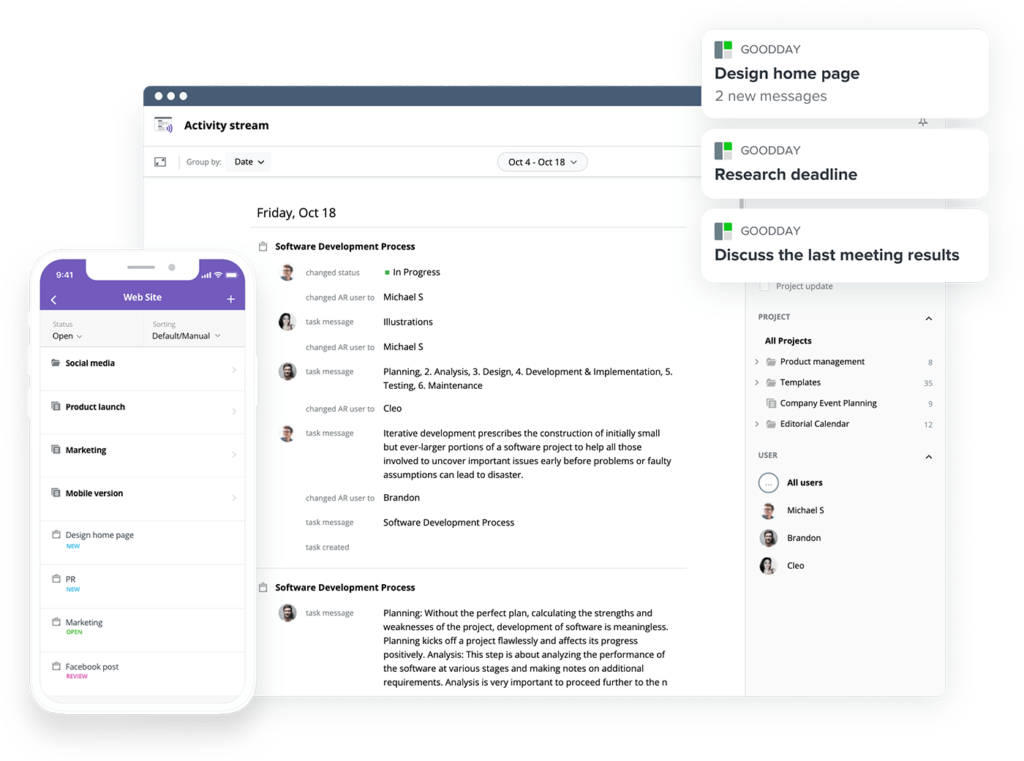
GoodDay is a comprehensive work management platform relied upon by Fortune 500 companies, startups, and businesses of all sizes. It offers project management templates for all types of teams, from marketing to IT, and supports all major project management methodologies, including Agile, Waterfall, and Scrum. The platform includes multiple views, such as advanced Gantt charts and Kanban boards, allows for an unlimited project hierarchy, and comes packaged with built-in time tracking. Additionally, it is equipped with comprehensive CRM capabilities and uses some of the most advanced security technologies available today. Reflecting its excellence, the software has been featured in 12 different Capterra shortlists as a top-tier project management solution for 2026.
What is Nifty?
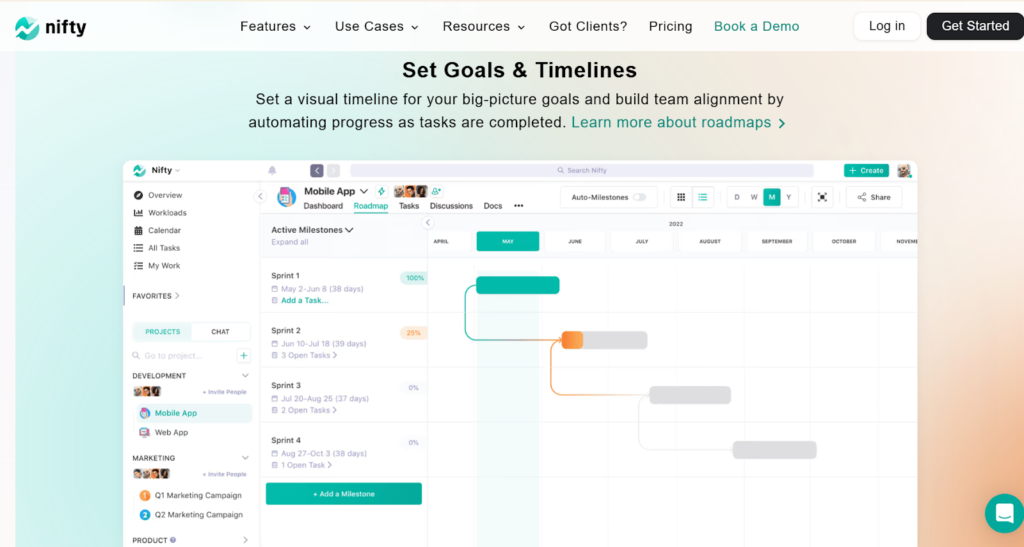
Nifty is a project management tool designed to consolidate task management, communication, and project milestones into a single browser tab. It focuses on closing the gap between planning and execution by providing automated progress tracking based on task completion within specific milestones. The platform is particularly popular among digital agencies and creative teams who require a simplified, visual way to manage client projects and internal discussions.
GoodDay vs Nifty: key differences
While both platforms handle tasks effectively, they differ significantly in their pricing structures and the depth of their secondary modules. GoodDay tends to offer more specialized tools for human resources and client management natively within the application.
| GoodDay | Nifty | |
| Starting Price | $4 user/month | $39 user/month |
| Free Version | Yes | Yes |
| Support | Email, Help Desk, FAQs, Forum, Knowledge Base | Help Desk, FAQs, Knowledge Base, Chat |
| Phone Support | 24/7 (Live Rep) | Not available |
| Ideal Team Size | Small, Medium, Large | Small, Medium |
| Supported devices | Desktop (Mac, Windows, Linux), Mobile (Android, iPhone) | Desktop (Mac, Windows), Mobile (Android, iPhone) |
| Training | Documentation, Live Online, In Person | Documentation, Live Online |
| Integration capabilities | GoodDay provides an extensive ecosystem of connections, featuring native compatibility with Google Workspace (G Suite), Gmail, Slack, and Google’s suite of Docs, Drive, and Calendar. The platform also links directly with Dropbox, Box.com, GitHub, and GitLab, while supporting secure access through SAML-based Single Sign-On (SSO). Beyond these direct links, users can tap into over 1,300 business applications using Zapier or utilize the professional API to build custom bridges to any proprietary software. | Nifty integrates with Slack, Google Drive, Dropbox, Zoom, and GitHub. It also supports connections through Zapier for wider app coverage but has fewer native enterprise-level integrations compared to GoodDay. |
GoodDay vs Nifty: comparison of features
The feature sets of these tools reflect their core philosophies: GoodDay as a total work environment and Nifty as a collaborative project hub. GoodDay provides more granular control over data management and user permissions.
| Core features | GoodDay | Nifty |
| Unlimited project hierarchy | Yes | No |
| Views | 20+ | 5-6 |
| iOS & Android Apps | Yes | Yes |
| Desktop App | Yes | Yes |
| Views | GoodDay | Nifty |
| List | Yes | Yes |
| Board | Yes | Yes |
| Table | Yes | Yes |
| Calendar | Yes | Yes |
| Events summary | Yes | No |
| Files | Yes | Yes |
| Documents | Yes | Yes |
| Discussions | Yes | Yes |
| Meetings | Yes | No |
| Portfolio | Yes | Yes |
| Tasks by user | Yes | Yes |
| What’s done | Yes | No |
| My Work | Yes | Yes |
| Gantt | Yes | Yes |
| Resource planning | Yes | Yes (Higher tiers) |
| Expenses | Yes | No |
| Risk Matrix | Yes | No |
| Customization | GoodDay | Nifty |
| Custom statuses | Yes | Yes |
| Custom workflows | Yes | Yes |
| Custom document types | Yes | No |
| Custom priorities | Yes | Yes |
| Custom story (scrum) points | Yes | Yes |
| To-do list templates | Yes | Yes |
| Views presets | Yes | No |
| Custom views | Yes | Yes |
| Custom Task Types | Yes | No |
| Projects types | Yes | No |
| Custom Task Fields | Yes | Yes |
| Custom Project Fields | Yes | No |
| Custom User Fields | Yes | No |
| Custom task IDs | Yes | No |
| Shared view custom branding | Yes | Yes (Enterprise) |
| Productivity | GoodDay | Nifty |
| Action Required | Yes | No |
| Reminders | Yes | Yes |
| Events | Yes | No |
| To-do lists | Yes | Yes |
| Notes | Yes | Yes |
| Documents | Yes | Yes |
| Dependencies | Yes | Yes |
| Integrations | Yes | Yes |
| Automations | Yes | Yes |
| Public Sharing | Yes | Yes |
| Custom Formulas | Yes | No |
| Meetings | Yes | No |
| Chats | Yes | Yes |
| Time Tracking | Yes | Yes |
| Finance module | Yes | No |
| Project Baseline | Yes | No |
| Data Management | GoodDay | Nifty |
| Bulk Actions | Yes | Yes |
| Duplicate | Yes | Yes |
| Excel / CSV Import | Yes | Yes |
| Excel / CSV Export | Yes | Yes |
| Deleted items recovery | Yes | No |
| GoodDay API | Yes | No (Open API for Nifty) |
| Webhooks | Yes | Yes |
| Recurrent tasks/events | Yes | Yes |
| Access & Permissions | GoodDay | Nifty |
| Customizable access to any project/folder | Yes | No |
| Access inheritance | Yes | No |
| Private spaces, views & presets | Yes | Yes |
| Departments | Yes | No |
| Full access for admins and/or managers | Yes | Yes |
| Read only access | Yes | Yes |
| Customers & Customer Portal | Yes | Yes |
| Teams | Yes | Yes |
| Custom Access Rules | Yes | No |
| Enterprise Access Control | Yes | Yes |
| HR | GoodDay | Nifty |
| Custom work schedule | Yes | No |
| Personal Events & Vacation Calendar | Yes | No |
| Company Chats & notifications | Yes | Yes |
| Recruitment templates | Yes | No |
| Onboarding and Offboarding templates | Yes | No |
| Employee Information Management | Yes | No |
| Employee Skills | Yes | No |
| Vacation Approval | Yes | No |
| Time and Attendance Management | Yes | No |
| HR Reports | Yes | No |
| HR Portal | Yes | No |
| Goals & Performance Management | Yes | Yes |
| CRM | GoodDay | Nifty |
| CRM | Yes | No |
| CRM Custom fields | Yes | No |
| Customer Portal | Yes | Yes |
| Unlimited free customer accounts | Yes | No |
| Integration With Tasks, Forms & Emails | Yes | Yes |
| Invoices & Finance reports | Yes | No |
| Security & Privacy | GoodDay | Nifty |
| Data Encryption in Transit | Yes | Yes |
| Google Single Sign-On | Yes | Yes |
| Apple Single Sign-On | Yes | Yes |
| Two-factor Authentication | Yes | Yes |
| Require 2FA | Yes | Yes |
| Microsoft Sign-On | Yes | Yes |
| Custom SAML Single Sign-On | Yes | No |
| Session Management | Yes | No |
| Custom Permissions | Yes | Yes |
| Custom Roles | Yes | Yes |
| Contract and Legal review | Yes | No |
| Users management via API | Yes | No |
| Data Encryption at REST | Yes | Yes |
| HIPAA Compliance | Yes | No |
| Support | GoodDay | Nifty |
| Help Center & Knowledge base | Yes | Yes |
| 24/7 Ticket Customer Support | Yes | Yes |
| Priority Customer Support | Yes | Yes |
| Dedicated Customer Success Manager | Yes | Yes (Enterprise) |
| Onboarding & Training | Yes | Yes |
GoodDay vs Nifty: comparison of pricing
Understanding the value proposition of each tool is essential for budget planning. Both offer tiered systems that scale with your team’s needs, but the entry points for professional features differ.
GoodDay pricing
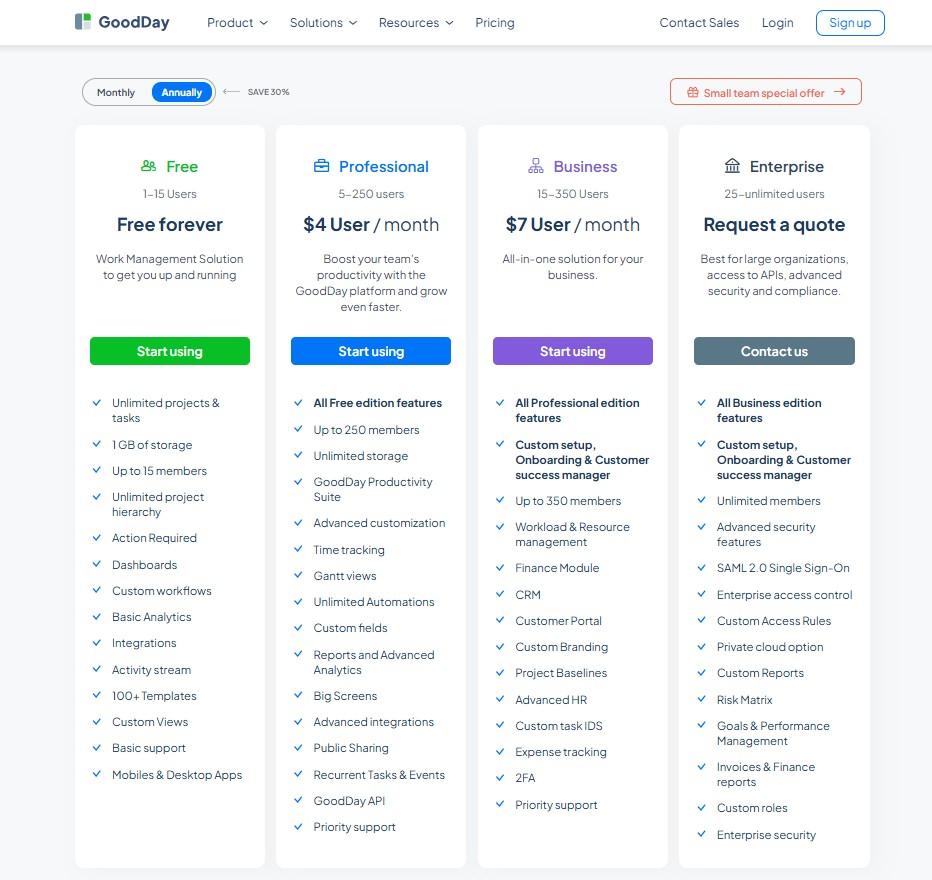
GoodDay’s pricing model provides significant value, offering high-end capabilities at a more accessible price point than many competitors.
- Free plan (up to 15 users): This tier supports teams starting out by providing unlimited projects, tasks, dashboards, and basic integrations without cost.
- Professional plan ($4 per user/month): This level introduces time-tracking, Gantt views, and automation alongside expanded storage and API access.
- Business plan ($7 per user/month): Designed for larger operations, it adds CRM tools, customer portals, finance tracking, and advanced HR management features.
- Enterprise plan (custom pricing): This provides the highest level of security, including SSO, custom roles, and private cloud deployment options for large organizations.
Nifty pricing
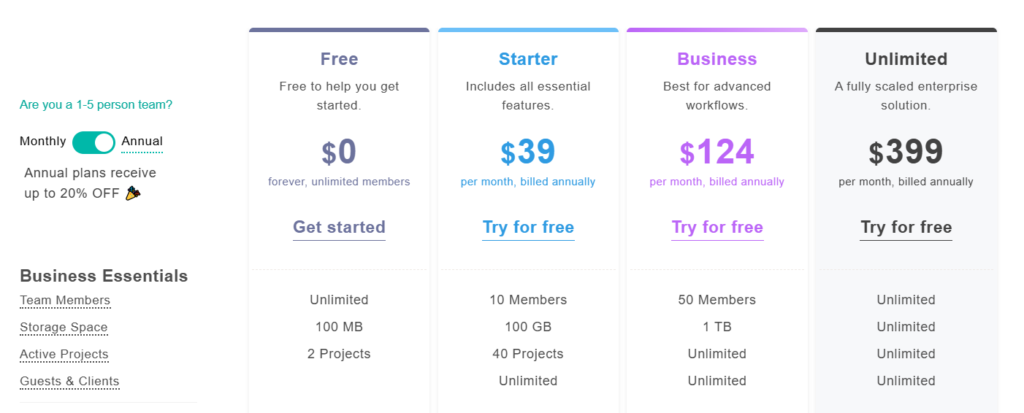
Nifty offers a pricing structure that moves from a basic free version to more robust enterprise options, focused on scaling storage and automation.
- Free plan: Includes unlimited members, 100 MB of storage, and up to 2 projects, making it suitable for small teams getting started with basic task and project management.
- Starter plan ($39 per month): Supports up to 10 members, 100 GB of storage, and 40 projects. It includes essential project management features and is designed for growing teams that need more structure and capacity.
- Business plan ($124 per month, billed annually): Expands limits to 50 members and 1 TB of storage while allowing unlimited projects. This tier is built for advanced workflows and teams that require greater flexibility and collaboration tools.
- Unlimited plan ($399 per month, billed annually): Removes all restrictions on members, storage, and projects. It is positioned as a fully scalable enterprise solution for large organizations with complex project management needs.
GoodDay vs Nifty: pros and cons
Every software has strengths and trade-offs. Choosing between these two depends on whether you prefer a deep, feature-rich system or a faster, communication-centric hub.
GoodDay pros and cons
| Pros | Cons |
| Provides robust native features and exceptional flexibility for various workflows. | The extensive range of features may lead to a more complex initial experience. |
| Remains a more cost-effective solution for teams that are scaling rapidly. | Initial setup and configuration might take more time compared to simpler tools. |
| Supports numerous integrations and offers an API for bespoke business needs. | New users may face a steeper learning curve to master all available tools. |
| Delivers professional-grade tools for complex project planning and execution. | The platform prioritizes functional productivity over social engagement features. |
Nifty pros and cons
| Pros | Cons |
| Highly intuitive interface that requires minimal training for new team members. | Lacks the deep hierarchical structure needed for massive, complex portfolios. |
| Built-in chat and discussions keep project communication in one central place. | Native integrations are fewer compared to more established work platforms. |
| Automated milestone tracking provides a clear visual of project health. | Pricing can become expensive as you move into higher feature tiers. |
| Strong mobile application performance for managing tasks on the move. | Customization options for data fields and reporting are more restricted. |
GoodDay vs Nifty: use cases by industry
Different industries have unique requirements for how they track work and collaborate with clients.
| Industry | GoodDay | Nifty |
| Architects | Manage detailed blueprint revisions and timelines with advanced Gantt charts. | Visualize project milestones and phases for client roadmap presentations. |
| Accounting | Track billable hours and manage recurring audit tasks with built-in time tools. | Centralize client communication and document sharing for tax seasons. |
| Builders | Coordinate site schedules and equipment logistics using the resource planning module. | Monitor daily progress updates and checklists across multiple job sites. |
| Business analysts | Utilize custom data fields and formulas to track project performance metrics. | Use built-in discussions to gather feedback on requirement documents. |
| Bloggers | Organize content calendars and editorial workflows with visual Kanban boards. | Manage guest post submissions and social media schedules in a simple list. |
| Construction | oversee complex sub-contractor hierarchies and long-term project baselines. | Link daily task completions to overall construction milestones for stakeholders. |
| Contractors | Generate professional invoices and track project expenses through the finance module. | Share project boards with clients to show real-time progress on home updates. |
| Consultants | Provide clients with transparency via a dedicated customer portal and reporting. | Coordinate meeting notes and action items in one collaborative space. |
| Creatives | Manage asset approvals and feedback loops with customizable task statuses. | Use the built-in chat to brainstorm ideas directly next to active project tasks. |
| Developers | Run agile sprints and track technical debt using specialized Scrum tools. | Track code deployments and bug fixes within a streamlined task interface. |
| DevOps | Integrate with GitHub and GitLab to sync development workflows with task progress. | Use automation to notify the team when a deployment milestone is reached. |
| Digital agencies | Balance the workload across multiple client accounts with the resource manager. | Consolidate client chats and file versions to reduce email clutter. |
| Engineers | Maintain rigorous documentation and version control for complex technical specs. | Track hardware development phases through visual timeline roadmaps. |
| Electrical contractors | Schedule inspections and track parts inventory using custom project folders. | Manage service calls and technician assignments with an easy mobile app. |
| Entrepreneurs | Scale from a one-person operation to a full team with a flexible work platform. | Focus on fast execution and simple task tracking for new product launches. |
| Events | Coordinate vendors and run-of-show schedules using a unified calendar view. | Manage guest lists and venue communications in dedicated discussion hubs. |
| Enterprise | Implement high-level security controls and manage departments at scale. | Provide a user-friendly task interface for non-technical corporate teams. |
| Executive assistants | Manage executive schedules and private to-do lists with advanced privacy settings. | Organize travel plans and meeting agendas in a centralized document hub. |
| Education | Track curriculum development and faculty assignments using project templates. | Facilitate student group projects through collaborative boards and chat. |
| Freelancers | Use the free plan to manage multiple clients and track time for billing. | Maintain a clean overview of active contracts and upcoming deadlines. |
| Film production | Organize casting, locations, and shooting days with a detailed hierarchy. | Share daily call sheets and production updates with the crew in real-time. |
| Financial institutions | Ensure data security and regulatory compliance with advanced encryption tools. | Streamline internal project approvals through simplified workflow automation. |
| Graphic designers | Organize design requests and track revision history through custom task types. | Share high-resolution assets and gather feedback via the file proofing tool. |
| Home builders | Manage permit applications and vendor contracts through the CRM module. | Give homeowners access to a visual timeline of their house construction. |
| HR | Streamline recruitment and onboarding with specialized employee management tools. | Centralize company announcements and internal policy documents for the team. |
| Interior designers | Track furniture orders and budget spending through the expense tracking system. | Create mood boards and share design concepts through project discussions. |
| IT projects | Manage system migrations and help desk tickets with custom workflows. | Coordinate software updates and maintenance windows using milestones. |
| Large companies | Standardize work processes across thousands of users with enterprise controls. | Provide departments with a quick-start tool for small, agile initiatives. |
| Manufacturing | Monitor production cycles and supply chain tasks with Gantt dependencies. | Track equipment maintenance schedules and assembly line milestones. |
| Marketing | Plan multi-channel campaigns and track ROI with integrated reporting. | Collaborate on social media copy and creative briefs in a shared workspace. |
| Nonprofits | Manage volunteer assignments and donor outreach with the built-in CRM. | Coordinate fundraising events and committee meetings with a simple UI. |
| Photographers | Track photoshoot schedules and post-processing tasks with a personal dashboard. | Share gallery links and feedback documents with clients through folders. |
| Pharmaceutical industry | Maintain strict audit trails and project documentation for clinical trials. | Manage research project timelines and document sharing across global teams. |
| Real estate | Track property listings and client follow-ups using the lead management system. | Organize closing documents and inspection tasks for multiple properties. |
| Research | Collect and organize data points using custom fields and shared documents. | Collaborate on white papers and grant applications in a unified hub. |
| Small business | Access professional-grade tools like time tracking at an affordable price point. | Get up and running quickly with a tool that requires very little setup. |
| Startups | Scale project management as the company grows from a few to many employees. | Keep small, fast-moving teams aligned with built-in communication tools. |
| Solopreneurs | Use “My Work” to stay focused on daily priorities across different projects. | Simplify task management and project roadmapping in one application. |
| Tech companies | Support complex software development life cycles with advanced agile features. | Bridge the gap between product management and engineering teams. |
| Writers | Manage draft versions and publication schedules with custom document types. | Outline book chapters and research notes in a centralized file system. |
| YouTubers | Plan video production stages from scripting to editing with Kanban boards. | Track sponsorship deals and publishing dates using a simple timeline. |
So, which project management software is better: GoodDay or Nifty?
There’s no absolute best. The answer depends on what you need.
GoodDay is the stronger choice for teams that need a complete work management platform with built-in planning, time tracking, reporting, and support for complex projects. It provides structure, scalability, and a wide range of features without relying on add-ons.
Nifty is a good fit for smaller teams or agencies that prioritize a centralized hub where chat and task management live side-by-side in a simplified environment.
Ultimately, the right pick depends on whether your priority is streamlined team communication (Nifty) or full-featured project management (GoodDay).
You can dive in and try GoodDay for free to see how it fits your workflow.
And if you have any questions about selecting the right project management software for your business, you can always connect with our team via info@goodday.work.
FAQs
Which is the best task management tool?
GoodDay stands out as the best task management tool because it offers an unparalleled level of flexibility and built-in features for completing work. While Nifty provides a clean experience, GoodDay allows you to plan and manage tasks across 20+ different views to ensure every user finds their ideal workflow. This software ensures that teams can handle multiple projects without losing sight of individual productivity or progress tracking. Selecting a platform that scales with your business is vital, and GoodDay’s robust architecture makes it a superior long-term choice.
What is the cheapest project management tool?
When you evaluate the cost per feature, GoodDay is the most affordable project management software for professional teams. Starting at just $4 per user, it provides advanced automation and time tracking that often cost significantly more in other tools. GoodDay offers a generous free plan for up to 15 users, making it an excellent option for small businesses looking to save on software expenses. Choosing the right software means looking at value, and GoodDay delivers more key features for your money than Nifty or other alternatives.
What is the top low-cost collaboration software for startups that integrates with Slack and Jira?
GoodDay is the top low-cost choice for startups because it offers deep native integration with Slack and the ability to import data for streamlined project workflows. The platform provides customizable templates and Kanban boards that allow new companies to proceed with project planning immediately. While Nifty has collaboration features, GoodDay’s ability to manage complex project workflows at a lower price point provides better scalability. This makes it easier for a human team to stay organized while completing critical tasks during early growth stages.
How much does enterprise project management software cost?
Enterprise project management software pricing varies, but GoodDay offers custom plans designed to provide maximum security and advanced access control for large companies. These plans often include dedicated support, custom SAML SSO, and session management to ensure your business data remains protected. While many platforms charge a premium for basic security, GoodDay integrates these protections into a platform that handles multiple projects with ease. Proceeding with an enterprise review of GoodDay will reveal a tool that balances high-end functionality with a competitive cost structure.
What are the latest features in project management software for campaign planning?
The latest features in management software include advanced Gantt charts and automated resource planning to help teams streamline their project workflows. GoodDay has recently enhanced its progress tracking and custom fields to allow for more granular reporting on marketing initiatives. These updates help users respond to changes in real-time, ensuring that tasks are completed on schedule across all active projects. By using an intuitive interface with integrated documents, GoodDay provides a more comprehensive environment for project planning than Nifty.
What is the best task management software?
GoodDay is widely considered the best task management software due to its ability to streamline how teams manage tasks and task assignments. It provides users with a dedicated “My Work” dashboard that simplifies daily priorities and improves individual productivity across the board. The platform supports advanced automation and recurring tasks, which help to save time on manual administrative work. Whether you are using Windows, Mac, or mobile, GoodDay ensures that every user has the tools they need to succeed.
What team collaboration software has the best customer support?
GoodDay provides exceptional customer support, offering 24/7 assistance with a live representative to help you evaluate and implement the software. This level of service is rare for such an affordable tool and ensures that your team can resolve issues quickly via phone or chat. High user ratings reflect the quality of the help desk and documentation provided by the GoodDay team to all users. Having reliable support is essential when you manage tasks for a growing business, and GoodDay consistently outperforms Nifty in this area.




