Are you trying to decide which tool might fit your team best?
GoodDay is a powerful work management platform that provides an all-in-one environment for project planning and performance tracking, while Monday.com is a highly visual platform focused on colorful, easy-to-build workflows.
| GoodDay | Monday.com | |
| Core functionality | End-to-end work management with integrated productivity tools. | Visual workflow automation and flexible board structures. |
| Advanced features | Native time tracking, resource planning, and financial management. | Complex automation recipes and large marketplace apps. |
| Visuals | Clean, professional interface with 20+ functional views. | Highly colorful, customizable columns and visual boards. |
| Complexity | Advanced features are built-in and ready to use. | Simple at start, but requires add-ons for deep functionality. |
| Best for | Teams needing a complete, high-performance system for all work. | Teams prioritizing visual task tracking and simple boards. |
| Choose if | You want all tools in one place without hidden costs. | You prefer a highly colorful and modular work OS. |
In this guide, we’ll explore every factor to consider when choosing between GoodDay and Monday.com to help you select the best project management software.
But if you have any questions that are not covered in this article, you can always connect with our team via info@goodday.work.
GoodDay vs Monday.com: an overview
Choosing between these two platforms involves evaluating how your team handles daily tasks and long-term goals. While both aim to improve productivity, their structures cater to different organizational needs and management styles.
What is GoodDay?
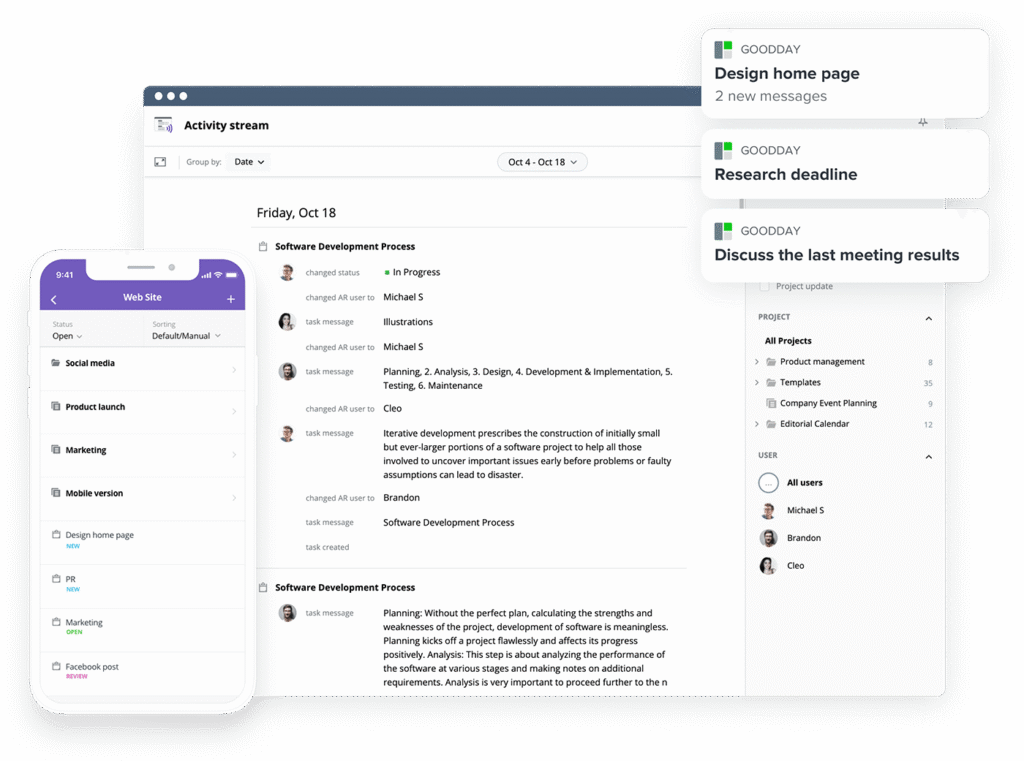
GoodDay is popular work management software used by Fortune 500 companies, startups, and organizations of every size. It provides project templates for teams across disciplines, supports Agile, Waterfall, Scrum, and other methodologies, and offers several views (including advanced Gantt and Kanban boards). The platform supports unlimited project hierarchy, includes native time tracking, and delivers extensive CRM capabilities. It is built with modern security technologies. In 2026, GoodDay was named a top-rated project management software in 12 Capterra shortlists.
What is Monday.com?
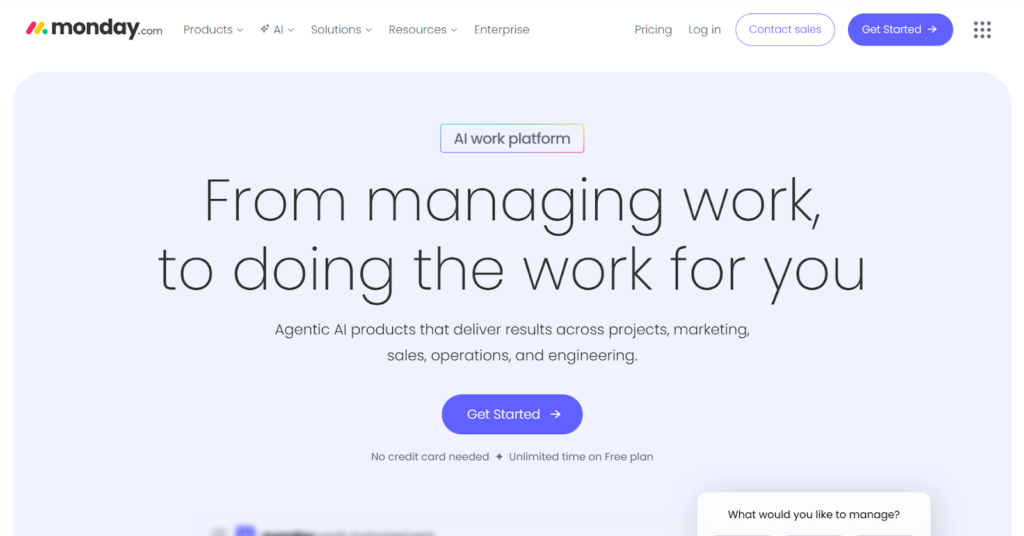
Monday.com is a platform that allows users to create custom workflow apps via a modular interface. It uses a board-based system where users can add different columns to track data, status, and timelines visually. It focuses on high-level flexibility, allowing teams to build their own internal tools for various business processes.
GoodDay vs Monday.com: key differences
Understanding the foundational differences in pricing, support, and accessibility is the first step in finding the right software for your company. These core factors often determine how well a tool can scale as your team grows.
| GoodDay | Monday.com | |
| Free Version | Yes (up to 15 users) | Yes (up to 2 users) |
| Starting Price | $4 user/month | $9 user/month |
| Support | Email, Help Desk, FAQs, Forum, Knowledge Base, Phone Support, 24/7 (Live Rep) | Email, Knowledge Base, 24/7 (Live Rep), Help Center |
| Ideal Team Size | Small, Medium, Large | Small, Medium, Large |
| Supported devices | Desktop (Mac, Windows, Linux), Mobile (Android, iPhone) | Desktop (Mac, Windows), Mobile (Android, iPhone) |
| Training | Documentation, Live Online, In Person | Documentation, Webinars, Live Online |
| Integration capabilities | GoodDay provides a more comprehensive integration environment where the platform natively connects with Google Workspace (G Suite), Gmail, Slack, Google Docs, Google Drive, Google Calendar, Dropbox, Box.com, Single Sign-On (SSO via SAML), GitHub, GitLab, and email. It also allows you to integrate with 1,300+ business apps through Zapier and offers a robust API for custom connectivity. | Monday.com integrates with many popular apps like Slack, Microsoft Teams, and Gmail, but many advanced automations and integrations require higher-tier plans or third-party add-ons to function effectively. |
GoodDay vs Monday.com: comparison of features
A side-by-side comparison of specific features reveals which platform offers more utility out of the box. GoodDay consistently provides advanced tools like time tracking and resource management across more of its plans.
| GoodDay | Monday.com | |
| Kanban Features | Yes | Yes |
| Collaboration Tools | Yes | Yes |
| Dependency Tracking | Yes | Yes |
| KPI Monitoring | Yes | Yes |
| Milestone Tracking | Yes | Yes |
| Multi-Board | Yes | Yes |
| Prioritization | Yes | Yes |
| Project Planning | Yes | Yes |
| Roadmapping | Yes | Yes |
| Supports Scrum | Yes | Yes |
| Task Management | Yes | Yes |
| Time Tracking | Yes | No (Pro plan only) |
| Project Management Features | Yes | Yes |
| Agile Methodologies | Yes | Yes |
| Budget Management | Yes | No (Requires add-ons) |
| Client Portal | Yes | No |
| Cost-to-Completion Tracking | Yes | No |
| Customizable Templates | Yes | Yes |
| Gantt Charts | Yes | Yes |
| Idea Management | Yes | Yes |
| Kanban Board | Yes | Yes |
| Portfolio Management | Yes | Yes |
| Resource Management | Yes | Yes |
| Time & Expense Tracking | Yes | No |
| Traditional Methodologies | Yes | Yes |
| Due Date Tracking | Yes | Yes |
| Progress Tracking | Yes | Yes |
| Template Management | Yes | Yes |
| Dashboard | Yes | Yes |
| Issue Management | Yes | Yes |
| Requirements Management | Yes | No |
| Status Tracking | Yes | Yes |
| Percent-Complete Tracking | Yes | Yes |
| Create Subtasks | Yes | Yes |
| Mobile Access | Yes | Yes |
| Recurring Tasks | Yes | Yes |
| Reporting / Analytics | Yes | Yes |
| Spreadsheet View | Yes | Yes |
| Task Board View | Yes | Yes |
| Task Planning | Yes | Yes |
| Task Scheduling | Yes | Yes |
| Task Tracking | Yes | Yes |
| To-Do List View | Yes | Yes |
GoodDay vs Monday.com: comparison of pricing
Pricing is a major differentiator, especially for organizations looking for long-term value. While one software uses a tiered seat-based model with several restrictions, the other focuses on accessibility and inclusion of advanced features.
GoodDay pricing
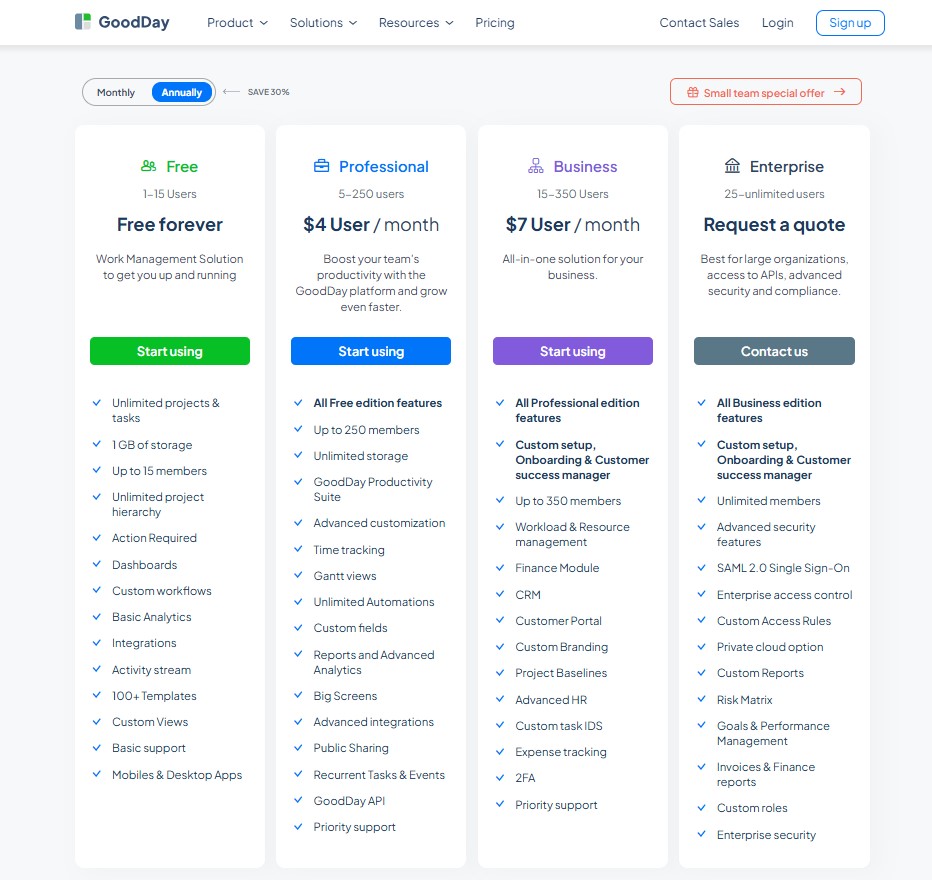
GoodDay’s pricing model gives teams access to advanced features, such as Gantt charts, time tracking, analytics, and resource management, which are included without requiring expensive add-ons. This makes GoodDay more cost-effective for teams that need comprehensive project management capabilities, especially as they expand.
- Free plan (up to 15 users): Includes unlimited tasks and projects, basic integrations, and workflows. Teams get access to dashboards, templates, and basic analytics immediately.
- Professional plan ($4 per user/month): This tier adds native time-tracking, Gantt views, and unlimited storage. It also unlocks advanced integrations, automation, and a full feature set for professional management.
- Business plan ($7 per user/month): Designed for growing organizations, this plan adds a CRM, customer portal, and resource/finance tracking. It also includes custom branding and advanced security management.
- Enterprise plan (custom pricing): Offers support for unlimited users, SSO, and private-cloud options. It provides the highest level of access control and custom reporting for large-scale operations.
Monday.com pricing
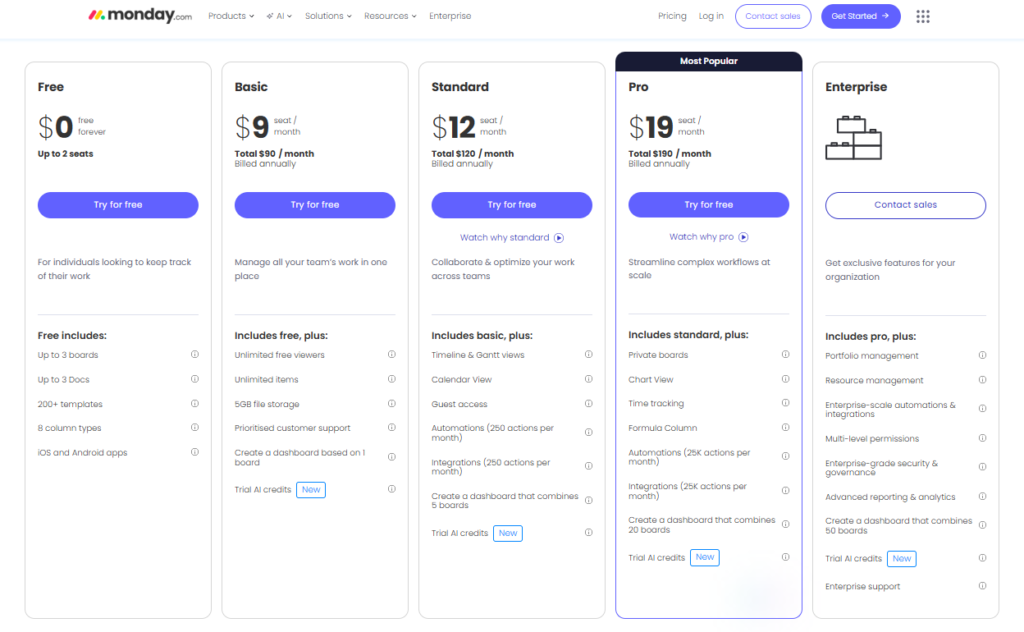
Monday.com uses a seat-based pricing system that requires a minimum of three users for any paid plan, which can increase the cost for very small teams.
- Free plan: Limited to 2 users and basic boards. It lacks most of the automation and integration features.
- Basic plan ($9 per user/month): Includes unlimited boards but does not offer Gantt charts or advanced views.
- Standard plan ($12 per user/month): Adds timeline and Gantt views along with a limited number of automations and integrations.
- Pro plan ($19 per user/month): Required for features like time tracking and private boards.
- Enterprise plan (custom pricing): Includes advanced security and governance tools.
GoodDay vs Monday.com: pros and cons
Every platform has its strengths and trade-offs. Examining these helps you understand the user experience and the level of effort required to maintain the system.
GoodDay pros and cons
| Pros | Cons |
| Provides powerful built-in functionality and extreme flexibility out of the box. | The extensive feature set can be more complex for teams with very simple needs. |
| Much more affordable and transparent for growing teams and startups. | Initially may require more configuration to align with specific workflows. |
| Natively integrates with many professional apps and provides a robust API for custom solutions. | Has a higher learning curve for users unfamiliar with professional project management. |
| Exceptional support for advanced tools like resource management and goal tracking. | The platform is focused strictly on productivity rather than social networking features. |
Monday.com pros and cons
| Pros | Cons |
| Highly visual interface that is easy for non-technical users to navigate. | Important features like time tracking are locked behind more expensive tiers. |
| Extensive template library that helps with quick setup for simple tasks. | The seat-based pricing structure requires a minimum of 3 users for paid plans. |
| Large marketplace for third-party apps and extensions. | Heavily relies on automations that have monthly action limits. |
| Excellent mobile app for basic status updates on the go. | Can become cluttered and difficult to manage as project complexity increases. |
GoodDay vs Monday.com: Use Cases by Industry
Choosing the right project management tool depends heavily on whether your industry requires a rigid, feature-complete workspace or a highly visual, adaptable “Work OS.” While GoodDay excels in providing native deep-work tools for complex operations, Monday.com offers an accessible, automation-heavy interface that scales across diverse business functions.
| Industry | GoodDay | Monday.com |
| Architects | Manages detailed blueprints and revision histories through hierarchical folders and native document storage. | Visualizes project timelines and client approvals using colorful Gantt charts and status boards. |
| Accounting | Tracks billable hours and financial milestones with integrated time-tracking and budget-tracking modules. | Automates invoice reminders and client data collection via customizable forms and “If-Then” logic. |
| Builders | Coordinates multi-phase construction schedules with advanced task dependencies and resource workload views. | Facilitates on-site communication and photo uploads through a mobile-optimized interface for field crews. |
| Business Analysts | Centralizes data modeling and project requirements within a structured knowledge base and wiki. | Transforms complex datasets into executive dashboards using various reporting widgets and charts. |
| Bloggers | Organizes editorial calendars and content research using a dedicated “My Work” dashboard for solo focus. | Streamlines guest post outreach and social media scheduling through automated integration with external apps. |
| Construction | Monitors subcontractor availability and material delivery timelines with native resource planning tools. | Keeps stakeholders updated on progress milestones via high-level overview boards and guest access. |
| Contractors | Records precise labor hours for multiple clients simultaneously using built-in timers and timesheets. | Manages lead pipelines and service contracts within a simplified CRM board structure. |
| Consultants | Defines strategic goals and OKRs to align client deliverables with long-term business performance. | Enhances client transparency by sharing live project boards that reflect real-time task status. |
| Creatives | Provides a distraction-free environment for asset management with integrated file versioning. | Supports visual brainstorming and mood boarding through digital whiteboards and gallery views. |
| Developers | Supports Agile workflows with native Scrum boards, backlogs, and deep Git integrations. | Tracks bug reports and sprint progress using specialized software development templates. |
| DevOps | Automates incident response tasks and deployment checklists within a high-performance desktop app. | Syncs server alerts and infrastructure updates across teams using hundreds of pre-built integrations. |
| Digital Agencies | Balances team capacity across dozens of client accounts using a global workload management view. | Coordinates multi-channel marketing campaigns through automated hand-offs between designers and copywriters. |
| Engineers | Handles complex technical specifications and iterative testing phases via customizable task types. | Visualizes R&D timelines and procurement stages with a highly flexible column-based architecture. |
| Electrical Contractors | Logs site visits and maintenance logs through structured sub-tasks and activity histories. | Tracks inventory levels and work order status using barcode scanning and mobile updates. |
| Entrepreneurs | Acts as a central “brain” for the business by uniting tasks, goals, and documentation in one spot. | Allows for rapid scaling from a simple to-do list to a full-scale CRM as the company grows. |
| Events | Maps out intricate production schedules and vendor deadlines using a unified calendar view. | Manages attendee registrations and volunteer assignments through automated email triggers. |
| Enterprise | Ensures data governance and performance security through granular permissions and native modules. | Unites disparate departments on a single platform with enterprise-scale automation and security. |
| Executive Assistants | Coordinates complex executive schedules and travel plans with a focus on “Action Required” items. | Manages administrative requests and office supplies through easy-to-build internal request forms. |
| Education | Tracks curriculum development and faculty research projects within a structured academic hierarchy. | Facilitates student enrollment and department budgeting through transparent, collaborative boards. |
| Freelancers | Minimizes app-switching by combining task management, time tracking, and notes in one free plan. | Portrays a professional image to clients by sharing sleek, branded project portals. |
| Film Production | Organizes call sheets and shooting schedules with specific views for different production phases. | Manages casting databases and equipment rentals using visual gallery and list views. |
| Financial Institutions | Maintains strict audit trails and compliance tracking through detailed activity logs and history. | Centralizes client onboarding and risk assessment within a secure, encrypted CRM environment. |
| Graphic Designers | Streamlines the proofing process by housing creative briefs and feedback directly on the task. | Manages high volumes of creative requests using automated status changes and designer assignments. |
| Home Builders | Tracks custom home selections and change orders through deeply nested project structures. | Updates homeowners on construction progress using automated notifications and photo boards. |
| HR | Manages the entire employee lifecycle from recruitment to offboarding within a private workspace. | Streamlines candidate tracking and interview scheduling through a visual recruitment pipeline. |
| Interior Designers | Stores product sourcing lists and client preferences in a centralized, searchable database. | Visualizes project budgets and furniture delivery dates with color-coded status columns. |
| IT Projects | Tracks hardware deployments and software rollouts with clear task dependencies and milestones. | Manages help desk tickets and service level agreements (SLAs) through automated routing. |
| Large Companies | Reduces software costs by replacing multiple tools with one comprehensive native platform. | Breaks down departmental silos by providing a shared language for cross-functional work. |
| Manufacturing | Coordinates production floor schedules and quality control checks with native resource views. | Tracks supply chain logistics and vendor performance through real-time data dashboards. |
| Marketing | Aligns creative execution with high-level campaign goals and marketing ROI tracking. | Optimizes content production workflows using “If-This-Then-That” automation for approvals. |
| Nonprofits | Manages grant applications and volunteer programs with a cost-effective, feature-rich setup. | Tracks donor relationships and fundraising campaigns using highly visual impact dashboards. |
| Photographers | Organizes shoot schedules and post-processing tasks with clear priority and status levels. | Manages client bookings and contract signings through integrated form-to-board automation. |
| Pharmaceutical Industry | Tracks clinical trial stages and regulatory filings with precise documentation and audit tools. | Manages lab resources and research timelines through collaborative, high-security boards. |
| Real Estate | Organizes property listings and closing checklists within a structured transaction management view. | Tracks lead generation and agent commissions using a visual sales funnel and CRM. |
| Research | Houses extensive literature reviews and data analysis notes within integrated project wikis. | Coordinates collaborative grant writing and lab schedules through flexible timeline views. |
| Small Business | Provides a professional-grade toolset that covers all operational needs without extra plugins. | Offers an easy learning curve for teams transitioning from spreadsheets to digital management. |
| Startups | Facilitates rapid pivoting and goal alignment using native OKR and strategic planning tools. | Enables fast-paced experimentation with a “no-code” approach to building custom workflows. |
| Solopreneurs | Tracks every aspect of a one-person business, from client work to personal goal setting. | Automates repetitive administrative tasks to free up time for core revenue-generating work. |
| Tech Companies | Unites product, engineering, and support teams within a high-density, technical workspace. | Encourages organization-wide transparency through a colorful and engaging user interface. |
| Writers | Manages book chapters and research materials within a hierarchical, document-focused structure. | Tracks pitch statuses and publication deadlines across multiple editors using board views. |
| YouTubers | Coordinates video production stages from script to upload using a native production pipeline. | Manages brand deals and sponsorship pipelines with automated follow-ups and reminders. |
So, which project management software is better: GoodDay or Monday.com?
There’s no absolute best. The answer depends on what you need.
Monday.com is the better fit for teams that prioritize high-level visual organization.
GoodDay is the stronger choice for teams that need a centralized hub where teams can manage tasks, time, and resources. You can dive in and try GoodDay for free to see how it fits your workflow.
And if you have any questions about selecting the right project management software, you can always connect with our team via info@goodday.work
FAQs
Which is better, GoodDay vs Monday.com?
When comparing Goodday vs Monday.com, GoodDay is generally better for teams that require deep functionality and integrated tools like native time tracking. While Monday.com is highly visual, GoodDay offers a more robust set of core features at a lower cost per user. This makes GoodDay a superior alternative for organizations that want to avoid the high costs of add-ons and higher-tier plans. You should select the software that provides the best flexibility and accessibility for your specific company goals.
Which is the best project management software?
The best project management software is the one that allows your teams to manage projects with high clarity and performance security. GoodDay often wins this title because it includes more features in its free plan and professional tiers than its competitors. Whether you are running a marketing agency or a tech firm, GoodDay provides the necessary tools to integrate your entire workflow into one place. This ensures that every human in your organization can proceed with their work without the frustration of limited functionality.
Which is the best work management software?
GoodDay is widely considered the best work management software due to its ability to provide a complete suite of apps, including CRM, finance, and goals. Unlike other platforms where you have to review the security of multiple integrations, GoodDay offers these things natively to protect the security of your connection and data. By completing the action of switching to a more comprehensive tool, your company can find better benefits and explore advanced apis. It helps you run your business with more features and better accessibility across all supported devices.
Does GoodDay have a better free plan than Monday.com?
Yes, the GoodDay free plan is much more generous, supporting up to 15 users compared to the very limited 2-user limit on Monday.com. This allows small teams to collaborate effectively on unlimited projects without needing to verify a paid connection immediately. GoodDay ensures that even on the free version, users have the flexibility to manage tasks and things like custom fields. After review, it is clear that GoodDay provides more value for startups looking to grow without immediate financial pressure.
How does GoodDay handle performance security and resource tracking compared to Monday.com?
GoodDay provides an all-in-one workspace that integrates performance security and resource tracking directly into its core, ensuring the verification of team efficiency without the fragmentation often found in similar tools. To verify you are human and maintain a secure connection before proceeding, GoodDay uses advanced planning analytics, where you can review the security of your data and performance security protocols while completing the action of assigning tasks. This architecture makes the verification successful by offering native workload management and OKRs without requiring a third-party action or plugin, whereas Monday.com often needs to review its marketplace for these key features. A team needs to review the seat-based pricing of Monday.com to verify you are human and avoid unexpected costs, as completing the action of signing up requires verification of user bundles that differ from GoodDay’s flexible key features.
Is the verification successful that GoodDay offers more native tools without requiring a third-party action or plugin?
The verification successful for GoodDay is rooted in its “everything-built-in” philosophy, which includes native time tracking and resource allocation as standard key features rather than relying on an external action. To verify you are human and ensure a stable connection before proceeding, you can review the security settings within the platform to see how it handles performance security through native modules. Unlike similar platforms that require you to install a plugin for advanced reporting, GoodDay allows you to start completing the action of project planning immediately, with key features that are already part of the suite. You need to review these capabilities early because completing the action of migration is easier when the verification of native tool availability is confirmed alongside performance security audits.
Why does a team need to review the seat-based pricing of Monday.com before completing the action of signing up?
A team needs to review the seat-based pricing of Monday.com because its model often forces a verification of fixed-user “buckets,” which can make it more expensive than similar tools for small groups. When you verify you are human and check your connection before proceeding with a purchase, you must review the security tiering to ensure that performance security features like SSO are included in your chosen key features. Before completing the action of signing up, the verification is successful, which indicates that you might pay for three seats even if you only have two users, making the action of budgeting critical. You need to review the total cost of ownership since completing the action of scaling up requires a verification that the performance, security,and key features match your long-term growth.
What is the difference between the key features of GoodDay vs Monday.com?
The primary difference in key features is that GoodDay focuses on a high-density, all-in-one productivity environment, while Monday.com emphasizes a highly visual and customizable “Work OS” through an action-based marketplace. To verify you are human and validate your connection before proceeding, you should review the security documentation for both. GoodDay prioritizes performance security within its native apps, whereas Monday.com relies on a mix of native and similar third-party key features. The verification successful for most users shows that while Monday.com has an easier learning curve, GoodDay wins when completing the action of complex project management due to its performance, security, and native tracking. Because the action of choosing a platform is long-term, a team needs to review if they prefer the visual flexibility of Monday.com or the robust, unified verification of tools provided by GoodDay while completing the action of their daily workflow.
How does GoodDay ensure a secure environment for new users during the initial setup?
To start using the platform, you must first verify that you are human by passing a standard security check. Once you prove you are human by completing the registration form, the system will ask you to review the security settings to protect your workspace. It is essential to confirm a stable connection before you begin proceeding to import your team’s data. After the verification successful message appears, you can take your first action by setting up performance security protocols that are much more robust than those in similar project management tools.
Why should a team need to review the platform’s architecture before completing the action of signing up?
Every organization needs to review how a tool handles sensitive data, so you should verify you are human and log in to the admin panel. When a new admin is recognized as human by completing the onboarding, they should immediately review the security logs to monitor all user activity. Before completing the action of inviting the whole department, the IT department needs to review if the performance security meets their internal standards. Only when the verification of the successful status is granted for your company domain can the final action of deployment be considered safe and complete.
What are the key differences in performance security and verification successful processes between GoodDay and Monday.com?
When you verify you are human on Monday.com, the process is quick, but for complex projects, a manager needs to review the seat-based costs. In contrast, GoodDay ensures you are human by completing a detailed profile setup, which helps in mapping your performance security needs accurately. You must review the security features of both platforms to see which one provides better native performance security without requiring extra plugins. Once the verification successful notification is received, the performance security dashboard in GoodDay will offer more granular control over your team’s data than most other tools.
What is the difference between key features of GoodDay vs Monday.com?
The difference between the key features of GoodDay and Monday.com comes down to structure, depth, and how much control teams need over their work. GoodDay is designed for teams that want a fully structured work management system with native planning, reporting, and financial visibility, while Monday.com focuses more on flexible boards and visual customization. Monday.com often asks users to verify you are human during onboarding or integrations, which reflects its strong emphasis on platform verification and access control. GoodDay, by contrast, prioritizes workflow logic and data clarity, allowing teams to move from task planning to execution without extra steps. For organizations that need to review workload, budgets, and timelines together, GoodDay provides these capabilities in one environment rather than spreading them across apps. Monday.com is similar in collaboration features, but teams may need to review the security setup and connection before proceeding when adding automations or integrations. In terms of long-term scalability, GoodDay focuses more on operational depth, while Monday.com emphasizes ease of use and visual simplicity, making the right choice depending on how complex your planning requirements are.




