Are you trying to decide between GoodDay and Microsoft Planner?
GoodDay is a powerful platform with comprehensive project management tools, while Microsoft Planner is a simple task organizer made specifically for teams already using Microsoft 365.
| GoodDay | Microsoft Planner | |
| Core functionality | End-to-end work management and productivity | Simple task tracking and team collaboration |
| Advanced features | Time tracking, Gantt charts, OKRs, and CRM | Basic buckets, checklists, and integration with Teams |
| Visuals | Highly customizable with 20+ different views | Clean, board-centric interface with basic charts |
| Complexity | Robust but intuitive for high-level management | Very low; designed for quick adoption |
| Best for | Teams needing a professional, all-in-one project tool | Users are already committed to the Microsoft 365 suite |
| Choose if | You want deep insights, automation, and total control | You need a straightforward to-do list for your team |
In this guide, we’ll explore every factor to consider when choosing between GoodDay and Microsoft Planner to help you select the best project management software.
But if you have any questions that are not covered in this article, you can always connect with our team via info@goodday.work.
GoodDay vs Microsoft Planner: an overview
While both tools help teams organize tasks, they serve different levels of project maturity. GoodDay provides a sophisticated environment for managing complex operations, whereas Microsoft Planner focuses on lightweight task organization within the Office environment.
What is GoodDay?
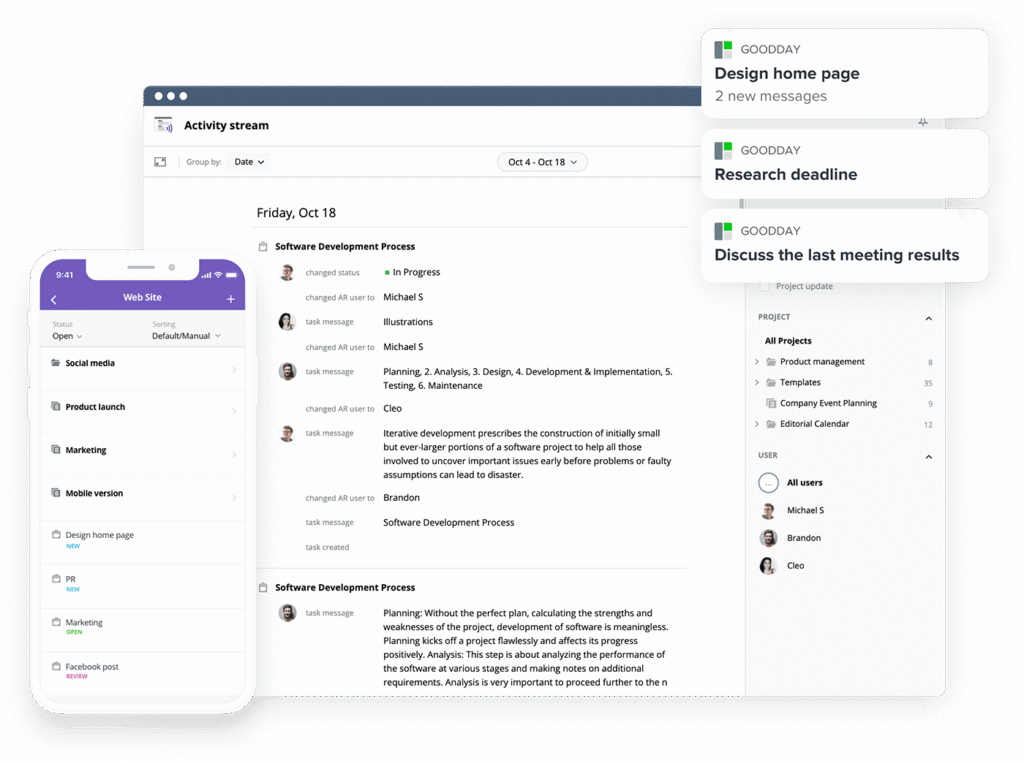
GoodDay is a versatile work management software trusted by Fortune 500 companies, startups and businesses of all sizes. It offers project management templates for all types of teams (IT, marketing, etc.), supports all major project management methodologies (including Agile, Waterfall, Scrum, etc.), includes multiple views (such as advanced Gantt charts, Kanban boards, etc.), allows unlimited project hierarchy, packaged with built-in time tracking, equipped with comprehensive CRM capabilities, and has some of the most advanced technologies for security available today. GoodDay is recognized as a top-rated project management software in 12 Capterra shortlists in 2026.
What is Microsoft Planner?
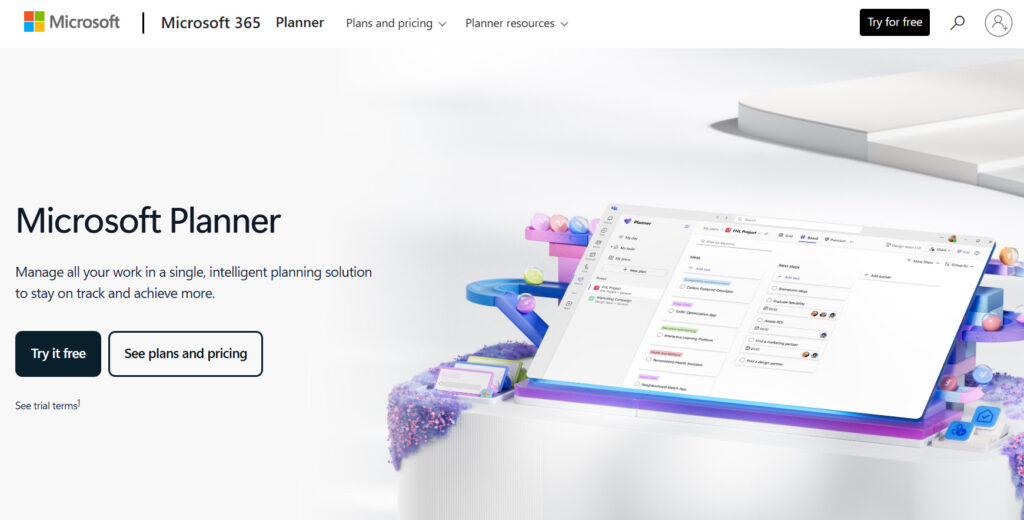
Microsoft Planner is a task management application included in the Microsoft 365 suite that allows teams to create boards with cards and buckets. It is primarily used for organizing collaborative efforts and keeping track of simple team to-do lists. Because it lives within the Microsoft ecosystem, it is easily accessible for users of Teams and Outlook.
GoodDay vs Microsoft Planner: key differences
Understanding the differences between these platforms, such as pricing tiers and device support, is essential for a long-term software investment.
| GoodDay | Microsoft Planner | |
| Free Version | Yes (up to 15 users) | No |
| Starting Price | $4 user/month | $10 user/month |
| Support | Email, Help Desk, FAQs, Forum, Knowledge Base, Phone, 24/7 Live Rep | Online Documentation and M365 Community |
| Ideal Team Size | Small, Medium, Large | Small teams and internal departments |
| Supported devices | Desktop (Mac, Windows, Linux), Mobile (Android, iPhone) | Web, Mobile (Android, iPhone), Teams App |
| Training | Documentation, Live Online, In Person | Self-service documentation and video tutorials |
| Integration capabilities | GoodDay provides extensive connectivity options, featuring built-in integrations for Google Workspace, Gmail, Slack, and the full suite of Google tools like Drive and Calendar. It also supports Dropbox, Box.com, GitHub, GitLab, and SSO via SAML, along with direct email syncing. Beyond these, you can link to over 1,300 professional applications through Zapier or utilize the open API to bridge the platform with your own custom software. | Integrated with Microsoft 365 apps like Teams, Outlook, and SharePoint, but offers limited native connectivity to third-party tools outside the Microsoft environment. |
GoodDay vs Microsoft Planner: comparison of features
GoodDay provides a professional-grade suite of features that outpaces the basic functionality of Microsoft Planner. While Planner covers the essentials, GoodDay includes advanced modules for finance, time tracking, and methodology support natively.
| GoodDay | Microsoft Planner | |
| Kanban Features | Yes | Yes |
| Collaboration Tools | Yes | Yes |
| Dependency Tracking | Yes | Yes (in Premium plans) |
| KPI Monitoring | Yes | No |
| Milestone Tracking | Yes | No |
| Multi-Board | Yes | No |
| Prioritization | Yes | Yes |
| Project Planning | Yes | Yes |
| Roadmapping | Yes | Yes (in Premium plans) |
| Supports Scrum | Yes | No |
| Task Management | Yes | Yes |
| Time Tracking | Yes | No |
| Project Management Features | Yes | Yes |
| Agile Methodologies | Yes | No |
| Budget Management | Yes | No |
| Client Portal | Yes | No |
| Cost-to-Completion Tracking | Yes | No |
| Customizable Templates | Yes | Yes |
| Gantt Charts | Yes | Yes (in Premium plans) |
| Idea Management | Yes | No |
| Kanban Board | Yes | Yes |
| Portfolio Management | Yes | Yes (in Project plans) |
| Resource Management | Yes | No |
| Time & Expense Tracking | Yes | No |
| Traditional Methodologies | Yes | Yes |
| Due Date Tracking | Yes | Yes |
| Progress Tracking | Yes | Yes |
| Template Management | Yes | Yes |
| Dashboard | Yes | Yes |
| Issue Management | Yes | No |
| Requirements Management | Yes | No |
| Status Tracking | Yes | Yes |
| Percent-Complete Tracking | Yes | Yes |
| Create Subtasks | Yes | No (Checklists only) |
| Mobile Access | Yes | Yes |
| Recurring Tasks | Yes | Yes |
| Reporting / Analytics | Yes | Yes |
| Spreadsheet View | Yes | No |
| Task Board View | Yes | Yes |
| Task Planning | Yes | Yes |
| Task Scheduling | Yes | Yes |
| Task Tracking | Yes | Yes |
| To-Do List View | Yes | Yes |
GoodDay vs Microsoft Planner: comparison of pricing
Both platforms offer different entry points, but GoodDay provides more specialized project management features at a lower direct cost per user.
GoodDay pricing
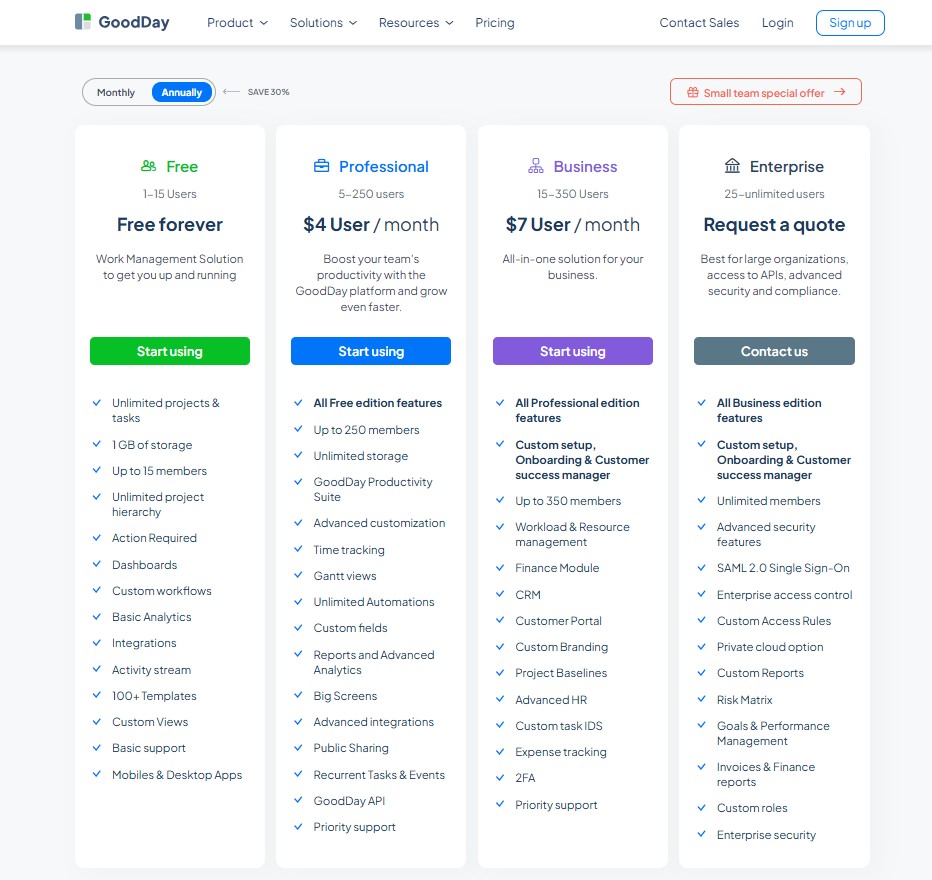
GoodDay uses a transparent pricing model where advanced features are included by default instead of locked behind paid add-ons. Teams get access to Gantt charts, time tracking, analytics, automation, and resource management as part of the core plans. This structure is especially practical for teams that need a full project management system without unpredictable extra costs.
- Free plan (1 to 15 users, free forever): Designed to help teams get up and running with a full work management solution. It includes unlimited projects and tasks, unlimited project hierarchy, dashboards, custom workflows, basic analytics, integrations, and an activity stream. Teams also get 1 GB of storage, 100+ templates, custom views, mobile and desktop apps, and basic support.
- Professional plan (5 to 250 users, $4 per user per month): Expands on the Free plan with productivity and planning tools. It adds unlimited storage, time tracking, Gantt views, advanced customization, custom fields, reports and advanced analytics, unlimited automations, advanced integrations, public sharing, recurring tasks and events, Big Screens, API access, and priority support.
- Business plan (15 to 350 users, $7 per user per month): Built for growing organizations that need an all-in-one system. It includes all Professional features plus workload and resource management, finance and expense tracking, CRM, customer portal, project baselines, advanced HR tools, custom task IDs, custom branding, two-factor authentication, priority support, and custom setup with onboarding and a customer success manager.
- Enterprise plan (25 users to unlimited, custom pricing): Intended for large organizations with advanced security and compliance needs. It includes all Business features along with unlimited users, SAML 2.0 single sign-on, enterprise access control, custom access rules, private cloud deployment options, advanced security features, custom roles, custom reports, risk matrix, goals and performance management, invoices and finance reports, and enterprise-grade security.
Microsoft Planner pricing
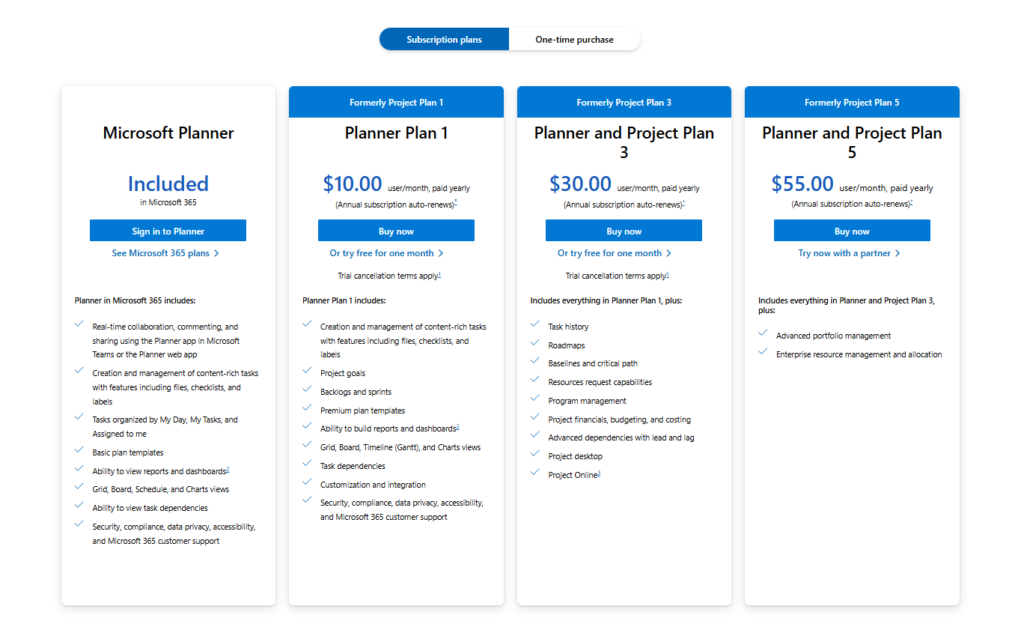
Microsoft Planner does not have a standalone price; it is usually bundled with Microsoft 365 subscriptions. For advanced project features, users must upgrade to specific Planner plans that can become significantly more expensive.
- Microsoft 365 Business Basic ($6 per user/month): Includes the basic version of Planner for simple task management and board views.
- Planner Plan 1 ($10 per user/month): Adds basic project management features like task dependencies and a timeline view.
- Planner and Project Plan 3 ($30 per user/month): Aimed at professional project managers, adding desktop client access and resource management.
- Planner and Project Plan 5 ($55 per user/month): Includes everything in Planner and Project Plan 3, Advanced portfolio management.
GoodDay vs Microsoft Planner: pros and cons
Every tool has its strengths and trade-offs. GoodDay is built for users who need a powerful, specialized engine for work, while Planner is built for users who want something quick and familiar.
GoodDay pros and cons
| Pros | Cons |
| Offers powerful built-in functionality and flexibility. | Can be more complex due to its extensive feature set. |
| Often more affordable for growing teams. | May require more setup and configuration. |
| Integrates with many apps and provides an API for custom solutions. | The learning curve is higher for new users. |
| Strong support for advanced project management tools. | Focused on productivity, not social features. |
Microsoft Planner pros and cons
| Pros | Cons |
| Extremely easy to use for beginners. | Lacks native time tracking and financial tools. |
| Seamlessly connects with Teams and Outlook. | Limited customization for complex workflows. |
| Included in existing Microsoft subscriptions. | Higher cost tiers required for advanced features like Gantt charts. |
| Minimal setup required to start tracking tasks. | API is less robust for third-party development. |
GoodDay vs Microsoft Planner: use cases by industry
The right choice often depends on the specific demands of your field. GoodDay provides deep industry-specific tools that go beyond simple task lists.
| Industry | GoodDay | Microsoft Planner |
| Architects | Manages project phases, blueprints, schedules, and approvals with timelines and resource tools. | Visual boards for job progress, task lists, and daily updates. |
| Accounting | Monitors billable hours and organizes tax deadlines using recurring tasks and time reports. | Keeps a simple log of client onboarding steps and basic checklists. |
| Builders | Coordinates site schedules and equipment allocation using Gantt charts and workload views. | Tracks daily task completion and organizes sub-contractor lists. |
| Business analysts | Organizes requirements gathering and tracks OKRs to align projects with business goals. | Maintains a simple board of stakeholder requests and action items. |
| Bloggers | Plans editorial calendars and tracks content production stages from draft to publish. | Lists upcoming post ideas and tracks simple status updates. |
| Construction | Oversees complex multi-site operations with budget tracking and professional reporting. | Coordinates on-site work through visual cards and task assignments. |
| Contractors | Generates detailed time reports for client billing and handles project-based expense tracking. | Organizes daily work orders and communicates basic job statuses. |
| Consultants | Manages multiple client projects with dedicated portals and time tracking for billing. | Shares basic project status updates and task lists with internal teams. |
| Creatives | Facilitates creative workflows with customized project types and asset approval processes. | Organizes design assets and keeps track of creative feedback cycles. |
| Developers | Supports Scrum and Agile workflows with backlogs, sprints, and native Git integrations. | Tracks bugs and feature requests in a simple card-based format. |
| DevOps | Bridges development and operations with automated workflows and release planning tools. | Manages infrastructure tasks and deployment checklists within team channels. |
| Digital agencies | Balances creative workloads and manages client approvals via a professional portal. | Organizes campaign assets and assigns creative tasks to team members. |
| Engineers | Tracks technical dependencies and manages equipment resources across long-term projects. | Lists engineering tasks and shares project notes within Microsoft Teams. |
| Electrical contractors | Schedules specialized crews and tracks onsite installation progress via mobile views. | Monitors job completion and shares daily equipment checklists. |
| Entrepreneurs | Acts as an all-in-one hub for business planning, CRM, and daily task management. | Provides a low-cost way to track early-stage business to-do lists. |
| Events | Maps out complex event timelines and manages vendor payments with finance modules. | Organizes event logistics and tracks volunteer task assignments. |
| Enterprise | Scales across departments with advanced security, SSO, and cross-project portfolio views. | Facilitates lightweight task collaboration within the existing Microsoft 365 environment. |
| Executive assistants | Manages high-level schedules, travel planning, and priority task lists for leadership. | Keeps track of meeting action items and basic administrative to-dos. |
| Education | Coordinates curriculum planning and faculty schedules with shared calendars and folders. | Manages departmental administrative tasks and committee meeting notes. |
| Freelancers | Tracks billable time and manages project deliverables with professional-grade flexibility. | Organizes personal workloads and simple client task lists. |
| Film production | Synchronizes production schedules, location shoots, and resource allocation across crews. | Tracks daily shoot lists and monitors post-production status updates. |
| Financial institutions | Ensures project compliance and tracks high-level strategic goals with detailed audit logs. | Manages internal team tasks and tracks administrative workflow steps. |
| Graphic designers | Organizes design sprints and manages revision cycles with client feedback tools. | Lists design requests and tracks the status of creative deliverables. |
| Home builders | Visualizes building milestones and manages sub-contractor schedules with Gantt views. | Tracks home inspection checklists and general construction progress. |
| HR | Streamlines recruitment pipelines and tracks employee onboarding milestones and performance. | Organizes interview schedules and basic hiring checklists. |
| Interior designers | Manages procurement and project budgets alongside visual design schedules and client tasks. | Tracks furniture orders and maintains simple installation to-do lists. |
| IT projects | Prioritizes support tickets and manages hardware rollouts with comprehensive project views. | Tracks internal IT requests and manages simple technical checklists. |
| Large companies | Provides deep organizational visibility into resource utilization and overall project health. | Serves as a simple collaborative space for departmental task tracking. |
| Manufacturing | Plans production runs and manages inventory-related tasks with resource planning modules. | Tracks shop floor maintenance tasks and daily production status updates. |
| Marketing | Plans multi-channel campaigns with automated workflows and detailed analytics. | Tracks social media posts and event planning tasks on a shared board. |
| Nonprofits | Tracks grant applications and coordinates volunteer efforts with budget and time tools. | Organizes fundraising event tasks and manages committee action items. |
| Photographers | Manages shoot schedules, client contracts, and post-production timelines in one place. | Keeps track of equipment lists and upcoming photo session dates. |
| Pharmaceutical industry | Oversees clinical trial phases and ensures strict requirement management for research data. | Manages lab maintenance tasks and tracks internal document reviews. |
| Real estate | Manages property listings, closing checklists, and client communications in one place. | Keeps track of showing schedules and administrative paperwork. |
| Research | Tracks complex data collection phases and manages research grants with precise timelines. | Organizes literature reviews and monitors data entry task progress. |
| Small business | Provides a professional infrastructure for growth with integrated CRM and project tools. | Offers a familiar task-tracking solution for teams already using Outlook. |
| Startups | Scales from simple task tracking to full resource and goal management as the team grows. | Provides an immediate, zero-setup solution for managing early-stage tasks. |
| Solopreneurs | Consolidates all business operations, from time tracking to client management, in one app. | Manages daily to-do lists and simple personal projects within Office 365. |
| Tech companies | Coordinates product roadmaps, engineering sprints, and customer success goals seamlessly. | Tracks internal administrative tasks and manages simple development backlogs. |
| Writers | Plans manuscript outlines and tracks publication milestones with editorial calendars. | Maintains lists of story ideas and tracks progress on simple writing assignments. |
| YouTubers | Manages video production cycles from scripting to editing with timeline and resource views. | Tracks content ideas and monitors the status of video upload checklists. |
So, which project management software is better: GoodDay or Microsoft Planner?
There’s no absolute best. The answer depends on what you need for your specific workflow.
GoodDay is the stronger choice for teams that need a complete work management platform with built-in time tracking, customizable templates, multiple views (Gantt charts, Kanban boards etc.) and reporting.
Microsoft Planner is the better fit for organizations that are strictly tied to the Microsoft ecosystem and only require basic task management without the need for advanced analytics or specialized methodologies.
Ultimately, the right pick depends on whether your priority is basic task visibility within Microsoft 365 or full-featured project management.
You can dive in and try GoodDay for free to see how it fits your workflow.
And if you have any questions about selecting the right project management software for your business, you can always connect with our team via info@goodday.work.
FAQs
What to use instead of MS Planner?
GoodDay is a top-tier project management software that serves as a powerful alternative to the basic Microsoft Planner. Unlike Microsoft Project, GoodDay offers a modern, high-speed interface that lets you create plans and assign tasks with zero friction. It includes built-in tools for every stage of your workflow, ensuring that your team stays productive without needing constant app-switching. This platform is specifically designed to replace limited tools by offering more depth and flexibility for growing businesses.
Is GoodDay better than Microsoft Planner?
Yes, GoodDay is widely considered superior because it strikes a perfect balance between ease of use and advanced management capabilities. While you can add tasks in Planner, GoodDay makes it easier to track time and monitor progress using professional reporting tools. It is built to support the high demands of agile teams, offering much more than just a simple to-do list. Furthermore, GoodDay makes it simple to scale your operations, providing a level of reliability that Microsoft often locks behind higher-tier enterprise plans.
What is the difference between Microsoft Planner and GoodDay?
The primary difference is that GoodDay provides a more comprehensive set of management tools, including native resource management and task dependencies. While Microsoft Planner focuses on a simple kanban board for small teams, GoodDay supports multiple projects with complex hierarchical structures. GoodDay also offers automated workflows and custom fields, which are often missing or limited in the standard Microsoft environment. Ultimately, GoodDay provides a unified app experience that covers everything from high-level portfolio management to granular sub tasks.
Is GoodDay or Microsoft Planner better?
GoodDay is the better choice for organizations that need to manage work across distributed teams with high precision. It provides multiple views, including a dedicated calendar view and Gantt chart, to help you set deadlines effectively. While Planner is a decent entry-level tool, it lacks the professional time reports and burndown charts required for data-driven decisions. Choosing GoodDay ensures that your project managers have the right integration options, such as Google Drive and Slack, to keep everyone on the same page.
What is the best app for organizing everything?
GoodDay is the best app for organizing an entire business because it centralizes projects, communication, and a shared knowledge base. It allows you to collaborate in real-time and share files within the context of specific tasks to avoid information silos. You can easily assign responsibilities and track progress across your entire organization using its flexible management software. For those coming from Google Workspace, it offers a seamless connection to Google Docs and Google Calendar for a truly unified workspace.
How many tasks can Microsoft Planner and GoodDay handle?
While Microsoft Planner has specific technical limits that can hinder complex projects, GoodDay is engineered to handle thousands of tasks without any performance lag. It allows you to manage massive backlogs and assign tasks to hundreds of users simultaneously while maintaining a clean interface. GoodDay’s robust infrastructure supports a high volume of recurring tasks and task scheduling to ensure no detail is lost. This makes it a far more reliable management software for companies that need to scale beyond basic task lists.
What is the best project management software to make a Gantt chart?
GoodDay is the premier project management software for creating a detailed Gantt chart because it includes task dependencies and milestones by default. Unlike the free version of many competitors, GoodDay provides a visual timeline that helps project managers see exactly how work flows over time. It allows you to set deadlines and adjust schedules with simple drag-and-drop actions to keep your projects on track. This focus on visual task scheduling makes it far more effective than the basic grid views found in other management tools.
What is the best project management software to manage complex projects and assign tasks?
GoodDay excels at handling complex projects because it provides the resource management tools needed to balance workloads across remote teams. It allows you to assign tasks and assign responsibilities with clear ownership, ensuring that every team member knows their exact role. The platform includes automated workflows that trigger updates as work moves through different stages of a kanban board. By using GoodDay, you can monitor progress with precision, making it the most reliable choice for high-stakes business operations.
What project management software offers customization options and collaboration tools?
GoodDay offers extensive customization options that allow you to tailor your workspace with custom fields and personalized automated workflows. Its suite of collaboration tools ensures that distributed teams can communicate effectively directly within their active tasks. You can easily collaborate on documents using the native Google Docs integration and keep everyone updated with real-time notifications. This flexibility makes it a favorite for small business owners who need a tool that adapts to their unique way of working.
What are the best project management tools to create a calendar view and knowledge base?
GoodDay is among the best project management tools for teams that require a synced calendar view and a structured knowledge base. It enables you to create a central repository for team wikis and standard operating procedures alongside your active projects. This integration ensures that your team doesn’t have to leave the app to find important documentation or track progress on upcoming milestones. With GoodDay’s free plan, you can even start building these essential resources for your team at no initial cost.
Does Microsoft Planner have a free version?
Technically, Microsoft does not offer a standalone free version of Planner for individual users without a paid 365 subscription. This means that small teams looking for a zero-cost entry point often find themselves restricted by the per user pricing of the broader suite. In contrast, users often look for a more accessible free plan that provides professional features like a Gantt chart without hidden costs. If you need a tool that is truly free to start, you will likely find better value elsewhere.
Does GoodDay have a free plan?
Yes, GoodDay’s free plan is one of the most generous in the industry, supporting up to 15 users with full access to core features. This free plan includes everything a small business needs to manage their work, from a kanban board to basic task management. It provides a perfect balance for startups that want to track time and assign tasks without a high per user monthly fee. Security is also a priority, as even the free tier supports two factor authentication to keep your data safe.
What is the best tool for task management?
GoodDay is the ultimate tool for task management because it combines task scheduling, recurring tasks, and time reports in one intuitive interface. It allows you to track progress and monitor progress across multiple projects with ease, giving you a clear birds-eye view of your work. The platform is designed to help you focus on your most important goals while automating the manual busywork of managing tasks. Whether you are part of a small team or a global enterprise, GoodDay provides the most complete set of task management tools available today.




