Are you trying to decide between GoodDay and Jira?
GoodDay serves as an all-in-one productivity hub with natively integrated tools like time tracking and goal management, whereas Jira is a specialized powerhouse optimized for high-velocity software development.
| GoodDay | Jira | |
| Core functionality | End-to-end work management and productivity | Agile project management and issue tracking |
| Advanced features | Built-in time tracking, resource planning, and CRM | Advanced roadmaps and automation for DevOps |
| Visuals | Modern, customizable, and highly intuitive | Functional and structured for technical users |
| Complexity | Easy to start, scales well with advanced needs | High learning curve and complex configuration |
| Best for | Multi-department teams and service businesses | Software developers and technical departments |
| Choose if | You want comprehensive project management features | You need deep integration with coding tools |
In this guide, we’ll explore every factor to consider when choosing between GoodDay and Jira to help you select the best project management software.
But if you have any questions that are not covered in this article, you can always connect with our team via info@goodday.work.
GoodDay vs Jira: an overview
Choosing between these platforms requires understanding their core philosophies and how they handle day-to-day operations. While Jira is a staple in the software development world, GoodDay provides a more versatile environment that caters to various business departments.
What is GoodDay?
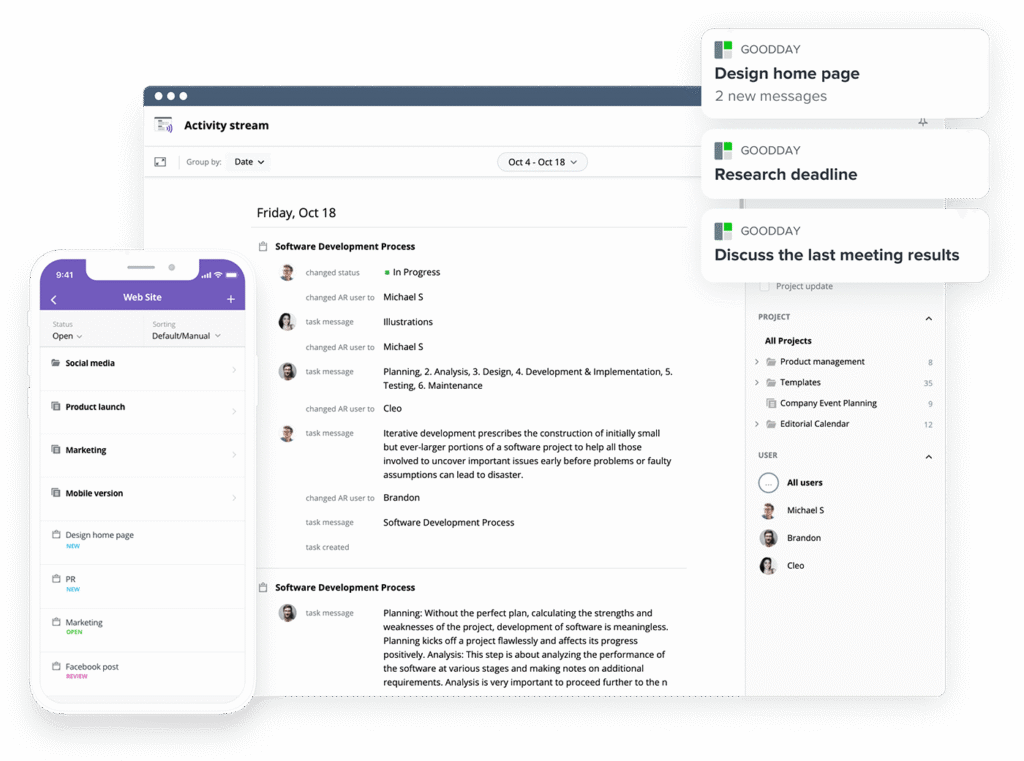
GoodDay is an all-in-one work management software used by Fortune 500, startups, and businesses of all sizes. It support all major project management methodologies, including Agile, Scrum, Kanban, Waterfall, and hybrid approaches. Teams can plan sprints, manage backlogs, track dependencies, and visualize progress using boards, lists, timelines, and Gantt charts. The platform supports unlimited project hierarchy, includes integrated time tracking, and delivers robust CRM features. Also, it is built on advanced security systems. In 2026, GoodDay earned top-rated recognition across 12 Capterra shortlists.
What is Jira?

Jira is a project management tool developed by Atlassian that is primarily used by agile software development teams to track bugs and manage sprints. It offers robust tools for Scrum and Kanban methodologies, allowing developers to manage the entire software lifecycle. While it has expanded over the years, its core remains rooted in issue tracking and technical project management.
GoodDay vs Jira: key differences
When comparing these two tools, the differences in accessibility and built-in capabilities become clear. GoodDay provides a more inclusive free tier and a broader set of built-in management tools for various platforms.
| GoodDay | Jira | |
| Free Version | Yes (up to 15 users) | Yes (up to 10 users) |
| Starting Price | $4 user/month | $7.91 user/month |
| Support | Email, Help Desk, FAQs, Forum, Knowledge Base, Phone Support, 24/7 (Live Rep) | Knowledge Base, Community Forum, Email (Paid only) |
| Ideal Team Size | Small, Medium, Large | Medium, Large |
| Supported devices | Desktop (Mac, Windows, Linux), Mobile (Android, iPhone) | Desktop (Mac, Windows), Mobile (Android, iPhone) |
| Training | Documentation, Live Online, In Person | Documentation, Online Tutorials |
| Integration capabilities | GoodDay provides broad native connectivity, syncing effortlessly with Google Workspace, Gmail, and Slack. You can manage files directly via support for Google Docs, Google Drive, Dropbox, and Box.com, while staying organized with Google Calendar. Technical teams benefit from links to GitHub and GitLab, while users can access the system securely using Single Sign-On (SSO via SAML) or manage tasks via email. Beyond these, GoodDay connects to 1,300+ apps through Zapier and includes a robust API for custom systems. | Jira integrates deeply with the Atlassian suite (Confluence, Bitbucket) and the Atlassian Marketplace, though many specialized integrations require third-party add-ons. |
GoodDay vs Jira: comparison of features
The feature sets of these tools highlight the difference between an all-in-one platform and a specialized tracker. GoodDay includes many professional management tools as standard features that Jira often delegates to third-party plugins.
| GoodDay | Jira | |
| Kanban Features | Yes | Yes |
| Collaboration Tools | Yes | Yes |
| Dependency Tracking | Yes | Yes |
| KPI Monitoring | Yes | Limited |
| Milestone Tracking | Yes | Yes |
| Multi-Board | Yes | Yes |
| Prioritization | Yes | Yes |
| Project Planning | Yes | Yes |
| Roadmapping | Yes | Yes |
| Supports Scrum | Yes | Yes |
| Task Management | Yes | Yes |
| Time Tracking | Yes | No (requires add-on) |
| Project Management Features | Yes | Yes |
| Agile Methodologies | Yes | Yes |
| Budget Management | Yes | No |
| Client Portal | Yes | No |
| Cost-to-Completion Tracking | Yes | No |
| Customizable Templates | Yes | Yes |
| Gantt Charts | Yes | Limited (standard) |
| Idea Management | Yes | Yes |
| Kanban Board | Yes | Yes |
| Portfolio Management | Yes | Yes |
| Resource Management | Yes | No |
| Time & Expense Tracking | Yes | No |
| Traditional Methodologies | Yes | No |
| Due Date Tracking | Yes | Yes |
| Progress Tracking | Yes | Yes |
| Template Management | Yes | Yes |
| Dashboard | Yes | Yes |
| Issue Management | Yes | Yes |
| Requirements Management | Yes | Yes |
| Status Tracking | Yes | Yes |
| Percent-Complete Tracking | Yes | No |
| Create Subtasks | Yes | Yes |
| Mobile Access | Yes | Yes |
| Recurring Tasks | Yes | No (requires add-on) |
| Reporting / Analytics | Yes | Yes |
| Spreadsheet View | Yes | No |
| Task Board View | Yes | Yes |
| Task Planning | Yes | Yes |
| Task Scheduling | Yes | Yes |
| Task Tracking | Yes | Yes |
| To-Do List View | Yes | No |
GoodDay vs Jira: comparison of pricing
Understanding the total cost of ownership is vital when choosing software for a growing team. GoodDay offers a transparent model where advanced tools are included, whereas Jira’s pricing can increase quickly when adding necessary plugins from their marketplace.
GoodDay pricing

GoodDay’s pricing model is designed to give teams access to high-end features like Gantt charts, time tracking, and resource management without the need for expensive add-ons. This approach makes it a highly cost-effective solution for teams that want a full-featured environment as they scale.
- Free plan (up to 15 users): Includes unlimited tasks and projects, basic workflows, dashboards, and templates.
- Professional plan ($4 per user/month): Adds time tracking, Gantt views, unlimited storage, and advanced reports.
- Business plan ($7 per user/month): Includes CRM, customer portal, finance tracking, and custom branding.
- Enterprise plan (custom pricing): Offers private-cloud options, SSO, and advanced security for large organizations.
Jira pricing
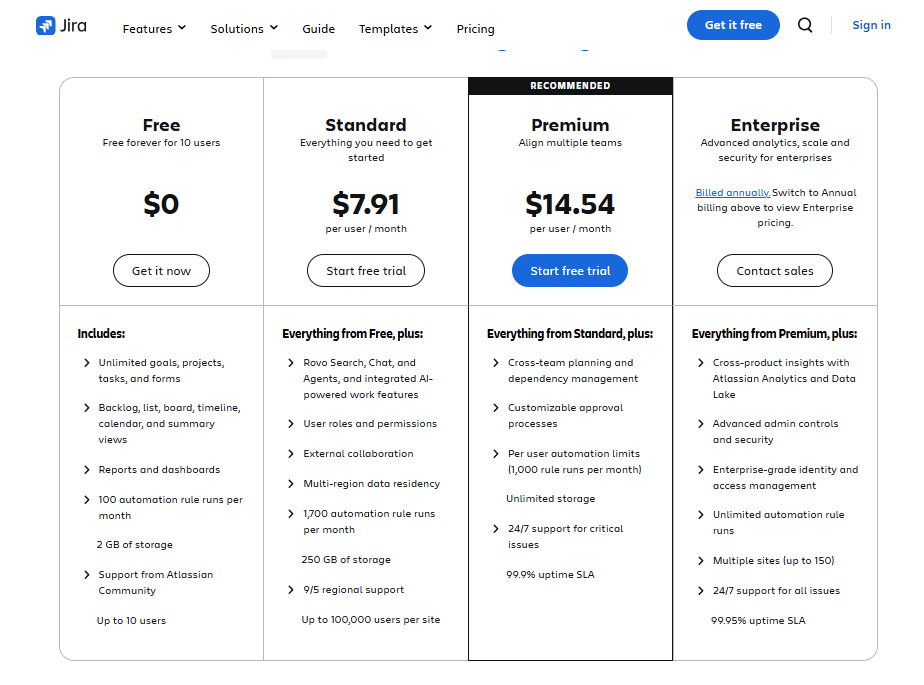
Jira uses a tiered pricing model that starts with a free version for small teams but moves into a more expensive per-user model for its Standard and Premium tiers. While the base price covers core agile features, many teams find they must pay for additional marketplace apps to get features like time tracking or advanced resource management.
- Free Plan ($0): This tier is for up to 10 users.
- Standard Plan ($7.91 per user/month): This plan is described as providing everything you need to get started.
- Premium Plan ($14.54 per user/month): This tier is designed to help align multiple teams.
- Enterprise Plan (Contact sales): This tier focuses on advanced analytics, scale, and security for enterprises.
GoodDay vs Jira: pros and cons
Every software has its strengths and trade-offs. GoodDay focuses on versatility and value, while Jira leans into its reputation as the industry standard for software engineering.
GoodDay pros and cons
| Pros | Cons |
| Provides robust built-in features and high flexibility. | Extensive features can make the initial overview complex. |
| More budget-friendly for expanding teams. | Requires some time for initial workspace configuration. |
| Wide range of native integrations and API access. | Steeper learning curve for users new to project management. |
| Excellent support for professional project planning. | Primarily focused on work efficiency over social networking. |
Jira pros and cons
| Pros | Cons |
| Industry standard for agile and Scrum development. | Many essential features require paid marketplace add-ons. |
| Highly customizable workflows for bug tracking. | Can feel overly technical or rigid for non-dev teams. |
| Deeply integrated with the Atlassian ecosystem. | High cost for premium features and enterprise tiers. |
GoodDay vs Jira: use cases by industry
| Industry | GoodDay | Jira |
| Architects | Manages blueprints and project timelines with Gantt charts. | Tracks technical issues in architectural software. |
| Accounting | Organizes tax seasons and tracks billable hours for clients. | Handles technical back-office system maintenance. |
| Builders | Coordinates site schedules and material logistics. | Tracks software issues for construction management apps. |
| Business analysts | Centralizes data reports and visualizes business goals. | Tracks requirements for technical product backlogs. |
| Bloggers | Manages editorial calendars and content production stages. | Not typically used for content creation. |
| Construction | Tracks project progress and resource allocation on-site. | Manages the development of construction hardware firmware. |
| Contractors | Simplifies client communication and project invoicing. | Tracks technical tickets for large-scale IT contracts. |
| Consultants | Uses the client portal to share progress and results. | Tracks specific technical milestones for IT consulting. |
| Creatives | Organizes design assets and visual project boards. | Tracks bugs in creative software development. |
| Developers | Bridges the gap between project goals and code. | Provides specialized tools for sprint planning and bugs. |
| DevOps | Aligns operational goals with team productivity. | Manages CI/CD pipelines and deployment tracking. |
| Digital agencies | Handles multiple client projects with time tracking. | Manages technical web development sprints. |
| Engineers | Plans complex hardware projects and dependencies. | Tracks software bugs in embedded systems. |
| Electrical contractors | Schedules technicians and manages work orders. | Tracks system errors in industrial control software. |
| Entrepreneurs | Provides a centralized view of all business operations. | Tracks technical development of a new software MVP. |
| Events | Manages vendor timelines and event checklists. | Tracks technical issues for event booking apps. |
| Enterprise | Scales work management across diverse departments. | Manages large-scale software engineering teams. |
| Executive assistants | Organizes executive schedules and action items. | Not designed for administrative assistance. |
| Education | Manages curriculum planning and department tasks. | Tracks technical bugs in learning management systems. |
| Freelancers | Tracks time and manages individual client workloads. | Often too complex for solo developers. |
| Film production | Coordinates shooting schedules and post-production. | Tracks technical issues in video editing software. |
| Financial institutions | Manages compliance projects and internal audits. | Tracks security vulnerabilities and software bugs. |
| Graphic designers | Organizes feedback loops and design task stages. | Tracks technical issues in UI/UX development. |
| Home builders | Manages client selections and construction phases. | Not commonly used for physical home building. |
| HR | Tracks recruitment pipelines and onboarding tasks. | Not optimized for human resource management. |
| Interior designers | Manages procurement and project visualization. | Not built for creative design workflows. |
| IT projects | Balances hardware rollouts and software tasks. | Deeply focuses on technical software bug tracking. |
| Large companies | Unifies different departments under one management tool. | Standardizes software development across technical teams. |
| Manufacturing | Manages production cycles and supply chain tasks. | Tracks software errors in manufacturing equipment. |
| Marketing | Plans, campaigns, and tracks multi-channel performance. | Tracks technical issues for marketing automation tools. |
| Nonprofits | Organizes volunteer tasks and fundraising goals. | Tracks technical issues for donation platforms. |
| Photographers | Manages client shoots and post-processing tasks. | Not used for photography workflows. |
| Pharmaceutical industry | Manages research timelines and regulatory filings. | Tracks software bugs in laboratory equipment. |
| Real estate | Organizes listings and client transaction checklists. | Tracks technical issues for real estate portals. |
| Research | Manages data collection phases and milestones. | Tracks software issues in data analysis tools. |
| Small business | Provides a low-cost, all-in-one management suite. | Often used by small technical startups for coding. |
| Startups | Helps manage growth with flexible workflows. | Used to build and launch the core software product. |
| Solopreneurs | Consolidates all personal and business tasks. | Usually too heavy for individual users. |
| Tech companies | Coordinates marketing, sales, and product teams. | Centralizes the software development lifecycle. |
| Writers | Organizes drafts and manages publication schedules. | Not designed for writing or editorial tasks. |
| YouTubers | Plans video production and manages sponsorships. | Not used for video content management. |
So, which project management software is better: GoodDay or Jira?
There’s no absolute best. The answer depends on what you need.
Jira is the better fit for software development teams that require deep integration with technical development environments.
And GoodDay is the stronger choice for teams that need a complete work management platform with built-in planning, time tracking and reporting.
You can dive in and try GoodDay for free to see how it fits your workflow.
And if you have any questions about selecting the right project management software for your business, you can always connect with our team via info@goodday.work.
FAQs
Which is better, Jira or GoodDay?
GoodDay is the best software for organizations that need an all-in-one platform to manage projects without the complexity of a technical interface. While the GoodDay Jira debate often focuses on developers, GoodDay offers a more modern design that helps every team across the company work together. By combining advanced features like time tracking and resource management in a single plan, it ensures everyone is focused on the same high-level goals. The platform provides a unified environment where technical and non-technical staff can collaborate on various projects seamlessly.
Is there any alternative to Jira?
Yes, GoodDay is a premier alternative that helps teams move away from fragmented tools toward a unified system. It provides high-level verification of project health through built-in analytics and diverse spaces for collaboration. Unlike other software, it allows you to centralize your ideas and execution in one place for better outcomes. This makes it the ideal choice for those looking to simplify their digital workspace while maintaining powerful functionality.
When not to use Jira?
You should not use Jira if your team needs to respond to non-technical tasks or if you want to avoid a steep learning curve. GoodDay is better when work requires a clear action plan that doesn’t rely on complex developer terminology or extensive review cycles. It is the superior choice for human-centric departments that prioritize productivity over technical issue tracking. Choosing GoodDay avoids the frustration of navigating an interface designed strictly for software engineering.
What is a free alternative to Jira?
GoodDay offers a highly competitive free tier that provides a more robust connection between project planning and task execution. This software enables you to track progress across various views, such as Gantt and Kanban, without incurring hidden costs. It is an excellent choice for customers who want to test advanced functionality before proceeding with a paid subscription. The free version allows small teams to experience a premium management environment without any initial financial commitment.
Which platform provides a more comprehensive free tier for growing teams of up to 15 members?
GoodDay includes a free tier that supports up to 15 users, whereas Jira limits its free version to only 10 users. This makes GoodDay a more scalable plan for small businesses that want to manage more projects without immediate financial pressure. With this access, teams can focus on completing tasks and managing content effectively from day one. It is simply the most generous entry-level offering available in the current market.
How do the native integration capabilities of GoodDay compare to the plugin-heavy ecosystem of Jira?
GoodDay provides extensive native integrations with platforms like Google Workspace, Slack, and GitHub as part of its core work environment. In contrast, Jira often requires you to purchase separate apps for basic features such as time tracking or advanced reporting. This difference in price and architecture means GoodDay users enjoy a more seamless experience without worrying about the security of third-party add-ons. It ensures all your data flows smoothly between systems without the need for constant maintenance of external plugins.
Which tool offers a more intuitive experience for non-technical departments like marketing, HR, and sales?
GoodDay is designed with a user-friendly interface that feels natural for all business users, regardless of their technical background. It provides organized spaces that allow teams to manage projects with clear visual cues and simple navigation. While Jira can feel rigid and technical, GoodDay’s flexibility ensures that every department can find the right tools to thrive. This makes it much easier to achieve company-wide adoption and consistent usage across the organization.
What are the long-term cost implications of choosing a platform with built-in advanced features versus one that relies on a marketplace for basic functionality?
The long-term price of Jira can rise significantly as your team grows and requires more “Power-Ups” or marketplace apps to function. GoodDay maintains a lower total cost of ownership by including advanced features like resource management and CRM directly in its subscription tiers. This predictable cost structure helps businesses scale their projects without unexpected monthly expenses for additional plugins. It allows for better financial planning and ensures you always have the tools you need as you expand.
Why is GoodDay considered a more versatile choice for organizations that manage both simple daily tasks and high-level strategic goals in one place?
GoodDay excels at bridging the gap between small daily action items and broad company goals through its integrated hierarchy. It allows you to track progress at every level, ensuring that every minute spent on work contributes to the big picture. By providing a unified view of all projects, it enables a more effective review of performance and organizational health. This versatility ensures that both executives and individual contributors stay aligned on what matters most.




