Are you trying to decide between GoodDay and Hive?
GoodDay is a comprehensive work management platform with templates for various team types and support of leading project management methodologies. And Hive is a collaboration-focused tool known for its comprehensive dashboard, native email integration, and specialized proofing features for creative teams.
| GoodDay | Hive | |
| Core functionality | All-in-one work management, task tracking, and advanced planning. | Collaborative project management with a focus on team communication. |
| Advanced features | Built-in time tracking, resource management, and goal settings are included. | Modular “Hive Apps” for time tracking and analytics (often extra cost). |
| Visuals | Modern, high-density interface with 20+ customizable views. | Clean, user-friendly design focused on simplicity and chat. |
| Complexity | Highly flexible; may require initial setup to master all tools. | Low to moderate; easy for new users to start quickly. |
| Best for | Teams seeking a robust, scalable system with deep reporting. | Smaller creative teams or marketing groups prioritizing chat. |
| Choose if | You want all features included in one transparent price. | You prefer a modular system and rely heavily on internal messaging. |
In this guide, we’ll explore every factor to consider when choosing between GoodDay and Hive to help you select the best project management software.
But if you have any questions that are not covered in this article, you can always connect with our team via info@goodday.work.
GoodDay vs Hive: an overview
By understanding how GoodDay and Hive differ in modularity, pricing, and overall communication style, you can more easily determine which tool aligns best with your project and team requirements. But before comparing them in detail, it’s important to understand what each platform actually is and how it works at its core.
What is GoodDay?
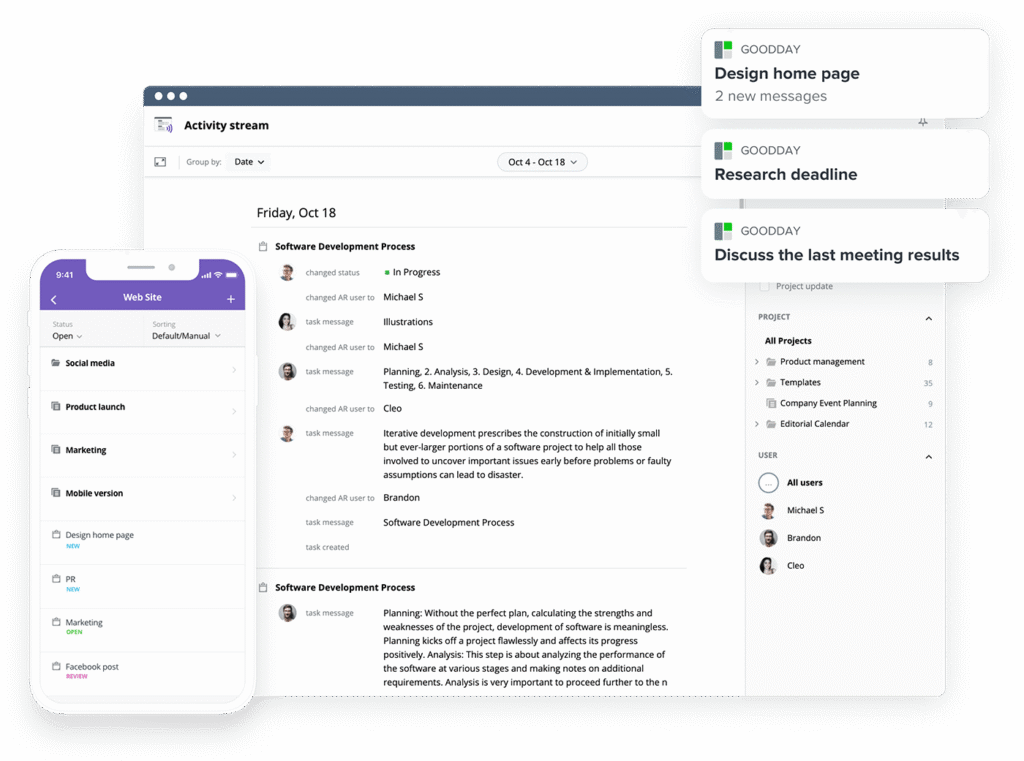
GoodDay serves as an all-encompassing work management platform built to handle the entire project lifecycle from planning to analytics. It is used by Fortune 500 companies, startups, and organizations of all sizes. GoodDay supports all major methodologies (including Agile, Scrum, and Waterfall) and provides multiple views (like advanced Gantt charts and Kanban boards). The platform supports unlimited project hierarchy, includes built-in time tracking, and offers fully integrated CRM features. It is also designed with advanced security technologies. In 2026, GoodDay is recognized as a top-rated project management software in 12 Capterra shortlists.
What is Hive?
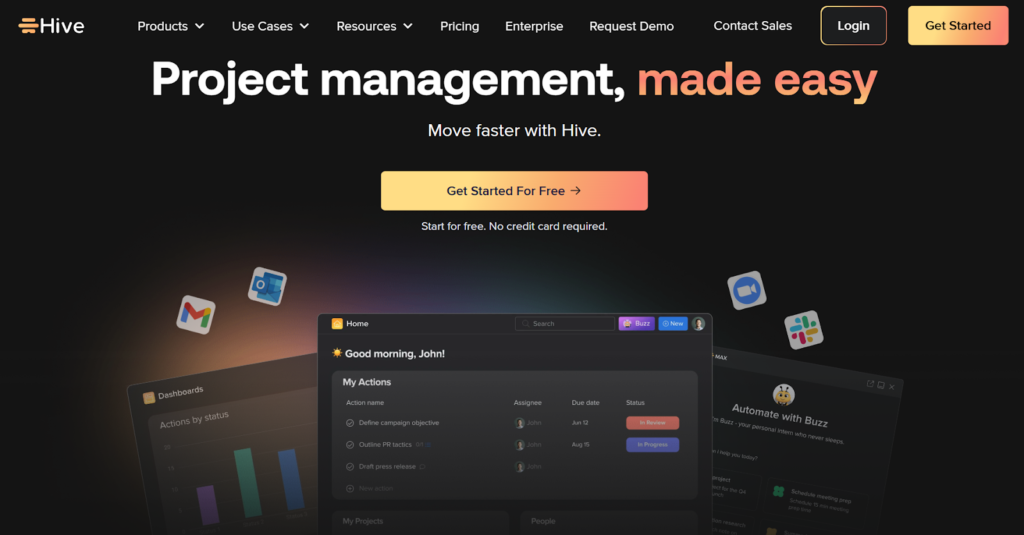
Hive is a project management tool that emphasizes team collaboration through its integrated messaging and email features. It allows users to manage tasks through various layouts like Kanban or Gantt, though many advanced functionalities are handled through separate “apps” within the platform. Hive is primarily built for fast-moving teams that want a centralized space for both their conversations and their project workflows.
GoodDay vs Hive: key differences
Understanding the logistical side of these platforms helps determine which one can actually grow with your business. While Hive offers a simple starting point, GoodDay provides significantly more utility in its free and entry-level tiers.
| GoodDay | Hive | |
| Free Version | Yes (up to 15 users) | Yes (up to 10 users) |
| Starting Price | $4 user/month | $1 user/month |
| Support | Email, Help Desk, FAQs, Forum, Knowledge Base, Phone Support, 24/7 (Live Rep) | Email, Help Center, Webinars, Community Forum |
| Ideal Team Size | Small, Medium, Large | Small, Medium |
| Supported devices | Desktop (Mac, Windows, Linux), Mobile (Android, iPhone) | Desktop (Mac, Windows), Mobile (Android, iPhone) |
| Training | Documentation, Live Online, In Person | Documentation, Hive University, Webinars |
| Integration capabilities | GoodDay provides extensive connectivity by natively integrating with the entire Google Workspace ecosystem, including Gmail, Docs, Drive, and Calendar, alongside Slack, Dropbox, and Box.com. It also supports technical workflows with native GitHub and GitLab connections, ensures enterprise security through Single Sign-On (SSO via SAML), and maintains direct email integration. Beyond these, it links to over 1,300 business applications through Zapier and offers a professional API for developing any custom internal solutions your team requires. | Hive integrates with common tools like Slack, Zoom, and Google Drive. More advanced automations and deeper integrations often require the use of “Hive Automate,” which may involve additional costs or setup depending on your plan. |
GoodDay vs Hive: comparison of features
The depth of features is where GoodDay truly stands out, offering built-in tools that Hive often treats as optional add-ons.
| GoodDay | Hive | |
| Kanban Features | Yes | Yes |
| Collaboration Tools | Yes | Yes |
| Dependency Tracking | Yes | Yes |
| KPI Monitoring | Yes | No (requires add-on) |
| Milestone Tracking | Yes | Yes |
| Multi-Board | Yes | Yes |
| Prioritization | Yes | Yes |
| Project Planning | Yes | Yes |
| Roadmapping | Yes | Yes |
| Supports Scrum | Yes | Yes |
| Task Management | Yes | Yes |
| Time Tracking | Yes | No (requires add-on) |
| Project Management Features | Yes | Yes |
| Agile Methodologies | Yes | Yes |
| Budget Management | Yes | No |
| Client Portal | Yes | No (requires add-on) |
| Cost-to-Completion Tracking | Yes | No |
| Customizable Templates | Yes | Yes |
| Gantt Charts | Yes | Yes |
| Idea Management | Yes | Yes |
| Kanban Board | Yes | Yes |
| Portfolio Management | Yes | Yes |
| Resource Management | Yes | No (requires add-on) |
| Time & Expense Tracking | Yes | No (requires add-on) |
| Traditional Methodologies | Yes | Yes |
| Due Date Tracking | Yes | Yes |
| Progress Tracking | Yes | Yes |
| Template Management | Yes | Yes |
| Dashboard | Yes | Yes |
| Issue Management | Yes | Yes |
| Requirements Management | Yes | No |
| Status Tracking | Yes | Yes |
| Percent-Complete Tracking | Yes | Yes |
| Create Subtasks | Yes | Yes |
| Mobile Access | Yes | Yes |
| Recurring Tasks | Yes | Yes |
| Reporting / Analytics | Yes | No (requires add-on) |
| Spreadsheet View | Yes | Yes |
| Task Board View | Yes | Yes |
| Task Planning | Yes | Yes |
| Task Scheduling | Yes | Yes |
| Task Tracking | Yes | Yes |
| To-Do List View | Yes | Yes |
GoodDay vs Hive: comparison of pricing
In 2026, GoodDay and Hive both provide compelling pricing structures, yet they vary greatly in their out of the box capabilities and how expenses increase as an organization expands.
GoodDay pricing
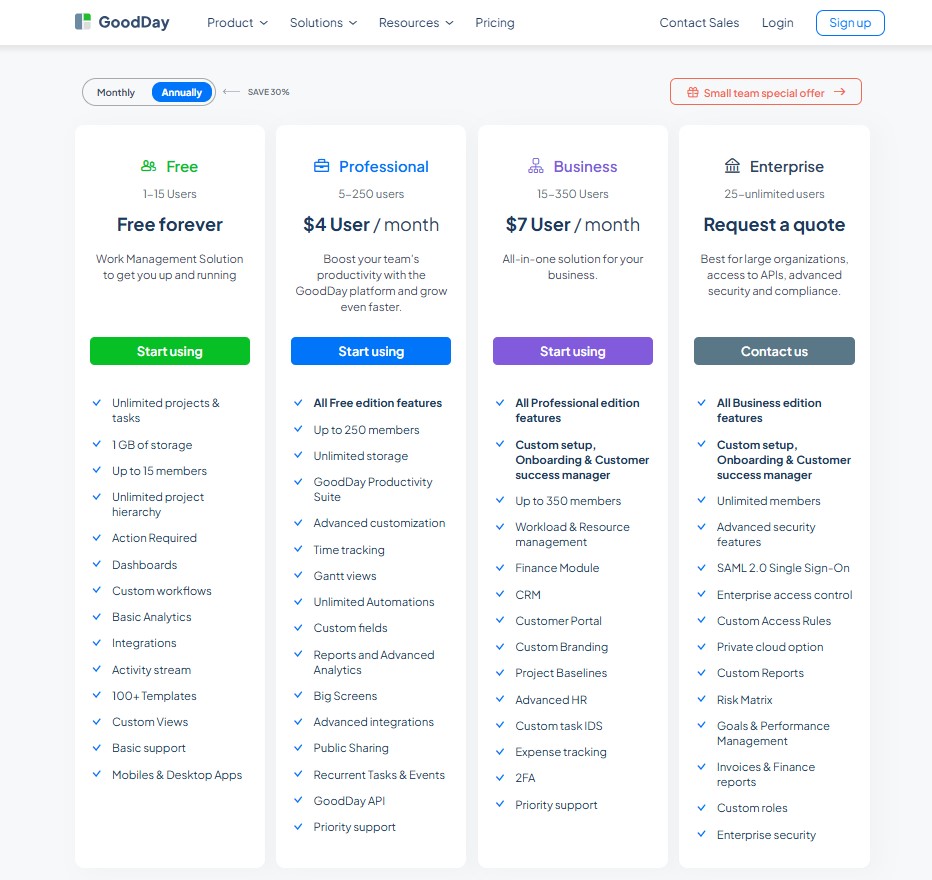
GoodDay uses a pricing structure that grants teams access to sophisticated tools—including Gantt charts, native time tracking, data analytics, and resource planning—as part of the core package without needing expensive extras. This makes the platform significantly more economical for organizations that require a full suite of management tools as they scale.
- Free plan (up to 15 users): Includes unlimited tasks and projects, standard workflows, customized dashboards, and core analytics.
- Professional plan ($4 per user/month): Unlocks time-tracking, Gantt views, unlimited data storage, advanced automation, and detailed reporting.
- Business plan ($7 per user/month): Adds a customer portal, CRM features, financial and expense tracking, and custom branding for professional services.
- Enterprise plan (custom pricing): Offers maximum security, SSO, private cloud hosting, and dedicated support for large-scale deployments.
Hive pricing
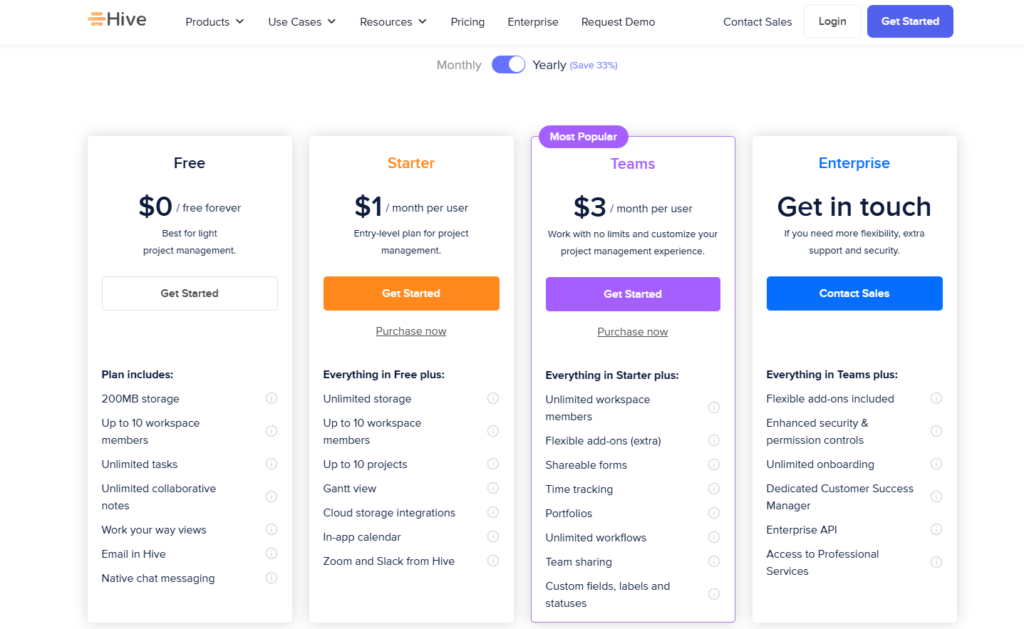
Hive’s pricing can be more difficult to predict because while their base plans are competitively priced, many essential project management features are locked behind “per-user, per-month” add-on fees.
- Free – $0: Suitable for very light project management, but limited by 200 MB storage, a maximum of 10 users, and no advanced planning tools like Gantt or time tracking.
- Starter – $1 per user per month: Adds basic planning features such as Gantt view, calendar sync, and unlimited storage, but still limits teams to 10 users and 10 projects.
- Teams – $3 per user per month: Removes user and project limits and unlocks core features like time tracking, portfolios, and custom workflows, while many advanced capabilities still require paid add-ons.
- Enterprise – custom pricing: Includes all add-ons, enhanced security, onboarding, and dedicated support, but final cost depends on user count and enterprise-level agreements.
GoodDay vs Hive: pros and cons
Every tool has its strengths and trade-offs. GoodDay prioritizes power and value, while Hive prioritizes ease of use and social interaction.
GoodDay pros and cons
| Pros | Cons |
| Provides robust built-in features and high flexibility right out of the box. | The vast array of features can feel complex for very small, simple teams. |
| Significantly more budget-friendly for teams that are scaling up. | Initial setup may take more thought due to high customization options. |
| Extensive native integrations and a developer-friendly API for custom setups. | A steeper learning curve for users used to very basic to-do lists. |
| Excellent support for advanced methodologies like Scrum and Waterfall. | Focused on professional productivity rather than social networking features. |
Hive pros and cons
| Pros | Cons |
| A very intuitive interface that most users can learn in minutes. | Costs can escalate quickly due to the “add-on” pricing model for basic features like analytics. |
| Strong focus on internal chat and collaboration. | Resource management and time tracking are not as deep as dedicated PM tools. |
| “Democratically built” based on user feedback and requests. | The mobile application can be slower and less functional than the desktop version. |
GoodDay vs Hive: use cases by industry
Both platforms serve a variety of industries, but GoodDay’s deeper data structure often provides better support for technical and detail-oriented fields.
| Industry | GoodDay | Hive |
| Architects | Manage complex blueprints, timelines, and client approvals in one view. | Use Gantt charts to track design phases and chat with consultants. |
| Accounting | Track billable hours and financial deadlines with high precision. | Manage tax season workflows and internal team communications. |
| Builders | Coordinate site schedules, equipment, and subcontractors efficiently. | Use simple checklists for site inspections and daily updates. |
| Business analysts | Utilize advanced data reporting and KPI tracking for deep insights. | Organize research tasks and share notes with stakeholders. |
| Bloggers | Plan content calendars with integrated time tracking for productivity. | Brainstorm ideas in chat and track drafting milestones. |
| Construction | Bridge the gap between field work and office management with mobile access. | Use image attachments and basic task lists for on-site updates. |
| Creatives | Manage high-volume assets with custom workflows and client feedback. | Collaborate on designs via integrated chat and proofing tools. |
| Developers | Support full Scrum cycles with story points and bug tracking. | Track feature requests and link them to communication threads. |
| Digital agencies | Scale multiple client accounts with dedicated portals and budgets. | Coordinate campaign launches and agency-wide announcements. |
| IT projects | Manage hardware deployments and software sprints with ease. | Organize help desk tickets and team troubleshooting sessions. |
| Marketing | Execute multi-channel campaigns with detailed resource planning. | Manage social media calendars and collaborate on copy. |
| Small business | Get enterprise-grade tools on a startup-friendly budget. | Start quickly with a user-friendly interface for general tasks. |
So, which project management software is better: GoodDay or Hive?
There’s no absolute best. The answer depends on what you need.
GoodDay is the stronger choice for teams that need a robust work management platform which can support complex projects. And Hive is the better fit for teams where internal chat and social collaboration are the top priorities.
Ultimately, the right pick depends on whether your priority is a chat-focused tool (Hive) or full-featured, scalable project management software (GoodDay).
You can dive in and try GoodDay for free to see how it fits your workflow.
And if you have any questions about selecting the right project management software for your business, you can always connect with our team via info@goodday.work
FAQs
What is better than Hive for project management?
GoodDay is a superior project management solution because it offers robust features natively that other platforms treat as expensive add-ons. While Hive relies on a modular system, GoodDay includes integrated time tracking and high-level resource management in its core package. This ensures your team can track projects with precision without navigating a complex pricing structure or fragmented toolset. Choosing GoodDay provides a more cohesive management platform that supports long-term growth and organizational transparency.
Is Hive becoming obsolete?
While Hive remains a functional collaboration tool, it struggles to keep pace with all-in-one project management software like GoodDay. Modern project management platforms now prioritize native functionality, whereas Hive’s reliance on separate “apps” for resource planning can feel outdated. GoodDay offers a more forward-thinking approach by including custom fields and automated workflows without extra fees. This makes GoodDay a more stable and comprehensive tracking tool for teams looking toward the future of work.
Is Hive still worth it?
Hive can be a helpful collaboration tool for very small teams, but its value diminishes as your organization scales. The cost per user per month often escalates because essential advanced features are locked behind separate paid subscriptions. In contrast, GoodDay’s business plan provides a much higher return on investment by including Gantt charts and project portfolios as standard. For those seeking maximum value, GoodDay’s free plan is also more generous, supporting up to 15 users with unlimited tasks.
What are the risks of using Hive?
One major risk of using Hive is the potential for hidden costs due to its extensive list of additional features that require individual payments. Teams may also face a steep learning curve when trying to sync various modular “apps” to manage projects effectively. Furthermore, Hive’s mobile apps are often cited as being less functional than the desktop version, which can hinder remote team collaboration. GoodDay mitigates these risks by offering a unified user interface where all key features work together seamlessly from day one.
Is Hive a good project management tool?
Hive is a decent project management tool for basic task tracking and team communication, but it often lacks the depth required for professional operations. It is widely known for a user-friendly interface, yet it frequently requires third-party apps to handle complex project planning. GoodDay stands out as a better alternative because it provides a more intuitive user interface alongside deep technical tools. By using GoodDay, you get a more powerful engine to manage tasks and achieve your strategic goals.
What is the best alternative to Hive for project management?
GoodDay is the best alternative for teams that want to boost productivity through a truly integrated management platform. It replaces the need for other tools by combining task management, document storage, and time management in one place. Unlike Hive, GoodDay offers a free version that includes unlimited projects for a larger number of team members. This makes it the ideal choice for those who want to organize tasks without the limitations of a fragmented system.
Which is the most popular project management tool?
While several project management platforms are popular, GoodDay is rapidly gaining positive reviews for its balance of power and affordability. It is recognized across various industries for its ability to manage multiple projects with high-density data views. While Hive is popular among creative groups, GoodDay is preferred by teams that need robust features like bug tracking and a kanban board view. Its popularity stems from a user-friendly approach that doesn’t sacrifice the depth needed for professional work.
What is the difference between GoodDay and Hive?
The primary difference lies in how they handle advanced features and platform architecture. GoodDay provides a unified environment with customizable templates and native time tracking included in the base price. Hive uses a modular “Teams” plan where you must pay extra for collaboration features like analytics or resource management. GoodDay also offers a more flexible free tier, allowing users to access professional tools without an immediate annual subscription.
How do key features of GoodDay and Hive compare?
When comparing key features, GoodDay offers more robust features for project planning, such as advanced project timelines and workload views. Hive focuses heavily on facilitating communication through its native chat, but it lacks the built-in resource planning found in GoodDay. GoodDay’s integration with Google Workspace and Google Drive is more seamless, providing a better flow for file sharing. Ultimately, GoodDay gives you more advanced features out of the box to improve productivity.
What’s the best software for project management?
GoodDay is the best project management software because it accommodates various workflow preferences through 20+ different views. It is designed to boost productivity by automating repetitive tasks and providing clear project tracking. While Hive is a popular collaboration tool, it cannot match the structural integrity and scalability of GoodDay. For any organization that needs to track projects from conception to completion, GoodDay is the most reliable choice.
What project management software can help to boost productivity and manage projects effectively?
GoodDay is specifically engineered to boost productivity and manage projects effectively through its “My Work” dashboard. This feature allows team members to focus on their daily task management while staying aligned with the overall project planning. Hive attempts to enhance productivity through chat, but it often leads to information being lost in long threads. GoodDay ensures all project information stays connected to the relevant tasks, making it a more efficient tracking tool.
What is the best tool for managing multiple projects?
GoodDay is the premier tool for managing multiple projects because of its unique project portfolios and multi-level folder structure. It allows for high-level resource management across different teams, ensuring no one is over-allocated. While Hive can track projects, its interface can become cluttered when handling a high volume of unlimited tasks. GoodDay’s user interface remains clean and organized, even when you are overseeing a complex enterprise-level operation.
What are the top project management platforms in 2026?
As we look at the top project management platforms in 2026, GoodDay continues to lead the market in value and innovation. It has moved past the learning curve issues of older tools by providing an intuitive user interface that suits even non-tech-savvy individuals. While Hive is still a contender, its “pro plan” add-ons make it less competitive than GoodDay’s all-inclusive business plan. GoodDay remains the top-rated project management tool for those who demand both power and ease of use.
What is the best project management software?
The best project management software is GoodDay because it offers a free forever plan that actually supports real team growth. It provides unlimited users on its enterprise tier and unlimited tasks for its free users, which is rare in the industry. While Hive is a solid collaboration tool, it often provides limited features unless you upgrade to their most expensive paid plans. GoodDay is the most complete management platform available today for anyone who wants to manage tasks with total confidence.




