Are you trying to decide between GoodDay and GanttPRO?
GoodDay vs GanttPRO remains a popular dilemma because these tools offer very different approaches to managing work.
GoodDay is a comprehensive work management platform with more built-in features like time tracking, goals, and multiple project views, while GanttPRO is known for its focus on timeline management and interactive Gantt charts.
| GoodDay | GanttPRO | |
| Core functionality | All-in-one work management platform | Gantt chart-based project planning |
| Advanced features | Time tracking, CRM, HR tools, BI analytics | Critical path, baselining, auto-scheduling |
| Visuals | 20+ views (Gantt, Kanban, List, Timeline, etc.) | Primary focus on Gantt and Board views |
| Complexity | Highly flexible with deep customization | Simple, focused, and specialized |
| Best for | Small to enterprise teams wanting a full suite | Project managers focused on specific timelines |
| Choose if | You need an end-to-end management solution | You prioritize timeline visuals over total work management |
In this guide, we’ll explore every factor to consider when choosing between GoodDay and GanttPRO to help you select the best project management software.
But if you have any questions that are not covered in this article, you can always connect with our team via info@goodday.work
GoodDay vs GanttPRO: an overview
Choosing between these two tools requires understanding whether your team needs a specialized scheduling engine or a versatile command center for all work processes. While both excel at visual planning, they cater to different operational requirements.
What is GoodDay?
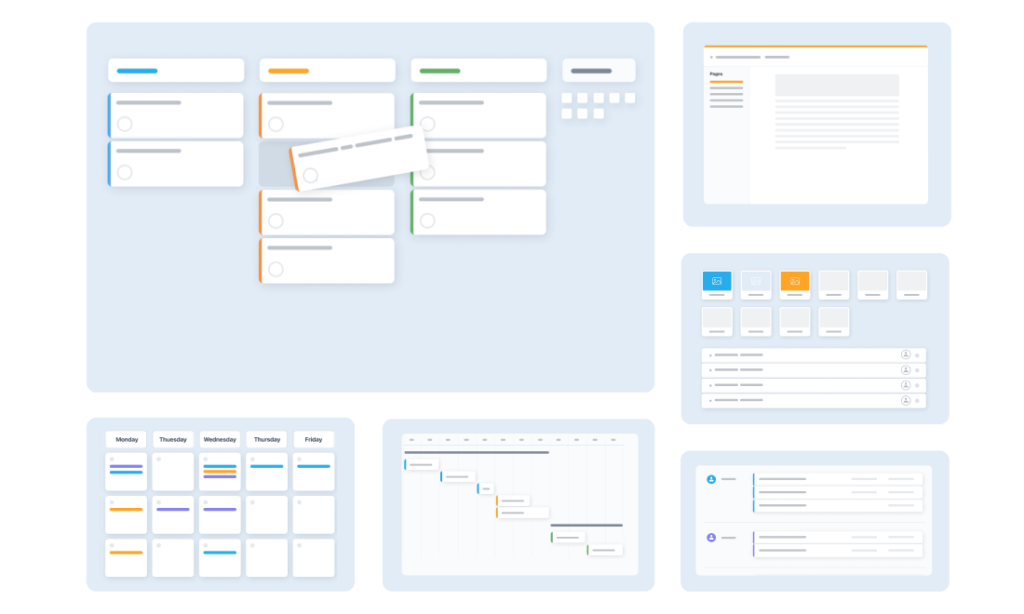
GoodDay is a high-productivity work management platform designed to help teams organize projects, tasks, and company goals in one central location. Trusted by Fortune 500 companies, the system provides an extensive array of native features, including resource management, time tracking, and professional analytics. GoodDay is built to scale from small businesses to large enterprises through deep workflow customization and was recognized as a top-rated project management software in 12 Capterra shortlists in 2026.
What is GanttPRO?
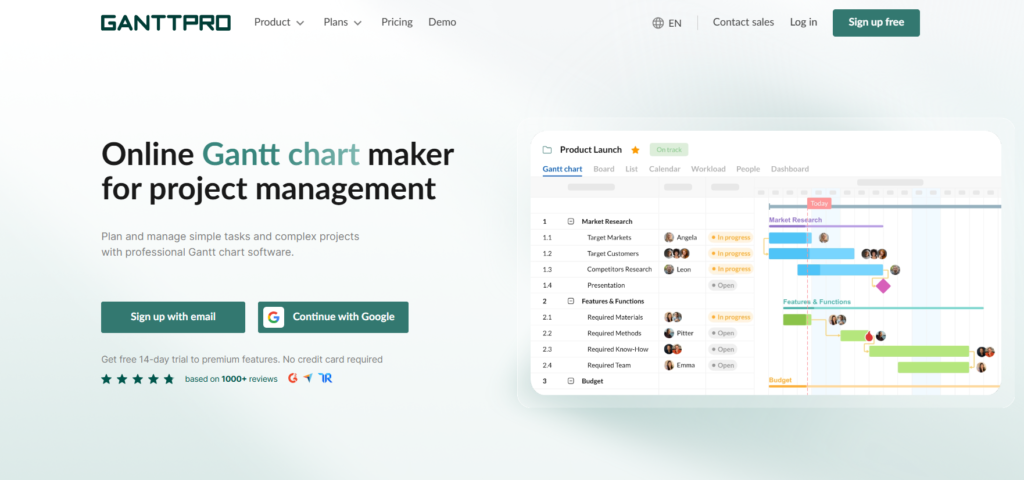
GanttPRO is a specialized project management tool that centers almost entirely around the Gantt chart interface. It allows project managers to build detailed schedules, manage dependencies, and monitor workloads through a drag and drop timeline. While it includes basic collaboration features, its primary strength lies in its intuitive and powerful scheduling capabilities.
GoodDay vs GanttPRO: key differences
The most significant distinction lies in the scope of the platforms. GoodDay provides a much broader ecosystem of management tools compared to the more focused timeline approach of GanttPRO.
| GoodDay | GanttPRO | |
| Free Version | Yes (up to 15 users) | No (only 14-day trial) |
| Starting Price | $4 per user/month | $7 per user/month |
| Support | Email, Help Desk, FAQs, Forum, Knowledge Base, Phone, 24/7 Live Rep | Email, Help Desk, FAQs, Knowledge Base |
| Ideal Team Size | Small, Medium, Large | Small, Medium |
| Supported devices | Desktop (Mac, Windows, Linux), Mobile (Android, iPhone) | Desktop (Mac, Windows), Mobile (Android, iPhone) |
| Training | Documentation, Live Online, In Person | Documentation, Live Online |
| Integration capabilities | GoodDay provides extensive integration options, natively connecting with Google Workspace (G Suite), Gmail, Slack, Google Docs, Google Drive, and Google Calendar. It also supports seamless data sharing with Dropbox and Box.com, ensures secure access via Single Sign-On (SSO via SAML), and supports technical workflows through GitHub and GitLab. Beyond these native connections, teams can link to over 1,300 business applications using Zapier or utilize the flexible API to integrate with any proprietary internal systems. | GanttPRO provides essential integrations with Google Drive, Slack, JIRA Cloud, and Microsoft Teams. It also supports Zapier for connecting to other tools and offers an API for custom data synchronization. |
GoodDay vs GanttPRO: comparison of features
When comparing the feature sets, GoodDay consistently provides a more diverse range of tools that support agile, traditional, and hybrid methodologies.
| GoodDay | GanttPRO | |
| Kanban Features | Yes | Yes |
| Collaboration Tools | Yes | Yes |
| Dependency Tracking | Yes | Yes |
| KPI Monitoring | Yes | No |
| Milestone Tracking | Yes | Yes |
| Multi-Board | Yes | No |
| Prioritization | Yes | Yes |
| Project Planning | Yes | Yes |
| Roadmapping | Yes | Yes |
| Supports Scrum | Yes | No |
| Task Management | Yes | Yes |
| Time Tracking | Yes | Yes |
| Project Management Features | Yes | Yes |
| Agile Methodologies | Yes | No |
| Budget Management | Yes | Yes |
| Client Portal | Yes | No |
| Cost-to-Completion Tracking | Yes | Yes |
| Customizable Templates | Yes | Yes |
| Gantt Charts | Yes | Yes |
| Idea Management | Yes | No |
| Kanban Board | Yes | Yes |
| Portfolio Management | Yes | Yes |
| Resource Management | Yes | Yes |
| Time & Expense Tracking | Yes | Yes |
| Traditional Methodologies | Yes | Yes |
| Due Date Tracking | Yes | Yes |
| Progress Tracking | Yes | Yes |
| Template Management | Yes | Yes |
| Dashboard | Yes | Yes |
| Issue Management | Yes | No |
| Requirements Management | Yes | No |
| Status Tracking | Yes | Yes |
| Percent-Complete Tracking | Yes | Yes |
| Create Subtasks | Yes | Yes |
| Mobile Access | Yes | Yes |
| Recurring Tasks | Yes | Yes |
| Reporting / Analytics | Yes | Yes |
| Spreadsheet View | Yes | No |
| Task Board View | Yes | Yes |
| Task Planning | Yes | Yes |
| Task Scheduling | Yes | Yes |
| Task Tracking | Yes | Yes |
| To-Do List View | Yes | Yes |
GoodDay vs GanttPRO: comparison of pricing
Understanding the cost structure is vital for long-term budget planning. GoodDay offers a high-value model that includes more features at a lower entry point compared to GanttPRO.
GoodDay pricing
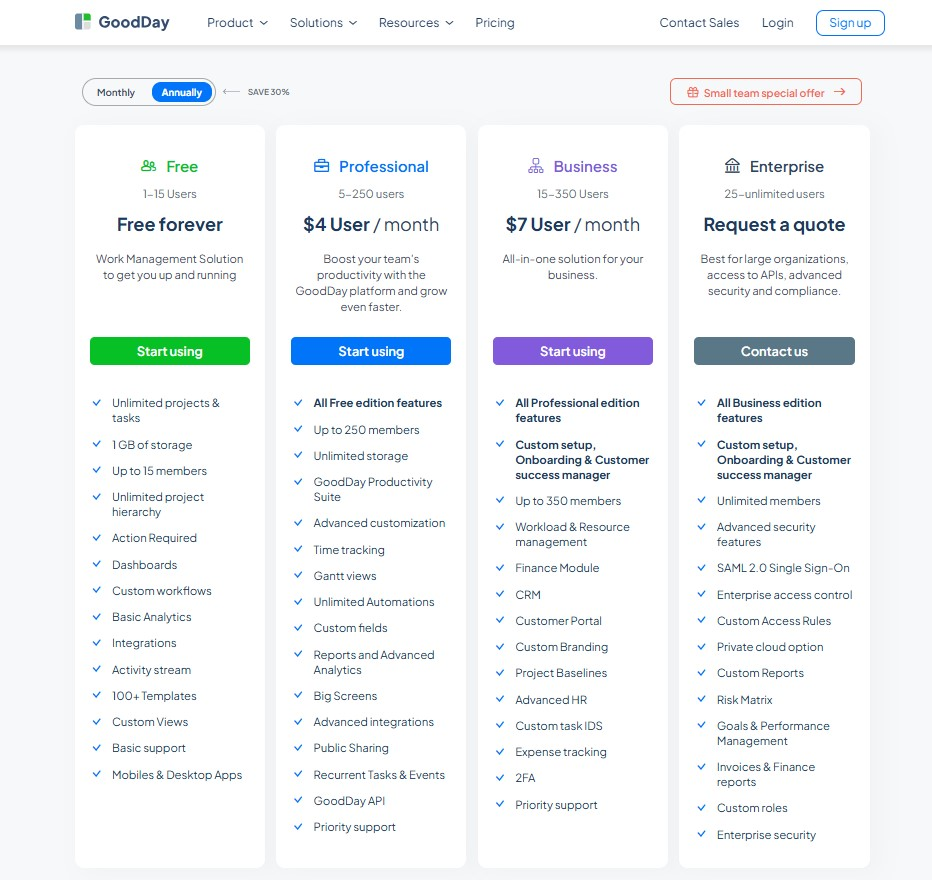
GoodDay’s pricing model focuses on providing sophisticated tools like Gantt charts, time monitoring, performance analytics, and resource allocation as standard components of the platform. By avoiding the need for expensive bolt-on services, GoodDay serves as a highly economical option for teams that require a complete set of management capabilities as they scale up.
- Free tier (supporting 15 members): This version allows for unlimited projects and tasks while providing essential templates, dashboards, and standard workflows to organize your work.
- Professional tier ($4 per seat/month): This plan grants full control over project execution by adding native time tracking, Gantt chart views, advanced reporting, and unlimited storage.
- Business tier ($7 per seat/month): Ideal for organizations managing external partnerships, this level introduces CRM tools, dedicated customer portals, and expense tracking.
- Enterprise tier (custom pricing): Designed for large organizations, this option offers the highest level of security, private cloud hosting, SSO integration, and specialized administrative management.
GanttPRO pricing
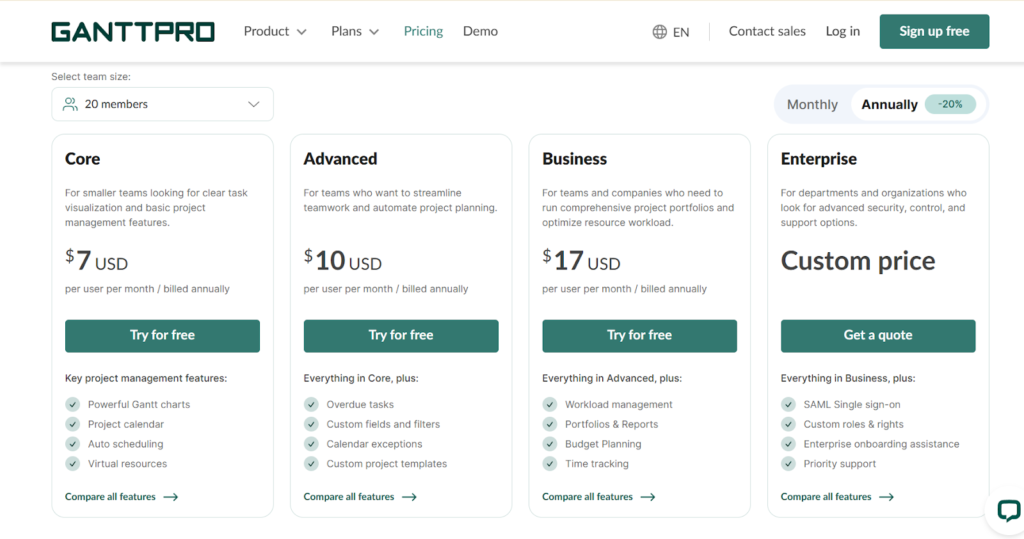
GanttPRO typically follows a tiered pricing structure that begins at a higher price point per user. While they offer a free trial, there is no permanent free tier for teams.
- Core ($7 per user/month): Focused on basic task visualization and project management, this plan includes powerful Gantt charts, project calendars, auto-scheduling, and unlimited virtual resources.
- Advanced ($10 per user/month): Designed to streamline teamwork, this tier adds features such as overdue task tracking, custom fields and filters, calendar exceptions, and custom project templates.
- Business ($17 per user/month): Aimed at companies managing complex portfolios, this plan includes everything in Advanced plus workload management, portfolio reports, budget planning, and native time tracking.
- Enterprise (Custom price): This tier is built for organizations requiring advanced security and support, offering SAML Single Sign-On (SSO), custom roles and rights, priority support, and enterprise onboarding assistance.
GoodDay vs GanttPRO: pros and cons
Every tool has its strengths and areas for consideration. Choosing the right one depends on balancing these factors against your specific team’s needs.
GoodDay pros and cons
| Pros | Cons |
| Provides deep native functionality and extensive system flexibility. | The vast array of available features can increase initial complexity. |
| Delivers higher cost-efficiency for organizations as they scale. | Setting up specific enterprise workflows may require initial time. |
| Connects with over 1,000 apps and offers a robust developer API. | New users might experience a steeper learning curve than simple tools. |
| Excellent native support for advanced project management methodologies. | The interface is built for high productivity rather than social interaction. |
GanttPRO pros and cons
| Pros | Cons |
| Extremely intuitive drag and drop Gantt interface. | Limited flexibility for non-Gantt workflows. |
| Easy to learn for users focused only on scheduling. | Higher cost per user without a free version. |
| Excellent visual timeline presentation features. | Fewer native integrations than competitors. |
| Helpful auto-scheduling and dependency management. | Lacks advanced business tools like CRM or HR modules. |
GoodDay vs GanttPRO: use cases by industry
Both tools serve various sectors, but GoodDay’s versatility allows it to support more diverse operational departments within those industries.
| Industry | GoodDay | GanttPRO |
| Architects | Architects use the platform to manage complex blueprints, track billable hours, and coordinate with contractors. | Firms utilize the visual timelines to map out long-term construction phases and milestones. |
| Accounting | Accounting teams leverage custom workflows for tax seasons and automated reminders for client deadlines. | Accountants track audit schedules and financial reporting deadlines using simple Gantt charts. |
| Builders | Building companies manage materials, equipment, and subtasks across multiple job sites simultaneously. | Construction managers visualize the critical path of a build to prevent project delays. |
| Business analysts | Analysts benefit from the BI module to turn project data into actionable business insights. | Pros in this field use the tool to schedule research phases and stakeholder interviews. |
| Bloggers | Content creators organize their editorial calendars and social media distribution in a single view. | Bloggers plan large series or book launches through simple timeline visualizations. |
| Construction | Construction firms track budget management and resource allocation for every infrastructure project. | Teams prioritize scheduling labor and heavy machinery on a visual timeline. |
| Contractors | Independent contractors use the mobile app to update task progress while on-site. | Individual contractors map out their availability and project end dates for clients. |
| Consultants | Professionals manage multiple client accounts with dedicated portals and time tracking. | Consultants show clients project roadmaps to justify timelines and deliverables. |
| Creatives | Design teams manage the creative process from initial idea to final proofing and approval. | Creative leads use Gantt charts to ensure campaign assets are finished before launch. |
| Developers | Software teams use the native GitHub integrations and Scrum support for sprint planning. | Dev leads track major release versions and dependency-heavy coding projects. |
| DevOps | Engineers automate work processes and track system deployment schedules efficiently. | DevOps teams map out server migrations and infrastructure updates on a timeline. |
| Digital agencies | Agencies coordinate across various client projects using portfolio management and CRM tools. | Project managers schedule campaign launches and media buying cycles. |
| Engineers | Engineering teams handle complex requirements and document management for technical builds. | Engineers visualize the manufacturing process and assembly line dependencies. |
| Electrical contractors | Electricians track specific task progress and material costs for various residential jobs. | Leads plan the sequence of wiring across different floors of a building. |
| Entrepreneurs | Founders use the goal-tracking features to align daily tasks with long-term vision. | Startup owners map out product development and fundraising milestones. |
| Events | Planners manage everything from vendor lists to day-of schedules and budget tracking. | Event leads use timelines to ensure catering and decor arrive at specific times. |
| Enterprise | Large organizations utilize SSO and advanced security to manage thousands of work processes. | Corporate departments schedule high-level strategic initiatives across many teams. |
| Executive assistants | Assistants organize executive calendars and track recurring tasks for leadership. | EAs plan complex travel itineraries and board meeting preparations. |
| Education | Schools and universities manage curriculum development and administrative tasks in one place. | Researchers use Gantt charts to track grant applications and study phases. |
| Freelancers | Solopreneurs use the free plan to manage clients, track time, and handle invoicing. | Freelance designers map out their project pipeline to avoid overbooking. |
| Film production | Production teams coordinate casting, location scouting, and filming schedules. | Directors visualize the post-production timeline to meet release dates. |
| Financial institutions | Banks use the secure platform for internal project tracking and compliance management. | Financial planners track the rollout of new banking software or services. |
| Graphic designers | Designers keep all project assets organized and track time spent on each iteration. | Designers use timelines to balance multiple client deadlines throughout the month. |
| Home builders | Builders track the entire lifecycle of a home from permits to final inspection. | Site managers schedule the arrival of plumbers and electricians in sequence. |
| HR | HR teams manage recruitment pipelines and employee onboarding with custom templates. | Managers map out the yearly training schedule for an entire company. |
| Interior designers | Designers track furniture orders and client approvals across various rooms. | Leads use Gantt charts to coordinate the arrival of delivery crews. |
| IT projects | IT departments manage ticket queues, hardware deployments, and system upgrades. | Managers visualize the timeline for network migrations and software rollouts. |
| Large companies | Corporations benefit from advanced automation and deep reporting across all departments. | Large teams use Gantt charts to keep hundreds of dependencies aligned. |
| Manufacturing | Manufacturers track production cycles and supply chain management within the platform. | Leads schedule machine maintenance and production runs on a visual chart. |
| Marketing | Marketing teams plan complex campaigns and track ROI through integrated analytics. | Managers visualize the timeline of an omni-channel marketing launch. |
| Nonprofits | Nonprofits manage donor relationships and volunteer tasks while staying within budget. | Teams track fundraising event planning and grant cycles. |
| Photographers | Photographers organize shoot schedules, editing queues, and client delivery dates. | Pros plan long-term gallery exhibitions and complex travel for shoots. |
| Pharmaceutical industry | Researchers manage clinical trials and documentation while ensuring regulatory compliance. | Managers track the stages of drug development and testing timelines. |
| Real estate | Agents track listings, client meetings, and the closing process for every property. | Developers map out the timeline for new housing developments. |
| Research | Scientists manage laboratory tasks, data collection, and paper submissions. | Leads visualize the phases of a multi-year research grant. |
| Small business | Owners use the all-in-one features to replace multiple expensive software tools. | Small teams use the timeline to keep everyone aligned on basic tasks. |
| Startups | Fast-growing teams use the flexible structure to adapt as their business scales. | Founders use the tool to communicate the product roadmap to investors. |
| Solopreneurs | Individuals manage their entire business from a single dashboard using the free plan. | Solo workers visualize their workload to ensure they don’t miss deadlines. |
| Tech companies | Tech firms manage product roadmaps, bug tracking, and release management. | Project managers focus on coordinating technical dependencies across teams. |
| Writers | Authors organize chapters, research notes, and editing deadlines in a clean view. | Writers map out the phases of a book from draft to publication. |
| YouTubers | Creators track video production stages from scripting to final upload. | YouTubers plan their upload schedule and sponsorship deadlines. |
So, which project management software is better: GoodDay or GanttPRO?
There’s no absolute best. The answer depends on what you need for your daily operations and team growth.
GoodDay is the stronger choice for teams that need a complete work management platform with built-in planning, time tracking, reporting, and support for complex projects. GanttPRO is the better fit for project managers whose primary focus is building and sharing interactive Gantt charts.
You can dive in and try GoodDay for free to see how it fits your workflow.
And if you have any questions about selecting the right project management software, you can always connect with our team via info@goodday.work
FAQs
What is better than GanttPRO?
GoodDay is often considered a superior alternative because it offers a much broader range of features beyond just Gantt charts. While GanttPRO is specialized, GoodDay provides task management, CRM, time tracking, and advanced analytics in one platform. Teams often find it better to scale their business without needing extra software. It is also more budget-friendly for teams of all sizes.
Which software is best for a Gantt chart?
GoodDay provides an incredibly flexible Gantt chart that is part of a larger, comprehensive project management solution. This allows users to view their project timeline while also having direct access to resource management and time tracking. Many professionals prefer this integrated approach over a standalone tool. It ensures that the Gantt view is always synchronized with the rest of the team’s work.
What is the best software for project management?
GoodDay stands out as the best software for project management due to its high level of customization and built-in productivity tools. It supports various methodologies, including Agile, Scrum, and Waterfall, making it suitable for any industry. The platform provides a unified workspace that replaces the need for separate tracking and reporting apps. Its free plan for up to 15 users makes it highly accessible for growing teams.
What is the best tool for project management?
GoodDay is a leading tool for project management because it balances power with a user-friendly interface. It allows teams to plan projects, assign team members, and track progress using 20+ different views. The inclusion of advanced automation and a native time tracking feature helps teams save time on administrative tasks. It is designed to improve overall work processes across the entire organization.
What is the best Gantt chart software?
GoodDay is highly rated as the best Gantt chart software because its timeline view is deeply connected to real-time project data. Unlike simpler tools, it allows for complex dependency tracking and portfolio management across multiple projects. Users can easily adjust project schedules and see the immediate impact on resource availability. This makes it a powerful choice for managers who need more than just a visual chart.
How to create a good Gantt chart?
To create a good Gantt chart, you should first break your project down into manageable tasks and establish clear milestones. Using a tool like GoodDay makes this easy by allowing you to drag and drop tasks to set a project timeline. You must also link dependencies so that the schedule updates automatically when changes occur. Finally, ensuring your chart is shared with all team members keeps the entire project on track.
What is the best project management software?
The best project management software is one that offers comprehensive project management features like GoodDay. It provides teams with everything they need, from document management to budget management, in a single interface. By enabling teams to customize their workflows, it ensures that every department can work in the way that suits them best. Its ability to provide a clear project tracking experience makes it the top choice for modern businesses.
What project management tools do GoodDay and GanttPRO have?
Both GoodDay and GanttPRO offer essential project management tools such as task scheduling, milestones, and collaboration features. GoodDay expands on this by providing advanced automation, a customer portal, and a dedicated BI module for reporting. GanttPRO focuses more on the interactive Gantt chart and critical path analysis. While both help with managing tasks, GoodDay provides a more complete set of tools for total business management.
Which tool is better for small businesses?
GoodDay is the ideal choice for small businesses because it offers a free forever plan that supports up to 15 users. This allows small teams to access professional-grade project planning and task management without an initial investment. As the business grows, the affordable paid plans provide even more advanced features like resource management. GanttPRO lacks a free tier, which can be a barrier for startups with limited budgets.
Can I manage multiple projects at once?
Yes, GoodDay is specifically designed to handle multiple projects within a single workspace using its portfolio management features. You can see a high-level overview of all active initiatives or dive into the details of a specific project timeline. This multi-project visibility is essential for department heads and agency owners who need to track progress across many teams. It ensures that no task or deadline is overlooked.




