Are you trying to decide between GoodDay and Freedcamp?
GoodDay is a comprehensive work management platform with more built-in features like time tracking, goals, and multiple project views, while Freedcamp is known for its modular architecture and highly accessible free version that includes unlimited users and projects.
| GoodDay | Freedcamp | |
| Core functionality | End-to-end work management and process automation | Task management and team collaboration hubs |
| Advanced features | Built-in CRM, HR tools, and financial tracking | Wiki, password manager, and issue tracker |
| Visuals | Modern, data-rich interface with customizable skins | Clean, modular layout with widget-based dashboards |
| Complexity | Professional-grade with a focus on deep customization | User-friendly with a lower initial learning curve |
| Best for | Organizations seeking a single source of truth for all departments | Small businesses and startups need essential tools for free |
| Choose if | You need high scalability and advanced security | You want unlimited collaborators without per-user fees |
In this guide, we’ll explore every factor to consider when choosing between GoodDay and Freedcamp to help you select the best project management software.
But if you have any questions that are not covered in this article, you can always connect with our team via info@goodday.work
GoodDay vs Freedcamp: an overview
Choosing the right platform depends on whether you need a deep, analytical work environment or a straightforward task-sharing tool. While both platforms help teams stay organized, they cater to different levels of operational complexity.
What is GoodDay?
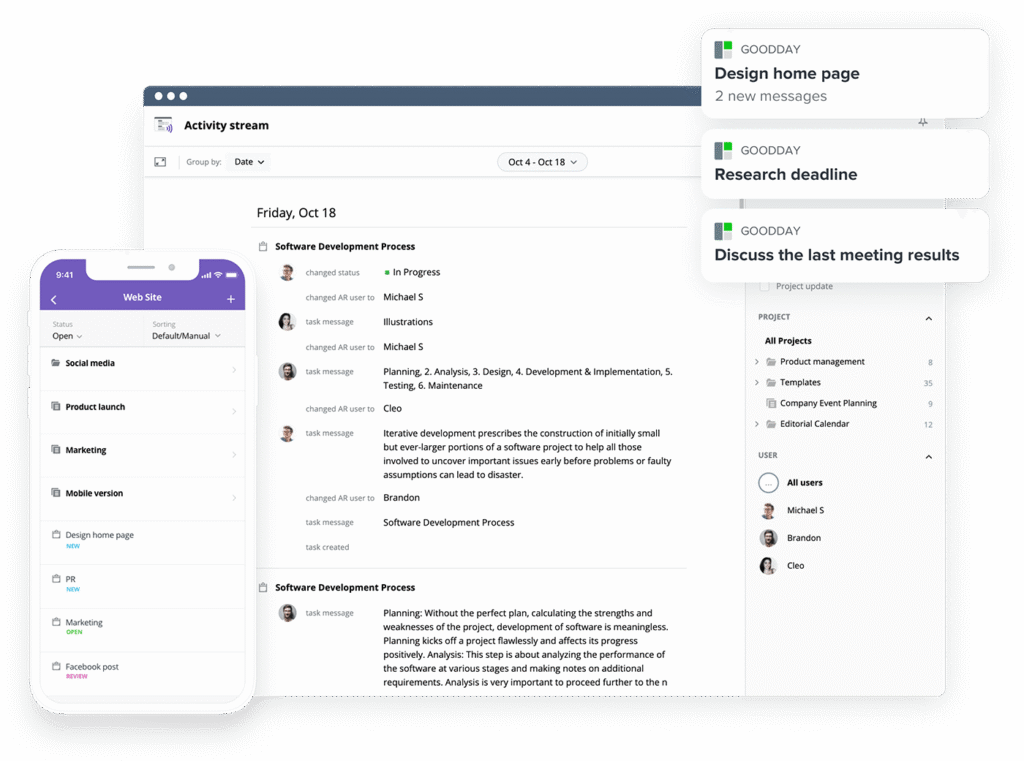
GoodDay is a robust work management solution utilized by major global corporations, including Fortune 500 companies, as well as growing startups and organizations of every scale. The platform provides specialized project templates tailored for diverse departments (such as IT, marketing, and HR). It natively supports various management frameworks (like Scrum, Waterfall, and Agile), while offering high-level visibility through tools (like Kanban boards and advanced Gantt charts). With an unlimited project hierarchy, built-in time tracking, and a fully functional CRM, it provides a comprehensive ecosystem for business operations. Furthermore, the software employs state-of-the-art security protocols and has earned a spot on 12 Capterra shortlists as top project management software in 2026.
What is Freedcamp?
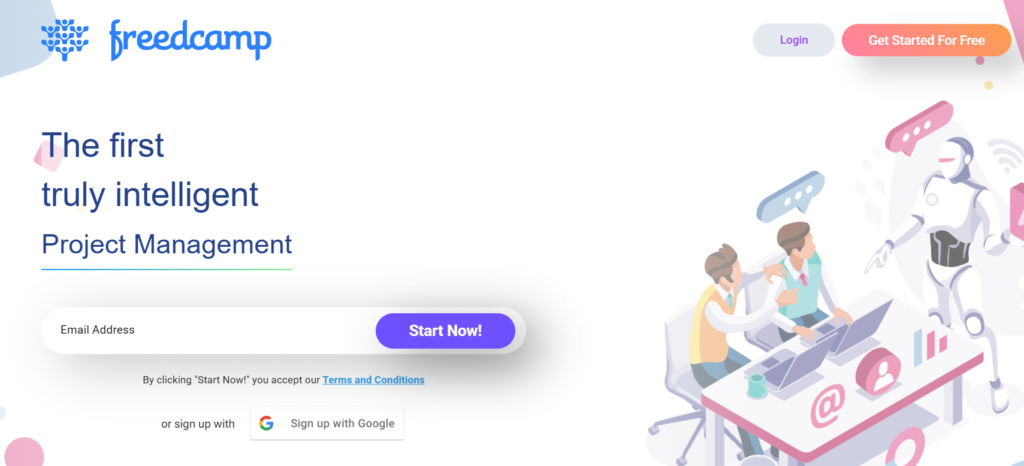
Freedcamp is a project management tool designed to be a “Swiss Army knife” of collaboration by offering a wide range of applications that can be added to any project. It provides a unique value proposition by offering unlimited users and tasks on its free plan, making it popular for small teams and solopreneurs. The platform focuses on centralizing communication through discussions, files, and milestones to keep project goals clear.
GoodDay vs Freedcamp: key differences
The primary distinction lies in the depth of the feature set and the pricing philosophy. GoodDay provides a high-performance environment for complex workflows, whereas Freedcamp prioritizes accessibility and modularity.
| GoodDay | Freedcamp | |
| Starting Price | $4 user/month | $1.49 user/month |
| Free Version | Yes | Yes |
| Support | Email, Help Desk, FAQs, Forum, Knowledge Base, Phone Support, 24/7 (Live Rep) | Email, Help Desk, FAQs, Forum, Knowledge Base |
| Ideal Team Size | Small, Medium, Large | Small, Medium |
| Supported devices | Desktop (Mac, Windows, Linux), Mobile (Android, iPhone) | Desktop (Mac, Windows), Mobile (Android, iPhone) |
| Training | Documentation, Live Online, In Person | Documentation, Live Online |
| Integration capabilities | GoodDay functions as a versatile command center, integrating natively with Slack, Gmail, and the entire Google suite to keep your team aligned. It simplifies file management and coding workflows with built-in support for Dropbox, Box.com, GitHub, and GitLab, while securing your workspace with SAML-based SSO. You can further expand your capabilities by leveraging Zapier to access 1,300+ business applications or by using the API to integrate with any unique legacy system. | Freedcamp integrates with Google Drive, Dropbox, and OneDrive natively. It offers Zapier support and an API for custom connections, though native enterprise-grade integrations are more limited compared to GoodDay. |
GoodDay vs Freedcamp: comparison of features
GoodDay provides a more robust suite of professional tools, particularly regarding hierarchy, resource planning, and data management.
| Core features | GoodDay | Freedcamp |
| Unlimited project hierarchy | Yes | No |
| Views | 20+ Views | 5-7 Views |
| iOS & Android Apps | Yes | Yes |
| Desktop App | Yes | Yes |
| Views | GoodDay | Freedcamp |
| List | Yes | Yes |
| Board | Yes | Yes |
| Table | Yes | Yes |
| Calendar | Yes | Yes |
| Events summary | Yes | Yes |
| Files | Yes | Yes |
| Documents | Yes | Yes |
| Discussions | Yes | Yes |
| Meetings | Yes | No |
| Portfolio | Yes | No |
| Tasks by user | Yes | Yes |
| What’s done | Yes | No |
| My Work | Yes | Yes |
| Gantt | Yes | Yes (Paid) |
| Resource planning | Yes | No |
| Expenses | Yes | No |
| Risk Matrix | Yes | No |
| Customization | GoodDay | Freedcamp |
| Custom statuses | Yes | Yes |
| Custom workflows | Yes | No |
| Custom document types | Yes | No |
| Custom priorities | Yes | No |
| Custom story (scrum) points | Yes | No |
| To-do list templates | Yes | Yes |
| Views presets | Yes | No |
| Custom views | Yes | No |
| Custom Task Types | Yes | No |
| Projects types | Yes | No |
| Custom Task Fields | Yes | Yes |
| Custom Project Fields | Yes | No |
| Custom User Fields | Yes | No |
| Custom task IDs | Yes | Yes |
| Shared view custom branding | Yes | Yes |
| Productivity | GoodDay | Freedcamp |
| Action Required | Yes | No |
| Reminders | Yes | Yes |
| Events | Yes | Yes |
| To-do lists | Yes | Yes |
| Notes | Yes | No |
| Documents | Yes | Yes |
| Dependencies | Yes | No |
| Integrations | Yes | Yes |
| Automations | Yes | No |
| Public Sharing | Yes | Yes |
| Custom Formulas | Yes | No |
| Meetings | Yes | No |
| Chats | Yes | No |
| Time Tracking | Yes | Yes |
| Finance module | Yes | No |
| Project Baseline | Yes | No |
| Data Management | GoodDay | Freedcamp |
| Bulk Actions | Yes | Yes |
| Duplicate | Yes | Yes |
| Excel / CSV Import | Yes | Yes |
| Excel / CSV Export | Yes | Yes |
| Deleted items recovery | Yes | No |
| GoodDay API | Yes | No |
| Webhooks | Yes | Yes |
| Recurrent tasks/events | Yes | Yes |
| Access & Permissions | GoodDay | Freedcamp |
| Customizable access to any project/folder | Yes | No |
| Access inheritance | Yes | No |
| Private spaces, views & presets | Yes | No |
| Departments | Yes | No |
| Full access for admins and/or managers | Yes | Yes |
| Read only access | Yes | Yes |
| Customers & Customer Portal | Yes | Yes |
| Teams | Yes | Yes |
| Custom Access Rules | Yes | No |
| Enterprise Access Control | Yes | No |
| HR | GoodDay | Freedcamp |
| Custom work schedule | Yes | No |
| Personal Events & Vacation Calendar | Yes | No |
| Company Chats & notifications | Yes | No |
| Recruitment templates | Yes | No |
| Onboarding and Offboarding templates | Yes | No |
| Employee Information Management | Yes | No |
| Employee Skills | Yes | No |
| Vacation Approval | Yes | No |
| Time and Attendance Management | Yes | No |
| HR Reports | Yes | No |
| HR Portal | Yes | No |
| Goals & Performance Management | Yes | No |
| CRM | GoodDay | Freedcamp |
| CRM | Yes | Yes |
| CRM Custom fields | Yes | No |
| Customer Portal | Yes | No |
| Unlimited free customer accounts | Yes | Yes |
| Integration With Tasks, Forms & Emails | Yes | Yes |
| Invoices & Finance reports | Yes | Yes |
| Security & Privacy | ||
| Data Encryption in Transit | Yes | Yes |
| Google Single Sign-On | Yes | Yes |
| Apple Single Sign-On | Yes | Yes |
| Two-factor Authentication | Yes | Yes |
| Require 2FA | Yes | No |
| Microsoft Sign-On | Yes | Yes |
| Custom SAML Single Sign-On | Yes | Yes |
| Session Management | Yes | No |
| Custom Permissions | Yes | No |
| Custom Roles | Yes | No |
| Contract and Legal review | Yes | No |
| Users management via API | Yes | No |
| Data Encryption at REST | Yes | Yes |
| HIPAA Compliance | Yes | No |
| Support | GoodDay | Freedcamp |
| Help Center & Knowledge base | Yes | Yes |
| 24/7 Ticket Customer Support | Yes | Yes |
| Priority Customer Support | Yes | Yes |
| Dedicated Customer Success Manager | Yes | No |
| Onboarding & Training | Yes | Yes |
GoodDay vs Freedcamp: comparison of pricing
Both platforms offer high value, but their pricing structures target different types of team growth.
GoodDay pricing
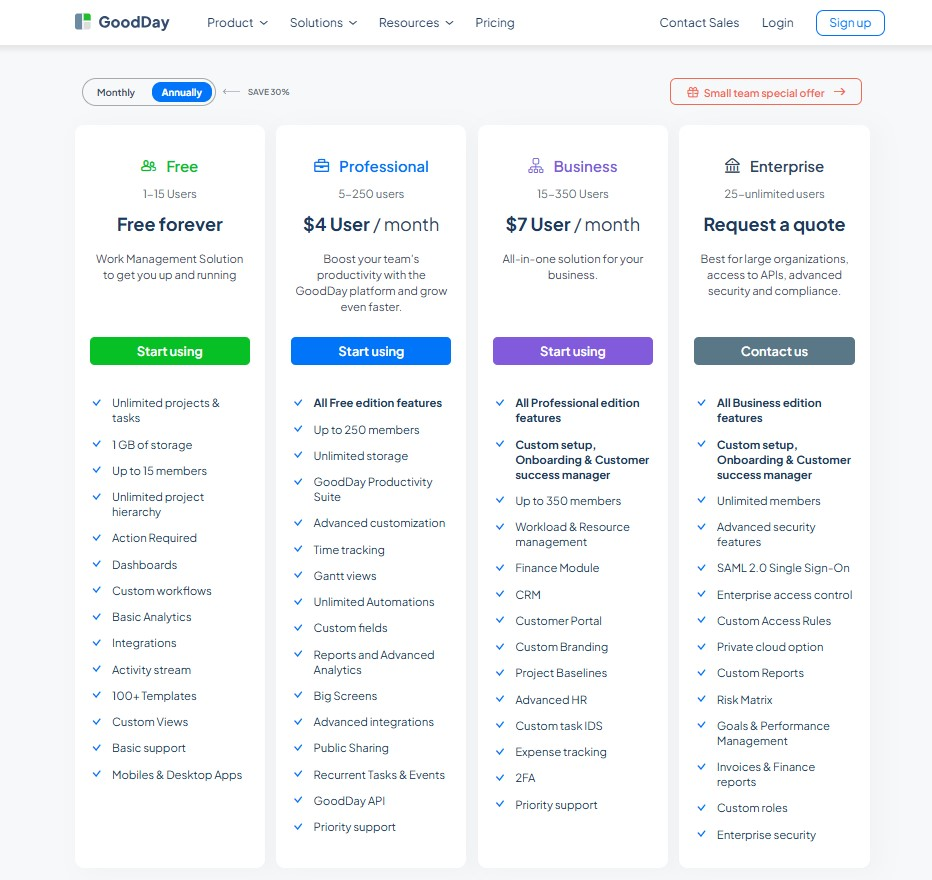
GoodDay’s pricing model scales with your business, delivering professional-grade tools at an industry-leading price.
- Free plan (up to 15 users): This forever-free option is built for high-impact work, providing small teams with unlimited tasks and projects, customizable workflows, templates, and essential analytics. It includes full access to mobile apps and primary integrations to keep your operations mobile and connected.
- Professional plan ($4 per user/month): Designed to accelerate team output, this tier introduces powerful visualization tools like Gantt charts, alongside integrated time tracking and expansive storage. It also empowers users with advanced reporting, automation, and API access for deeper system connectivity.
- Business plan ($7 per user/month): This all-in-one solution for growing companies adds a dedicated CRM module, white-labeled client portals, and sophisticated tools for tracking finances and resources. Security is bolstered with two-factor authentication, while custom branding helps maintain a professional image.
- Enterprise plan (custom pricing): Built for the complex needs of large organizations, this plan offers unlimited user capacity and premium security features like SAML SSO. It provides granular control through custom user roles, advanced access management, and the flexibility of private-cloud deployment options.
Freedcamp pricing
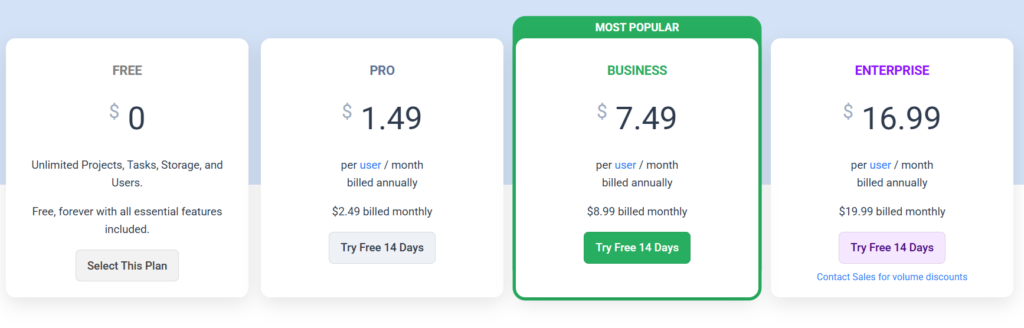
Freedcamp uses a modular pricing approach, starting with a free tier and scaling up for specialized business needs.
- Free plan: Offers unlimited projects, tasks, and users with core apps like calendar and time tracking, but lacks advanced views and some integrations.
- Pro plan ($1.49 per user/month): Adds email-in capabilities and integrations with cloud storage providers like Google Drive and Dropbox.
- Business plan ($7.49 per user/month): Unlocks the Wiki, CRM, Invoices, and more advanced reporting features.
- Enterprise plan ($16.99 per user/month): Provides white-labeling, priority phone support, daily data snapshots, and SAML SSO.
GoodDay vs Freedcamp: pros and cons
Understanding the trade-offs of each platform will help you determine which one matches your team’s culture and technical requirements.
GoodDay pros and cons
| Pros | Cons |
| Delivers powerful native features and a high degree of adaptability for any process. | The broad range of professional tools might feel complex at first. |
| Maintains a very low price point for teams that need to scale efficiently. | Users may need to invest more time in initial setup and fine-tuning. |
| Connects with hundreds of applications and offers an open API for custom development. | There is a more noticeable learning curve for those transitioning from basic tools. |
| Provides high-level support for technical project management and deep reporting. | The platform prioritizes high-level productivity over social or casual features. |
Freedcamp pros and cons
| Pros | Cons |
| Incredibly accessible with a free plan that doesn’t limit user counts. | Advanced project views like Gantt charts are locked behind paid tiers. |
| Clean, widget-based interface that is easy for non-technical users to navigate. | Lacks the deep hierarchical structure needed for massive enterprise portfolios. |
| The modular system allows you to hide features you don’t use. | Automations and complex workflow builders are limited compared to GoodDay. |
| Includes a built-in password manager and a wiki for team knowledge. | Reporting and analytics are not as granular as those in professional-grade tools. |
GoodDay vs Freedcamp: use cases by industry
| Industry | GoodDay | Freedcamp |
| Architects | GoodDay manages complex blueprints and project timelines with advanced Gantt charts. | Architects use the file management system to store and share design drafts easily. |
| Accounting | The platform tracks billable hours and financial milestones through integrated finance tools. | Accounting teams utilize the invoices app to send estimates and bill clients. |
| Builders | Site managers coordinate materials and labor schedules using resource planning views. | Builders track major project phases using the milestone application. |
| Business analysts | Analysts leverage custom data fields and advanced reporting to visualize project health. | Analysts use the widget board to get a quick summary of task distributions. |
| Bloggers | Content creators organize editorial calendars and track drafting progress in one view. | Bloggers use the discussion boards to brainstorm ideas with contributors. |
| Construction | Teams handle multi-tier subcontracts and dependencies through an unlimited project hierarchy. | Construction crews manage simple punch lists and daily tasks via the mobile app. |
| Contractors | External partners stay aligned with specific project folders and custom access rules. | Contractors benefit from the free collaborator roles to view assigned tasks. |
| Consultants | Professionals manage client portfolios and track time for accurate billing. | Consultants store client contact details and lead info within the CRM module. |
| Creatives | Teams use the Action Required feature to streamline feedback and design approvals. | Creatives organize mood boards and brand assets using the files application. |
| Developers | GoodDay supports Scrum and Agile with story points and bug tracking workflows. | Developers use the issue tracker to log and resolve software bugs efficiently. |
| DevOps | Engineers automate deployment workflows and monitor infrastructure tasks. | DevOps teams use the wiki to document system architectures and protocols. |
| Digital agencies | Agencies run multiple client campaigns simultaneously with customized dashboards. | Agencies use the shared calendar to coordinate social media posting schedules. |
| Engineers | Technical teams manage complex dependencies and technical documentation in a secure environment. | Engineers use the task lists to break down large builds into manageable steps. |
| Electrical contractors | Electricians track work orders and inventory needs across various job sites. | Field workers use the calendar view to check their daily appointment schedule. |
| Entrepreneurs | Founders scale their operations from simple tasks to complex business processes. | Small business owners use the free plan to manage startup costs and to-dos. |
| Events | Coordinators manage vendor lists and event timelines with precise deadline tracking. | Event planners use the discussion hub to coordinate with external vendors. |
| Enterprise | Large firms utilize SSO and enterprise-grade security to manage thousands of users. | Enterprise departments use the private cloud option for isolated data hosting. |
| Executive assistants | Assistants organize executive schedules and track high-priority reminders. | Assistants manage sensitive login information using the built-in password manager. |
| Education | Institutions manage faculty schedules and departmental resources effectively. | Teachers use the task boards to organize curriculum development with colleagues. |
| Freelancers | Solo workers use the personal “My Work” view to stay on top of various clients. | Freelancers take advantage of the unlimited projects to organize their entire portfolio. |
| Film production | Producers coordinate cast, crew, and equipment across complex shooting schedules. | Production teams use the discussion boards to share script notes and updates. |
| Financial institutions | Banks utilize HIPAA compliance and data encryption at rest for sensitive info. | Financial teams use the milestones to track quarterly compliance deadlines. |
| Graphic designers | Designers track time spent on revisions and organize assets by project. | Designers use the public project feature to showcase work to clients. |
| Home builders | Project managers oversee every stage of a build from permits to final inspection. | Builders use the mobile app to check off tasks while on the construction site. |
| HR | HR teams manage recruitment and onboarding through specialized department templates. | Recruiters use the task lists to track candidates through various interview stages. |
| Interior designers | Designers manage procurement and client budgets through custom project fields. | Designers use the wiki to maintain a database of preferred furniture vendors. |
| IT projects | Teams implement Waterfall or Agile methodologies to deliver software on time. | IT staff use the issue tracker to manage internal help desk tickets. |
| Large companies | Organizations centralize data from all departments into a single source of truth. | Departments use white-labeling to provide a branded experience for their partners. |
| Manufacturing | Managers monitor production lines and supply chain dependencies with ease. | Teams use the milestones to ensure manufacturing runs meet shipping deadlines. |
| Marketing | Agencies plan multi-channel campaigns and track ROI through custom reports. | Marketing teams use the discussions app to refine brand messaging. |
| Nonprofits | Organizations manage volunteers and donor outreach within a structured system. | Nonprofits use the free plan to keep overhead costs low while staying organized. |
| Photographers | Photographers track shoot dates and post-production workflows for every client. | Photographers use the CRM to manage lead inquiries and client details. |
| Pharmaceutical industry | Research teams maintain strict data security and audit trails for compliance. | Teams use the document management features to store regulatory filings. |
| Real estate | Agents manage listings and client communications through the built-in CRM. | Agents use the task lists to track the closing process for each property. |
| Research | Scientists organize long-term studies and track progress against grant milestones. | Researchers use the wiki to compile and share findings with the team. |
| Small business | Owners automate repetitive tasks to focus on growth and customer service. | Small teams use the widget dashboard to monitor daily operations at a glance. |
| Startups | Fast-growing teams utilize the flexible hierarchy to adapt as they expand. | Startups use the free version to collaborate without worrying about user limits. |
| Solopreneurs | Individual users organize their daily schedules and long-term goals in one place. | Solopreneurs use the time tracker to monitor their own productivity. |
| Tech companies | Companies manage product roadmaps and technical debt using advanced planning tools. | Tech teams use the API to sync project data with other internal tools. |
| Writers | Authors track word counts and chapter deadlines through custom task statuses. | Writers use the discussion boards to gather feedback from editors. |
| YouTubers | Creators plan video production schedules and coordinate with editors via tasks. | YouTubers use the calendar to visualize their content upload schedule. |
So, which project management software is better: GoodDay or Freedcamp?
There’s no absolute best. The answer depends on what you need.
GoodDay is the stronger choice for teams that need a complete work management platform with built-in planning, time tracking, reporting, and support for complex projects. And Freedcamp is a good fit for small teams or individuals who want a modular, easy-to-use tool that offers a generous free version with unlimited users.
Ultimately, the right pick depends on whether your priority is a flexible, lightweight collaboration hub (Freedcamp) or full-featured project management (GoodDay).
You can dive in and try GoodDay for free to see how it fits your workflow.
And if you have any questions about selecting the right project management software for your business, you can always connect with our team via info@goodday.work
FAQs
What is the best project tracking software?
GoodDay excels because it provides a centralized repository for all your projects and tasks. This project management software offers advanced automation and highly customizable dashboards that ensure your team stays on track with all deadlines. While others like Freedcamp provide basic progress monitoring, GoodDay offers the depth needed for completing complex initiatives efficiently. It is the ideal choice for businesses that need to explore detailed data and maintain high security.
Which platform has the lowest cost per user for multi-office teams?
In a direct pricing comparison, GoodDay is often the most cost-effective choice for professional teams due to its $4 per user plan that includes robust features. This platform allows multi-office teams to collaborate across different industries without the high cost associated with other tools. The scalability of GoodDay’s paid tiers provides better value when you need advanced resource management and security. Finding the right fit for your budget is easier when you select a software that doesn’t charge extra for essential features.
Which project management software offers the best project management tools?
GoodDay provides a superior suite of project management tools, including advanced Gantt charts, dependencies, and time tracking built directly into the app. This software ensures that teams can organize their workflow and monitor resources with total ease and precision. Compared to the goodday freedcamp comparison, GoodDay offers more integrated productivity tools that help in completing tasks on time. It provides a user friendly interface that remains professional enough for Fortune 500 businesses to review and utilize daily.
Which workflow management software offers the most robust customization features?
GoodDay is known as a highly customizable platform that allows you to define custom task lists, workflows, and permissions for every project. This flexibility makes it the top project planning tool for teams that need to manage complex subtasks and unique organizational structures. While Freedcamp uses a modular approach, GoodDay offers more advanced automation and custom fields that adapt to your specific team management needs. The security and depth of customization in GoodDay provide a more stable environment for your sensitive files and discussions.
What is the best software for task management?
For effective task management, GoodDay is the premier choice because it allows you to view your work through multiple lenses, like Kanban, calendar, and table views. This project management software helps teams organize their daily tasks and track progress with automated notifications and reminders. Unlike a basic task app, GoodDay integrates project planning with time tracking to ensure everyone is working toward the same goals. You can find all your files and project data in one place, providing a seamless connection between your team and their responsibilities.




