Are you trying to decide between GoodDay and Flow?
GoodDay is a comprehensive work management platform with more built-in features like time tracking, goals, and multiple project views, while Flow is known for its minimalist design, ease of use, and focus on simple team coordination.
| GoodDay | Flow |
| Core functionality | Complete work management and productivity suite |
| Advanced features | Time tracking, CRM, HR tools, and custom workflows |
| Visuals | Professional, data-heavy, and highly structured |
| Complexity | High flexibility with a moderate learning curve |
| Best for | Organizations needing a single tool for all operations |
| Choose if | You need deep analytics and custom project hierarchies |
In this guide, we’ll explore every factor to consider when choosing between GoodDay and Flow to help you select the best project management software.
But if you have any questions that are not covered in this article, you can always connect with our team via info@goodday.work
GoodDay vs Flow: an overview
Choosing the right platform requires understanding whether your team needs a specialized task manager or a full-scale operational engine. While both tools help organize work, they cater to very different levels of organizational depth.
What is GoodDay?
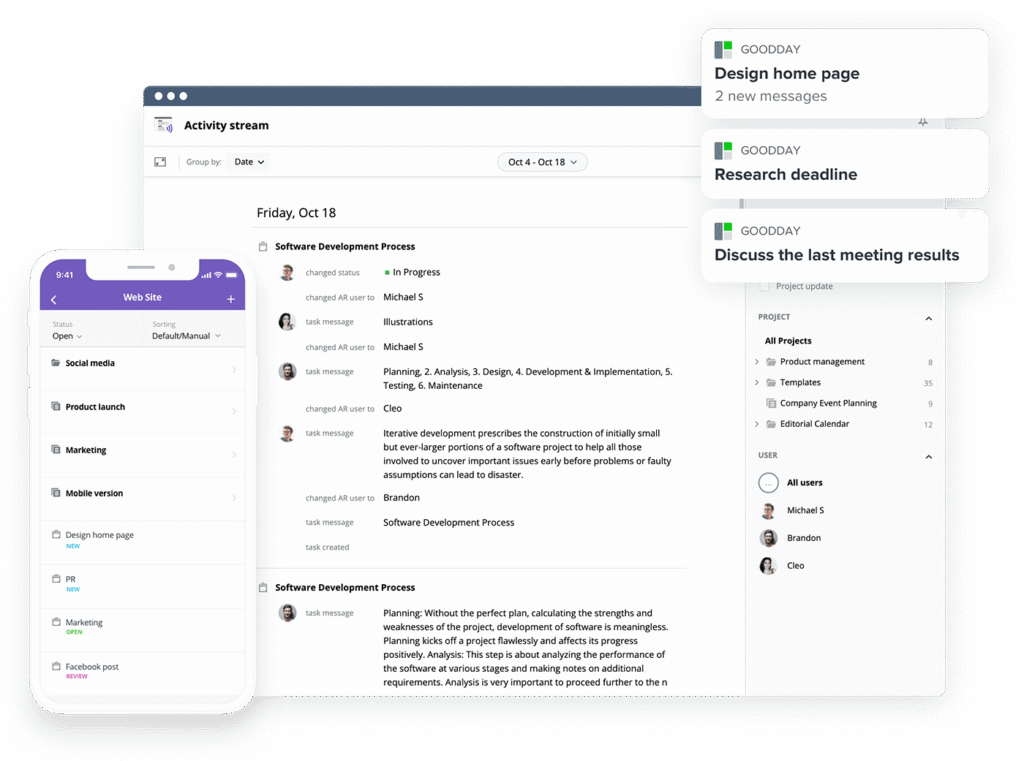
As a high-performance management tool, GoodDay is the platform of choice for everyone from Fortune 500 giants to agile startups worldwide. The software caters to every department, including marketing and IT, by offering specialized templates and full compatibility with Agile, Scrum, and Waterfall methodologies. With a feature set that includes advanced Gantt charts, Kanban boards, and a multi-layered project hierarchy, it also simplifies operations with built-in time tracking and CRM tools. High-level security protocols ensure your information is always safe, contributing to its standing in 12 separate Capterra shortlists as a premier project management choice for 2026.
What is Flow?
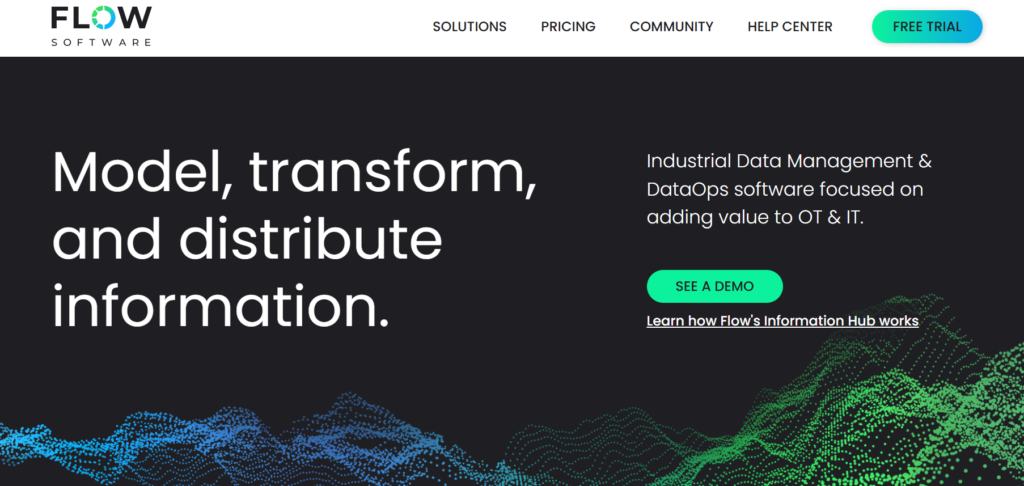
Flow is a streamlined project management application designed to bring tasks, timelines, and team conversations into a single, attractive interface. It focuses heavily on reducing workplace distractions by providing a clean environment where teams can discuss work directly within task cards. While it offers essential features like Kanban boards and project timelines, it is primarily built for teams that prioritize quick setup and intuitive navigation over complex data reporting.
GoodDay vs Flow: key differences
The primary difference lies in the breadth of the feature set and the cost of scaling. GoodDay offers an all-in-one approach at a lower entry price, whereas Flow focuses on a premium, simplified user experience.
| GoodDay | Flow | |
| Starting Price | $4 user/month | $11,39 user/month |
| Free Version | Yes | Yes (Trial/Limited version) |
| Support | Email, Help Desk, FAQs, Forum, Knowledge Base, Phone Support, 24/7 (Live Rep) | Email, Help Desk, Knowledge Base |
| Ideal Team Size | Small, Medium, Large | Small, Medium |
| Supported devices | Desktop (Mac, Windows, Linux), Mobile (Android, iPhone) | Desktop (Mac, Windows), Mobile (Android, iPhone) |
| Training | Documentation, Live Online, In Person | Documentation, Live Online |
| Integration capabilities | The integration capabilities of GoodDay are highly comprehensive, offering native support for email, Slack, and the full range of Google Workspace services. Teams can easily sync their work with GitHub, GitLab, Dropbox, and Box.com, while managing user access via SAML Single Sign-On (SSO). To ensure no tool is left behind, GoodDay connects with more than 1,300 third-party apps through Zapier and offers a robust API for those requiring specialized, bespoke system integrations. | Flow provides a targeted set of integrations for modern teams, connecting natively with Slack, Google Drive, and Dropbox. It also supports Zapier and offers API access on higher-tier plans to facilitate connections with other third-party productivity tools. |
GoodDay vs Flow: comparison of features
GoodDay provides a much wider array of native modules, particularly for HR, CRM, and advanced data management. Flow keeps its feature set lean to ensure the interface remains uncluttered.
| Core features | GoodDay | Flow |
| Unlimited project hierarchy | Yes | No |
| Views | 20+ | 5 |
| iOS & Android Apps | Yes | Yes |
| Desktop App | Yes | Yes |
| Views | GoodDay | Flow |
| List | Yes | Yes |
| Board | Yes | Yes |
| Table | Yes | No |
| Calendar | Yes | Yes |
| Events summary | Yes | No |
| Files | Yes | Yes |
| Documents | Yes | No |
| Discussions | Yes | Yes |
| Meetings | Yes | No |
| Portfolio | Yes | No |
| Tasks by user | Yes | Yes |
| What’s done | Yes | No |
| My Work | Yes | Yes |
| Gantt | Yes | Yes (Timeline) |
| Resource planning | Yes | Yes (Basic) |
| Expenses | Yes | No |
| Risk Matrix | Yes | No |
| Customization | GoodDay | Flow |
| Custom statuses | Yes | Yes |
| Custom workflows | Yes | No |
| Custom document types | Yes | No |
| Custom priorities | Yes | Yes |
| Custom story (scrum) points | Yes | No |
| To-do list templates | Yes | Yes |
| Views presets | Yes | No |
| Custom views | Yes | No |
| Custom Task Types | Yes | No |
| Projects types | Yes | No |
| Custom Task Fields | Yes | No |
| Custom Project Fields | Yes | No |
| Custom User Fields | Yes | No |
| Custom task IDs | Yes | No |
| Shared view custom branding | Yes | No |
| Productivity | GoodDay | Flow |
| Action Required | Yes | No |
| Reminders | Yes | Yes |
| Events | Yes | No |
| To-do lists | Yes | Yes |
| Notes | Yes | Yes |
| Documents | Yes | No |
| Dependencies | Yes | Yes |
| Integrations | Yes | Yes |
| Automations | Yes | No |
| Public Sharing | Yes | No |
| Custom Formulas | Yes | No |
| Meetings | Yes | No |
| Chats | Yes | Yes |
| Time Tracking | Yes | No |
| Finance module | Yes | No |
| Project Baseline | Yes | No |
| Data Management | GoodDay | Flow |
| Bulk Actions | Yes | Yes |
| Duplicate | Yes | Yes |
| Excel / CSV Import | Yes | Yes |
| Excel / CSV Export | Yes | Yes |
| Deleted items recovery | Yes | Yes |
| GoodDay API | Yes | No (Uses Flow API) |
| Webhooks | Yes | Yes |
| Recurrent tasks/events | Yes | Yes |
| Access & Permissions | GoodDay | Flow |
| Customizable access | Yes | Limited |
| Access inheritance | Yes | No |
| Private spaces & views | Yes | Yes |
| Departments | Yes | No |
| Full admin access | Yes | Yes |
| Read-only access | Yes | Yes |
| Customers & Portal | Yes | No |
| Teams | Yes | Yes |
| Custom Access Rules | Yes | No |
| Enterprise Access Control | Yes | Yes |
| HR | GoodDay | Flow |
| Custom work schedule | Yes | No |
| Vacation Calendar | Yes | No |
| Company Chats | Yes | Yes |
| Recruitment templates | Yes | No |
| On/Offboarding templates | Yes | No |
| Employee Info mgmt | Yes | No |
| Employee Skills | Yes | No |
| Vacation Approval | Yes | No |
| Attendance Management | Yes | No |
| HR Reports | Yes | No |
| HR Portal | Yes | No |
| Goals & Performance | Yes | No |
| CRM | GoodDay | Flow |
| CRM | Yes | No |
| CRM Custom fields | Yes | No |
| Customer Portal | Yes | No |
| Free customer accounts | Yes | No |
| Task/Email Integration | Yes | No |
| Invoices & Finance | Yes | No |
| Security & Privacy | GoodDay | Flow |
| Encryption in Transit | Yes | Yes |
| Google SSO | Yes | Yes |
| Apple SSO | Yes | Yes |
| 2FA | Yes | Yes |
| Require 2FA | Yes | Yes |
| Microsoft Sign-On | Yes | No |
| Custom SAML SSO | Yes | Yes |
| Session Management | Yes | Yes |
| Custom Permissions | Yes | Yes |
| Custom Roles | Yes | No |
| Contract review | Yes | No |
| API User mgmt | Yes | Yes |
| Encryption at REST | Yes | Yes |
| HIPAA Compliance | Yes | No |
| Support | GoodDay | Flow |
| Help Center | Yes | Yes |
| 24/7 Ticket Support | Yes | No |
| Priority Support | Yes | Yes |
| Success Manager | Yes | Yes |
| Onboarding & Training | Yes | Yes |
GoodDay vs Flow: comparison of pricing
Both platforms use a subscription model, but GoodDay offers significantly more value at each price point, especially for larger teams.
GoodDay pricing
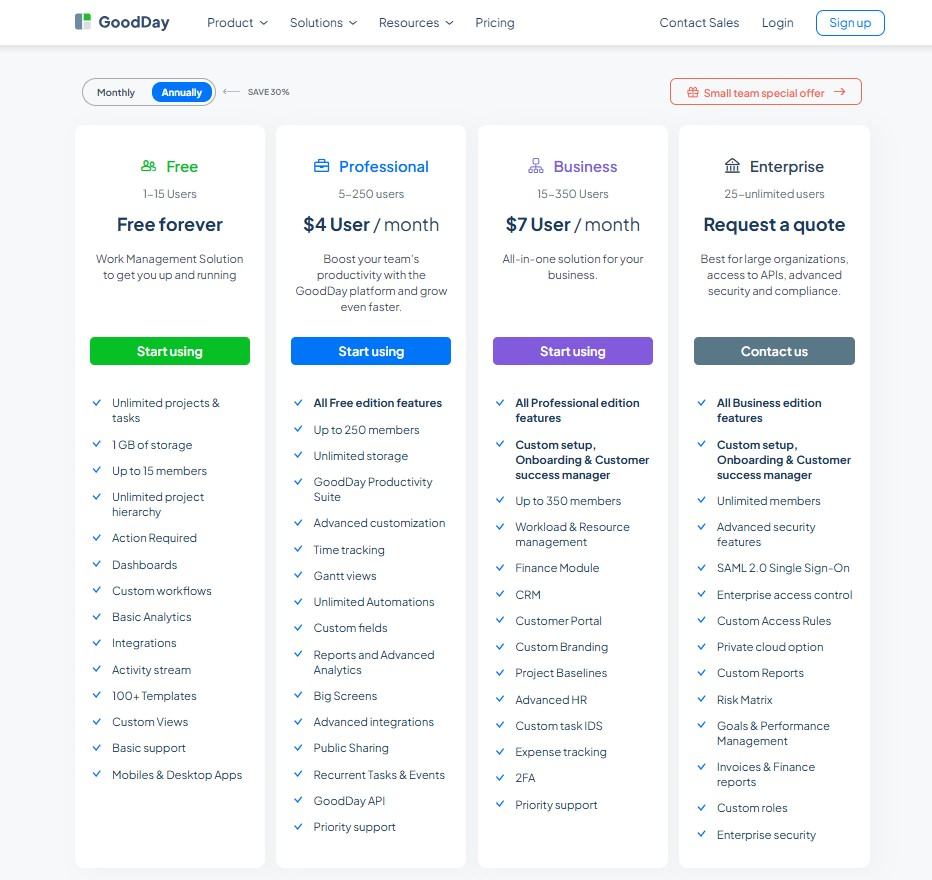
GoodDay offers a highly competitive pricing structure designed to provide premium functionality without the steep price tag.
- Free plan (up to 15 users): This tier serves as a complete foundation for small teams, granting access to essential tools such as unlimited tasks and projects, various workflows, templates, dashboards, and mobile accessibility alongside core integrations.
- Professional plan ($4 per user/month): Aimed at growing teams, this level unlocks high-level management features including Gantt charts, built-in time tracking, and expansive storage. It also introduces automated processes, custom fields, and detailed analytical reporting via API access.
- Business plan ($7 per user/month): This comprehensive package is tailored for scaling companies, adding a robust CRM, dedicated client portals, and sophisticated resource and financial monitoring. It also includes white-label branding options, advanced HR modules, and two-factor authentication for increased security.
- Enterprise plan (custom pricing): For large-scale operations, this plan provides an elite environment with unlimited seat capacity, SSO integration, and granular access permissions. Organizations can also benefit from custom user roles and the option for private-cloud hosting.
Flow pricing
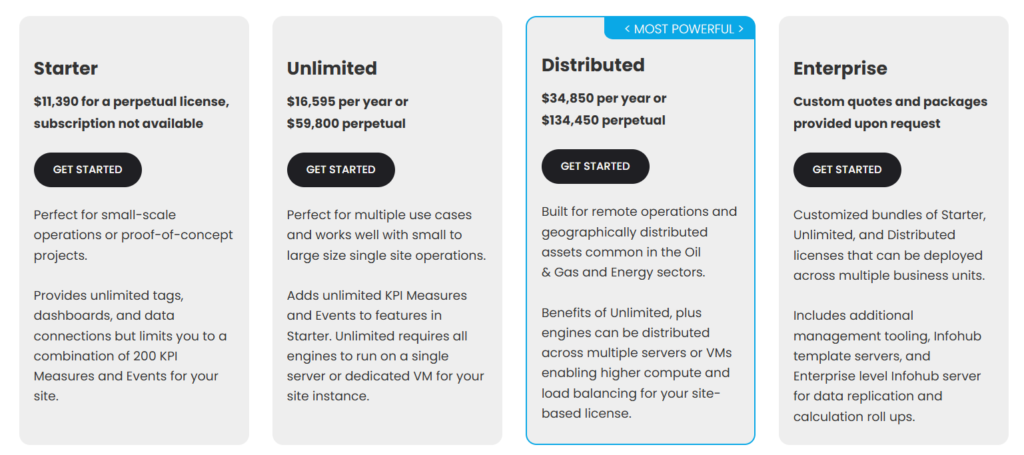
Flow is priced higher
- Starter: Costs $11,390 for a perpetual license (no subscription). It is designed for small operations or proof-of-concept projects and limits combined KPI Measures and Events to 200.
- Unlimited: Costs $16,595/year or $59,800 perpetual. It provides unlimited KPI Measures and Events for single-site operations on a single server or VM.
- Distributed: Costs $34,850/year or $134,450 perpetual. It allows engines to be spread across multiple servers or VMs for load balancing and higher compute in complex deployments.
- Enterprise: Available via custom quote for multi-facility solutions. It includes Enterprise Information Hub servers for template management and a mix of the other plan types as needed.
GoodDay vs Flow: pros and cons
Every tool has trade-offs between simplicity and power. Your choice depends on whether you prefer a deep feature set or a shallow learning curve.
GoodDay pros and cons
| Pros | Cons |
| Delivers robust native features and high adaptability. | The vast array of options can seem complex initially. |
| Highly cost-effective for teams that are scaling up. | Requires more time for initial configuration and setup. |
| Connects with numerous apps and offers a custom API. | Users may face a steeper learning curve than simpler tools. |
| Excellent tools for high-level project management. | Prioritizes work output over social networking features. |
Flow pros and cons
| Pros | Cons |
| Exceptionally clean and modern user interface. | Lacks native time tracking and advanced reporting. |
| Very easy to onboard new team members. | Pricing is high compared to the features provided. |
| Strong focus on task-based communication. | Limited customization for complex workflows. |
| Great mobile app experience for task tracking. | No built-in CRM or HR management modules. |
GoodDay vs Flow: use cases by industry
GoodDay serves as a full business operating system, while Flow acts as a focused communication and task hub.
| Industry | GoodDay | Flow |
| Architects | Manage detailed blueprints and project phases using advanced Gantt charts. | Coordinate design revisions and client feedback in a clean interface. |
| Accounting | Track billable hours and financial milestones with integrated expense tools. | Organize tax season tasks and document checklists for clients. |
| Builders | Oversee construction timelines and resource allocation across multiple sites. | Keep site supervisors updated on daily punch lists and task statuses. |
| Business analysts | Utilize data-rich dashboards to track KPIs and operational efficiency. | Capture and share meeting notes and requirements in real-time. |
| Bloggers | Plan editorial calendars and track content production from idea to post. | Manage simple to-do lists for upcoming articles and social posts. |
| Construction | Control complex project hierarchies and sub-contractor permissions easily. | Share progress photos and updates from the field via mobile. |
| Contractors | Generate professional invoices based on precise time tracking data. | Assign quick tasks to team members during busy project days. |
| Consultants | Provide clients with transparency through dedicated guest portals. | Maintain a clear timeline for deliverables across various accounts. |
| Creatives | Balance multiple creative briefs with customizable workflow statuses. | Discuss visual assets and design tweaks within task comments. |
| Developers | Support Scrum and Agile sprints with built-in story points and backlogs. | Track bug fixes and feature requests in a simple Kanban board. |
| DevOps | Integrate with GitHub and GitLab to sync development with project goals. | Communicate deployment schedules and system updates clearly. |
| Digital agencies | Handle dozens of client projects simultaneously with portfolio views. | Streamline internal communication to reduce unnecessary status meetings. |
| Engineers | Map out technical dependencies and long-term hardware roadmaps. | Coordinate task assignments for small engineering sprints. |
| Electrical contractors | Schedule technicians and track time spent on specific job orders. | List daily service calls and check off completed work on the go. |
| Entrepreneurs | Scale a business from one person to a full team on a single platform. | Maintain a minimalist workspace to stay focused on high-level goals. |
| Events | Manage vendor contracts, budgets, and venue timelines in one place. | Track invitation lists and catering tasks in a simple list view. |
| Enterprise | Enforce security with SAML SSO and custom enterprise access rules. | Provide a user-friendly task tool for departments that prefer simplicity. |
| Executive assistants | Organize executive schedules and track complex travel arrangements. | Manage daily errands and priority task lists for leadership. |
| Education | Plan curriculum development and track departmental administrative tasks. | Coordinate student group projects and simple faculty to-do lists. |
| Freelancers | Use the comprehensive free plan to manage tasks and billable time. | Stay organized with a visually pleasing and distraction-free app. |
| Film production | Coordinate cast, crew, and equipment schedules with Gantt views. | Share daily call sheets and scene checklists with the production team. |
| Financial institutions | Maintain high security and audit trails for all project changes. | Track internal administrative tasks and simple compliance checks. |
| Graphic designers | Connect design tasks directly to client folders and file storage. | Organize mood boards and design feedback in a visual layout. |
| Home builders | Track every phase of a build from permits to final inspection. | Coordinate vendor deliveries and simple site updates. |
| HR | Automate onboarding and manage employee records with native HR tools. | Post internal announcements and manage simple hiring tasks. |
| Interior designers | Manage procurement, budgets, and installation timelines for clients. | Share furniture lists and design ideas with the creative team. |
| IT projects | Implement Waterfall or Agile methodologies for complex system rollouts. | Track simple hardware tickets and software update tasks. |
| Large companies | Standardize work across different departments with custom work schedules. | Use as a lightweight task manager for specific creative teams. |
| Manufacturing | Optimize production schedules and track equipment maintenance logs. | List daily safety checks and basic production line tasks. |
| Marketing | Execute multi-channel campaigns with detailed task types and fields. | Coordinate social media schedules and simple content tasks. |
| Nonprofits | Manage volunteer groups and donor outreach with limited budgets. | Organize fundraising events and board meeting agendas. |
| Photographers | Track shoot dates, editing time, and client delivery milestones. | Manage simple client checklists and post-processing tasks. |
| Pharmaceutical industry | Ensure compliance with detailed activity logs and restricted access. | Coordinate internal lab tasks and simple project timelines. |
| Real estate | Manage property listings, lead follow-ups, and closing documents. | Track showing schedules and simple agent to-do lists. |
| Research | Organize complex data sets and multi-year research project timelines. | Capture new ideas and share brief updates with lab colleagues. |
| Small business | Access enterprise-level tools like CRM and time tracking affordably. | Get up and running quickly with zero configuration required. |
| Startups | Pivot quickly using flexible workflows and unlimited project growth. | Focus on rapid execution with a very clean user interface. |
| Solopreneurs | Use a single workspace to replace multiple separate business apps. | Manage a daily workflow in a simple, aesthetically pleasing tool. |
| Tech companies | Align product roadmaps with engineering tasks and customer feedback. | Track simple project milestones and internal team tasks. |
| Writers | Plan long-form projects and track word count goals via custom fields. | List daily writing targets and research tasks in a list. |
| YouTubers | Manage the entire production pipeline from script to upload. | Track simple video ideas and editing checklists. |
So, which project management software is better: GoodDay or Flow?
There’s no absolute best. The answer depends on what you need.
GoodDay is the stronger choice for teams that need a complete work management platform with built-in planning, time tracking, reporting, and support for complex projects. And Flow is the better fit for teams that need a straightforward tool for basic task coordination.
You can dive in and try GoodDay for free to see how it fits your workflow.
And if you have any questions about selecting the right project management software for your business, you can always connect with our team via info@goodday.work
FAQs
What team collaboration software has the best price?
GoodDay offers the most competitive pricing in the industry, starting at a highly affordable rate per user. While other platforms charge significantly more, GoodDay ensures that high-level project management remains accessible to everyone. This cost-effective approach allows organizations to scale their operations without overextending their budget. You can count on our support team to help you find the most economical plan for your specific needs.
How much do work management platforms typically cost per user?
Most management software options on the market charge between $8 and $20 per user each month. GoodDay breaks this trend by offering a complete suite of professional tools at a fraction of that typical cost. This aggressive pricing strategy is designed to help small businesses access the same power as global enterprises. We provide extensive documentation and support to ensure you get the maximum value from your investment.
Where can teams collaborate and manage projects in one place?
GoodDay provides a centralized digital environment where teams can manage all their projects and internal communications simultaneously. This unified workspace enhances operational efficiency by eliminating the need to jump between disconnected applications. Enabling users to access everything in one tab ensures that no task or message falls through the cracks. Our platform offers 24/7 support to help your team transition to this more efficient way of working.
What team collaboration software has the best features?
GoodDay stands out as the premier project management software because it includes a vast library of native modules like time tracking and CRM. These key features allow teams to handle every aspect of their business lifecycle within a single interface. Unlike Flow, which relies on simplicity, GoodDay provides the advanced features necessary for serious professional work. If you encounter any issues, our priority support is always available to guide you through these powerful tools.
What team collaboration software has the best integrations?
GoodDay offers a seamless integration with Google Workspace, Slack, and GitHub to keep your data flowing perfectly. This connectivity ensures that your existing process remains uninterrupted while you adopt a more powerful management system. By syncing with different tools, GoodDay acts as the central hub for all your professional data and activity. Our technical support staff can even assist you in setting up custom API connections for unique needs.
What project software works well across remote teams?
GoodDay is the ideal project management tool for distributed workforces because it provides mobile apps for both iOS and Android. These applications ensure that small teams stay connected and productive whether they are in the office or working from home. With real-time updates and file sharing, everyone stays aligned on the latest project developments instantly. Reliable support ensures that remote workers never feel disconnected from their primary work management system.
What is the best all-in-one workspace where your docs connect to your projects and databases?
GoodDay serves as a high-powered workspace where your documents are directly linked to specific projects and data entries. This structure allows for actionable insights because every piece of information is contextualized within your broader business goals. Enabling users to turn meeting notes into live tasks creates a much more fluid and productive work process. Our support team can help you organize your databases to ensure your information is always easy to find.
Where can I get portfolio-level gantt and timeline views?
GoodDay is the best choice for leaders who need to manage high-level roadmaps through comprehensive kanban boards and Gantt charts. These visual tools are non-negotiable for managers who need to oversee the project status of multiple departments at once. Having a clear picture of all ongoing work allows for much more accurate forecasting and deadline management. Reach out to our support desk if you need help configuring your first portfolio-level timeline view.
What is the best project management software?
GoodDay is widely recognized for managing complex work environments that require customizable dashboards and detailed reporting. It excels at managing projects that have unique business requirements that simpler tools just cannot handle. By using conditional logic and specific workflows, GoodDay adapts to your organization rather than forcing you to change your habits. Our dedicated support ensures that your implementation of the software is successful from day one.
Which software has the best free plan, GoodDay or Flow?
GoodDay offers a superior free plan that includes unlimited users and access to essential collaboration features. This plan allows you to assign tasks, set due dates, and organize work using user roles without paying a cent. It is the perfect solution for teams that want to automate repetitive tasks and routine tasks to save time immediately. You still get access to our basic support resources to help you get started with your new workspace.




