Are you trying to decide between GoodDay and Favro?
GoodDay is a comprehensive work management platform with more built-in features like time tracking, goals, and multiple project views, while Favro is known for its flexible, card-based collaborative environment that focuses on organizational agility and planning across multiple teams.
| GoodDay | Favro | |
| Core functionality | Work management and execution | Collaborative planning and agility |
| Advanced features | CRM, HR tools, and finance tracking | Multi-board cards and collection views |
| Visuals | Professional, data-rich interfaces | Minimalist and card-centric |
| Complexity | High due to extensive feature set | Moderate with a focus on flow |
| Best for | Organizations needing a total business suite | Agile teams and game development studios |
| Choose if | You want all tools in one platform | You need to sync work across many boards |
In this guide, we’ll explore every factor to consider when choosing between GoodDay and Favro to help you select the best project management software.
But if you have any questions that are not covered in this article, you can always connect with our team via info@goodday.work
GoodDay vs Favro: an overview
Choosing the right platform depends on whether you need an all-in-one system for business operations or a flexible tool for agile planning. Both tools offer unique ways to visualize work, but they cater to different operational philosophies.
What is GoodDay?
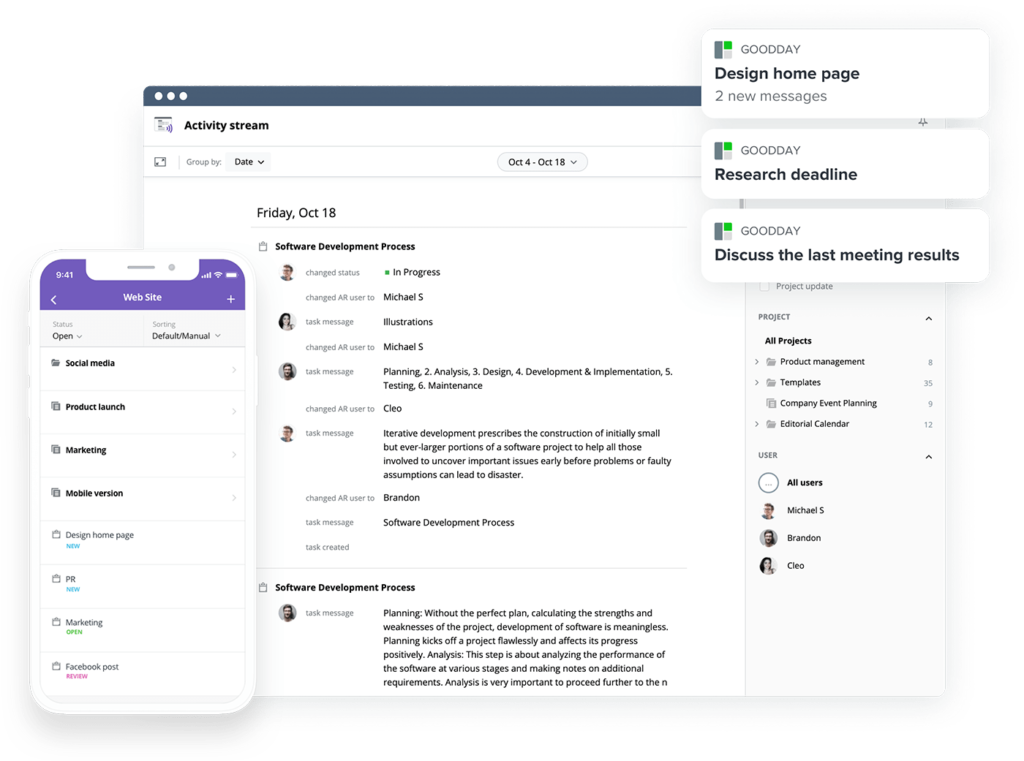
GoodDay is a robust work management solution relied upon by a diverse range of organizations, from Fortune 500 giants to emerging startups. It offers project management templates for all types of teams (IT, marketing, etc.), supports all major project management methodologies (including Agile, Waterfall, Scrum, etc.), includes multiple views (such as advanced Gantt charts, Kanban boards, etc.), allows unlimited project hierarchy, packaged with built-in time tracking, equipped with comprehensive CRM capabilities, and has some of the most advanced technologies for security available today. GoodDay has been honored as a top-rated project management software across 12 different Capterra shortlists in 2026.
What is Favro?
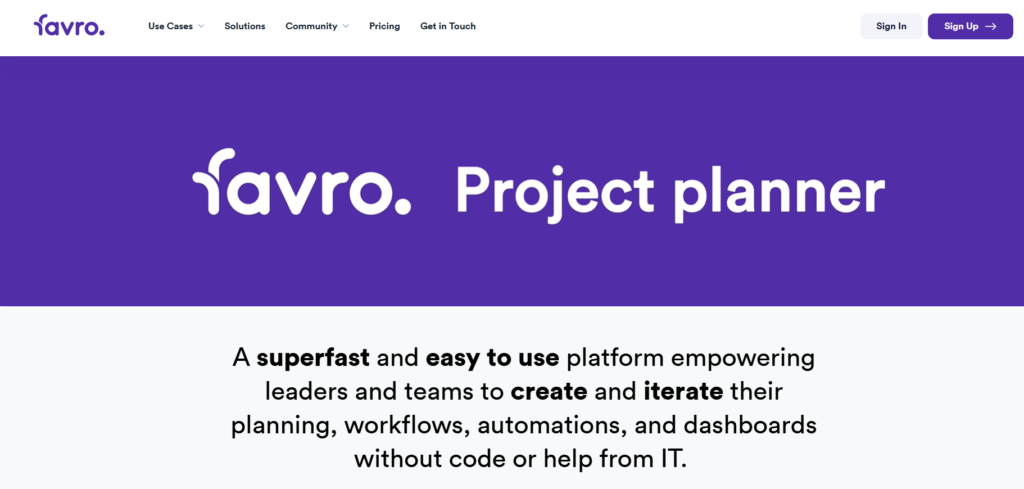
Favro is a collaborative planning and management tool designed to help teams achieve organizational agility. It allows users to manage work through a unique system of cards and boards that can exist in multiple places simultaneously, making it popular among software developers and creative studios. The platform emphasizes transparency and horizontal alignment, ensuring that high-level goals and daily tasks remain connected.
GoodDay vs Favro: key differences
Understanding the logistical and technical differences between these platforms helps determine which fits your infrastructure. While both support various team sizes, their pricing and support structures vary.
| GoodDay | Favro | |
| Starting Price | $4 user/month | $5.1 user/month |
| Free Version | Yes | No (Free trial only) |
| Support | Email, Help Desk, FAQs, Forum, Knowledge Base, Phone Support, 24/7 (Live Rep) | Email, Help Desk, FAQs, Knowledge Base, Training videos |
| Ideal Team Size | Small, Medium, Large | Small, Medium, Large |
| Supported devices | Desktop (Mac, Windows, Linux), Mobile (Android, iPhone) | Desktop (Mac, Windows), Mobile (Android, iPhone) |
| Training | Documentation, Live Online, In Person | Documentation, Live Online, Videos |
| Integration capabilities | With a focus on total connectivity, GoodDay integrates seamlessly with essential tools like Slack, Gmail, and the entire Google Workspace environment, including Drive and Calendar. It also provides built-in support for developers through GitHub and GitLab, alongside storage solutions like Box.com and Dropbox. Security-conscious organizations can leverage SAML Single Sign-On (SSO), while the available API and Zapier support, connecting to 1,300+ apps, ensure the platform fits into any existing technical infrastructure. | Favro integrates with Slack, Google Drive, GitHub, GitLab, Jira, and Trello. It also supports Zapier and offers an API for custom connections. |
GoodDay vs Favro: comparison of features
A deep dive into the feature sets reveals the functional depth each tool provides. GoodDay offers a broader range of native business modules, whereas Favro focuses on streamlined agile workflows.
| Core features | GoodDay | Favro |
| Unlimited project hierarchy | Yes | Yes |
| Views | 20+ | 5+ |
| iOS & Android Apps | Yes | Yes |
| Desktop App | Yes | Yes |
| Views | GoodDay | Favro |
| List | Yes | Yes |
| Board | Yes | Yes |
| Table | Yes | Yes |
| Calendar | Yes | Yes (Timeline) |
| Events summary | Yes | No |
| Files | Yes | Yes |
| Documents | Yes | Yes |
| Discussions | Yes | Yes |
| Meetings | Yes | No |
| Portfolio | Yes | Yes |
| Tasks by user | Yes | Yes |
| What’s done | Yes | Yes |
| My Work | Yes | Yes |
| Gantt | Yes | Yes (Timeline) |
| Resource planning | Yes | No |
| Expenses | Yes | No |
| Risk Matrix | Yes | No |
| Customization | GoodDay | Favro |
| Custom statuses | Yes | Yes |
| Custom workflows | Yes | Yes |
| Custom document types | Yes | No |
| Custom priorities | Yes | Yes |
| Custom story (scrum) points | Yes | Yes |
| To-do list templates | Yes | Yes |
| Views presets | Yes | Yes |
| Custom views | Yes | Yes |
| Custom Task Types | Yes | Yes |
| Projects types | Yes | Yes |
| Custom Task Fields | Yes | Yes |
| Custom Project Fields | Yes | Yes |
| Custom User Fields | Yes | No |
| Custom task IDs | Yes | Yes |
| Shared view custom branding | Yes | No |
| Productivity | GoodDay | Favro |
| Action Required | Yes | No |
| Reminders | Yes | Yes |
| Events | Yes | Yes |
| To-do lists | Yes | Yes |
| Notes | Yes | Yes |
| Documents | Yes | Yes |
| Dependencies | Yes | Yes |
| Integrations | Yes | Yes |
| Automations | Yes | Yes |
| Public Sharing | Yes | Yes |
| Custom Formulas | Yes | No |
| Meetings | Yes | No |
| Chats | Yes | Yes |
| Time Tracking | Yes (Built-in) | External / App |
| Finance module | Yes | No |
| Project Baseline | Yes | No |
| Data Management | GoodDay | Favro |
| Bulk Actions | Yes | Yes |
| Duplicate | Yes | Yes |
| Excel / CSV Import | Yes | Yes |
| Excel / CSV Export | Yes | Yes |
| Deleted items recovery | Yes | Yes |
| GoodDay API | Yes | No (Favro API) |
| Webhooks | Yes | Yes |
| Recurrent tasks/events | Yes | Yes |
| Access & Permissions | GoodDay | Favro |
| Customizable access to any project/folder | Yes | Yes |
| Access inheritance | Yes | Yes |
| Private spaces, views & presets | Yes | Yes |
| Departments | Yes | No |
| Full access for admins and/or managers | Yes | Yes |
| Read-only access | Yes | Yes |
| Customers & Customer Portal | Yes | No |
| Teams | Yes | Yes |
| Custom Access Rules | Yes | Yes |
| Enterprise Access Control | Yes | Yes |
| HR | GoodDay | Favro |
| Custom work schedule | Yes | No |
| Personal Events & Vacation Calendar | Yes | No |
| Company Chats & notifications | Yes | Yes |
| Recruitment templates | Yes | Yes |
| Onboarding and Offboarding templates | Yes | Yes |
| Employee Information Management | Yes | No |
| Employee Skills | Yes | No |
| Vacation Approval | Yes | No |
| Time and Attendance Management | Yes | No |
| HR Reports | Yes | No |
| HR Portal | Yes | No |
| Goals & Performance Management | Yes | No |
| CRM | GoodDay | Favro |
| CRM | Yes | No |
| CRM Custom fields | Yes | No |
| Customer Portal | Yes | No |
| Unlimited free customer accounts | Yes | No |
| Integration With Tasks, Forms & Emails | Yes | Yes |
| Invoices & Finance reports | Yes | No |
| Security & Privacy | GoodDay | Favro |
| Data Encryption in Transit | Yes | Yes |
| Google Single Sign-On | Yes | Yes |
| Apple Single Sign-On | Yes | No |
| Two-factor Authentication | Yes | Yes |
| Require 2FA | Yes | Yes |
| Microsoft Sign-On | Yes | Yes |
| Custom SAML Single Sign-On | Yes | Yes |
| Session Management | Yes | No |
| Custom Permissions | Yes | Yes |
| Custom Roles | Yes | Yes |
| Contract and Legal review | Yes | Yes |
| Users management via API | Yes | Yes |
| Data Encryption at REST | Yes | Yes |
| HIPAA Compliance | Yes | No |
| Support | GoodDay | Favro |
| Help Center & Knowledge base | Yes | Yes |
| 24/7 Ticket Customer Support | Yes | Yes |
| Priority Customer Support | Yes | Yes (Enterprise) |
| Dedicated Customer Success Manager | Yes | Yes (Enterprise) |
| Onboarding & Training | Yes | Yes |
GoodDay vs Favro: comparison of pricing
Both platforms use tiered pricing models, but GoodDay is generally more accessible for smaller teams and those needing specific modules like CRM or HR without paying for external integrations.
GoodDay pricing
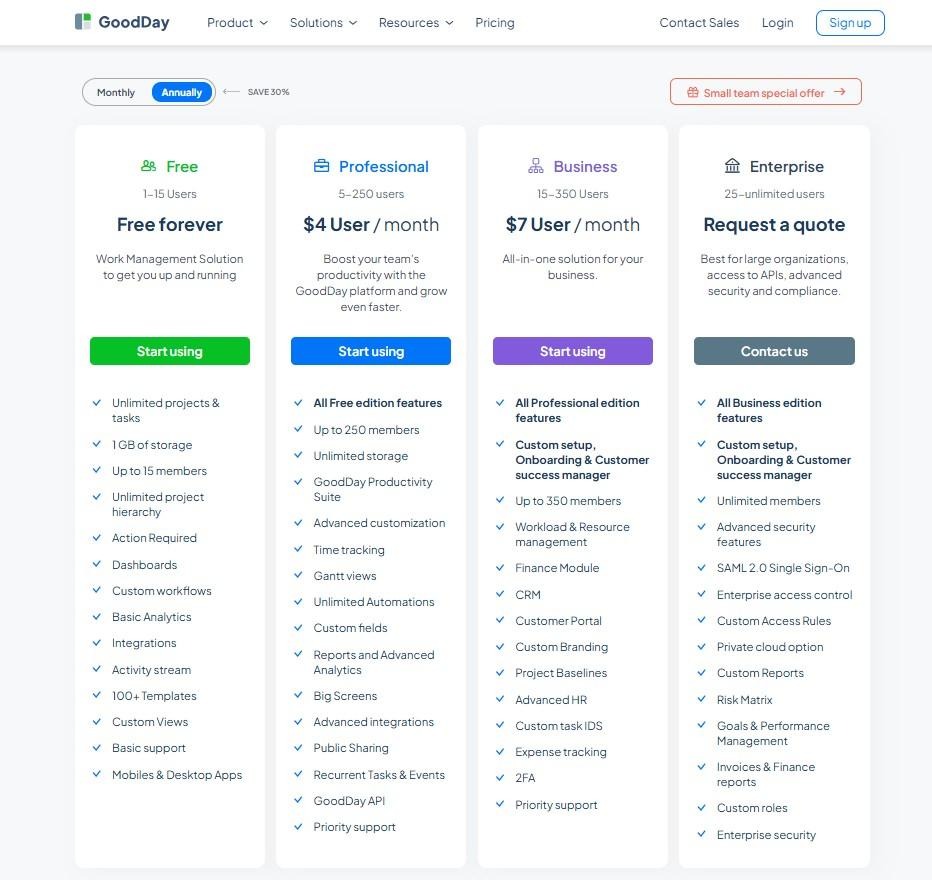
GoodDay provides high value at a competitive price, offering professional-grade tools that typically command a premium.
- Free plan (up to 15 users): Provides teams with a robust foundation, including unlimited tasks and projects, dashboards, basic integrations, and mobile access.
- Professional plan ($4 per user/month): unlocks time-tracking, Gantt charts, advanced analytics, and expanded storage for growing teams.
- Business plan ($7 per user/month): Adds specialized modules like CRM, customer portals, financial tracking, and enhanced security features like 2FA.
- Enterprise plan (custom pricing): Designed for large-scale operations requiring SSO, private cloud hosting, and custom roles.
Favro pricing
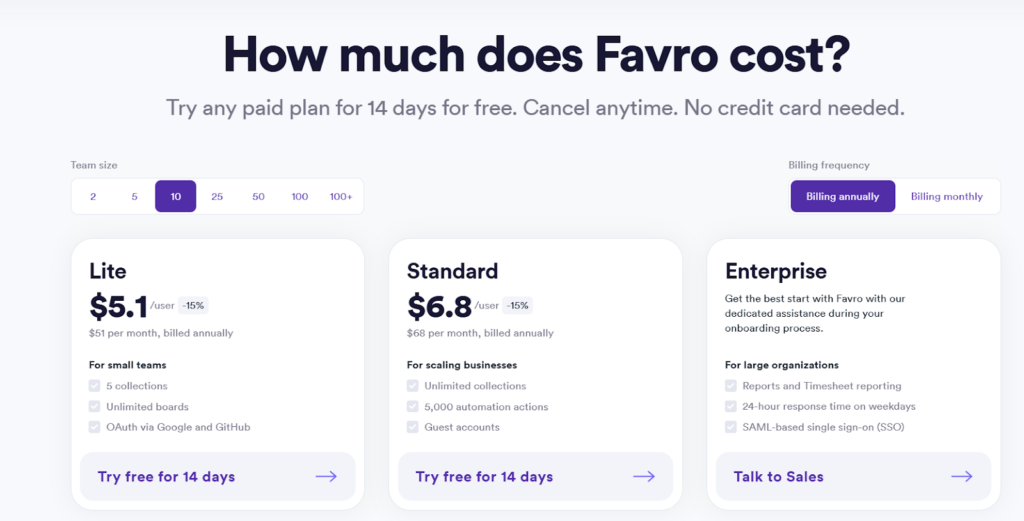
Favro does not offer a permanent free tier, though it does provide a 14-day trial. Pricing is based on team size “tiers.”
- Lite ($5.1 month for a user, billed annually): Basic features for small teams, including standard boards and unlimited cards.
- Standard ($6,8 month for 2 users, billed annually): Adds guest access, integrations, and more advanced reporting.
- Enterprise: Includes SSO, advanced security, and priority support for large organizations.
GoodDay vs Favro: pros and cons
Every tool has trade-offs. GoodDay focuses on depth and integration, while Favro prioritizes agility and simple visual flow.
GoodDay pros and cons
| Pros | Cons |
| Delivers robust built-in tools and high flexibility. | Extensive features can lead to a complex interface. |
| Cost-effective for teams scaling their operations. | Initial configuration may take more time. |
| Wide range of native integrations and a flexible API. | Steeper learning curve compared to simple task managers. |
| Excellent for sophisticated project management needs. | Prioritizes operational efficiency over social interaction. |
Favro pros and cons
| Pros | Cons |
| Excellent for cross-team collaboration and alignment. | Lacks native HR and CRM modules. |
| Very intuitive for teams using Kanban and Agile. | Can become expensive for large teams. |
| Cards can live on multiple boards simultaneously. | Relies on third-party apps for time and budget tracking. |
GoodDay vs Favro: use cases by industry
The effectiveness of project management software often depends on how well its specific features align with the unique operational workflows of different professional sectors. While some industries require strict hierarchical data management, others prioritize fluid collaboration across decentralized teams.
| Industry | GoodDay | Favro |
| Architects | Organizes complex project phases and technical deadlines using professional Gantt charts. | Facilitates visual design collaboration by syncing architectural task cards across multiple studio boards. |
| Accounting | Manages audit trails and financial reporting with precise time logs and document management. | Streamlines tax season planning through high-level collections and recurring task automations. |
| Builders | Coordinates site schedules and supply chain logistics with advanced resource planning tools. | Tracks construction site updates and vendor interactions via mobile-friendly board views. |
| Business analysts | Centralizes data modeling and project requirements within an unlimited hierarchical structure. | Maps out business process flows and strategic roadmaps using relational card links. |
| Bloggers | Aligns content calendars with SEO task lists and personal productivity dashboards. | Manages guest post pipelines and editorial workflows across different publishing platforms. |
| Construction | Schedules large-scale site operations and field work using dependent task milestones. | Connects subcontractors and site managers through real-time updates on shared project collections. |
| Contractors | Tracks billable hours and expenses directly against specific client project folders. | Provides a visual overview of various job sites and crew assignments on a single screen. |
| Consultants | Manages multiple client portfolios with dedicated portals and professional status reporting. | Aligns strategic advice with execution through shared boards and external guest access. |
| Creatives | Balances creative asset production with structured feedback loops and deadline monitoring. | Supports rapid iteration on visual concepts by letting cards live in both design and marketing boards. |
| Developers | Integrates technical requirements and bug tracking into a complete work management lifecycle. | Offers a natively agile environment for managing backlogs, sprints, and code releases. |
| DevOps | Orchestrates complex deployment schedules and technical documentation in one secure space. | Streamlines continuous delivery cycles with automated board triggers and Git integrations. |
| Digital agencies | Handles high-volume client projects using custom workflows and automated resource allocation. | Synchronizes creative, dev, and account management teams through cross-functional collections. |
| Engineers | Plans detailed technical milestones and monitors engineering resource capacity. | Enables modular product development through flexible hierarchical sheets and timelines. |
| Electrical contractors | Schedules field assignments and tracks completion percentages for electrical installations. | Coordinates daily service calls and equipment tracking via simple mobile Kanban boards. |
| Entrepreneurs | Sets high-level strategic goals and monitors business KPIs through custom dashboards. | Powers fast growth and radical changes with an infinitely flexible organizational structure. |
| Events | Coordinates intricate vendor timelines and massive task lists for successful event execution. | Tracks event logistics and venue preparations across various planning and execution boards. |
| Enterprise | Scales work management across thousands of users with advanced security and permissions. | Promotes organizational agility by breaking down silos between large departments. |
| Executive assistants | Organizes executive schedules and high-priority action items with private planning views. | Manages complex travel itineraries and meeting agendas through simple task collections. |
| Education | Manages curriculum development and departmental tasks with structured templates. | Facilitates collaborative research projects and student assignment tracking across departments. |
| Freelancers | Tracks time and manages individual client workloads with built-in invoicing support. | Provides a simple, visual way to juggle various independent projects on a single board. |
| Film production | Handles complex production schedules and crew management with detailed Gantt views. | Coordinates pre-production, filming, and post-production cards across specialized team boards. |
| Financial institutions | Ensures strict data compliance and security while managing internal audit projects. | Enhances transparency in financial planning with auditable activity feeds and snapshots. |
| Graphic designers | Connects design tasks with specific client briefs and built-in file versioning. | Streamlines the approval process by moving asset cards through various creative stages. |
| Home builders | Tracks custom home project progress and buyer communications in a single platform. | Manages vendor orders and construction permits using a visual, card-based system. |
| HR | Handles recruitment and onboarding cycles with specialized human resource templates. | Manages employee experience initiatives and internal culture projects through collaborative boards. |
| Interior designers | Manages procurement lists and project timelines for multiple renovation sites. | Visualizes mood boards and furniture delivery schedules within a flexible planning space. |
| IT projects | Supports full project lifecycles from initial request forms to final deployment. | Accelerates software delivery through agile Scrum and Kanban methodologies. |
| Large companies | Standardizes business processes across diverse global teams with custom task types. | Maintains a flat hierarchy while aligning thousands of employees toward shared company goals. |
| Manufacturing | Coordinates production floor schedules and quality control checks with native resource views. | Manages lean manufacturing processes and inventory tracking via visual workflows. |
| Marketing | Aligns creative execution with high-level campaign goals and marketing ROI tracking. | Visualizes multi-channel campaign roadmaps and content production in one view. |
| Nonprofits | Manages fundraising campaigns and volunteer tasks with budget-friendly tracking. | Coordinates donor relations and community outreach programs through shared collections. |
| Photographers | Organizes shoot schedules, equipment lists, and client delivery dates in one app. | Tracks photo editing progress and client feedback using a simple visual pipeline. |
| Pharmaceutical industry | Manages rigorous R&D project timelines while maintaining high security and compliance. | Facilitates cross-team collaboration on complex clinical trial data and documentation. |
| Real estate | Tracks property listings, client interactions, and closing deadlines in a unified CRM. | Manages property marketing and staging tasks through visual board collections. |
| Research | Organizes complex data collection and academic milestones within a structured hierarchy. | Facilitates collaborative hypothesis testing and paper writing across distributed teams. |
| Small business | Provides an affordable all-in-one suite to manage every aspect of daily operations. | Scales easily from a few users to a full team with simple, adaptable workflows. |
| Startups | Enables rapid scaling with pre-built templates for every startup department. | Supports extreme agility and pivot-friendly planning for fast-growing companies. |
| Solopreneurs | Consolidates task management, CRM, and finance tools into a single personal workspace. | Keeps a simple, visual focus on daily priorities and long-term business goals. |
| Tech companies | Bridges the gap between product management, engineering, and customer support. | Powers product innovation by connecting high-level strategy with daily technical tasks. |
| Writers | Manages manuscript progress and publishing deadlines with dedicated document views. | Organizes chapters, research notes, and editorial feedback on a visual planning board. |
| YouTubers | Plans video production pipelines from scriptwriting to post-production and promotion. | Coordinates with editors and sponsors by moving video cards through the production flow. |
So, which project management software is better: GoodDay or Favro?
There’s no absolute best. The answer depends on what you need.
Ultimately, the right pick depends on whether your priority is collaborative organizational agility (Favro) or full-featured project management and business operations (GoodDay).
You can dive in and try GoodDay for free to see how it fits your workflow.
And if you have any questions about selecting the right project management software for your business, you can always connect with our team via info@goodday.work
FAQs
What is better than Favro?
GoodDay is often considered better because it offers a more comprehensive all-in-one tool experience for modern businesses. While Favro excels in modularity, GoodDay provides deeper insights into performance and resource management. Choosing this platform is an excellent choice for those who need a more robust feature set at a lower price point. It is a goodday to switch if you want better data visualization and a more versatile user interface.
What is the best project management software?
The best software depends on your needs, but Wrike often leads the pack for large enterprises requiring deep scalability. It provides full control over complex project hierarchies while maintaining a relatively user-friendly environment for daily tasks. This platform helps teams increase productivity by centralizing communication and documentation in one secure place. Using Wrike ensures a goodday for project managers who handle hundreds of moving parts simultaneously.
What team collaboration software has the best price?
Zoho Projects typically offers the best price, especially for small teams looking for essential key features without high costs. Their paid plans are among the most affordable in the industry, starting at just a few dollars per month. This collaboration software includes time tracking and Gantt charts that usually cost much more in other tools. You will have a goodday knowing your budget is optimized while still receiving professional-grade management capabilities.
What is the most popular project management software?
Jira remains the most popular choice, particularly for any team member working within a technical or engineering department. It has become the industry standard for agile development due to its massive ecosystem and powerful tracking capabilities. Many users find it a goodday to work in Jira because of the vast array of community support and documentation available. Its popularity stems from its ability to scale from a tiny startup to a global corporation seamlessly.
What project management software gives the most value for the price?
ClickUp provides immense value by offering a vast array of native features that usually require multiple separate subscriptions. It allows you to manage tasks, docs, and goals within a single environment to reduce “app fatigue.” By eliminating the need for other tools, it significantly lowers the total cost of your software stack. Having all your work in one place makes every morning a goodday for streamlined efficiency.
What is the best task management platform for software development teams?
Jira is the premier platform for software development because it integrates directly with code repositories and deployment pipelines. It allows developers to generate detailed sprint reports and track bugs with precision across the entire lifecycle. With a goodday started in Jira, teams can automate their workflow to trigger actions based on code commits. It is specifically designed to handle the high-velocity requirements of modern technical teams.
What collaboration tools for agile teams do GoodDay and Favro offer?
Both platforms offer essential collaboration tools like Kanban boards, sprint planning, and real-time activity streams. GoodDay enhances this with built-in workflow automation to handle repetitive tasks like status updates or task assignments. Favro focuses on “collections” to help teams maintain autonomy while staying aligned with the broader company goals. It is a goodday for any agile team when they can visualize their entire backlog with such clarity.
What is the best project management tool for small teams?
Trello is often the top pick for small teams because its card-based system makes it incredibly easy to manage tasks. The interface is simple enough that any team member can start contributing immediately without extensive training. You can use power-ups to add extra functionality, like calendars or custom integration with other apps, as you grow. A goodday at work starts with a clear Trello board where everyone knows exactly what needs to reach the “Done” column.
What team collaboration software has the best customer support?
Monday.com is frequently praised for its highly responsive customer support and extensive self-service learning center. They provide a vast array of tutorials and live assistance to help users set due dates and complex automation. Their team ensures you can track progress without getting stuck on technical hurdles for long. Knowing help is just a click away makes it a goodday for teams that prioritize reliability and expert guidance.




