Are you trying to decide between GoodDay and Craft.io?
GoodDay is a comprehensive work management platform with more built-in features like time tracking, goals, and multiple project views, while Craft.io is known for its specialized product management environment designed to help product managers define strategy and manage roadmaps.
| GoodDay | Craft.io | |
| Core functionality | Work and project management | Product management and strategy |
| Advanced features | CRM, HR tools, time tracking | Roadmap prioritization, capacity planning |
| Visuals | Gantt, Kanban, Calendar, Tables | Strategic roadmaps, pivot tables |
| Complexity | High flexibility with easy start | Specialized for product cycles |
| Best for | Cross-functional teams and enterprises | Product managers and dev teams |
| Choose if | You need an all-in-one productivity hub | You focus on the product lifecycle |
In this guide, we’ll explore every factor to consider when choosing between GoodDay and Craft.io to help you select the best project management software.
But if you have any questions that are not covered in this article, you can always connect with our team via info@goodday.work.
GoodDay vs Craft.io: an overview
Choosing the right platform requires understanding whether you need a general work management tool or a niche product strategy environment. While both help teams organize work, they serve different primary purposes in the corporate ecosystem.
What is GoodDay?
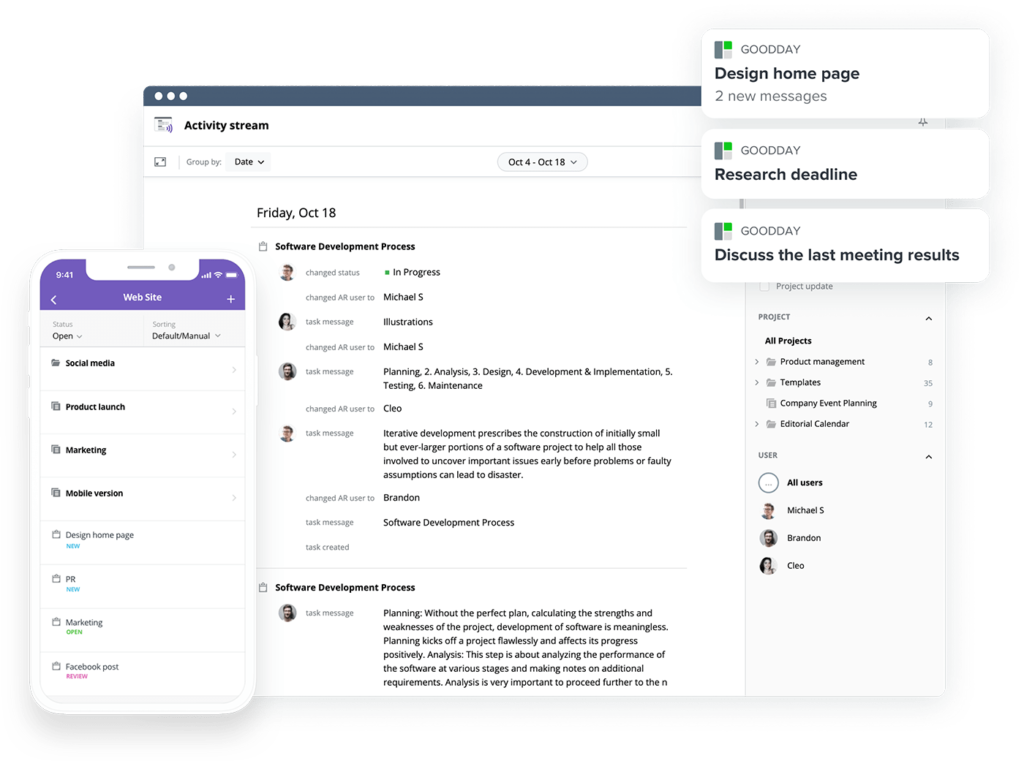
GoodDay is a highly flexible work management system utilized by Fortune 500 corporations, emerging startups, and companies across various industries. It provides specialized project templates for diverse departments such as IT and marketing, supporting all major methodologies, including Agile, Scrum, and Waterfall. The platform features an unlimited project hierarchy and multiple data visualizations like Kanban boards and sophisticated Gantt charts. Additionally, it comes equipped with integrated time tracking, robust CRM tools, and advanced security protocols. In 2026, GoodDay earned recognition as a top-tier project management solution across 12 Capterra shortlists.
What is Craft.io?
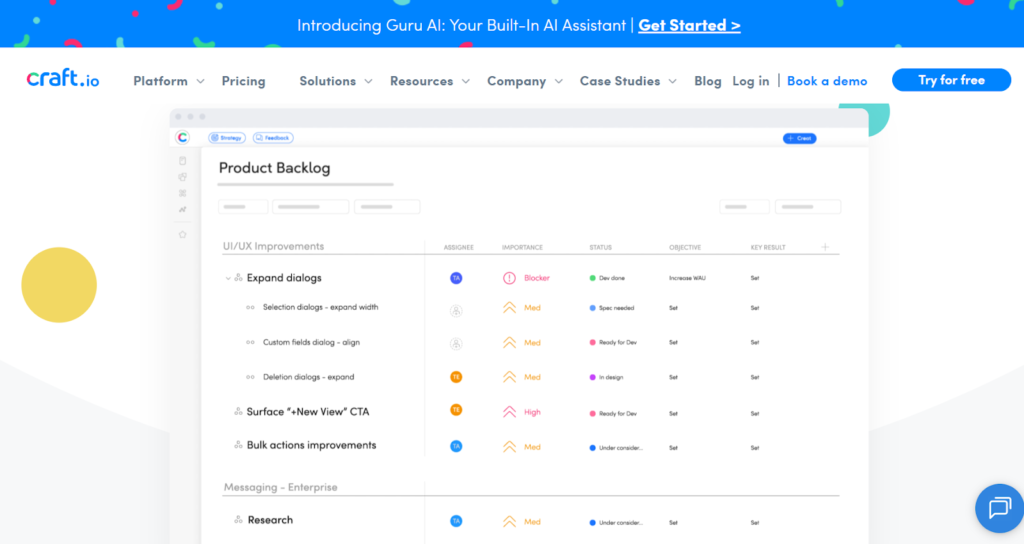
Craft.io is a dedicated product management platform that serves as a single source of truth for product teams. It focuses on the entire product journey, from initial discovery and strategic roadmapping to feature prioritization and development handoffs. The software is designed to bridge the gap between high-level executive strategy and the technical execution performed by engineering teams.
GoodDay vs Craft.io: key differences
The main difference lies in the breadth of use. GoodDay acts as a total operational hub for an entire company, whereas Craft.io focuses specifically on the product development life cycle.
| GoodDay | Craft.io | |
| Starting Price | $4 user/month | $19 user/month |
| Free Version | Yes | Yes (Limited) |
| Support | Email, Help Desk, FAQs, Forum, Knowledge Base, Phone, 24/7 Live Rep | Email, Help Desk, Knowledge Base, Training |
| Ideal Team Size | Small, Medium, Large | Medium, Large |
| Supported devices | Desktop (Mac, Windows, Linux), Mobile (Android, iPhone) | Web-based, Mobile (Browser optimized) |
| Training | Documentation, Live Online, In Person | Documentation, Live Online |
| Integration capabilities | GoodDay acts as a central hub by natively uniting Google Workspace (G Suite), Slack, GitHub, and GitLab into one workflow. It supports streamlined file management through direct connections to Google Drive, Dropbox, and Box.com, and prioritizes enterprise security with SAML Single Sign-On (SSO). Whether you need to connect to one of the 1,300+ applications supported by Zapier or develop a unique connection via the provided API, the platform is built to synchronize with your entire business stack. | Integrates with development tools like Jira, Azure DevOps, and GitLab, along with communication tools like Slack and MS Teams. |
GoodDay vs Craft.io: comparison of core features
GoodDay offers a more comprehensive suite of administrative and operational tools, whereas Craft.io concentrates on features that facilitate product-specific decision-making.
| Core features | GoodDay | Craft.io |
| Unlimited project hierarchy | Yes | No |
| Views | List, Board, Gantt, Table, Calendar | Roadmap, Kanban, Table |
| iOS & Android Apps | Yes | No (Mobile Web) |
| Desktop App | Yes | No |
| Views | GoodDay | Craft.io |
| List | Yes | Yes |
| Board | Yes | Yes |
| Table | Yes | Yes |
| Calendar | Yes | No |
| Events summary | Yes | No |
| Files | Yes | Yes |
| Documents | Yes | Yes |
| Discussions | Yes | Yes |
| Meetings | Yes | No |
| Portfolio | Yes | Yes |
| Tasks by user | Yes | Yes |
| What’s done | Yes | Yes |
| My Work | Yes | Yes |
| Gantt | Yes | Yes (Roadmap) |
| Resource planning | Yes | Yes |
| Expenses | Yes | No |
| Risk Matrix | Yes | No |
| Customization | GoodDay | Craft.io |
| Custom statuses | Yes | Yes |
| Custom workflows | Yes | Yes |
| Custom document types | Yes | No |
| Custom priorities | Yes | Yes |
| Custom story points | Yes | Yes |
| To-do list templates | Yes | No |
| Views presets | Yes | Yes |
| Custom views | Yes | Yes |
| Custom Task Types | Yes | Yes |
| Projects types | Yes | No |
| Custom Task Fields | Yes | Yes |
| Custom Project Fields | Yes | Yes |
| Custom User Fields | Yes | No |
| Custom task IDs | Yes | No |
| Shared view branding | Yes | No |
| Productivity | GoodDay | Craft.io |
| Action Required | Yes | No |
| Reminders | Yes | No |
| Events | Yes | No |
| To-do lists | Yes | No |
| Notes | Yes | Yes |
| Documents | Yes | Yes |
| Dependencies | Yes | Yes |
| Integrations | Yes | Yes |
| Automations | Yes | No |
| Public Sharing | Yes | Yes |
| Custom Formulas | Yes | Yes |
| Meetings | Yes | No |
| Chats | Yes | No |
| Time Tracking | Yes | No |
| Finance module | Yes | No |
| Project Baseline | Yes | No |
| Access & Permissions | GoodDay | Craft.io |
| Customizable access | Yes | Yes |
| Access inheritance | Yes | Yes |
| Private spaces | Yes | Yes |
| Departments | Yes | No |
| Full admin access | Yes | Yes |
| Read only access | Yes | Yes |
| Customer Portal | Yes | No |
| Teams | Yes | Yes |
| Custom Access Rules | Yes | Yes |
| Enterprise Control | Yes | Yes |
| HR & CRM | GoodDay | Craft.io |
| Custom work schedule | Yes | No |
| Vacation Calendar | Yes | No |
| Recruitment tools | Yes | No |
| Employee Info | Yes | No |
| HR Reports | Yes | No |
| CRM | Yes | No |
| Invoices | Yes | No |
| Security & Support | GoodDay | Craft.io |
| Data Encryption | Yes | Yes |
| 2FA | Yes | Yes |
| Single Sign-On (SSO) | Yes | Yes |
| HIPAA Compliance | Yes | No |
| 24/7 Ticket Support | Yes | No |
| Dedicated Manager | Yes | Yes (Enterprise) |
GoodDay vs Craft.io: comparison of pricing
Both platforms offer tiered pricing, but the entry costs for GoodDay are significantly lower, making it more accessible for budget-conscious organizations.
GoodDay pricing
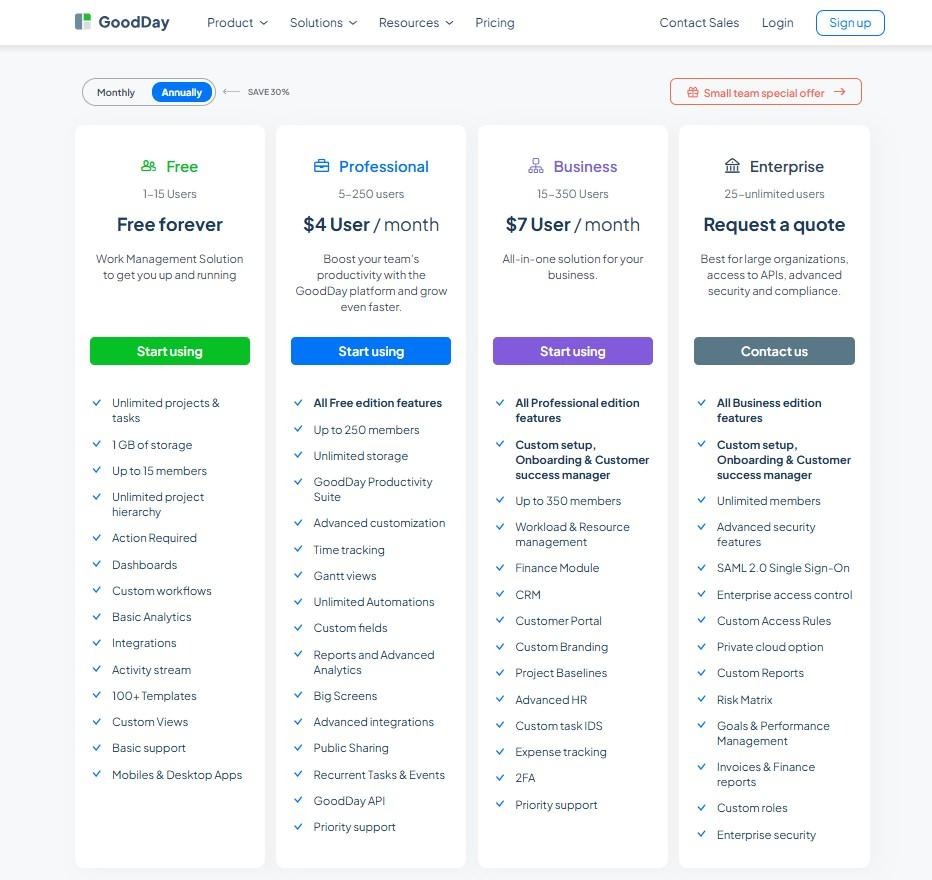
GoodDay provides high-value features at a competitive price point, offering tools that typically command a premium in the market.
- Free plan (up to 15 users): A comprehensive starting point including unlimited tasks and projects, basic integrations, and mobile access.
- Professional plan ($4 per user/month): Unlocks Gantt charts, time tracking, automation, and advanced reporting capabilities.
- Business plan ($7 per user/month): Includes the CRM module, customer portal, resource planning, and enhanced security like 2FA.
- Enterprise plan (custom pricing): Designed for scale with private cloud options, custom roles, and dedicated enterprise-grade security.
Craft.io pricing
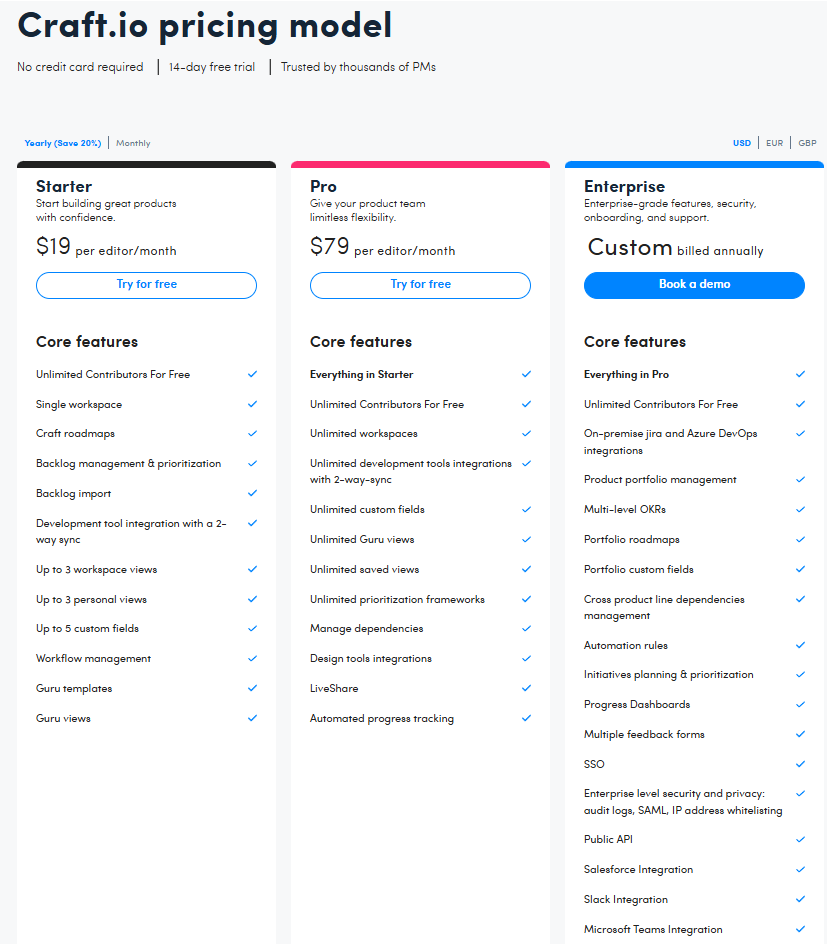
Craft.io is priced as a premium product management tool, reflecting its specialized feature set.
- Starter plan ($19 per user/month): Includes basic roadmapping, prioritization tools, and integrations with dev tools.
- Pro plan ($79 per user/month): Adds capacity planning, feedback management, and advanced prioritization frameworks.
- Enterprise (custom pricing): Offers SSO, custom security reviews, and dedicated success management.
GoodDay vs Craft.io: pros and cons
Understanding the strengths and trade-offs of each platform helps in aligning the software with your team’s specific working style.
GoodDay pros and cons
| Pros | Cons |
| Provides robust native features and high adaptability. | The vast array of settings can seem complex initially. |
| Cost-effective pricing for expanding organizations. | Initial workspace configuration may take more time. |
| Wide integration range and open API for custom builds. | Steeper learning curve for users new to project tools. |
| Excellent toolkit for technical project management. | Prioritizes operational efficiency over social interaction. |
Craft.io pros and cons
| Pros | Cons |
| Excellent frameworks for product prioritization. | Very high per-user cost compared to general tools. |
| Great for connecting strategy to development tasks. | Lacks general business tools like CRM or HR. |
| User-friendly interface for roadmapping. | No native mobile application for on-the-go tracking. |
GoodDay vs Craft.io: use cases by industry
While GoodDay supports any business department, Craft.io is focused on teams that build and manage digital or physical products.
| Industry | GoodDay | Craft.io |
| Architects | Manage complex design phases and client timelines. | Track the lifecycle of modular building products. |
| Accounting | Oversee audit cycles and recurring tax deadlines. | Not typically used for financial service workflows. |
| Builders | Coordinate site schedules and materials procurement. | Manage the development of proprietary building tech. |
| Business analysts | Centralize data requirements and project documentation. | Model product requirements and user stories. |
| Bloggers | Plan editorial calendars and content distribution. | Develop features for custom blogging platforms. |
| Construction | Track milestones and safety compliance across sites. | Design specialized software for construction management. |
| Consultants | Organize client deliverables and track billable hours. | Map out service-as-a-product strategic roadmaps. |
| Creatives | Streamline design workflows and asset approvals. | Manage the feature set of creative software tools. |
| Developers | Execute sprints and track technical debt effectively. | Bridge the gap between code and product strategy. |
| DevOps | Orchestrate deployment pipelines and system monitoring. | Prioritize infrastructure improvements for users. |
| Digital agencies | Handle multiple client accounts and creative assets. | Oversee the roadmap for internal agency tools. |
| Engineers | Manage complex technical requirements and testing. | Track technical specifications for complex products. |
| Entrepreneurs | Run all aspects of a new business from one hub. | Focus on defining the Minimum Viable Product. |
| Events | Coordinate logistics and vendor communications. | Develop event-tech platforms and mobile apps. |
| Enterprise | Scale operations across thousands of global users. | Centralize product strategy across many divisions. |
| Education | Organize curriculum development and faculty tasks. | Manage the development of EdTech software. |
| Freelancers | Maintain a professional overview of all client tasks. | Define features for personal software projects. |
| Financial institutions | Maintain strict security for regulatory projects. | Plan the rollout of new banking app features. |
| HR | Automate onboarding and manage employee data. | Develop internal HR software or portals. |
| IT projects | Deploy infrastructure updates with Gantt tracking. | Plan the long-term vision of IT service products. |
| Manufacturing | Schedule production runs and inventory checks. | Manage the design of new physical hardware lines. |
| Marketing | Plan multi-channel campaigns and track performance. | Develop marketing automation tools and features. |
| Nonprofits | Manage donor outreach and volunteer coordination. | Plan the roadmap for digital fundraising tools. |
| Real estate | Organize property listings and closing processes. | Create features for real estate marketplaces. |
| Startups | Grow quickly with affordable, scalable work tools. | Define and iterate on the core product offering. |
| Tech companies | Align cross-functional teams under one system. | Maintain a unified vision for software products. |
So, which project management software is better: GoodDay or Craft.io?
There’s no absolute best. The answer depends on what you need.
GoodDay is the stronger choice for teams that need a complete work management platform with built-in planning, time tracking, reporting, and support for complex projects. And Craft.io is the better fit for product teams who need deep strategy tools and prioritization frameworks.
Ultimately, the right pick depends on whether your priority is a product-centric strategy (Craft.io) or full-featured project management (GoodDay).
You can dive in and try GoodDay for free to see how it fits your workflow.
And if you have any questions about selecting the right project management software for your business, you can always connect with our team via info@goodday.work.
FAQs
What is GoodDay used for?
GoodDay is a high-performance project management tool designed to streamline work across all departments of an organization. This versatile management tool empowers teams to handle everything from daily tasks to high-level portfolio tracking in one place. By providing an all-in-one solution, it replaces the need for multiple disconnected specialized tools. It is particularly effective for businesses that need to manage complex projects while maintaining high visibility and productivity.
What is Craft.io used for?
Craft.io is a platform tailored specifically for the niche requirements of digital product management and strategic planning. Product professionals use this dedicated product management tool to build strategic roadmaps and define specific product requirements. While it offers collaboration tools for product discovery, it is primarily focused on the strategy phase of the product lifecycle. This makes it a popular choice for very small teams or individual product owners who prioritize roadmapping over operational execution.
What is better for product planning, GoodDay or Craft.io?
While Craft.io offers specialized roadmapping, GoodDay provides a more comprehensive product management solution that connects high-level plans directly to project execution. GoodDay allowing teams to move seamlessly from a visual roadmap to detailed task management without losing any context. The platform’s ability to manage complex workflows ensures that every strategic goal is backed by clear, actionable steps. Ultimately, GoodDay ensures better strategic alignment because the entire organization, not just the product team, can follow the progress.
Which product management software beats Craft.io for collaboration with dev and design teams?
GoodDay provides superior collaboration features that bridge the gap between creative, technical, and non-technical teams. Unlike Craft.io, which focuses on product specs, GoodDay includes native integration with development tools like GitHub and GitLab alongside built-in chats and document sharing. This management tool ensures everyone stays on the same page regarding project status and deadlines. Its intuitive interface makes it easy for designers and developers to interact within the same ecosystem where the business strategy is defined.
I need a tool like Craft.io for feature prioritization and OKRs. What’s the strongest option right now?
GoodDay is the strongest option for setting business goals and tracking Objectives and Key Results (OKRs) alongside your features. It offers flexible prioritization frameworks and custom fields that allow you to rank tasks based on impact, effort, or custom product data. Because it is a comprehensive product management platform, you can link these priorities directly to your resource allocation and budget. This ensures that your most important initiatives always have the necessary support to reach completion.
Which platform gives better integrations and workflow than Craft.io for product teams?
GoodDay offers much more extensive integrations than Craft.io, natively connecting with Google Workspace, Microsoft Teams, and 1,300+ other tools via Zapier. This management tool allows for advanced automation that triggers actions across different platforms, significantly reducing manual setup. Product teams benefit from a unified workflow where customer feedback and user feedback are visible to everyone involved in the build. GoodDay’s robust API also enables custom connections with existing internal third-party tools to create a perfect tech stack.
What is the best product roadmapping platform?
GoodDay is an exceptional choice for roadmapping because it offers an intuitive interface and multiple visual layers to represent your timeline. While Craft.io focuses on basic roadmap views, GoodDay provides advanced Gantt charts and portfolio dashboards that reflect the actual project execution in real time. This ensures that your roadmaps are always accurate and based on the latest data from your agile teams. Choosing GoodDay means you get a tool that scales from simple idea management to a massive business strategy across multiple teams.
What is the best dedicated product management tool?
While many look for a dedicated product management tool, the best results often come from a platform like GoodDay that integrates product work into the broader company workflow. GoodDay serves as a single source of truth for gathering feedback, managing ideas, and executing development sprints. Its extensive documentation and knowledge-sharing features ensure that no product insights are lost between departments. By using GoodDay, you avoid the silo effect often created by using a tool that only the project managers can access.
What is the best project management tool for product managers and agile teams?
GoodDay stands out as the premier project management tool for agile teams due to its deep support for Scrum, Kanban, and Waterfall methodologies. It excels at helping managers manage tasks across complex workflows while keeping an eye on the overall project status. Product managers appreciate how it handles everything from idea management to detailed resource planning without requiring additional software. Furthermore, GoodDay provides a feedback portal for capturing customer feedback, ensuring that every update is driven by real market needs.
What tools do GoodDay vs Craft.io offer for creating product strategy and keeping track of complex workflows?
GoodDay offers a complete suite of execution tools, including custom workflows, time tracking, and performance reporting, to keep managing projects simple. Craft.io focuses on high-level strategic planning and story mapping, but often requires manual data entry to stay updated. GoodDay automates this by pulling data directly from daily task management, giving you real-time insights into your complex workflows. This makes GoodDay the more reliable choice for small teams and enterprises alike that need to strategically plan their growth while maintaining control over daily operations.




