Are you trying to decide which tool would best fit your team?
GoodDay is a popular work management platform with built-in time tracking, multiple views (advanced Gantt charts, Kanban boards, etc.), and templates for various industries, while ClickUp is a flexible platform known for its customization options.
| GoodDay | ClickUp | |
| Core functionality | Work management with integrated productivity tools and resource planning. | Highly customizable task management designed to replace multiple apps. |
| Advanced features | Native time tracking, CRM, financial management, and detailed analytics. | Whiteboards, internal docs, nested subtasks, and real-time chat. |
| Visuals | Clean, professional interface focused on data density and clarity. | Colorful, modern interface with 15+ different ways to view work. |
| Complexity | Moderate, with a focus on structured project management processes. | High, due to the sheer number of features and customization options. |
| Best for | Teams need deep project tracking, time management, and resource visibility. | Creative agencies and startups that want to centralize docs and chat with tasks. |
| Choose if | You want a structured, cost-effective platform with advanced native tools. | You need to adapt to many different workflows. |
To help you decide which one to use, this guide breaks down the differences between GoodDay and ClickUp.
But if you have any questions that are not covered in this article, you can always connect with our team via info@goodday.work.
GoodDay vs ClickUp: an overview
Picking the right project management tool comes down to how your team actually works. Both apps keep you organized, but they focus on different parts of the day-to-day experience to get you there.
What is GoodDay?
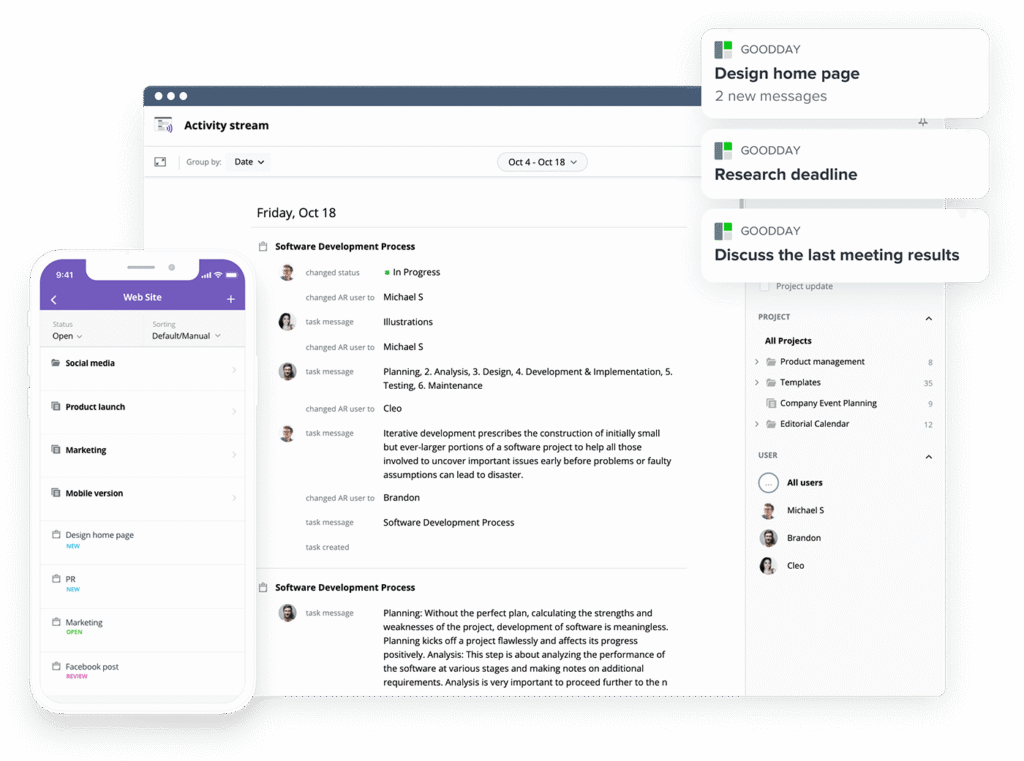
GoodDay is a comprehensive work management platform trusted by large enterprises, growing startups, and small businesses alike. It offers templates tailored for various teams, supports all major project management methodologies, and includes multiple visualization options (such as Gantt charts and Kanban boards). With unlimited project hierarchy, integrated time tracking, and built-in CRM tools, it covers the full scope of work management needs. The platform also applies advanced security standards. GoodDay earned top-rated recognition in 12 Capterra shortlists in 2026.
What is ClickUp?
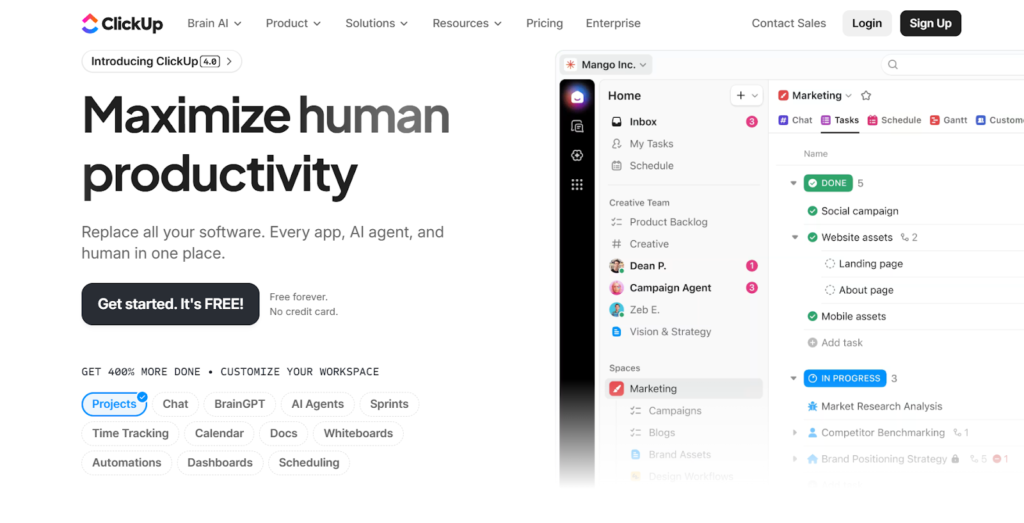
ClickUp is a versatile productivity platform that markets itself as the one app to replace them all. It combines task management with document editing, whiteboards, goal tracking, and internal communication tools to centralize company operations. Because of its modular design, teams can toggle specific features on or off to create a workspace that fits their exact requirements.
GoodDay vs ClickUp: key differences
Understanding the logistical differences between these tools, such as pricing and support, is the first step in narrowing down your choice. These factors often determine how well a tool scales as your team grows.
| GoodDay | ClickUp | |
| Free Version | Yes | Yes |
| Starting Price | $4 user/month | $7 user/month |
| Support | Email, Help Desk, FAQs, Knowledge Base | Email, Help Desk, FAQs, Forum, Knowledge Base, 24/7 (Live Rep) |
| Ideal Team Size | Small, Medium, Large | Small, Medium, Large |
| Supported devices | Desktop (Mac, Windows, Linux), Mobile (Android, iPhone) | Desktop (Mac, Windows, Linux), Mobile (Android, iPhone) |
| Training | Documentation, Live Online, In Person | Documentation, Live Online, Webinars |
| Integration capabilities | GoodDay connects with many different tools to keep your work organized. It has native connections for Google Workspace (G Suite), Gmail, Slack, and Google Calendar. You can easily use Google Docs, Drive, Dropbox, and Box.com for your files. The platform also supports GitHub, GitLab, and Single Sign-On (SSO via SAML) for technical and security needs. Additionally, you can use email, connect to 1,300+ apps through Zapier, or use the API for your own custom setup. | ClickUp integrates with over 1,000 tools, including Slack, GitHub, Google Drive, Dropbox, and Zoom. It also provides Zapier and Make.com connections alongside a public API for custom integrations. |
GoodDay vs ClickUp: comparison of features
Comparing specific features helps you see which tool aligns with your daily operations. Both platforms offer robust task management, but their specialized tools cater to different needs.
| GoodDay | ClickUp | |
| Kanban Features | Yes | Yes |
| Collaboration Tools | Yes | Yes |
| Dependency Tracking | Yes | Yes |
| KPI Monitoring | Yes | Yes |
| Milestone Tracking | Yes | Yes |
| Multi-Board | Yes | Yes |
| Prioritization | Yes | Yes |
| Project Planning | Yes | Yes |
| Roadmapping | Yes | Yes |
| Supports Scrum | Yes | Yes |
| Task Management | Yes | Yes |
| Time Tracking | Yes | Yes |
| Project Management Features | Yes | Yes |
| Agile Methodologies | Yes | Yes |
| Budget Management | Yes | No (requires custom fields) |
| Client Portal | Yes | Yes (via guest access) |
| Cost-to-Completion Tracking | Yes | No |
| Customizable Templates | Yes | Yes |
| Gantt Charts | Yes | Yes |
| Idea Management | Yes | Yes |
| Kanban Board | Yes | Yes |
| Portfolio Management | Yes | Yes |
| Resource Management | Yes | Yes |
| Time & Expense Tracking | Yes | Yes |
| Traditional Methodologies | Yes | Yes |
| Due Date Tracking | Yes | Yes |
| Progress Tracking | Yes | Yes |
| Template Management | Yes | Yes |
| Dashboard | Yes | Yes |
| Issue Management | Yes | Yes |
| Requirements Management | Yes | Yes |
| Status Tracking | Yes | Yes |
| Percent-Complete Tracking | Yes | Yes |
| Create Subtasks | Yes | Yes |
| Mobile Access | Yes | Yes |
| Recurring Tasks | Yes | Yes |
| Reporting / Analytics | Yes | Yes |
| Spreadsheet View | Yes | Yes |
| Task Board View | Yes | Yes |
| Task Planning | Yes | Yes |
| Task Scheduling | Yes | Yes |
| Task Tracking | Yes | Yes |
| To-Do List View | Yes | Yes |
GoodDay vs ClickUp: comparison of pricing
Both platforms offer a tiered pricing model, but they differ in how much value they provide in their entry-level plans. Choosing between them requires looking at which features are included without extra costs.
GoodDay pricing
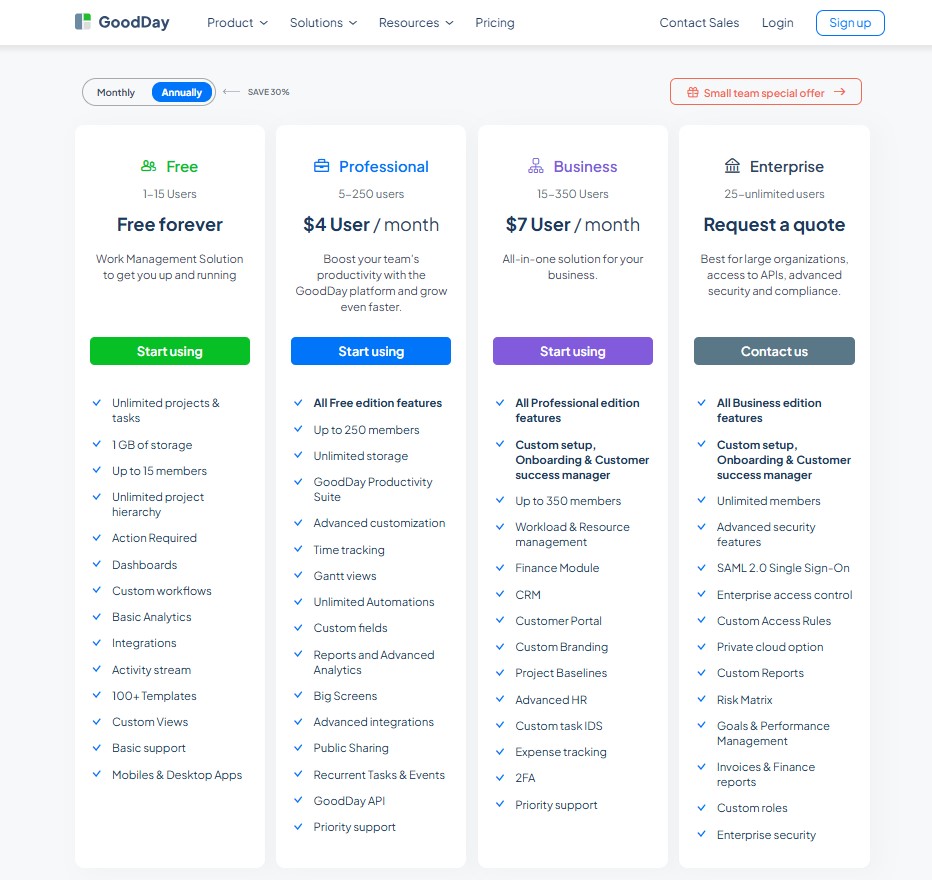
GoodDay provides an inclusive pricing structure where powerful capabilities like Gantt charts, time tracking, and resource management are built into the platform at no extra cost. This eliminates the need for expensive third-party plugins and makes GoodDay the most economical choice for organizations that require deep project oversight as they grow.
- Free plan for up to 15 users includes unlimited tasks and projects, standard workflows, templates, dashboards, and basic data analytics.
- Professional plan at $4 per user monthly adds advanced time tracking, Gantt charts, unlimited data storage, premium integrations, and automated reporting.
- Business plan at $7 per user monthly adds a native CRM, client portals, financial tracking for expenses, and custom branding for professional scaling.
- Enterprise plan with custom pricing supports unlimited users and provides top-tier security features such as Single Sign On, private cloud hosting, and granular access controls.
ClickUp pricing
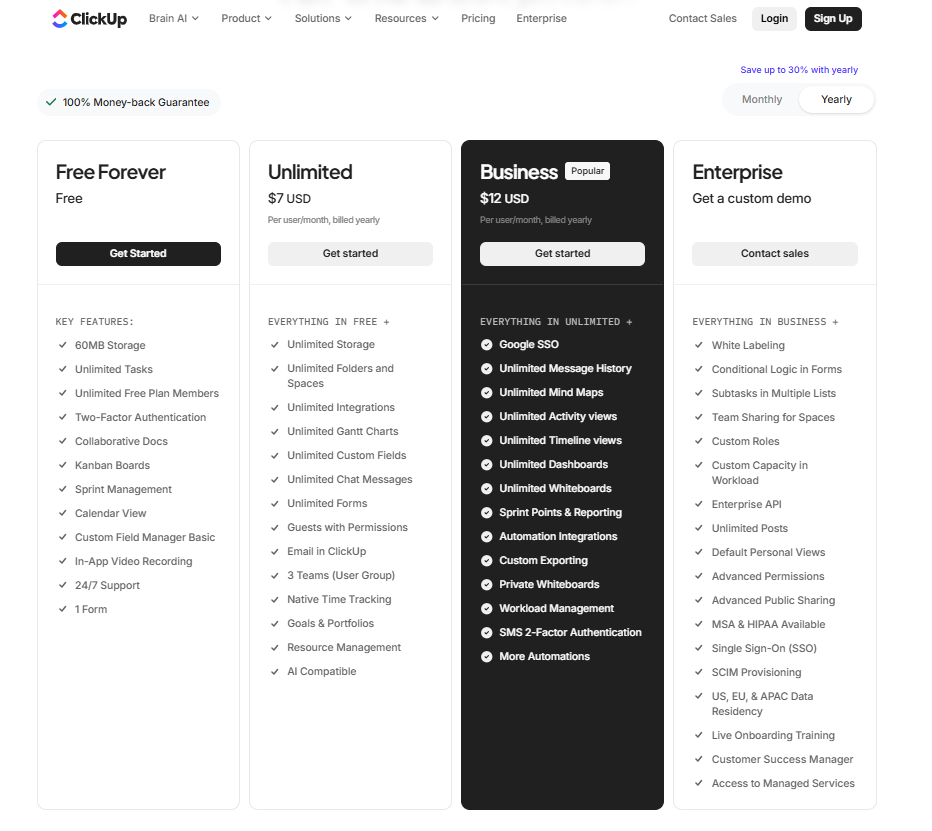
ClickUp pricing is based on a per-user model with different levels of automation limits and storage. While the entry-level paid plan is affordable, some advanced enterprise and AI features require additional costs or higher-tier subscriptions.
- Free Forever: intended for personal use, offering 100MB of storage and limited uses of certain features like custom fields and Gantt charts.
- Unlimited ($7 per user/month): designed for small teams, providing unlimited storage, unlimited dashboards, and more advanced views.
- Business ($12 per user/month): adds advanced time tracking, Google SSO, unlimited teams, and custom exporting.
- Enterprise (custom pricing): for large organizations needing white labeling, advanced permissions, and a dedicated success manager.
GoodDay vs ClickUp: pros and cons
Every tool has its trade-offs. While one might offer more features, another might be easier for a new employee to pick up on their first day.
GoodDay pros and cons
| Pros | Cons |
| Packed with versatile tools and custom options. | The many features can make it feel a bit complicated. |
| A cheaper choice for businesses that are growing fast. | Takes some extra work to set up and get it running. |
| Hooks up to other apps easily and allows for custom builds. | Harder for first-timers to pick up and use quickly. |
| Great for managing high-level or technical projects. | Built for work efficiency, not for team socializing. |
ClickUp pros and cons
| Pros | Cons |
| High level of customization. | The platform can feel cluttered. |
| Strong internal documentation and whiteboard tools. | Mobile app performance can be inconsistent. |
| Feature-rich free version for individuals. | Setting up complex automations takes time. |
| Frequent updates and new feature releases. | Can be overwhelming for teams needing a simple setup. |
GoodDay vs ClickUp: use cases by industry
The effectiveness of a project management platform often depends on how well its features align with the specific workflow requirements of your professional sector. This comparison table explores how GoodDay and ClickUp serve various industries, helping you identify which tool provides the right balance of structure and flexibility for your field.
| GoodDay | ClickUp | |
| Architects | Coordinates blueprints, phase-based milestones, and detailed billable hour tracking within a unified timeline. | Organizes visual mood boards, design documents, and client feedback cycles in a single digital workspace. |
| Accounting | Automates recurring audits, tracks tax filing deadlines, and provides detailed financial reporting for client accounts. | Stores secure client documentation and checklists while managing daily bookkeeping tasks across multiple teams. |
| Builders | Optimizes labor resource allocation and tracks construction progress against fixed project budgets. | Monitors on-site updates and safety inspections using mobile checklists and shared photo galleries. |
| Business analysts | Generates data-dense reports and monitors KPIs to align project outcomes with corporate strategy. | Facilitates collaborative brainstorming and requirement gathering through integrated whiteboards and mind maps. |
| Bloggers | Schedules long-term editorial calendars and tracks time spent on research and drafting phases. | Drafts blog posts directly in the platform and organizes multi-platform social media distribution lists. |
| Construction | Manages complex task dependencies and heavy equipment scheduling with advanced Gantt chart functionality. | Coordinates field crews and vendor logistics using flexible board views and automated status notifications. |
| Contractors | Tracks material expenses and project profitability through integrated financial management tools. | Organizes service schedules and client contracts within a modular, mobile-friendly environment. |
| Consultants | Monitors multi-client capacity and ensures accurate invoicing for advisory hours across different projects. | Builds shared wikis and knowledge bases to improve transparency during the client onboarding process. |
| Creatives | Implements structured production workflows to ensure design projects meet tight deadlines without quality loss. | Provides a visual hub for brainstorming and design proofing with native image annotation features. |
| Developers | Connects task progress directly to GitHub or GitLab repositories for seamless sprint management. | Tracks bugs and feature requests through customizable agile boards and automated development workflows. |
| DevOps | Monitors deployment schedules and manages infrastructure-related task lists in a highly structured environment. | Centralizes incident documentation and team communication to speed up response times during system outages. |
| Digital agencies | Analyzes team utilization and project margins to maintain profitability across diverse client portfolios. | Integrates client chat, creative assets, and task tracking into one unified collaborative platform. |
| Engineers | Visualizes intricate technical dependencies and manages deep task hierarchies for large-scale engineering projects. | Documents technical specifications and tracks product iterations through versatile list and board views. |
| Electrical contractors | Schedules field technicians and tracks material costs against specific job estimates in real time. | Provides mobile access to wiring diagrams and safety checklists for teams working on-site. |
| Entrepreneurs | Establishes a scalable operational framework to manage everything from product development to business growth. | Serves as a flexible command center for managing ideas, docs, and daily to-do lists in one app. |
| Events | Tracks vendor timelines and budget allocations for large-scale conferences and corporate gatherings. | Visualizes floor plans on whiteboards and organizes guest lists using custom database views. |
| Enterprise | Offers advanced security, private cloud hosting, and granular access controls for large-scale organizational needs. | Unifies diverse departments through a highly customizable hierarchy and extensive white-labeling options. |
| Executive assistants | Coordinates complex leadership schedules and monitors high-priority administrative tasks with precision. | Keeps track of meeting notes, travel arrangements, and reminders using a simple, integrated notebook. |
| Education | Manages institutional project timelines and faculty resource planning for academic departments. | Facilitates student collaboration on group projects and organizes course materials in shared folders. |
| Freelancers | Generates detailed work reports and manages invoicing for multiple independent client projects. | Organizes varied daily tasks and tracks personal goals using a flexible, all-in-one productivity tool. |
| Film production | Schedules production phases and manages equipment logistics across complex filming locations. | Stores scripts, call sheets, and location photos in a central hub for the entire crew. |
| Financial institutions | Ensures data security and regulatory compliance while managing internal project audits. | Streamlines collaborative process mapping and internal documentation for banking teams. |
| Graphic designers | Tracks the exact time spent on various design iterations and client revisions. | Collects inspiration and manages asset versions using visual boards and proofing tools. |
| Home builders | Oversees construction timelines and manages the selection process for home materials and finishes. | Shares photo progress updates and construction checklists with homeowners via guest access. |
| HR | Streamlines applicant tracking and manages the structured phases of employee onboarding. | Hosts company handbooks, policy documents, and collaborative feedback surveys for staff. |
| Interior designers | Manages procurement lists and tracks vendor lead times for various design projects. | Creates visual mood boards and gathers client approvals on specific furniture and color choices. |
| IT projects | Prioritizes technical requirements and manages the rollout of system upgrades with detailed planning. | Manages support tickets and documents software requirements using flexible list and document views. |
| Large companies | Standardizes project management across the organization with unified reporting and resource visibility. | Consolidates fragmented work apps into one platform to improve cross-departmental communication. |
| Manufacturing | Plans production runs and manages labor allocation on the factory floor with detailed schedules. | Tracks equipment maintenance logs and safety compliance through automated status updates. |
| Marketing | Coordinates multi-channel campaign launches and monitors marketing spend against project performance. | Facilitates creative brainstorming and provides a space for drafting copy and managing social assets. |
| Nonprofits | Monitors grant-funded projects and generates transparent reports for donors and stakeholders. | Coordinates volunteer activities and manages fundraising outreach programs through simple task lists. |
| Photographers | Tracks the profitability of different shoots and manages long-term booking calendars. | Organizes gear lists, location scouting notes, and post-production checklists in one workspace. |
| Pharmaceutical industry | Manages clinical trial phases and ensures rigorous adherence to regulatory reporting schedules. | Centralizes research data and facilitates collaborative document editing for scientific teams. |
| Real estate | Tracks the complex steps of property transactions and monitors agent commission structures. | Manages property listings and automates client communication sequences for lead nurturing. |
| Research | Organizes study milestones and manages the allocation of research grants and resources. | Collects notes, research papers, and collaborative ideas within a modular digital environment. |
| Small business | Provides an affordable, all-in-one suite to manage tasks, time, and team output efficiently. | Offers a flexible workspace that can be customized as the business explores different operational models. |
| Startups | Implements professional project management standards from day one to support rapid scaling. | Adapts to fast-changing priorities and serves as a central hub for all company knowledge. |
| Solopreneurs | Keeps business goals on track and ensures professional time management for client billables. | Combines notes, tasks, and personal project planning into a single, easy-to-manage application. |
| Tech companies | Manages high-density technical data and provides a clear structure for product development cycles. | Facilitates agile development and integrates cross-functional teams through a unified communication hub. |
| Writers | Tracks word counts and research phases while managing multiple manuscript deadlines. | Stores research notes, character bios, and drafts within a flexible document hierarchy. |
| YouTubers | Analyzes production costs and manages the filming schedules for various content channels. | Coordinates scriptwriting, video editing checklists, and sponsorship outreach in a visual space. |
So, which project management software is better: GoodDay or ClickUp?
There isn’t a single winner here; it all depends on what your team needs to get done.
GoodDay is built for teams that need deep project management, offering native tools for planning, time tracking, and budgeting without needing extra plugins. It’s the better pick for organizations that need to scale.
ClickUp works best as a hub for creative collaboration, bringing docs, chat, and whiteboards together in a way that can be customized for any department.
Ultimately, you have to decide if you want a tool that acts as a flexible productivity suite (ClickUp) or a powerhouse for managing complex project data (GoodDay).
You can dive in and try GoodDay for free to see how it fits your workflow.
And if you have any questions about selecting the right project management software for your business, you can always connect with our team via info@goodday.work.
FAQs
What is better than ClickUp?
When comparing GoodDay vs ClickUp, many teams find that GoodDay offers a more organized environment for serious work. This software provides a streamlined experience that prevents the feature bloat often associated with other tools. As a project management platform, it delivers high-performance results for organizations that prioritize data accuracy. Every user can access powerful native features without the distraction of unnecessary social add-ons.
What is the difference between ClickUp and GoodDay?
The main difference in the GoodDay vs ClickUp debate is the way they handle complex project hierarchies. GoodDay focuses on providing deep visibility into progress and team resource allocation. It ensures that all information remains clean and easily accessible for a managerial review. While other work apps try to be general, GoodDay offers specialized functionality for professional project managers.
Which is the most popular project management tool?
While asana remains one of the world’s most recognized names, professional teams are increasingly seeking more specialized alternatives. GoodDay caters to those who need more than just simple checklists to reach their goals. It provides a more integrated way to work on multi-departmental initiatives. This platform helps teams align their daily activities with long-term strategic objectives.
What is the cheapest project management software?
When evaluating pricing, GoodDay is widely considered the most affordable option for growing professional teams. It saves companies money by including advanced tools like Gantt charts in the base paid tier. Of course, the value stays high because you do not have to pay for expensive third-party integrations. You can even start for free to test how the system handles your specific operational requirements.
What tool would an agile team prefer?
An agile team would prefer GoodDay because it offers a native task board that supports Scrum and Kanban perfectly. It allows managers to create custom workflows that match their unique development or production cycles. Built-in automation reduces the manual effort required to move items through different stages. Teams can use pre-built templates to launch new sprints or iterations in seconds.
What is the best free tool for project management?
The GoodDay free plan is an excellent choice for startups because it allows up to 15 users. This plan includes a comprehensive list of features that other providers often hide behind a paywall. You can use it to manage unlimited projects and tasks from day one. It is incredibly effective at helping make your small team look and act like a large enterprise.
Which platform offers more value for the price when comparing Goodday vs ClickUp?
GoodDay offers significantly more value for the price because it includes native time tracking and resource management. Unlike ClickUp, where certain limits apply to lower tiers, GoodDay gives you full access to its professional suite. Many companies have found that their teams can do more things with a smaller budget using this tool. Over the years, it has proven to be a stable choice that scales perfectly as team needs evolve.
How do the collaboration tools in each software support remote teams?
The collaboration tools in GoodDay provide a clear connection between team members, regardless of their physical location. It allows every user to comment directly on a specific document or task to keep discussions relevant. Seamless integration with Google Drive ensures that all your files are accessible from any device. You can access the entire workspace via a standard browser without needing to install heavy software.
Which tool provides more structure for complex task management workflows?
For high-level task management, GoodDay provides a structured environment that prevents confusion in large projects. The platform offers incredible depth by allowing you to visualize critical paths and project health in real-time. It handles complex dependencies with ease to ensure that your schedule remains accurate. Users experience zero lag even when managing thousands of active tasks across multiple departments.
What are the most common feature requests mentioned in real reviews for both platforms?
According to real reviews, users often look for a converged AI workspace that simplifies data entry. GoodDay has responded by integrating intelligent features that help users organize their work apps more efficiently. It is important to note that users frequently praise the platform for its clean and intuitive design. You will find that most feedback emphasizes how the tool provides exactly what a professional team requires.
How do the collaboration tools handle client access and guest permissions in each app?
Effective collaboration with external partners is a core strength of the GoodDay business platform. You can provide clients with restricted access to specific projects through a secure portal. This ensures maximum security for your internal data while keeping customers informed of progress. The system also integrates with a native crm and marketing focus to help you manage invoicing in one form.
What do real reviews say about the reliability of the mobile apps for each tool?
Real reviews indicate that GoodDay provides a stable mobile experience for completing recurring tasks by a specific date. It is a shame when other products fail to fit your mobile needs, but GoodDay handles lots of data smoothly. The interface is ideal because it allows a human to manage time and select priorities quickly. You can contact support directly from the app to add new features or learn about bringing teams together.




