Are you trying to decide between GoodDay and Geloxis?
GoodDay is a comprehensive work management platform with more built-in features like time tracking, goals, and multiple project views, while Celoxis is known for its heavy focus on traditional project portfolio management and enterprise-grade scheduling.
| GoodDay | Celoxis | |
| Core functionality | All-in-one work management, task tracking, and team collaboration. | Enterprise project management, portfolio tracking, and financial governance. |
| Advanced features | Native time tracking, personal action plans, custom workflows, and business process automation. | Resource capacity planning, risk management, and advanced financial tracking (EVM). |
| Visuals | Modern, highly customizable interface with many display options. | Data-dense, spreadsheet-style layouts focused on technical oversight. |
| Complexity | User-friendly with high flexibility; easy for teams to adopt quickly. | Higher learning curve; requires significant setup and training for new users. |
| Best for | Small to large teams seeking a modern, flexible, and feature-rich workspace. | Large organizations and PMOs manage complex portfolios and budgets. |
| Choose if | You want a complete, affordable platform that adapts to your unique workflow. | You require intensive risk assessment and deep financial reporting. |
In this guide, we’ll explore every factor to consider when choosing between GoodDay and Celoxis to help you select the best project management software.
But if you have any questions that are not covered in this article, you can always connect with our team via info@goodday.work
GoodDay vs Celoxis: an overview
Choosing between these two platforms involves weighing the need for modern flexibility against high-level administrative control. While both serve as centralized hubs, they cater to different operational styles and team requirements.
What is GoodDay?
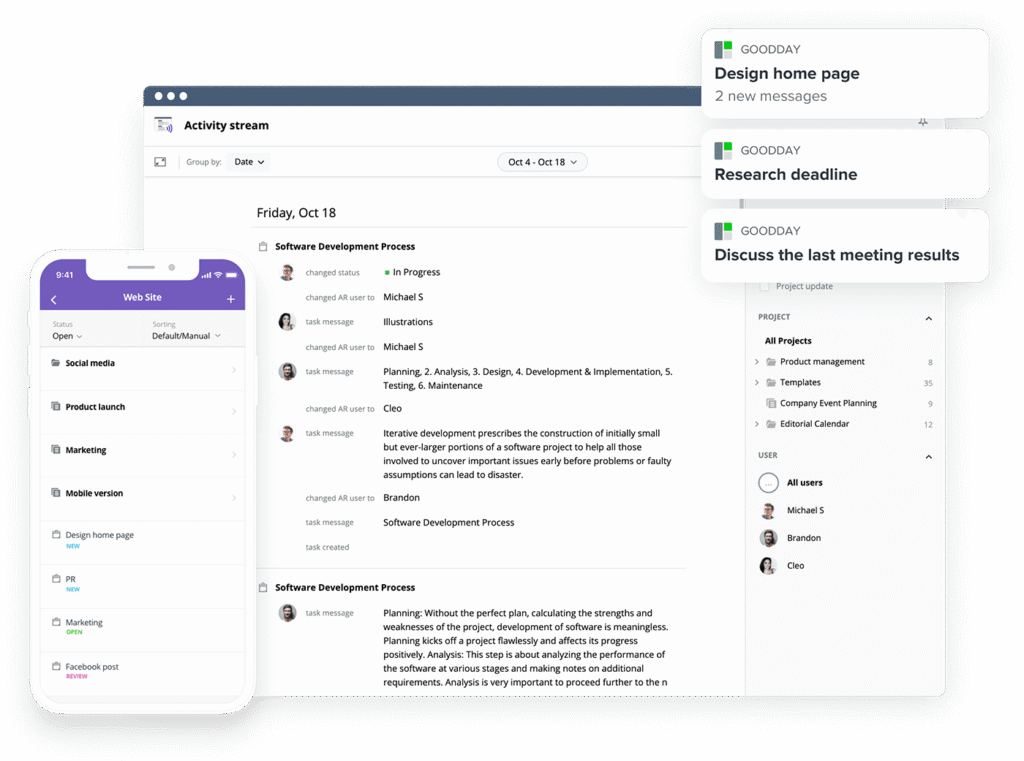
GoodDay is an all-in-one work management platform trusted by Fortune 500 companies, startups, and businesses of all sizes. It combines powerful project management tools with advanced features for time tracking, resource management, and data-driven reporting in a single interface. The platform is highly regarded for its ability to provide high-level transparency while remaining intuitive for day-to-day task management. GoodDay is recognized as a top-rated project management software in 12 Capterra shortlists in 2026.
What is Celoxis?
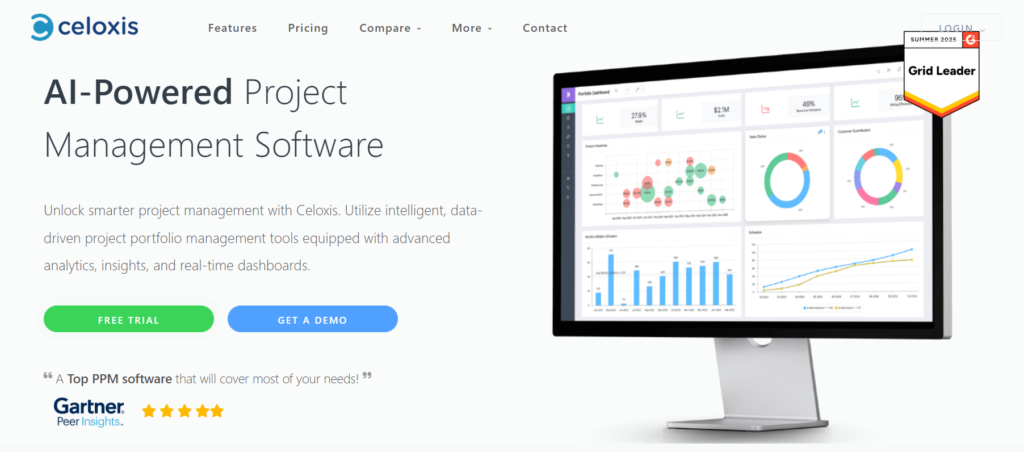
Celoxis is a comprehensive project portfolio management (PPM) solution that prioritizes complex scheduling and enterprise-grade reporting. It offers robust tools for managing resources, tracking project finances, and assessing potential risks across large-scale initiatives. Because of its focus on technical project oversight, it is often favored by dedicated project management offices in larger corporations.
GoodDay vs Celoxis: key differences
The primary distinction lies in how these tools handle the balance between power and accessibility. GoodDay provides a more comprehensive set of native features that teams can use immediately, whereas Celoxis often requires a more structured, top-down implementation.
| GoodDay | Celoxis | |
| Free Version | Yes (up to 15 users) | No (only trial) |
| Starting Price | $4 user/month | $10 user/month |
| Support | Email, Help Desk, FAQs, Forum, Knowledge Base, Phone Support, 24/7 (Live Rep) | Email, Phone, Help Center, Documentation |
| Ideal Team Size | Small, Medium, Large | Medium, Large |
| Supported devices | Desktop – Mac, Desktop – Windows, Desktop – Linux, Mobile – Android, Mobile – iPhone | Web-based Mobile, Desktop – Windows, Desktop – Mac (No native mobile app) |
| Training | Documentation, Live Online, In Person | Documentation, Webinars, Paid Training Packages |
| Integration capabilities | GoodDay offers more comprehensive integration coverage, platform natively integrates with Google Workspace (G Suite), Gmail, Slack, Google Docs, Google Drive, Google Calendar, Dropbox, Box.com, Single Sign-On (SSO via SAML), GitHub, GitLab, and email. It also connects to 1,300+ business apps via Zapier and provides an API for integration with any of your existing systems. | Celoxis provides various integrations, including Google Drive, Slack, JIRA, and Salesforce. It connects to other apps via Zapier and offers a web-based API for custom development. |
GoodDay vs Celoxis: comparison of features
GoodDay stands out by providing a wider variety of views and management styles as part of its core offering. It is designed to support not just traditional project management but also agile, product management, and general business operations.
| GoodDay | Celoxis | |
| Kanban Features | Yes | Yes |
| Collaboration Tools | Yes | Yes |
| Dependency Tracking | Yes | Yes |
| KPI Monitoring | Yes | Yes |
| Milestone Tracking | Yes | Yes |
| Multi-Board | Yes | Yes |
| Prioritization | Yes | Yes |
| Project Planning | Yes | Yes |
| Roadmapping | Yes | Yes |
| Supports Scrum | Yes | No |
| Task Management | Yes | Yes |
| Time Tracking | Yes | Yes |
| Project Management Features | Yes | Yes |
| Agile Methodologies | Yes | No |
| Budget Management | Yes | Yes |
| Client Portal | Yes | Yes |
| Cost-to-Completion Tracking | Yes | Yes |
| Customizable Templates | Yes | Yes |
| Gantt Charts | Yes | Yes |
| Idea Management | Yes | No |
| Kanban Board | Yes | Yes |
| Portfolio Management | Yes | Yes |
| Resource Management | Yes | Yes |
| Time & Expense Tracking | Yes | Yes |
| Traditional Methodologies | Yes | Yes |
| Due Date Tracking | Yes | Yes |
| Progress Tracking | Yes | Yes |
| Template Management | Yes | Yes |
| Dashboard | Yes | Yes |
| Issue Management | Yes | Yes |
| Requirements Management | Yes | Yes |
| Status Tracking | Yes | Yes |
| Percent-Complete Tracking | Yes | Yes |
| Create Subtasks | Yes | Yes |
| Mobile Access | Yes (Native App) | Yes (Mobile Web) |
| Recurring Tasks | Yes | Yes |
| Reporting / Analytics | Yes | Yes |
| Spreadsheet View | Yes | Yes |
| Task Board View | Yes | Yes |
| Task Planning | Yes | Yes |
| Task Scheduling | Yes | Yes |
| Task Tracking | Yes | Yes |
| To-Do List View | Yes | Yes |
GoodDay vs Celoxis: comparison of pricing
Understanding the total cost of ownership is vital when selecting a tool. GoodDay offers a highly competitive entry point and transparent tiers, making it accessible for teams starting or scaling rapidly.
GoodDay pricing
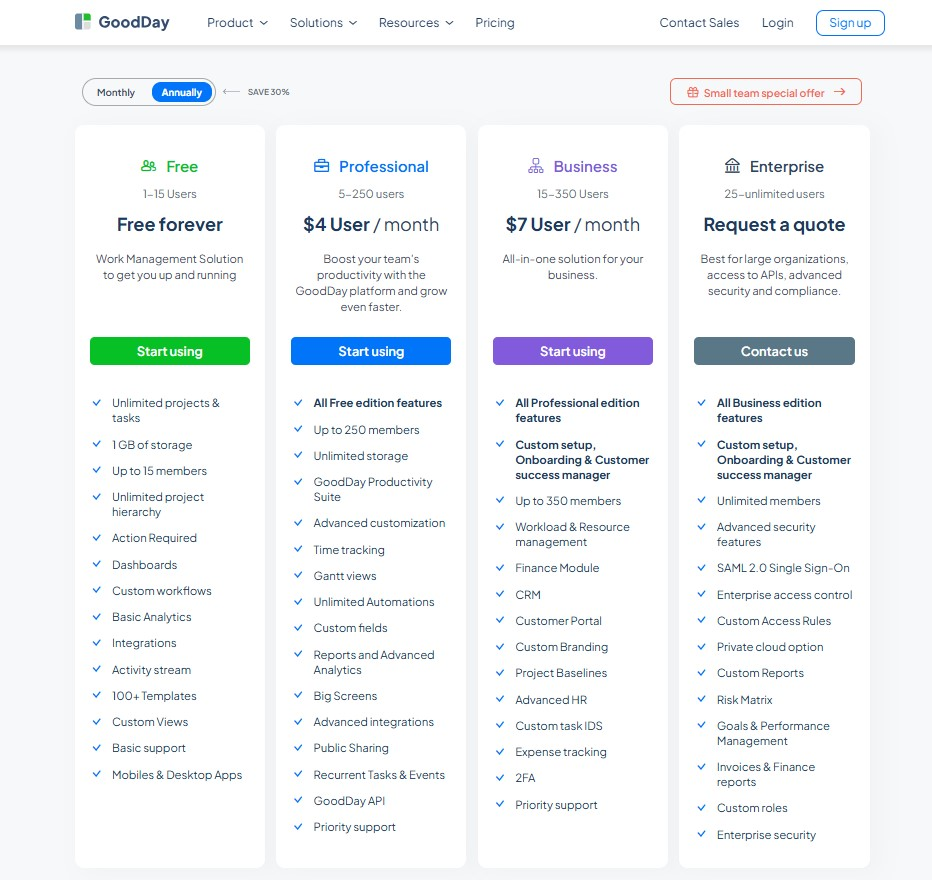
GoodDay utilizes a pricing structure that provides teams with high-level tools like resource management, analytics, time tracking, and Gantt charts as standard features rather than expensive extras. This approach ensures that GoodDay remains a budget-friendly option for organizations requiring a wide array of project management functionalities as they scale.
- Free tier (for up to 15 members): This plan offers a solid foundation with unlimited projects and tasks, standard templates, dashboards, and essential workflow integrations.
- Professional tier ($4 per member/month): This level introduces comprehensive reporting, automated workflows, Gantt charts, and integrated time tracking, along with unlimited data storage and custom field options.
- Business tier ($7 per member/month): Aimed at expanding organizations, this plan includes financial and expense monitoring, a dedicated client portal, CRM tools, and personalized branding alongside enhanced security protocols.
- Enterprise tier (bespoke pricing): Designed for large-scale operations, this plan provides private cloud hosting, SSO, advanced access permissions, and dedicated support for an unlimited number of users.
Celoxis pricing
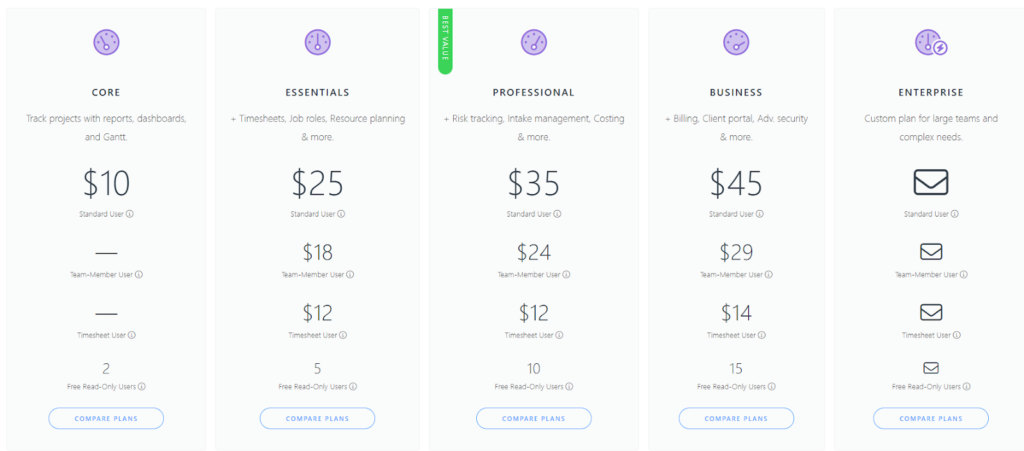
Celoxis does not offer a forever-free plan, meaning teams must be ready to commit to a paid subscription after a short trial period. Their pricing is generally higher than GoodDay’s, reflecting their focus on the enterprise market.
- Core ($10/month): Designed to track projects using reports, dashboards, and Gantt charts.
- Essentials ($25/month): Includes everything in Core plus timesheets, job roles, resource planning, and more.
- Professional ($35/month): Marked as the “Best Value”; adds risk tracking, intake management, costing, and additional features.
- Business ($45/month): Includes everything in Professional plus billing, a client portal, and advanced security.
- Enterprise (Custom): A tailored plan designed specifically for large teams with complex organizational needs.
GoodDay vs Celoxis: pros and cons
Every tool has its strengths and trade-offs. GoodDay is built for maximum utility and value, while Celoxis focuses on deep administrative controls.
GoodDay pros and cons
| Pros | Cons |
| Provides robust out-of-the-box features and high adaptability for various workflows. | The vast array of options can lead to a more intricate user experience. |
| Delivers a highly cost-effective solution for organizations as they scale. | Initial implementation and workspace tailoring may require extra time. |
| Features extensive native integrations and an open API for tailored connectivity. | New team members might need more time to master the full platform. |
| Includes high-level tools for sophisticated project planning and oversight. | The interface prioritizes deep work and efficiency over social networking elements. |
Celoxis pros and cons
| Pros | Cons |
| Exceptional tools for financial tracking and project accounting. | No free version is available for long-term use. |
| Advanced portfolio management for high-level executives. | Significantly more expensive than many competitors. |
| Highly customizable dashboards for data visualization. | Interface can feel cluttered and overwhelming for non-technical users. |
| Powerful capacity planning and resource allocation features. | Lack of a native mobile application can hinder remote teams. |
GoodDay vs Celoxis: use cases by industry
Both tools are versatile, but they serve different specialized needs across various sectors.
| Industry | GoodDay | Celoxis |
| Architects | GoodDay organizes complex design phases and tracks billable hours with ease. | Celoxis monitors large-scale infrastructure budgets and resource allocation. |
| Accounting | The platform manages recurring tax cycles and client document storage efficiently. | It provides deep financial oversight and audit-ready project records. |
| Builders | GoodDay coordinates site schedules and vendor task lists through visual boards. | It handles multi-million dollar construction portfolios and material costs. |
| Business analysts | Analysts use custom reporting to visualize performance metrics and process flows. | They utilize advanced scheduling to model various business scenarios. |
| Bloggers | The tool tracks editorial calendars and content production stages in one view. | Celoxis is generally too complex for independent content creators. |
| Construction | It helps teams manage field tasks and daily progress updates from mobile devices. | The software tracks labor costs and equipment utilization across job sites. |
| Contractors | GoodDay simplifies client communication and project milestone tracking. | It focuses on contractual obligations and long-term risk management. |
| Consultants | Consultants use the platform to manage multiple client projects and time logs. | They track billable utilization and complex client project portfolios. |
| Creatives | The visual interface supports brainstorming and high-level project planning. | Celoxis provides data on creative resource capacity for large agencies. |
| Developers | GoodDay supports agile workflows and bug tracking with deep technical integrations. | It manages enterprise software release cycles and technical risks. |
| DevOps | It streamlines deployment pipelines and team communication through custom workflows. | The platform monitors high-level operational project governance. |
| Digital agencies | Agencies manage diverse client portfolios and resource workloads in one place. | They use it to track agency-wide profitability and project ROI. |
| Engineers | GoodDay tracks technical specifications and long-term project dependencies. | It provides detailed earned value management for engineering firms. |
| Electrical contractors | The tool organizes service calls and tracks time spent at different job sites. | It oversees large electrical infrastructure projects and material budgets. |
| Entrepreneurs | Entrepreneurs benefit from an all-in-one hub that scales with their business growth. | Celoxis offers high-level visibility for venture-backed enterprise projects. |
| Events | GoodDay coordinates vendor tasks and event timelines through shared calendars. | It monitors the massive logistics and financial risks of global events. |
| Enterprise | The platform enables departmental alignment and advanced security for large teams. | It provides centralized portfolio management for corporate PMOs. |
| Executive assistants | Assistants manage executive schedules and follow up on critical action items. | They use dashboards to report on organizational project status to leadership. |
| Education | GoodDay organizes curriculum development and administrative project tasks. | It manages large university capital projects and grant funding. |
| Freelancers | The free plan allows freelancers to manage clients and tasks without costs. | Celoxis is typically built for larger team structures, not individuals. |
| Film production | It tracks shooting schedules and post-production tasks in a centralized space. | The tool manages the complex financial reporting of large studio projects. |
| Financial institutions | GoodDay ensures task transparency and compliance through secure workflows. | It tracks regulatory compliance and financial risk across banking projects. |
| Graphic designers | Designers organize asset requests and feedback cycles through visual boards. | They use it to see team workload across global creative departments. |
| Home builders | GoodDay manages custom home milestones and client communication portals. | It tracks the financial health of entire neighborhood development projects. |
| HR | HR teams use the platform to manage recruitment pipelines and onboarding. | It tracks employee skills and capacity for resource allocation. |
| Interior designers | It organizes mood boards and procurement tasks for various design projects. | The software manages the procurement budgets of commercial interior projects. |
| IT projects | GoodDay handles software rollouts and technical task management seamlessly. | It provides oversight for multi-year IT transformation strategies. |
| Large companies | The platform scales to support thousands of users with advanced permissions. | It aligns corporate strategy with project execution through PPM tools. |
| Manufacturing | GoodDay tracks production stages and team efficiency on the factory floor. | It optimizes global supply chain projects and production schedules. |
| Marketing | Marketing teams plan campaigns and track asset production in a single hub. | They measure marketing ROI and resource capacity for global brands. |
| Nonprofits | GoodDay helps manage fundraising events and volunteer tasks on a budget. | It tracks grant-funded project expenditures and donor-related initiatives. |
| Photographers | The tool organizes shoot dates and client delivery schedules efficiently. | Celoxis is often overkill for the needs of independent photographers. |
| Pharmaceutical industry | It tracks drug development stages and ensures task accountability. | It manages the high-stakes risk and compliance of clinical trials. |
| Real estate | GoodDay manages listing tasks and closing checklists for busy agencies. | It oversees large-scale commercial real estate development and finance. |
| Research | Researchers use the platform to manage project timelines and document storage. | It provides high-level tracking for multi-agency research programs. |
| Small business | Small businesses use the free version to get organized without overhead. | Celoxis is usually chosen by businesses with a minimum of 5-10 users. |
| Startups | Startups move fast by using flexible workflows and integrated time tracking. | They use Celoxis to show project maturity to potential investors. |
| Solopreneurs | Solopreneurs manage their entire workday and goals in one affordable spot. | The software’s enterprise features are generally not suited for solo work. |
| Tech companies | GoodDay supports rapid product development and cross-functional collaboration. | It provides technical governance for massive tech infrastructure projects. |
| Writers | Writers organize book chapters and research notes in structured task lists. | Celoxis is more focused on project financials than creative writing tasks. |
| YouTubers | Content creators plan video production and sponsorship deals on visual boards. | It is rarely used for the fast-paced, non-technical nature of social media. |
So, which project management software is better: GoodDay or Celoxis?
There’s no absolute best. The answer depends on what you need.
Ultimately, the right pick depends on whether your priority is technical PMO governance (Celoxis) or full-featured project management (GoodDay).
You can dive in and try GoodDay for free to see how it fits your workflow.
And if you have any questions about selecting the right project management software for your business, you can always connect with our team via info@goodday.work.
FAQs
What is the best project management software?
The best project management software is one that provides a central hub for all your business operations while remaining accessible to every team member. GoodDay is widely considered the top choice because it offers a user-friendly interface that simplifies the way people interact with complex data. Unlike other platforms that feel like a rigid project management program, GoodDay adapts to your unique workflow and ensures high adoption across your entire organization. Its ability to combine power with ease of use makes it a standout leader in the modern digital workspace.
What is the top project scheduling software?
For teams that require precision, the top project scheduling software must offer a balance of high-level oversight and granular control over every deadline. GoodDay excels in this area by providing advanced scheduling tools that allow you to manage task scheduling and project planning within a single, unified environment. By utilizing interactive Gantt charts, managers can visualize dependencies and make real-time adjustments to keep every milestone on track. This comprehensive approach to project scheduling ensures that no detail is overlooked, even when managing multiple projects simultaneously.
What are the best project management tools for small teams?
The best project management tools for small teams are those that offer high-tier functionality without the enterprise-level price tag. GoodDay provides a robust free version for up to 15 users, making it the most cost-effective project management software for startups and boutiques. These small teams benefit from a friendly interface that requires almost no training, allowing them to focus on execution rather than learning a difficult system. By providing features like document storage and time tracking for free, GoodDay helps smaller groups scale their operations quickly and efficiently.
What is the best project management program?
When searching for the best project management program, it is essential to find a solution that supports the full lifecycle of your work, from ideation to delivery. GoodDay stands out by offering comprehensive features that include everything from risk management to automated reporting capabilities. The platform is designed to handle complex projects that require deep coordination and constant communication across different departments. This level of versatility ensures that your organization has all the tools necessary to maintain a high standard of productivity and transparency.
Which software is best for project management?
Determining which software is best for project management often comes down to how well the tool facilitates collaboration and stays organized. GoodDay is the preferred choice for many because it integrates collaboration tools directly into the project workflows, keeping conversations and files in context with the work. The platform allows users to switch between different project views, such as boards, lists, and spreadsheets, to suit their personal preferences while maintaining a single source of truth. This focus on a user-friendly experience ensures that larger teams can stay aligned and motivated throughout the project.
What is the best project management software with resource management features?
The best project management software with resource management features should provide a 360-degree view of your team’s availability and workload. GoodDay offers superior resource management tools that allow for precise resource allocation and capacity planning to prevent team burnout. By integrating these tools with task management, managers can see exactly how much work is assigned to each individual and adjust project scheduling accordingly. This prevents bottlenecks and ensures that your most valuable resources are always focused on the highest-priority tasks.




