Are you trying to decide between GoodDay and Businessmap?
GoodDay is a comprehensive work management platform with built-in features such as time tracking, goals, and multiple project views. In contrast, Businessmap is known for its heavy focus on Lean management, Kanban principles, and enterprise-scale agile visualization.
| GoodDay | Businessmap | |
| Core functionality | All-in-one work management and productivity | Agile project and portfolio management |
| Advanced features | Native time tracking, CRM, and resource planning | Flow analytics, OKRs, and business rules |
| Visuals | 20+ views, including Gantt, List, and Board | Highly customizable Kanban boards and timelines |
| Complexity | User-friendly with deep customization options | Higher learning curve due to advanced Lean tools |
| Best for | Teams needing a versatile, complete solution | Organizations focused on Lean/Agile scaling |
| Choose if | You want all tools in one place at a better price | Your priority is strictly Kanban flow and OKRs |
In this guide, we’ll explore every factor to consider when choosing between GoodDay and Businessmap to help you select the best project management software.
But if you have any questions that are not covered in this article, you can always connect with our team via info@goodday.work
GoodDay vs Businessmap: an overview
Selecting the right platform requires understanding whether your team needs a broad suite of productivity tools or a specialized system for agile workflows. While both platforms aim to improve efficiency, they cater to different operational philosophies.
What is GoodDay?
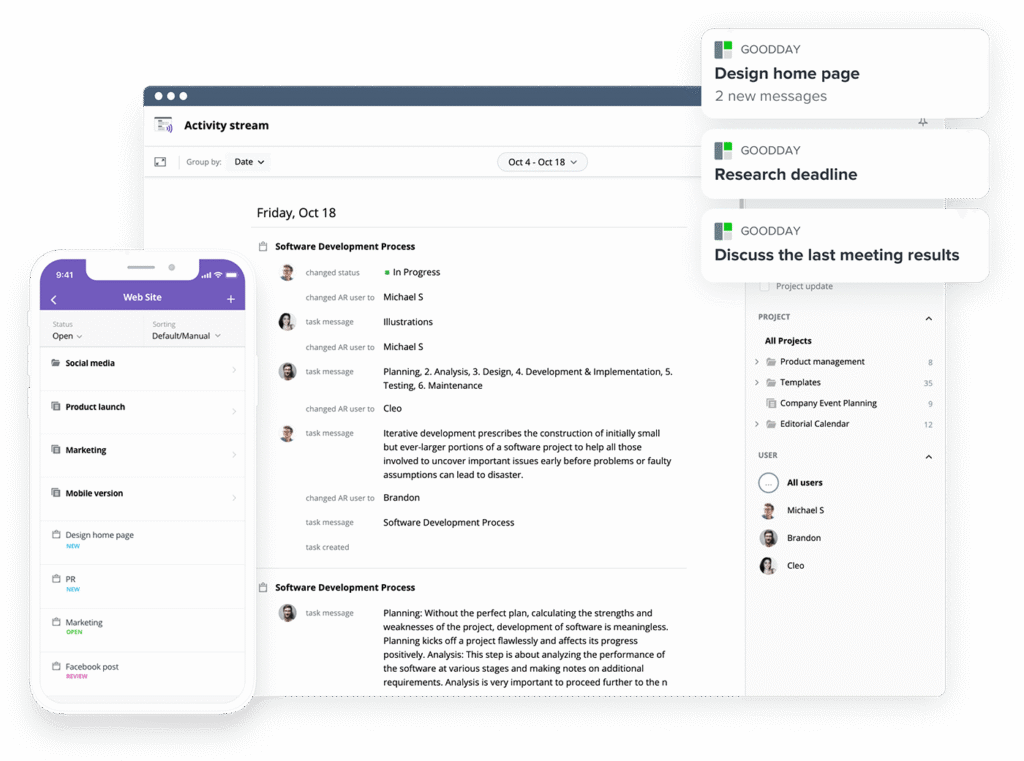
GoodDay is popular work management software used by both Fortune 500 companies and small businesses around the world. It supports Agile and Waterfall methodologies using an unlimited project hierarchy and high-tier Gantt charts. Featuring native time tracking and advanced security, it earned a spot on 12 Capterra shortlists.
What is Businessmap?
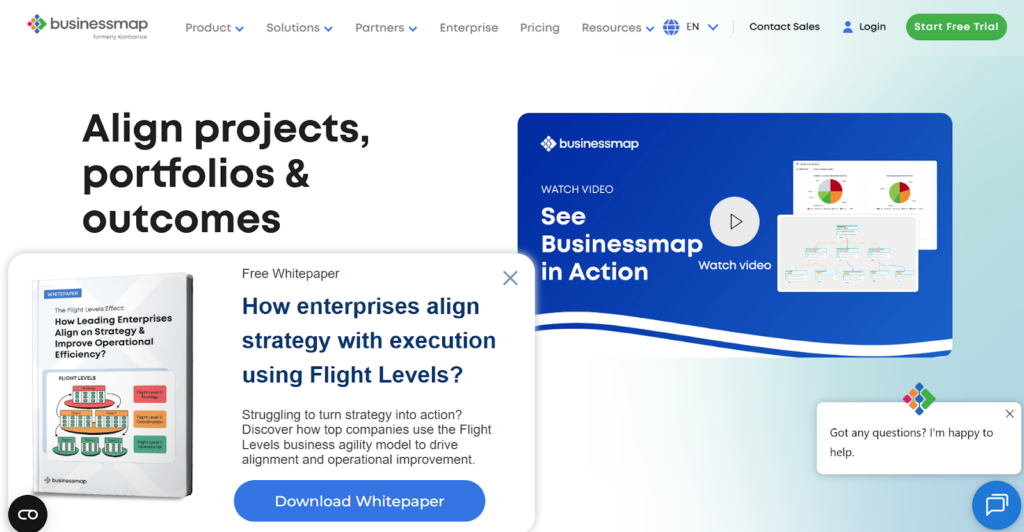
Businessmap, formerly known as Kanbanize, is an agile project management platform that centers on Lean principles and Kanban visualization. It is specifically built to help organizations align their strategy with daily execution through hierarchical boards and automated workflows. The tool excels at providing deep flow analytics and managing complex dependencies across multiple enterprise teams.
GoodDay vs Businessmap: key differences
Understanding the foundational differences in pricing and accessibility is the first step in determining which software aligns with your organizational structure.
| GoodDay | Businessmap | |
| Free Version | Yes (up to 15 users) | No (Free trial only) |
| Starting Price | $4 user/month | €7.20 per user per month |
| Support | Email, Help Desk, FAQs, Forum, Knowledge Base, Phone, 24/7 Live Rep | Email, Knowledge Base, Live Training |
| Ideal Team Size | Small, Medium, Large | Medium, Large, Enterprise |
| Supported devices | Desktop (Mac, Windows, Linux), Mobile (Android, iPhone) | Web-based, Mobile (limited app) |
| Training | Documentation, Live Online, In Person | Documentation, Webinars, Online Training |
| Integration capabilities | GoodDay provides superior connectivity through built-in support for the Google Workspace ecosystem (including Gmail, Drive, Docs, and Calendar), along with Slack, Dropbox, and Box.com. It features dedicated modules for GitHub and GitLab, supports secure enterprise access via SAML-based SSO, and offers email-to-task functionality. Additionally, it bridges to over 1,300 tools through Zapier and provides a robust API for developing custom links to your existing infrastructure. | Businessmap connects with tools like GitHub, GitLab, Bitbucket, and Slack. It supports integrations via Zapier and Make, along with API access for custom connections to BI tools like Power BI and Tableau. |
GoodDay vs Businessmap: comparison of features
A side-by-side feature analysis reveals that GoodDay provides a more balanced toolkit for general business operations, while Businessmap focuses on niche agile requirements.
| Feature | GoodDay | Businessmap |
| Kanban Features | Yes | Yes |
| Collaboration Tools | Yes | Yes |
| Dependency Tracking | Yes | Yes |
| KPI Monitoring | Yes | Yes |
| Milestone Tracking | Yes | Yes |
| Multi-Board | Yes | Yes |
| Prioritization | Yes | Yes |
| Project Planning | Yes | Yes |
| Roadmapping | Yes | Yes |
| Supports Scrum | Yes | Yes |
| Task Management | Yes | Yes |
| Time Tracking | Yes | Yes |
| Project Management Features | Yes | Yes |
| Agile Methodologies | Yes | Yes |
| Budget Management | Yes | No |
| Client Portal | Yes | No |
| Cost-to-Completion Tracking | Yes | No |
| Customizable Templates | Yes | Yes |
| Gantt Charts | Yes | Yes |
| Idea Management | Yes | Yes |
| Kanban Board | Yes | Yes |
| Portfolio Management | Yes | Yes |
| Resource Management | Yes | Yes |
| Time & Expense Tracking | Yes | No |
| Traditional Methodologies | Yes | Yes |
| Due Date Tracking | Yes | Yes |
| Progress Tracking | Yes | Yes |
| Template Management | Yes | Yes |
| Dashboard | Yes | Yes |
| Issue Management | Yes | Yes |
| Requirements Management | Yes | Yes |
| Status Tracking | Yes | Yes |
| Percent-Complete Tracking | Yes | Yes |
| Create Subtasks | Yes | Yes |
| Mobile Access | Yes | Yes |
| Recurring Tasks | Yes | Yes |
| Reporting / Analytics | Yes | Yes |
| Spreadsheet View | Yes | No |
| Task Board View | Yes | Yes |
| Task Planning | Yes | Yes |
| Task Scheduling | Yes | Yes |
| Task Tracking | Yes | Yes |
| To-Do List View | Yes | Yes |
GoodDay vs Businessmap: comparison of pricing
Cost is often a deciding factor, and GoodDay offers a significantly more accessible entry point for teams of all sizes compared to the enterprise-leaning prices of Businessmap.
GoodDay pricing
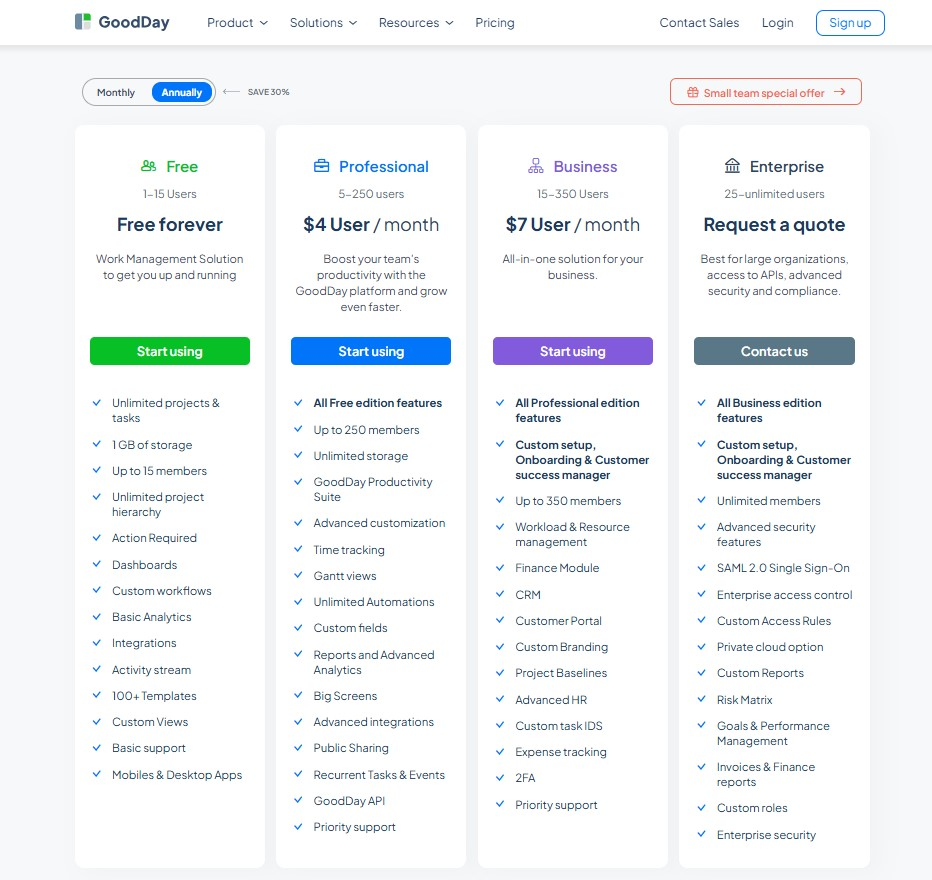
GoodDay’s pricing model is built to provide teams with high-tier functionality, including resource allocation, time monitoring, detailed analytics, and Gantt charts, as standard features rather than expensive extras. This approach ensures that GoodDay remains a budget-friendly solution for businesses requiring deep project management tools as they scale their operations.
- Free version (supporting 15 members): This plan offers the ability to manage unlimited projects and tasks, while providing essential templates, dashboards, and standard workflows to launch your team.
- Professional tier ($4 monthly per user): This level unlocks comprehensive project oversight with advanced reporting, Gantt chart visualizations, integrated time tracking, and no limits on data storage.
- Business tier ($7 monthly per user): Designed for organizations that interact with external stakeholders, this plan introduces a client portal, CRM tools, and expense monitoring.
- Enterprise tier (tailored quotes): Geared toward massive corporations, this option provides top-tier security protocols, SSO integration, private cloud hosting, and specialized administrative controls.
Businessmap pricing
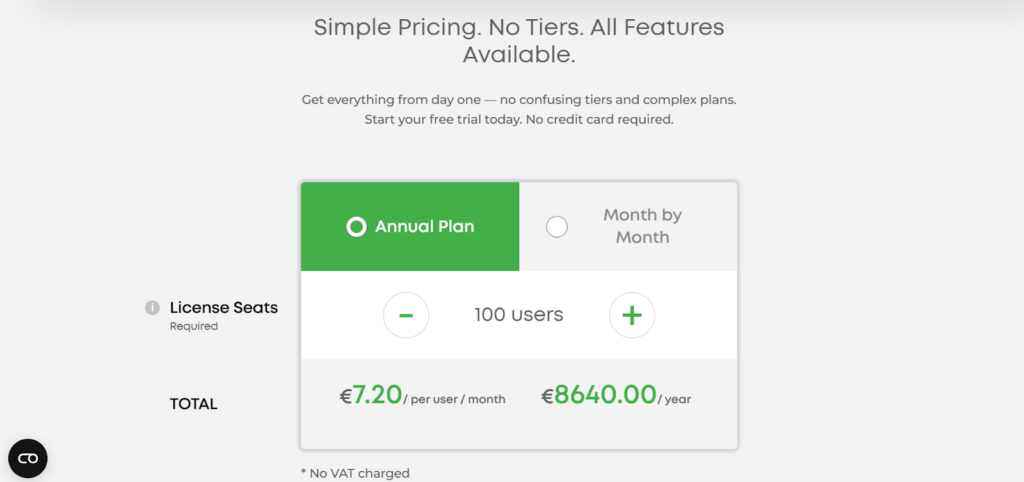
Businessmap typically operates on a higher price bracket. They do not offer a permanent free version for teams, focusing instead on a tiered model that scales based on the number of users and additional features like advanced security or increased automation rules.
- Free Trial: A free trial is available to start immediately, and no credit card information is required to begin.
- Annual Plan Rates: When billed annually for 100 users, the cost is €7.20 per user per month, totaling €8,640.00 per year.
GoodDay vs Businessmap: pros and cons
Every platform has its trade-offs; while GoodDay provides an exhaustive feature set, Businessmap leans heavily into its specific visual niche.
GoodDay pros and cons
| Pros | Cons |
| Delivers robust internal features and high adaptability. | The vast array of settings may feel complex initially. |
| Provides a more budget-friendly path for expanding teams. | Initial workspace configuration takes some thought. |
| Connects with over 1,000 apps and offers a developer API. | Features a learning curve for those new to PM software. |
| Features world-class tools for professional project oversight. | Prioritizes work output over social networking features. |
Businessmap pros and cons
| Pros | Cons |
| Specialized for Lean and Kanban workflows | Can be difficult for beginners to learn |
| Advanced flow analytics and forecasting | a higher starting price per user |
| Great for scaling Agile across departments | Requires a lot of time to set up correctly |
| Strong automation for repetitive actions | Lacks built-in CRM and budgeting tools |
GoodDay vs Businessmap: use cases by industry
Both GoodDay and Monday.com are popular choices, but GoodDay’s deep project management features often provide more value for technical and professional services.
| Industry | GoodDay | Businessmap |
| Architects | Plan complex blueprints and track site visits using Gantt charts. | Visualize project phases with colorful status columns. |
| Accounting | Manage tax seasons with recurring tasks and secure document storage. | Track client onboarding steps using simple list views. |
| Builders | Coordinate subcontractors and materials using integrated resource views. | Use basic boards to track construction milestones. |
| Business analysts | Centralize data requirements and track stakeholder feedback loops. | Create dashboards to summarize high-level project data. |
| Bloggers | Organize content calendars and track drafts from idea to publication. | Manage a simple social media posting schedule. |
| Construction | Link dependencies between site preparation and final inspections. | Provide a visual overview of various job sites. |
| Contractors | Log hours on-site and track expenses directly against project budgets. | Use a board to manage pending and active contracts. |
| Consultants | Share progress with clients through dedicated portals and reports. | Track billable hours via third-party integrations. |
| Creatives | Manage design assets and track versioning within task threads. | Use visual boards to group creative requests. |
| Developers | Sync with GitHub and manage sprints using native Agile tools. | Create simple task lists for software bug tracking. |
| DevOps | Automate deployment workflows and track system requirements. | Visualize the release pipeline using basic Kanban boards. |
| Digital agencies | Handle multiple client accounts using the portfolio management suite. | Organize campaign tasks for different marketing clients. |
| Engineers | Track technical specs and manage hardware development lifecycles. | Plan engineering sprints using standard board views. |
| Electrical contractors | Schedule technicians across different jobs and track time spent. | Maintain a list of service calls and equipment inventory. |
| Entrepreneurs | Scale from a solo operation to a full team on a single platform. | Quickly set up a basic structure for a new business. |
| Events | Coordinate vendors and timelines for large-scale conferences. | Track RSVP lists and guest information on a board. |
| Enterprise | Enforce security protocols and manage global team resources. | Connect different departments using high-level boards. |
| Executive assistants | Manage executive schedules and track confidential task lists. | Keep a visual log of travel plans and meetings. |
| Education | Plan curriculum and track student project progress across terms. | Organize faculty tasks and department resources. |
| Freelancers | Use the free tier to manage all client projects and deadlines. | Track individual to-do lists for various gigs. |
| Film production | Manage scene schedules and coordinate equipment rentals. | List production roles and daily shoot locations. |
| Financial institutions | Maintain strict audit trails and secure project documentation. | Track department initiatives using colorful status updates. |
| Graphic designers | Organize brand assets and gather feedback on specific files. | Manage a queue of design requests from other teams. |
| Home builders | Track custom home options and manage building permits. | Use a simple board to oversee housing developments. |
| HR | Manage recruitment pipelines and employee onboarding workflows. | Track candidate status through a standard funnel view. |
| Interior designers | Catalog furniture orders and manage installation dates. | Visualize room designs and client preferences. |
| IT projects | Manage software implementations and track hardware assets. | Organize help desk tickets and project tasks. |
| Large companies | Standardize processes across thousands of users and projects. | Enable cross-departmental visibility through shared boards. |
| Manufacturing | Monitor production lines and track supply chain dependencies. | Manage factory maintenance schedules and tasks. |
| Marketing | Launch multi-channel campaigns and track real-time performance. | Plan social media content and marketing events. |
| Nonprofits | Track grant applications and coordinate volunteer efforts. | Manage donor lists and fundraising event tasks. |
| Photographers | Manage shoot dates and track post-production editing stages. | Keep a simple schedule of upcoming photo sessions. |
| Pharmaceutical industry | Ensure compliance with strict requirements and track research phases. | Manage documentation for clinical trial progress. |
| Real estate | Organize property listings and track closing documentation. | Keep a visual log of active buyers and sellers. |
| Research | Plan laboratory experiments and track long-term study data. | Organize research papers and meeting notes. |
| Small business | Access professional tools at a price that fits a tight budget. | Start with a simple interface for basic task tracking. |
| Startups | Scale quickly using advanced automation and resource planning. | Build a quick and easy structure for early-stage tasks. |
| Solopreneurs | Handle billing, time tracking, and projects in one hub. | Organize daily tasks and personal goals. |
| Tech companies | Execute agile projects and manage complex product roadmaps. | Collaborate on product updates and feature requests. |
| Writers | Organize book chapters and track editorial feedback cycles. | Maintain a list of story ideas and submission deadlines. |
| YouTubers | Plan video scripts and track filming and editing progress. | Manage a content calendar for video uploads. |
So, which project management software is better: GoodDay or Businessmap?
There’s no absolute best. The answer depends on what you need.
GoodDay is the stronger choice for teams that need a complete work management platform with built-in planning, time tracking, reporting, and support for complex projects. And Businessmap is a good fit for teams that primarily need a flexible database to store and organize custom data sets rather than a dedicated project management engine.
Ultimately, the right pick depends on whether your priority is custom data organization (Businessmap) or full-featured project management (GoodDay).
You can dive in and try GoodDay for free to see how it fits your workflow.
And if you have any questions about selecting the right project management software for your business, you can always connect with our team via info@goodday.work.
FAQs
What software is better, GoodDay or Businessmap?
GoodDay is often the superior choice because it offers a more comprehensive suite of tools, including native time tracking and resource management, at a significantly lower price point. While Businessmap focuses on niche Lean and Kanban methodologies, GoodDay provides a versatile platform that adapts to any business workflow. This ensures your teams can execute projects without needing to pay for multiple external integrations. GoodDay also offers a generous free plan for up to 15 users, making it much more accessible than Businessmap.
What is the best PM tool?
The best tool for project management is one that combines task management, project planning, and strategic planning into a single, cohesive interface. GoodDay stands out by offering customizable templates and real-time updates that help teams stay organized and productive regardless of their industry. By providing built-in features for tracking progress and assigning responsibilities, it allows businesses to manage their entire workflow effectively. It is designed to ensure that completing tasks is as efficient as possible for every team member.
Where to find cloud-based software for daily team collaboration?
You can find powerful cloud-based solutions like GoodDay that prioritize team collaboration and document management in one centralized hub. This platform allows teams to access their projects from anywhere, ensuring that business processes continue smoothly even with remote workers. With native integrations for Google Drive and Google Calendar, GoodDay makes it easy to manage your schedule and files without switching tabs. It is a reliable solution for any business looking to enhance team productivity through better organization.
What is project management software?
Project management software is a digital solution designed to help teams plan, execute projects, and monitor progress from start to finish. These tools provide features like a Kanban board, Gantt charts, and due dates to help users manage their tasks and timelines efficiently. By using such a platform, businesses can automate repetitive business processes and improve overall transparency across the organization. GoodDay serves as a premier example of this, offering deep reporting and analytics to ensure every project stays on track.
What is the best project management software?
GoodDay is widely considered the best project management software because it balances advanced functionality with a user-friendly interface. It allows teams to create custom workflows and use agile project management software features to suit their specific needs. Unlike many competitors, it includes expense tracking and time tracking natively, ensuring you have all the tools required to manage your business effectively. Its ability to support both small teams and enterprise-level security makes it a top-tier choice for any organization.
What are the best platforms for real-time team collaboration?
Platforms like GoodDay are ideal for real-time team collaboration because they offer instant feedback and real-time updates on all active tasks. Centralizing communication and document management, it prevents information silos and keeps everyone aligned on the same strategy. Users can easily manage their workflow and see who is responsible for specific tasks at a glance. This high level of transparency is essential for maintaining team productivity in fast-paced business environments.
What project software works well across remote teams?
GoodDay is an excellent choice for remote teams because it provides a unified platform that everyone can access via the cloud or mobile apps. It simplifies the process of assigning responsibilities and tracking progress, which is often a challenge when teams are physically separated. With its integration with Slack and Google Drive, it ensures that all collaboration happens in one place, making the execution of projects phase much smoother. The software also helps in maintaining a clear project planning structure that everyone can follow.
What project management systems support both small teams and enterprise needs?
GoodDay is specifically designed to support the growth of a business, offering a free tier for small teams and robust security features for large enterprises. As your organization grows, the platform scales with you, providing advanced resource management and business process automation to handle increased complexity. It offers the flexibility to manage hundreds of projects while maintaining the granular control needed for individual tasks. This makes it a sustainable long-term solution for any company.
What are the best tools for business process automation?
GoodDay is a leader in business process automation, allowing users to create automated workflows that trigger based on specific task updates. This reduces the manual effort required for routine processes and ensures that no steps are missed during project execution. By automating due dates and status changes, your team can focus on more strategic planning and high-value work. The platform’s ability to connect with thousands of other apps via Zapier further extends its automation capabilities.
What is the best workflow management software?
GoodDay is the best workflow management software because it offers multiple ways to visualize and control your work, from a Kanban board to a spreadsheet view. It provides the tools necessary for tracking progress and ensuring that all business processes are running efficiently. With its customizable templates, you can quickly set up a workflow that matches your team’s unique requirements. This flexibility, combined with powerful reporting, ensures that you can always optimize your processes for better results.




