Are you trying to choose between GoodDay and Bitrix24?
GoodDay is a robust work management platform with natively built-in tools like resource planning, time tracking, and Gantt charts, while Bitrix24 combines project management with CRM, social intranet, and website builder.
| Core functionality | Comprehensive work and project management | CRM, collaboration, and communications |
| Advanced features | Native time tracking, resource planning, and HD reporting | Lead management, telephony, and contact center |
| Visuals | Clean, modern, and highly customizable interfaces | Traditional portal style with social media elements |
| Complexity | Intuitive setup with deep configuration options | Steep learning curve due to many disconnected modules |
| Best for | High-productivity teams and project-driven organizations | Sales departments and teams needing an internal social net |
| Choose if | You want a streamlined, all-in-one productivity engine | You need a CRM-first tool with built-in telephony |
In this guide, we’ll explore every factor to consider when choosing between GoodDay and Bitrix24 to help you select the best project management software. But if you have any questions that are not covered in this article, you can always connect with our team via info@goodday.work.
GoodDay vs Bitrix24: an overview
Choosing the right platform requires understanding the fundamental philosophy behind each software’s design. While both handle tasks, GoodDay prioritizes efficient project delivery, and Bitrix24 focuses on business automation and sales.
What is GoodDay?
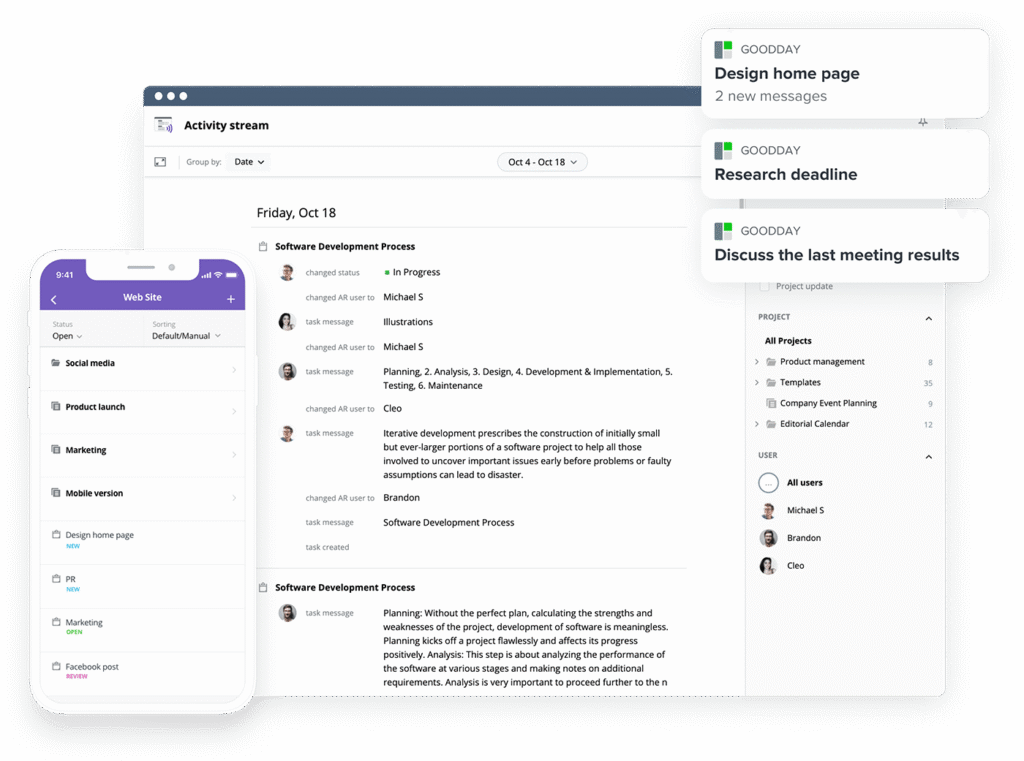
GoodDay is a versatile work management platform relied upon by Fortune 500 companies, startups, and organizations across industries. It offers team-specific project templates, supports major methodologies (like Agile, Scrum, and Waterfall), and provides multiple views (including advanced Gantt and Kanban). The platform enables unlimited project hierarchy, includes native time tracking, and features extensive CRM functionality. It also meets high security standards. In 2026, GoodDay is a a top-rated solution in 12 Capterra shortlists.
What is Bitrix24?
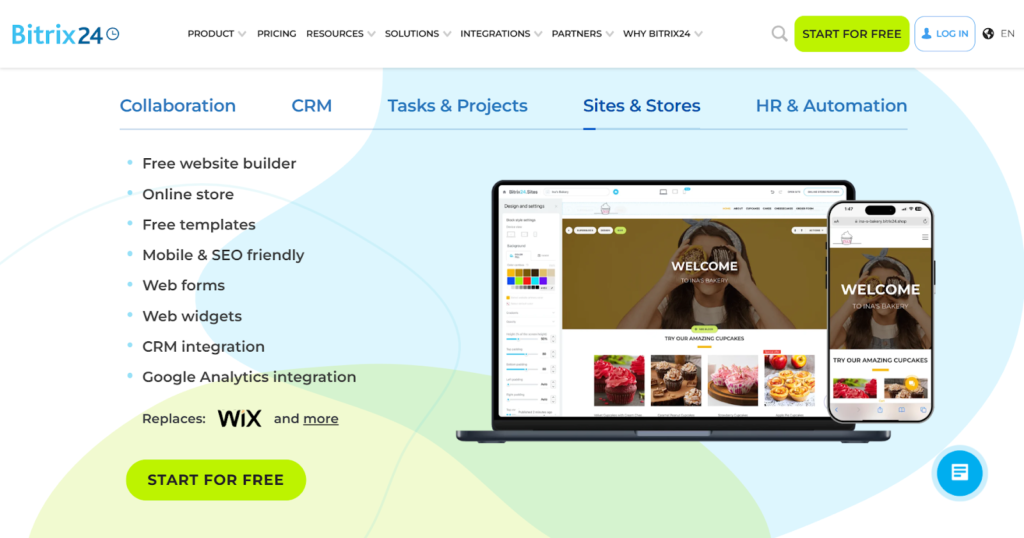
Bitrix24 is a multifunctional suite that centralizes communication, sales management, and basic project tasks. It is widely recognized for its robust CRM system and internal social collaboration tools like chats and video conferencing. While it offers project management features, its primary strength lies in managing customer relationships and internal company communications.
GoodDay vs Bitrix24: key differences
While both tools offer free tiers and mobile access, their technical infrastructure and integration capabilities cater to different operational needs. GoodDay provides a more cohesive environment for project execution, whereas Bitrix24 acts as a broad digital office.
| Free Version | Yes (up to 15 users) | Yes (unlimited users, limited features) |
| Starting Price | $4 user/month | Flat rates starting around $49/month for teams |
| Support | Email, Help Desk, FAQs, Forum, Knowledge Base, Phone, 24/7 Live Rep | Online Help Center, Ticket System, Partner Network |
| Ideal Team Size | Small, Medium, Large | Small, Medium, Large |
| Supported devices | Desktop (Mac, Windows, Linux), Mobile (Android, iPhone) | Desktop (Mac, Windows), Mobile (Android, iPhone) |
| Training | Documentation, Live Online, In Person | Documentation, Webinars, Partner-led training |
| Integration capabilities | GoodDay provides integrations with Google Workspace (formerly G Suite), including Gmail, Google Docs, Drive, and Calendar. It also bridges the gap with communication and storage leaders like Slack, Dropbox, and Box.com. For technical teams and secure environments, the platform supports GitHub, GitLab, and Single Sign-On (SSO via SAML), alongside standard email integration. Beyond these built-in options, you can link to over 1,300 business applications through Zapier or utilize the open API to create custom connections with your own internal systems. | Bitrix24 offers a dedicated Marketplace for apps and integrates with common tools like Mailchimp and QuickBooks. It provides an API and specializes in telephony and website widget integrations. |
GoodDay vs Bitrix24: comparison of features
GoodDay offers a more specialized set of project management tools out of the box, ensuring that advanced planning and tracking features are available to all users. Bitrix24 covers many areas, but often requires more manual configuration to match the project depth found in GoodDay.
| Kanban Features | Yes | Yes |
| Collaboration Tools | Yes | Yes |
| Dependency Tracking | Yes | Yes |
| KPI Monitoring | Yes | No |
| Milestone Tracking | Yes | Yes |
| Multi-Board | Yes | No |
| Prioritization | Yes | Yes |
| Project Planning | Yes | Yes |
| Roadmapping | Yes | No |
| Supports Scrum | Yes | Yes |
| Task Management | Yes | Yes |
| Time Tracking | Yes | Yes |
| Project Management Features | Yes | Yes |
| Agile Methodologies | Yes | Yes |
| Budget Management | Yes | No |
| Client Portal | Yes | Yes |
| Cost-to-Completion Tracking | Yes | No |
| Customizable Templates | Yes | Yes |
| Gantt Charts | Yes | Yes |
| Idea Management | Yes | No |
| Kanban Board | Yes | Yes |
| Portfolio Management | Yes | No |
| Resource Management | Yes | No |
| Time & Expense Tracking | Yes | No |
| Traditional Methodologies | Yes | Yes |
| Due Date Tracking | Yes | Yes |
| Progress Tracking | Yes | Yes |
| Template Management | Yes | Yes |
| Dashboard | Yes | Yes |
| Issue Management | Yes | Yes |
| Requirements Management | Yes | No |
| Status Tracking | Yes | Yes |
| Percent-Complete Tracking | Yes | No |
| Create Subtasks | Yes | Yes |
| Mobile Access | Yes | Yes |
| Recurring Tasks | Yes | Yes |
| Reporting / Analytics | Yes | Yes |
| Spreadsheet View | Yes | No |
| Task Board View | Yes | Yes |
| Task Planning | Yes | Yes |
| Task Scheduling | Yes | Yes |
| Task Tracking | Yes | Yes |
| To-Do List View | Yes | Yes |
GoodDay vs Bitrix24: comparison of pricing
Both platforms offer tiered pricing, but the value proposition varies based on how many “extra” features you need for project management. GoodDay tends to offer more specialized PM tools at a lower per-user cost.
GoodDay pricing
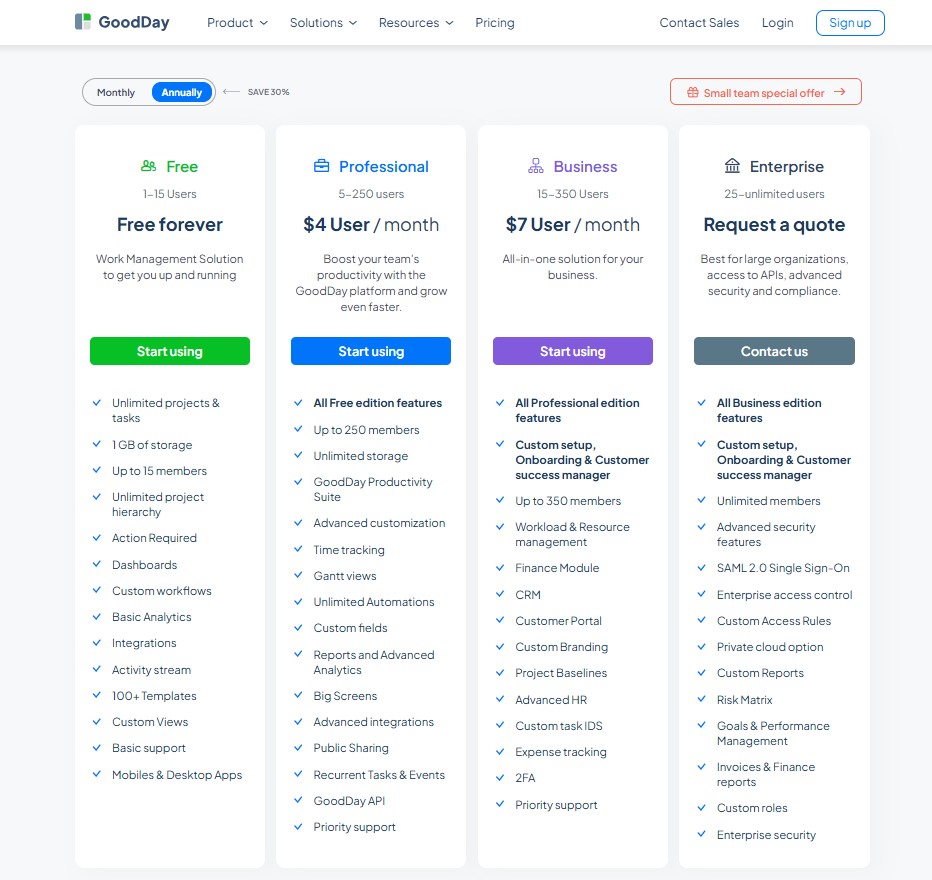
GoodDay’s pricing model ensures that teams have access to professional-grade tools like Gantt charts and resource management without paying for hidden add-ons. This makes the platform highly cost-effective for organizations that are scaling and need deep analytical capabilities.
- Free plan (up to 15 users): Provides unlimited tasks and projects, basic workflows, dashboards, and templates for small teams.
- Professional plan ($4 per user/month): Includes time-tracking, Gantt views, unlimited storage, automation, and advanced reports.
- Business plan ($7 per user/month): Adds a built-in CRM, client portals, finance/expense tracking, and custom branding for growing organizations.
- Enterprise plan (custom pricing): Offers advanced security, SSO, private-cloud options, and custom roles for large-scale operations.
Bitrix24 pricing
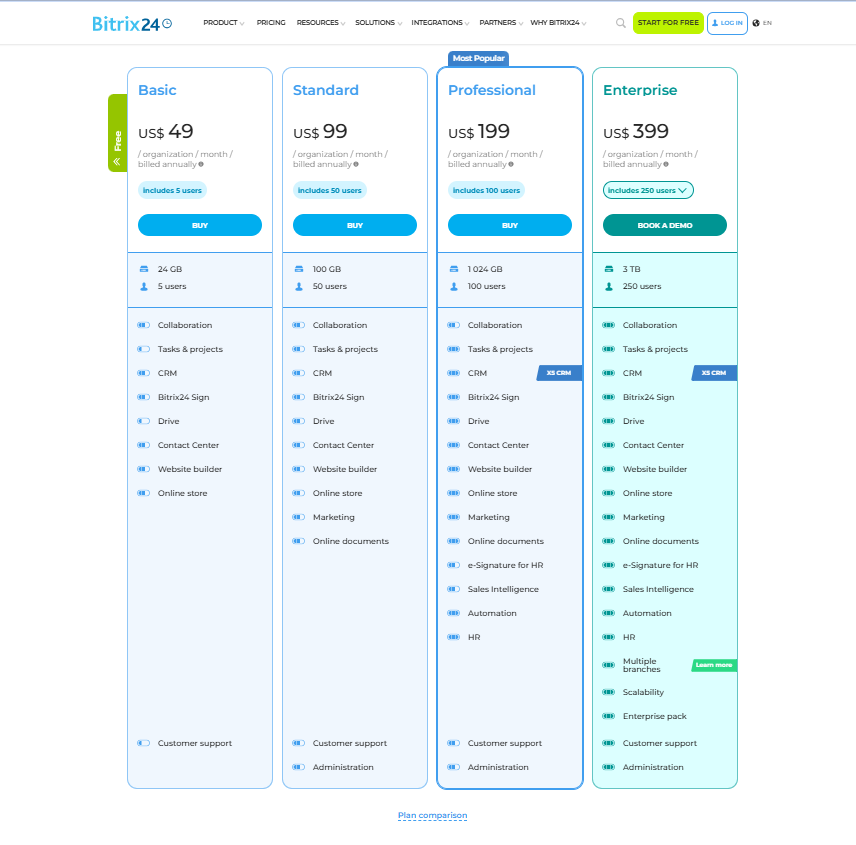
Bitrix24 uses a flat-rate pricing model for its cloud versions rather than a strictly per-user model, which can be beneficial for very large teams but expensive for smaller ones.
- Free plan: The free plan supports basic collaboration and CRM features for small teams. It includes tasks and projects, internal communication tools, drive storage, contact center access, website builder, online store, and customer support, with limited storage and functionality.
- Basic plan: The Basic plan costs $49 per organization per month, billed annually, and includes up to 5 users with 24 GB of storage. It covers collaboration tools, tasks and projects, CRM, Bitrix24 Sign, drive, contact center, website builder, online store, and customer support.
- Standard plan: The Standard plan is priced at $99 per organization per month, billed annually, and supports up to 50 users with 100 GB of storage. In addition to Basic features, it adds marketing tools, online documents, administration options, and extended collaboration capabilities.
- Professional plan: The Professional plan costs $199 per organization per month, billed annually, and includes up to 100 users with 1 TB of storage. It unlocks advanced CRM features (X5 CRM), sales intelligence, automation, HR tools, e-signature for HR, and deeper administrative controls. This is the most popular plan for growing organizations.
- Enterprise plan: The Enterprise plan starts at $399 per organization per month, billed annually, and includes 250 users with 3 TB of storage. It can scale up to 10,000 users across multiple branches. This plan includes all advanced features such as X5 CRM, automation, HR management, sales intelligence, enterprise scalability options, and enhanced administration and support.
GoodDay vs Bitrix24: pros and cons
Every tool has its trade-offs. GoodDay focuses on depth of functionality and precision, while Bitrix24 focuses on breadth of features across the entire business.
GoodDay pros and cons
| Pros | Cons |
| Provides robust native features and high flexibility for workflows. | The vast feature set can seem complex during initial discovery. |
| Remains more budget-friendly for teams as they scale up. | Initial configuration may require more thought than simpler tools. |
| Seamlessly connects with major apps and offers a custom API. | Users may face a learning curve when mastering advanced tools. |
| Excellent support for professional project management frameworks. | Prioritizes work output over social networking features. |
Bitrix24 pros and cons
| Pros | Cons |
| Includes a massive range of tools from CRM to telephony in one place. | The interface is often cluttered and confusing for new users. |
| Flat-rate pricing can be cheap for companies with hundreds of staff. | Customer support is notoriously slow and difficult to reach. |
| Strong internal communication features like chat and video. | Project management features lack the depth of specialized PM tools. |
| Good for sales teams who need to track leads and calls. | Many advanced features require moving to very expensive tiers. |
GoodDay vs Bitrix24: use cases by industry
| Industry | GoodDay | Bitrix24 |
| Architects | Manages project phases, blueprints, schedules, and approvals with timelines and resource tools. | Visual boards for job progress, task lists, and daily updates. |
| Accounting | Organizes tax season workflows and recurring client audits using structured folders and status tracking. | Automates client billing, document requests, and lead management through the integrated CRM. |
| Builders | Coordinates site construction timelines and equipment allocation via advanced Gantt and workload views. | Tracks subcontractor contracts and manages site-specific workgroups with shared file drives. |
| Business analysts | Visualizes complex data trends and project KPIs using customizable dashboards and reporting modules. | Facilitates data gathering through internal chat polls and centralized document knowledge bases. |
| Bloggers | Plans editorial calendars and tracks content production stages from draft to publication. | Manages guest contributor outreach and social media integration through the marketing suite. |
| Construction | Streamlines field-to-office communication and ensures safety milestones are met with progress tracking. | Stores site photos and manages supplier contact lists within the centralized contact center. |
| Contractors | Tracks billable hours and manages job dependencies to ensure multi-site projects stay on budget. | Handles initial bidding processes and manages customer inquiries via a unified telephony system. |
| Consultants | Provides clients with transparent project updates and time-based billing reports through custom portals. | Nurtures a pipeline of consulting leads and manages initial discovery call scheduling. |
| Creatives | Organizes design sprints and asset approvals using flexible Kanban boards and task checklists. | Shares design drafts for quick team feedback through the internal social activity feed. |
| Developers | Supports Scrum and Kanban frameworks with backlog grooming, sprint planning, and GitHub integration. | Connects distributed coding teams through secure video conferencing and instant messaging. |
| DevOps | Monitors deployment cycles and manages technical infrastructure tasks with high-level portfolio views. | Centralizes server maintenance documentation and incident reporting within the company wiki. |
| Digital agencies | Balances team utilization across dozens of client accounts using visual resource management tools. | Manages the end-to-end sales funnel for new business leads and handles agency-wide announcements. |
| Engineers | Tracks technical requirements and manages complex hardware-software dependencies with precision. | Stores technical manuals and facilitates group discussions on engineering standards. |
| Electrical contractors | Schedules technician dispatch and tracks time spent on specific electrical service tickets. | Manages customer service history and handles job bookings via automated web forms. |
| Entrepreneurs | Translates broad business visions into actionable goals and tracks progress with OKR modules. | Serves as a low-cost digital headquarters for general company communication and sales. |
| Events | Coordinates intricate production timelines and vendor deliverables using interactive event lists. | Manages guest registrations and processes ticket payments through the e-commerce engine. |
| Enterprise | Scales global operations with advanced security, SSO, and multi-departmental hierarchy structures. | Creates a unified social intranet for thousands of employees to stay connected and informed. |
| Executive assistants | Manages high-level executive tasking and coordinates cross-departmental meetings with calendar sync. | Handles travel bookings and expense approvals through automated business process workflows. |
| Education | Plans course development and manages faculty assignments using academic templates and timelines. | Facilitates student enrollment and maintains a database of parent/alumni contact information. |
| Freelancers | Tracks individual billable time and manages multiple client deadlines in a clean, focused interface. | Uses the CRM to track project proposals and manages basic client invoicing. |
| Film production | Manages daily call sheets, location scouting tasks, and production budgets in one place. | Centralizes cast and crew contact information and manages permit application documents. |
| Financial institutions | Ensures strict adherence to compliance workflows with detailed task audit trails and permissions. | Secures internal communication and manages loan application pipelines through the CRM. |
| Graphic designers | Manages asset versioning and organizes production schedules for various branding projects. | Uses the built-in drive to share large files and collects client feedback via live chat. |
| Home builders | Tracks custom home construction stages and manages interior design selection milestones. | Manages buyer leads and handles warranty service requests through the CRM portal. |
| HR | Streamlines employee onboarding and tracks recruitment stages with specialized HR workspace setups. | Manages employee leave requests, attendance tracking, and company-wide appreciations. |
| Interior designers | Coordinates furniture procurement and tracks installation schedules using visual boards. | Manages vendor catalogs and sends professional estimates and invoices to clients. |
| IT projects | Manages hardware rollouts and tracks software bug resolution with detailed issue tracking. | Provides a ticketing system for internal tech support and manages software license databases. |
| Large companies | Standardizes project delivery across business units with custom workflows and global reporting. | Implements a company-wide social network to drive employee engagement and culture. |
| Manufacturing | Plans production runs and manages equipment maintenance schedules with resource planning tools. | Tracks supply chain relationships and automates inventory reorder notifications. |
| Marketing | Plans multi-channel campaigns and tracks creative output with marketing-specific project templates. | Executes email marketing campaigns and manages social media interactions from one dashboard. |
| Nonprofits | Tracks grant application progress and manages volunteer assignments for community programs. | Manages donor databases and organizes fundraising outreach via integrated mail merge tools. |
| Photographers | Organizes shoot dates and post-processing task lists to ensure timely client delivery. | Tracks booking inquiries and manages deposit payments through integrated payment links. |
| Pharmaceutical industry | Manages R&D milestones and ensures clinical trial tasks meet strict regulatory deadlines. | Stores sensitive compliance documents and facilitates global research team collaboration. |
| Real estate | Tracks closing checklists and manages property listing tasks with status-driven workflows. | Automates lead follow-ups and manages property databases within the specialized real estate CRM. |
| Research | Organizes data collection phases and tracks academic publication deadlines for various studies. | Facilitates collaboration on white papers and stores research data in a shared knowledge base. |
| Small business | Provides professional-grade project tools that grow alongside the company without added complexity. | Offers a free suite of tools for basic customer tracking and team messaging. |
| Startups | Drives rapid growth with agile development tools and clear visibility into team productivity. | Helps build the initial customer base and manages early investor relations through the CRM. |
| Solopreneurs | Keeps daily tasks organized and ensures nothing is missed with a personalized “My Work” view. | Manages basic customer contacts and provides a simple website builder for a digital presence. |
| Tech companies | Manages the entire product lifecycle from initial idea to release using roadmapping tools. | Provides a centralized portal for customer support and internal team coordination. |
| Writers | Plans manuscript chapters and tracks editing cycles | Manages publishing contracts and tracks correspondence with literary agents. |
| YouTubers | Plans video production schedules and tracks sponsor deliverables from concept to upload. | Manages sponsorship leads and organizes fan outreach through the CRM and email tools. |
So, which project management software is better: GoodDay or Bitrix24?
There’s no absolute best. The answer depends on what you need.
GoodDay is the stronger choice for teams that need a complete work management platform. It provides structure, scalability, and a wide range of features without relying on add-ons.
Bitrix24 is the better fit for companies that need a “digital office” centered around a CRM and internal social networking. It works well if your priority is managing client leads and internal chat rather than deep project execution.
Ultimately, the right pick depends on whether your priority is business automation and sales (Bitrix24) or full-featured project management (GoodDay).
You can dive in and try GoodDay for free to see how it fits your workflow.
And if you have any questions about selecting the right project management software for your business, you can always connect with our team via info@goodday.work.
FAQs
What is better than Bitrix24?
GoodDay is the superior project management software because it provides a more intuitive and modern environment for professional teams. While Bitrix24 offers many modules, GoodDay is built to streamline project management by focusing on user experience and data clarity. It allows users to manage complex projects without the cluttered feel of older legacy systems. This makes it a more effective choice for those who value speed and productivity in their daily work.
Is Bitrix24 a good CRM?
Bitrix24 is primarily a CRM designed for sales teams to handle contact management and basic customer interactions. However, it often lacks the specialized project management features found in GoodDay that are necessary for detailed execution. GoodDay provides a better balance for companies that need to manage both customer relationships and internal deliverables in one place. Its user interface is significantly easier for non-sales departments to adopt quickly.
Is Bitrix worth it?
For many small businesses, Bitrix24 can feel overwhelming and expensive once you move past the basic free version. GoodDay offers more value because its paid plan includes advanced tools like resource planning as a standard part of the package. By choosing GoodDay, you avoid the high costs of premium plans that Bitrix24 requires for advanced functionality. It is a more sustainable investment for companies looking to organize tasks effectively as they scale.
How good is Bitrix24 for complex projects?
Bitrix24 can handle complex projects, but its steep learning curve often slows down project execution and team adoption. GoodDay is better suited for this purpose because it offers highly customizable workflows that adapt to your specific business needs. It allows project managers to track progress with deep granularity while maintaining a clean, manageable workspace. This flexibility ensures that even the most difficult assignments stay on schedule and under control.
Is Bitrix24 a project management tool?
While it is marketed as an all-in-one platform, Bitrix24 often functions more as a suite of disconnected communication tools and CRM features. GoodDay is a dedicated project management tool that places task management at the very center of its architecture. It provides a more cohesive environment where project tasks are linked directly to broader company milestones. This focused approach leads to better project performance and fewer missed deadlines.
How does Bitrix24 compare to GoodDay?
GoodDay provides a more professional workflow management experience compared to the social-media-style interface of Bitrix24. In GoodDay, you can assign tasks and track tasks using a variety of views, including highly functional Gantt charts. While Bitrix24 offers video calls and phone calls, GoodDay focuses on the core work, offering more detailed analytics and reporting. This makes GoodDay the preferred feature-rich platform for teams that prioritize actual delivery over internal social chatter.
Which tool is best for project management?
GoodDay is the best project management software for teams that need to automate repetitive tasks and maintain high team productivity. It integrates resource management and workload management into a single view, which is often missing in other project management tools. Its ability to represent tasks in multiple formats ensures that every team member can work in the way that suits them best. This versatility is why it is consistently rated higher for operational efficiency.
What is the cheapest project management tool?
GoodDay offers the best free plan on the market, supporting up to 15 users with access to essential features like task tracking. This is more generous than the Bitrix24 free version, which limits many of its more powerful automation features to higher tiers. When moving to a paid plan, GoodDay starts at a lower price point while providing more advanced features. This makes it the most cost-effective project management solution for small teams on a budget.
What is better for file sharing, GoodDay or Bitrix24?
GoodDay offers superior file-sharing capabilities because it integrates project documents directly into the context of specific tasks. This avoids the confusion of searching through a separate drive and ensures that remote teams always have the right version of a file. While Bitrix24 has file-sharing modules, GoodDay’s proofing tools allow for direct feedback and faster review cycles. This native connection between files and work significantly speeds up the creative and technical process.
What are the key features of GoodDay?
The key features of GoodDay include native time tracking, advanced resource management, and highly flexible project templates. It helps teams track progress through detailed analytics and advanced reporting that are easy to configure. The platform also features a drag-and-drop interface that makes project planning incredibly simple for any user. These tools are designed to help a business stay organized without needing multiple tools to get the job done.
What are the key features of Bitrix24?
Bitrix24 is known for its sales automation and sales process tools that help sales teams track leads. It includes communication apps like internal chat and video calls to facilitate team collaboration. While it features Gantt charts and basic workflow automation, these are often less intuitive than those in specialized project management systems. Its lead management is its strongest point, but it can struggle with complex workflows outside of a sales context.
What advanced features do GoodDay and Bitrix24 offer, and how do they compare?
GoodDay offers advanced features like cost-to-completion tracking and resource planning that are built directly into the user interface. Bitrix24 provides advanced automation for marketing campaigns, but these often require a human expert to set up correctly. GoodDay’s workflow automation is designed so users can create rules with just a few clicks, making it more accessible. Ultimately, GoodDay provides better tools for project managers who need to monitor project progress in real-time.
Which is the best project management software?
GoodDay stands out as the best project management software because it simplifies business processes for marketing teams, development teams, and small businesses alike. It offers a feature-rich environment that includes all the features needed for successful project planning and execution. By providing a centralized platform for all work, it eliminates the need for third-party apps to fill functional gaps. GoodDay is the ultimate workflow management solution for any organization looking to achieve better outcomes.




