Are you trying to decide between GoodDay and Basecamp?
GoodDay vs Basecamp remains a popular dilemma because these tools offer different approaches to managing work.
GoodDay is a comprehensive work management platform that provides teams with a highly flexible environment where they can customize workflows, track time, and manage resources without needing third-party add-ons. And Basecamp is known for its minimalist approach focused primarily on team communication and simple to-do lists.
| GoodDay | Basecamp | |
| Core functionality | End-to-end work management with advanced planning and execution tools. | Communication-centric collaboration with simple task lists. |
| Advanced features | Built-in time tracking, Gantt charts, resource management, and custom workflows. | Message boards, group chat, and shared schedules. |
| Visuals | Multiple views: Gantt, Kanban, List, Table, Calendar, and Workload. | Single view per project with card-based tools. |
| Complexity | Moderate; offers deep customization for professional project needs. | Low; very easy to start but lacks advanced project controls. |
| Best for | Teams needing data-driven insights and structured project tracking. | Small teams and agencies that prioritize simple chatting and file sharing. |
| Choose if | You want to manage projects, resources, and time in one powerful place. | You want a digital bulletin board to replace internal emails. |
In this guide, we’ll explore every factor to consider when choosing between GoodDay and Basecamp to help you select the best project management software.
But if you have any questions that are not covered in this article, you can always connect with our team via info@goodday.work
GoodDay vs Basecamp: an overview
Choosing the right project management software depends on whether your team requires deep analytical power or just a central place for conversations. While both platforms aim to organize work, they serve different organizational philosophies.
What is GoodDay?
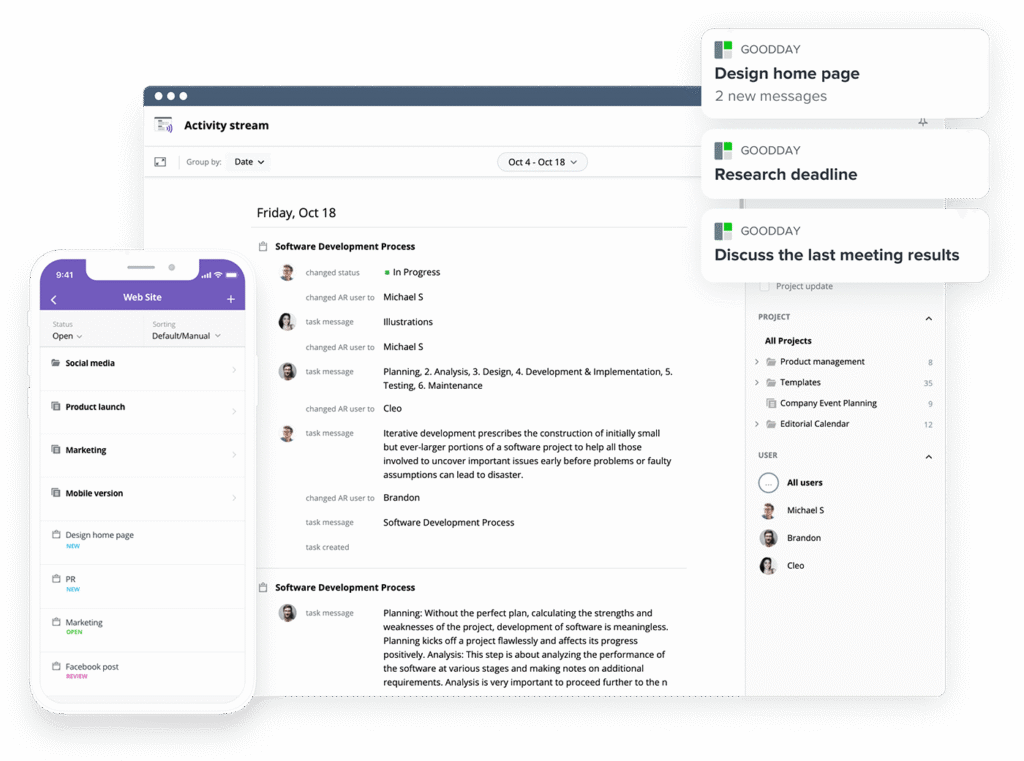
GoodDay is an all-in-one work management platform relied on by global enterprises, startups, and growing teams. It offers ready-made templates for different teams, supports all major project management approaches, and features multiple visualization options (such as Gantt and Kanban). Also, it provides unlimited project hierarchy, built-in time tracking, and comprehensive CRM tools. GoodDay was ranked as a top-rated project management software in 12 Capterra shortlists in 2026.
What is Basecamp?
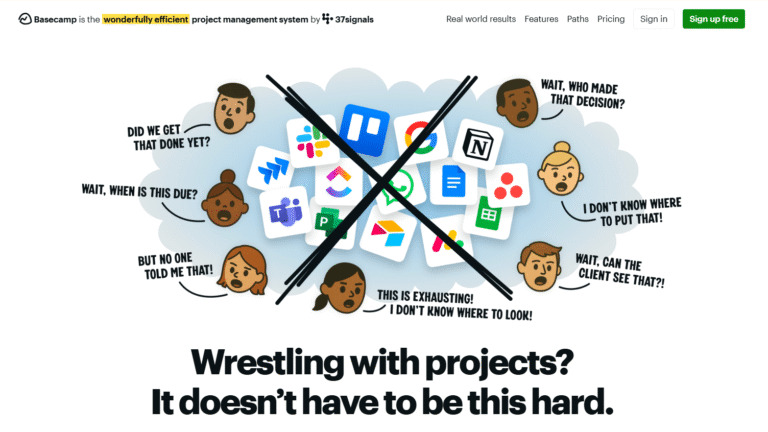
Basecamp is a collaboration tool that emphasizes simplicity over complex project management features. It organizes projects into separate hubs that include message boards, to-do lists, and file storage to keep everyone informed. Because it avoids advanced features like Gantt charts or time tracking, it is primarily used by teams that want to reduce email clutter and maintain a basic record of progress.
GoodDay vs Basecamp: key differences
The main difference lies in how much control you have over your data and project structures. GoodDay offers a robust professional toolkit, whereas Basecamp focuses on being a lightweight communication hub.
| GoodDay | Basecamp | |
| Free Version | Yes (up to 15 users) | No (limited trial only) |
| Starting Price | $4 user/month | $15 user/month |
| Support | Email, Help Desk, FAQs, Forum, Knowledge Base, Phone Support, 24/7 (Live Rep) | Email and Help Center |
| Ideal Team Size | Small, Medium, Large | Small and Freelance |
| Supported devices | Desktop (Mac, Windows, Linux), Mobile (Android, iPhone) | Desktop (Mac, Windows), Mobile (Android, iPhone) |
| Training | Documentation, Live Online, In Person | Documentation |
| Integration capabilities | GoodDay offers more comprehensive integration coverage, platform natively integrates with Google Workspace (G Suite), Gmail, Slack, Google Docs, Google Drive, Google Calendar, Dropbox, Box.com, Single Sign-On (SSO via SAML), GitHub, GitLab, and email. It also connects to 1,300+ business apps via Zapier and provides an API for integration with any of your existing systems. | Basecamp integrates with several third-party tools like Slack, Google Drive, and GitHub, but often requires external apps for time tracking and reporting. |
GoodDay vs Basecamp: comparison of features
When comparing the technical capabilities of these tools, GoodDay provides a significantly more professional suite of features for managing multiple projects.
| Feature | GoodDay | Basecamp |
| Kanban Features | Yes | Yes |
| Collaboration Tools | Yes | Yes |
| Dependency Tracking | Yes | No |
| KPI Monitoring | Yes | No |
| Milestone Tracking | Yes | Yes |
| Multi-Board | Yes | No |
| Prioritization | Yes | Yes |
| Project Planning | Yes | Yes |
| Roadmapping | Yes | No |
| Supports Scrum | Yes | No |
| Task Management | Yes | Yes |
| Time Tracking | Yes | No |
| Project Management Features | Yes | No |
| Agile Methodologies | Yes | No |
| Budget Management | Yes | No |
| Client Portal | Yes | No |
| Cost-to-Completion Tracking | Yes | No |
| Customizable Templates | Yes | Yes |
| Gantt Charts | Yes | No |
| Idea Management | Yes | No |
| Kanban Board | Yes | Yes |
| Portfolio Management | Yes | No |
| Resource Management | Yes | No |
| Time & Expense Tracking | Yes | No |
| Traditional Methodologies | Yes | Yes |
| Due Date Tracking | Yes | Yes |
| Progress Tracking | Yes | Yes |
| Template Management | Yes | Yes |
| Dashboard | Yes | No |
| Issue Management | Yes | No |
| Requirements Management | Yes | No |
| Status Tracking | Yes | Yes |
| Percent-Complete Tracking | Yes | No |
| Create Subtasks | Yes | No |
| Mobile Access | Yes | Yes |
| Recurring Tasks | Yes | Yes |
| Reporting / Analytics | Yes | No |
| Spreadsheet View | Yes | No |
| Task Board View | Yes | Yes |
| Task Planning | Yes | Yes |
| Task Scheduling | Yes | Yes |
| Task Tracking | Yes | Yes |
| To-Do List View | Yes | Yes |
GoodDay vs Basecamp: comparison of pricing
Understanding the costs is essential for long-term scalability. GoodDay offers a flexible per-user model that is highly affordable, while Basecamp uses a more rigid structure that may be expensive for small teams.
GoodDay pricing
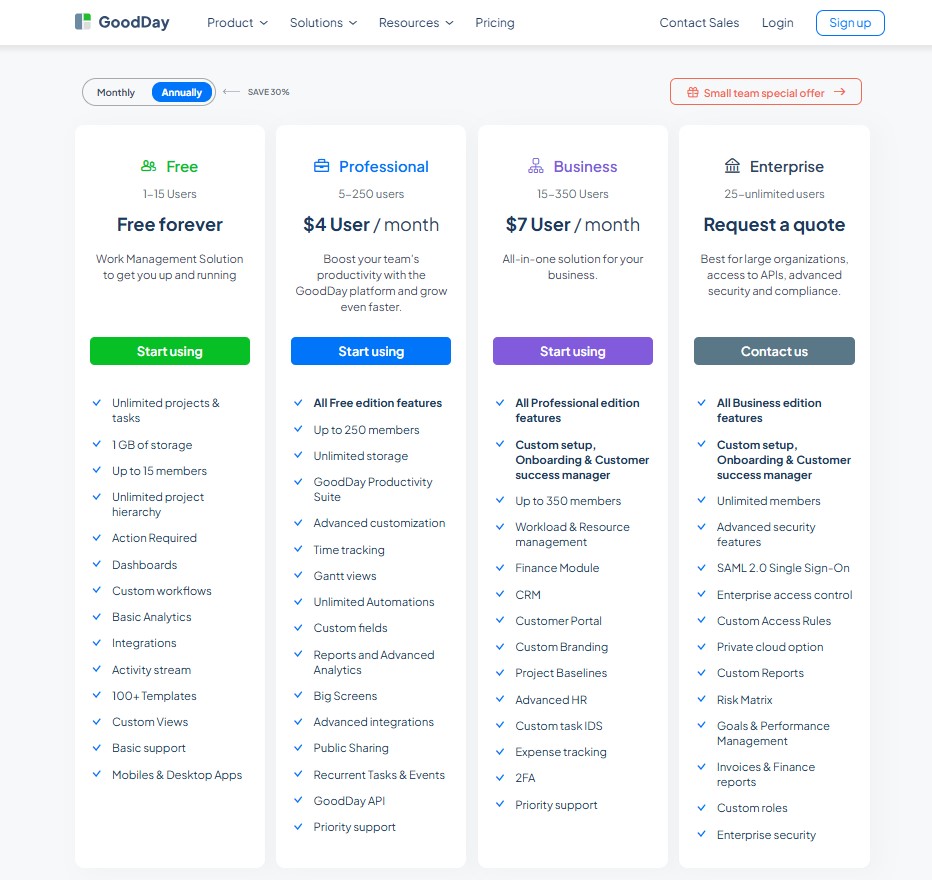
GoodDay’s pricing model gives teams access to advanced features (such as Gantt charts, time tracking, analytics, and resource management) that are included without requiring add-ons. This makes GoodDay more cost-effective for teams that need comprehensive project management capabilities, especially as they expand.
- Free plan (up to 15 users): Includes unlimited tasks and projects, basic integrations and workflows, dashboards, templates, and basic analytics.
- Professional plan ($4 per user/month): Adds time-tracking, Gantt views, unlimited storage, advanced integrations, automation, reports, custom fields, and the full feature set.
- Business plan ($7 per user/month): Adds CRM, customer portal, resource/finance/expense tracking, custom branding, and advanced security features.
- Enterprise plan (custom pricing): Supports unlimited users, enterprise security, SSO, advanced access control, private-cloud options, and custom roles.
Basecamp pricing
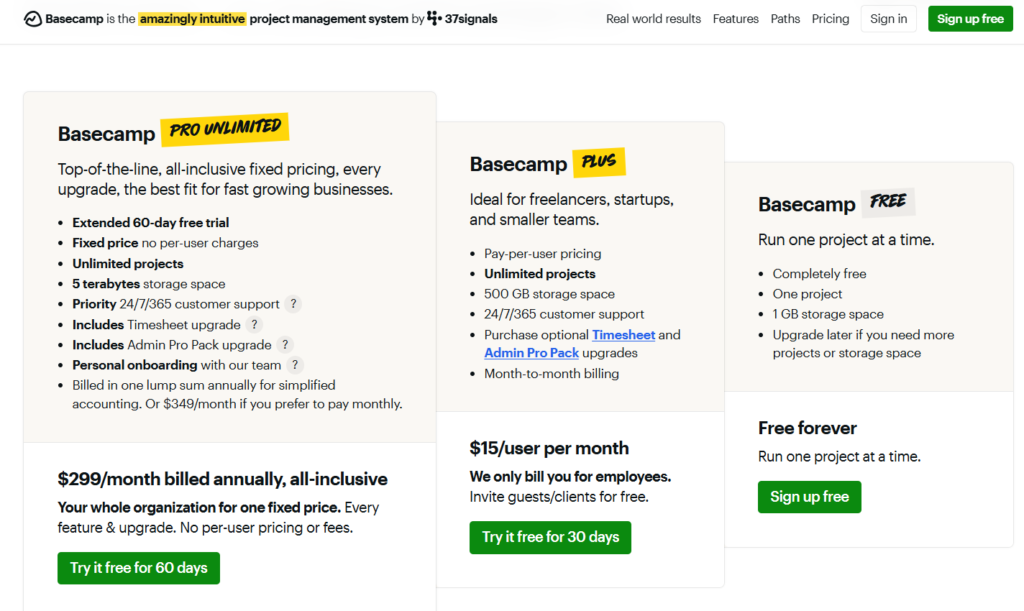
Basecamp keeps its pricing very narrow with two main options.
- Basecamp Plus ($15 per user/month): This plan is designed for individuals or smaller teams and includes 500 GB of storage for files and documents.
- Basecamp Pro Unlimited ($299/month billed annually): This flat-rate plan is intended for larger companies that want a fixed cost regardless of user count, providing 5 TB of storage and priority support.
GoodDay vs Basecamp: pros and cons
Every tool has its trade-offs. While GoodDay focuses on power and versatility, Basecamp focuses on simplicity and ease of use.
GoodDay pros and cons
| Pros | Cons |
| Offers powerful built-in functionality and flexibility for all project types. | Can be more complex due to its extensive feature set and customization options. |
| Often more affordable for growing teams thanks to the $4 starting price. | May require more initial setup and configuration to align with specific workflows. |
| Integrates with many apps and provides an API for custom solutions. | The learning curve is higher for new users who are used to very simple tools. |
| Strong support for advanced project management tools like Gantt and resource tracking. | Focused on productivity and data-driven management, not just social chatting. |
Basecamp pros and cons
| Pros | Cons |
| Very easy to learn and requires almost zero training for new hires. | Lacks essential project tools like Gantt charts, time tracking, and subtasks. |
| Centralizes team discussions and replaces internal email threads effectively. | Fixed pricing can be very expensive for small teams with only a few members. |
| The mobile app is reliable and mirrors the desktop experience well. | Very limited reporting and analytics make it hard to track team performance. |
| Great for simple, linear projects that only require checklists. | Not suitable for Agile, Scrum, or complex engineering workflows. |
GoodDay vs Basecamp: use cases by industry
Different industries require different levels of detail. Here is how each software serves various professional sectors.
| Industry | GoodDay | Basecamp |
| Architects | Manages project phases, blueprints, schedules, and approvals with timelines and resource tools. | Acts as a central file hub for sharing drawings and discussing client feedback. |
| Accounting | Tracks tax deadlines and audit progress with automated recurring tasks and time logs. | Provides a simple space to exchange documents and message clients. |
| Builders | Coordinates site schedules and equipment allocation using Gantt charts and workload views. | Visual boards for job progress, task lists, and daily updates. |
| Business analysts | Organizes data collection tasks and project requirements with advanced custom fields. | Shares meeting notes and research documents in a centralized folder. |
| Bloggers | Plans content calendars and tracks writing time across multiple publication stages. | Maintains a simple list of upcoming posts and ideas. |
| Construction | Oversees complex builds with dependency tracking and budget monitoring. | Keeps field crews updated with simple to-do lists and photo sharing. |
| Contractors | Monitors multiple job sites and hourly billing using integrated time tracking. | Uses message boards to confirm project details with various subcontractors. |
| Consultants | Manages client portfolios with dedicated portals and progress reporting. | Provides a shared area for client communications and final deliverables. |
| Creatives | Uses Kanban boards and proofing workflows to manage design assets and feedback. | Hosts brainstorming sessions and stores inspiration files. |
| Developers | Supports Scrum and Agile sprints with bug tracking and GitHub integrations. | Shares general project announcements and high-level goals. |
| DevOps | Automates deployment tasks and tracks system issues with custom status workflows. | Serves as a place for non-technical team updates and schedules. |
| Digital agencies | Tracks billable hours and manages campaign resources across multiple client accounts. | Coordinates simple creative projects and client messages. |
| Engineers | Handles complex technical dependencies and milestone tracking for multi-year projects. | Records high-level project milestones and general team chat. |
| Electrical contractors | Schedules service calls and tracks material expenses with resource modules. | Posts daily schedules and safety reminders for technicians. |
| Entrepreneurs | Aligns long-term business goals with daily execution using the built-in KPI module. | Keeps a basic checklist of startup tasks and partner contacts. |
| Events | Maps out detailed event timelines and vendor tasks with Gantt charts. | Shares invitation lists and catering menus in one place. |
| Enterprise | Scales work across departments with SSO, advanced security, and cross-project reporting. | Provides a simple communication tool for non-technical departments. |
| Executive assistants | Organizes complex calendars and tracks task progress for senior leadership. | Maintains a basic to-do list for administrative errands. |
| Education | Manages curriculum development and faculty workloads with planning tools. | Serves as a digital bulletin board for classroom announcements. |
| Freelancers | Tracks every billable minute and manages multiple client projects in one view. | Simple way to stay in touch with clients and share files. |
| Film production | Coordinates shooting schedules and talent resources with timeline views. | Distributes scripts and daily call sheets to the crew. |
| Financial institutions | Ensures compliance and tracks audit trails with robust security and history logs. | Centralizes general internal communication and meeting schedules. |
| Graphic designers | Manages asset versions and tracks time spent on different iterations. | Shares drafts and collects simple “thumbs up” approvals. |
| Home builders | Tracks construction milestones and manages vendor payments within the platform. | Posts daily updates and site photos for homeowners. |
| HR | Manages recruitment pipelines and employee onboarding with custom workflows. | Stores company policies and hosts general employee announcements. |
| Interior designers | Organizes sourcing lists and project timelines for residential or commercial builds. | Shares mood boards and furniture lists with clients. |
| IT projects | Tracks hardware rollouts and software tickets with integrated issue management. | Provides a space for general team coordination and scheduling. |
| Large companies | Unifies disparate teams under one platform with hierarchical project structures. | Offers a basic workspace for teams that don’t need project data. |
| Manufacturing | Monitors production cycles and resource capacity with advanced workload tools. | Shares safety procedures and general facility news. |
| Marketing | Plans multi-channel campaigns with roadmaps and performance analytics. | Coordinates simple social media posts and team chats. |
| Nonprofits | Tracks grant applications and volunteer hours with budgeting tools. | Organizes fundraiser planning and volunteer communication. |
| Photographers | Manages shoot schedules and tracks editing time per client. | Stores client contracts and basic to-do lists for shoots. |
| Pharmaceutical industry | Tracks regulatory approvals and R&D phases with strict process controls. | Shares research findings and team meeting notes. |
| Real estate | Manages listing pipelines and closing tasks with automated checklists. | Keeps a record of property photos and agent communications. |
| Research | Organizes literature reviews and data analysis tasks with custom fields. | Shares research papers and schedules lab meetings. |
| Small business | Provides a professional infrastructure for growth at an affordable price. | Acts as a simple digital office for very small teams. |
| Startups | Scales rapidly from simple tasks to complex product roadmaps. | Helps early-stage teams stay connected without complex tools. |
| Solopreneurs | Handles everything from daily tasks to financial tracking in one app. | Provides a basic place to store notes and checklists. |
| Tech companies | Bridges the gap between product management and executive reporting. | Hosts company-wide announcements and social threads. |
| Writers | Manages manuscript progress and tracks editing cycles with custom statuses. | Keeps a simple list of story ideas and draft deadlines. |
| YouTubers | Plans video production pipelines and tracks sponsorship deadlines. | Shares video ideas and keeps a basic upload schedule. |
So, which project management software is better: GoodDay or Basecamp?
There’s no absolute best. The answer depends on what you need.
GoodDay is the stronger choice for teams that need a complete work management platform with built-in planning, time tracking, reporting, and support for complex projects. The platform is built to grow with your business, offering sophisticated tools for both day-to-day tasks and long-term strategic goals.
And Basecamp is the better fit for organizations that only need basic communication and simple to-do lists without the need for data analysis or resource management.
Ultimately, the right pick depends on whether your priority is minimalist communication (Basecamp) or full-featured project management (GoodDay).
You can dive in and try GoodDay for free to see how it fits your workflow.
And if you have any questions about selecting the right project management software for your business, you can always connect with our team via info@goodday.work
FAQs
Is there anything better than Basecamp?
GoodDay is often considered a better choice for teams that find Basecamp too limited for professional project management. While Basecamp focuses on basic chat, GoodDay provides an all-in-one platform with Gantt charts, time tracking, and advanced reporting. This makes it much easier to manage projects that require data-driven insights rather than just conversation. Verification successful waiting is a common state in simple tools, but GoodDay ensures you have the power to move forward quickly.
Which is better, GoodDay or Basecamp?
GoodDay is better for teams that require structure, while Basecamp is better for those who only want a digital bulletin board. If you need to manage projects with dependencies or track employee workloads, GoodDay offers the specific tools needed for success. Basecamp lacks these professional features, which can make it difficult to scale. Choosing GoodDay ensures your task management remains efficient as your team size increases.
Is Basecamp good for project management?
Basecamp is a reliable tool for basic task management and communication, but it lacks many “true” project management features. It does not offer built-in time tracking, resource allocation, or native Gantt charts, which are essential for many industries. GoodDay fills these gaps by providing a more comprehensive environment for professionals. For those who need to manage multiple projects at once, GoodDay is a more effective solution.
Which platform is best for project management?
GoodDay is one of the best platforms for project management because it combines flexibility with a deep feature set. It allows you to switch between Kanban boards, timelines, and list views to suit your specific working style. Basecamp is more restricted, offering only a single way to view your work. When you choose GoodDay, you get a higher level of security of your connection and your data.
Which is the best free project management tool?
GoodDay offers one of the most generous free plans on the market, supporting up to 15 users with unlimited projects. Many other tools, including Basecamp, do not offer a permanent free tier for professional teams. This makes GoodDay a superior choice for startups and small businesses looking to keep costs low. It provides a professional start without forcing you to review the security of your budget immediately.
Which is the most popular project management tool?
While Basecamp is well-known for its age, GoodDay is rapidly gaining popularity among teams that need more than just a chat app. Modern businesses are moving toward platforms that integrate time tracking and resource planning directly into their workflow. GoodDay provides this modern approach, making it a favorite for digital agencies and tech companies. It helps you manage projects with much greater precision than older, simpler tools.
Does GoodDay or Basecamp offer better support for Agile project management?
GoodDay offers significantly better support for Agile because it includes native Scrum boards, burndown charts, and sprint planning tools. Basecamp does not have built-in support for Agile methodologies, requiring teams to adapt to-do lists for these workflows manually. With GoodDay, you can automate your Agile processes and track progress more accurately. This ensures your connection before proceeding with the next sprint is backed by real data.
Which project management software is better for managing multiple client portfolios?
GoodDay is the superior choice for client portfolios because it offers a dedicated Customer Portal and multi-project dashboard views. Basecamp allows you to invite guests, but it does not provide the high-level reporting needed to see the status of all clients at once. GoodDay allows you to organize work into a clear hierarchy, making it easy to jump between different accounts. It is designed specifically to handle the complexity of multiple projects simultaneously.
Is GoodDay too complex for a small team compared to Basecamp?
While GoodDay has more features, it is designed to be intuitive so that small teams can start with simple views and expand as they grow. You can turn off advanced features if you don’t need them, ensuring the interface remains clean. Basecamp is simple, but its lack of features means you may eventually outgrow it and have to switch tools later. GoodDay provides a better long-term home for your team’s Ray ID and digital workflow needs.




