Are you trying to decide which tool might fit your team best?
Choosing between GoodDay and Asana is a common dilemma.
GoodDay is a comprehensive work management platform with more built-in features like time tracking, goals, and multiple project views, while Asana is known for its collaboration tools.
| GoodDay | Asana | |
| Core functionality | All-in-one work management, including project, product, time, resource, and portfolio management. | Task and project management, collaboration, and work organization through a highly flexible system. |
| Advanced features | Resource allocation, expense tracking, customizable workflows, CRM, and advanced portfolio management. | Goals tracking (OKRs), Workload (resource management), advanced reporting, and custom automation rules. |
| Visuals | Comprehensive views including Gantt, calendar, kanban, table, and flowcharts (20+ views available). | Modern, intuitive views (List, Board, Timeline, Calendar) with a clean, distraction-free user interface. |
| Complexity | Higher complexity due to comprehensive, integrated features; steeper learning curve required for deep customization. | Lower complexity and highly intuitive for daily task handling; mastering advanced features and reporting takes time. |
| Best for | Complex projects, product lifecycle management, teams needing deep resource and financial tracking, IT, and large organizations seeking a single, integrated solution. | Marketing, sales, design, small to large teams focusing on task visibility, quick adoption, and ease of use. |
| Choose if | You need one platform to handle project, resource, financial, and product management with high customization and built-in advanced features. | You prioritize a clean, intuitive interface for collaboration, quick adoption, and flexibility in tracking tasks and workflows. |
In this guide, we’ll explore every factor to consider when selecting between GoodDay and Asana to help you select the best software.
But if you have any questions that are not covered in this article, you can always connect with our team via info@goodday.work.
GoodDay vs Asana: an overview
GoodDay and Asana are both built to help teams stay on track, but they work differently under the hood. While Asana focuses on being user-friendly and easy to pick up, GoodDay leans into deeper features for teams that need more control over their data.
What is GoodDay?
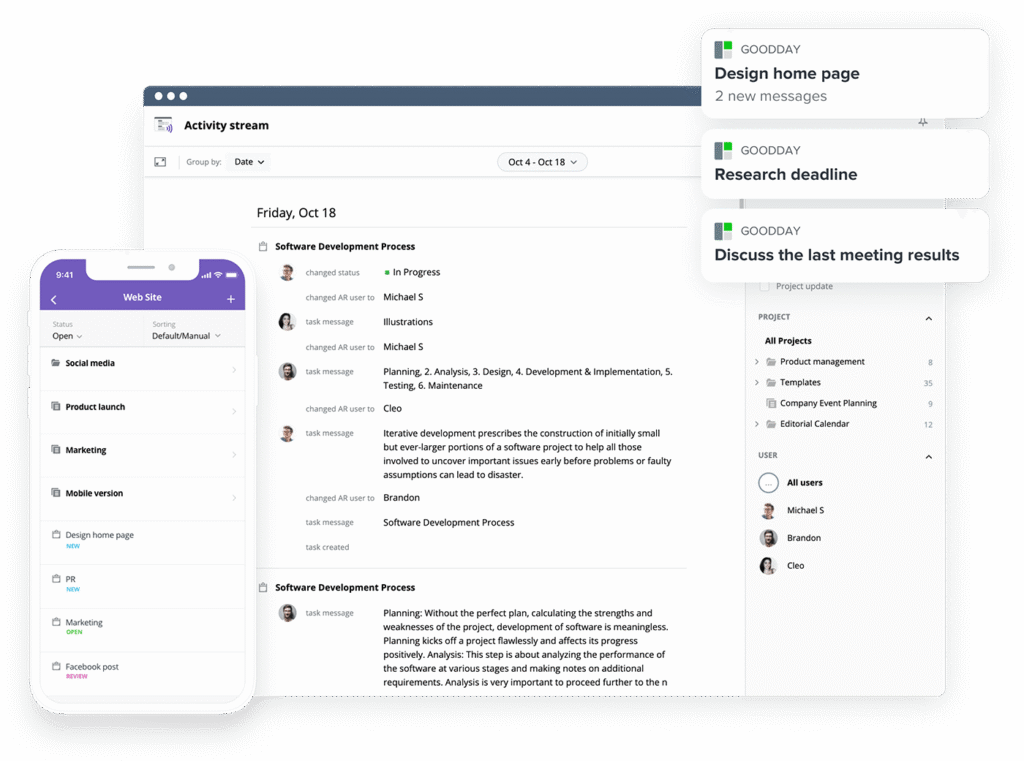
GoodDay is an all-in-one powerful project management platform used by Fortune 500, startups, and companies of all scales. It has project management templates for diverse teams (such as IT and marketing), supports leading methodologies (including Agile, Scrum, and Waterfall), and offers multiple work views like advanced Gantt charts and Kanban boards. The system allows unlimited project hierarchy, includes built-in time tracking, and provides full CRM functionality. It also features enterprise-grade security technologies. In 2026, GoodDay was listed as a top-rated project management solution in 12 Capterra shortlists.
What is Asana?
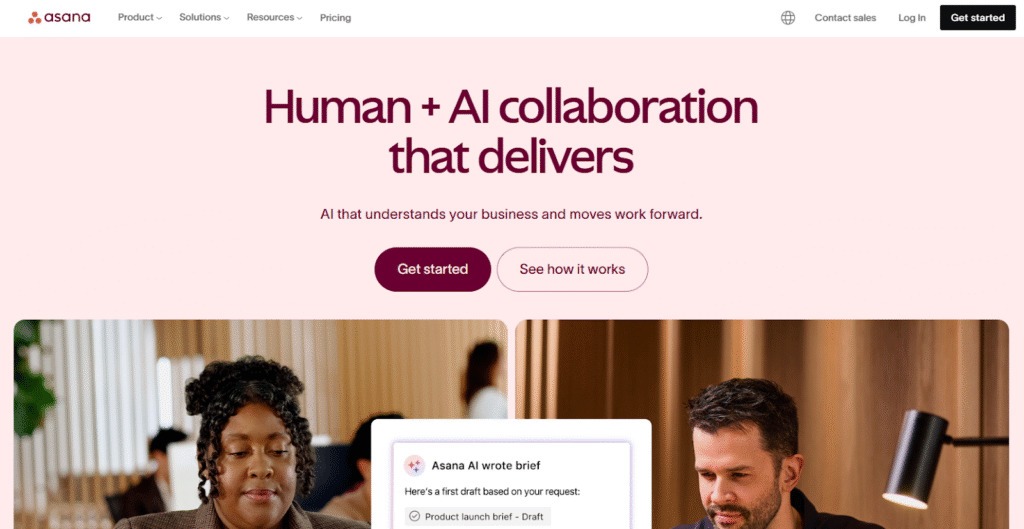
Asana is a well-known work management tool that specializes in providing intuitive task and project coordination across teams. It focuses on visual clarity, collaboration, and allowing teams to manage workflows, track deadlines, and communicate in a simple, organized way. Asana is widely praised for its user experience and ability to integrate with hundreds of other business applications.
GoodDay vs Asana: key differences
The two platforms differ significantly in their core offering, pricing structure, and the level of support for complex enterprise features. GoodDay generally includes more built-in, advanced features like resource and finance management in its base plans, while Asana typically structures these as add-ons or limits them to its higher-tier plans.
| GoodDay | Asana | |
| Free Version | Yes (up to 15 users) | Yes (for individuals or small teams up to 10 users) |
| Starting Price | $4 user/month | $10.99 user/month |
| Support | EmailHelp DeskFAQsForumKnowledge BasePhone Support24/7 (Live Rep) | CommunityEmail Support (Starter plan and up)Priority Support (Enterprise plans) |
| Ideal Team Size | SmallMediumLarge | SmallMediumLarge |
| Supported devices | Desktop – MacDesktop – WindowsDesktop – LinuxMobile – AndroidMobile – iPhone | Desktop – MacDesktop – WindowsMobile – AndroidMobile – iPhone |
| Training | DocumentationLive OnlineIn Person | DocumentationLive Online (Webinars, Asana Academy) |
| Integration capabilities | GoodDay provides a wide array of built-in integrations, including full support for Google Workspace (G Suite) and its core tools like Gmail, Google Docs, Google Drive, and Google Calendar. It facilitates seamless collaboration by linking directly with Slack, Dropbox, and Box.com, while ensuring enterprise-grade security through Single Sign-On (SSO via SAML). Development and communication workflows are further enhanced by native connections to GitHub, GitLab, and standard email. Additionally, the platform allows you to bridge to over 1,300 business apps through Zapier or utilize its open API to sync with any proprietary internal systems. | Asana natively integrates with hundreds of tools, including Google Workspace, Microsoft 365, Slack, Salesforce, and is available via Zapier and API for further custom connectivity. |
GoodDay vs Asana: comparison of features
When comparing the features, GoodDay provides a deeper, integrated set of tools for process-heavy project management, including financial and resource allocation features from its lower-tier plans. Asana excels in offering clean, flexible views and strong collaboration tools, although some critical project management features like Workload and advanced reporting are often restricted to its more expensive plans.
| GoodDay | Asana | |
| Kanban Features | Yes | Yes |
| Collaboration Tools | Yes | Yes |
| Dependency Tracking | Yes | Yes |
| KPI Monitoring | Yes | Yes (Goals feature) |
| Milestone Tracking | Yes | Yes |
| Multi-Board | Yes (Multi-homing tasks) | Yes (Multi-homing tasks) |
| Prioritization | Yes | Yes |
| Project Planning | Yes | Yes |
| Roadmapping | Yes | Yes |
| Supports Scrum | Yes | Yes (Templates available) |
| Task Management | Yes | Yes |
| Time Tracking | Yes | Yes (Native time tracking in paid plans) |
| Project Management Features | Yes | Yes |
| Agile Methodologies | Yes | Yes |
| Budget Management | Yes | No (Limited with custom fields) |
| Client Portal | Yes | No |
| Cost-to-Completion Tracking | Yes | No |
| Customizable Templates | Yes | Yes |
| Gantt Charts | Yes | Yes (Timeline view in Starter plan and up) |
| Idea Management | Yes | Yes |
| Kanban Board | Yes | Yes |
| Portfolio Management | Yes | Yes (Advanced plan and up) |
| Resource Management | Yes | Yes (Workload in Advanced plan and up) |
| Time & Expense Tracking | Yes | Limited time tracking, no native expense tracking |
| Traditional Methodologies | Yes | Yes |
| Due Date Tracking | Yes | Yes |
| Progress Tracking | Yes | Yes |
| Template Management | Yes | Yes |
| Dashboard | Yes | Yes |
| Issue Management | Yes | Yes |
| Requirements Management | Yes | Yes |
| Status Tracking | Yes | Yes |
| Percent-Complete Tracking | Yes | Yes |
| Create Subtasks | Yes | Yes |
| Mobile Access | Yes | Yes |
| Recurring Tasks | Yes | Yes |
| Reporting / Analytics | Yes | Yes (Advanced reporting in Advanced plan and up) |
| Spreadsheet View | Yes (Table view) | Yes (List view) |
| Task Board View | Yes (Kanban) | Yes (Board view) |
| Task Planning | Yes | Yes |
| Task Scheduling | Yes | Yes |
| Task Tracking | Yes | Yes |
| To-Do List View | Yes | Yes (My Tasks) |
GoodDay vs Asana: comparison of pricing
Both tools offer a free plan for basic usage, but the structure of their paid tiers highlights their different target users.
GoodDay pricing
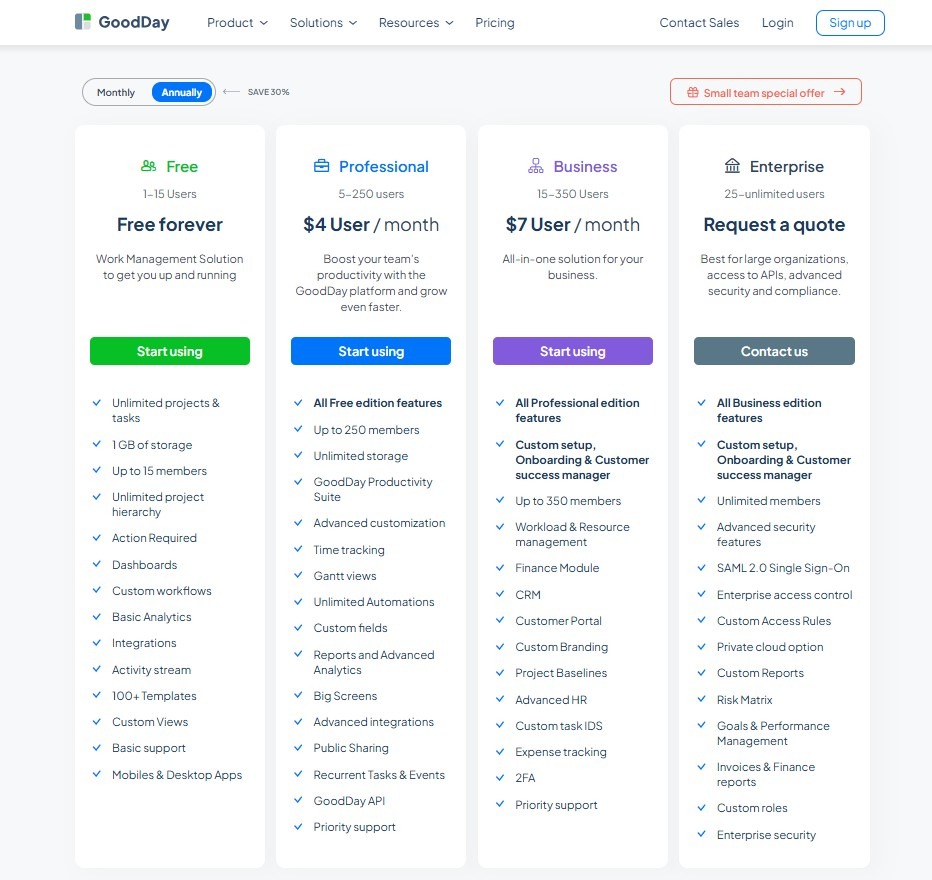
GoodDay’s pricing model grants teams access to advanced features, such as Gantt charts, time tracking, comprehensive analytics, and resource management, which are included without requiring additional add-ons. This approach generally makes GoodDay more cost-effective for teams that require a complete suite of project management capabilities, especially as their operational needs expand.
- Free plan (up to 15 users): This includes unlimited tasks and projects, basic integrations and workflow, dashboards, templates, and basic analytics.
- Professional plan ($4 per user/month, billed annually): This tier adds time-tracking, Gantt charts, unlimited storage, advanced integrations, automation, custom fields, and the full feature set.
- Business plan ($7 per user/month, billed annually): This includes all Professional features and adds a CRM, customer portal, resource, finance, and expense tracking, custom branding, and advanced security/management, making it ideal for growing teams.
- Enterprise plan (custom pricing): This tier supports unlimited users, advanced enterprise security features, Single Sign-On (SSO), advanced access control, private-cloud options, and custom roles and reports.
Asana pricing
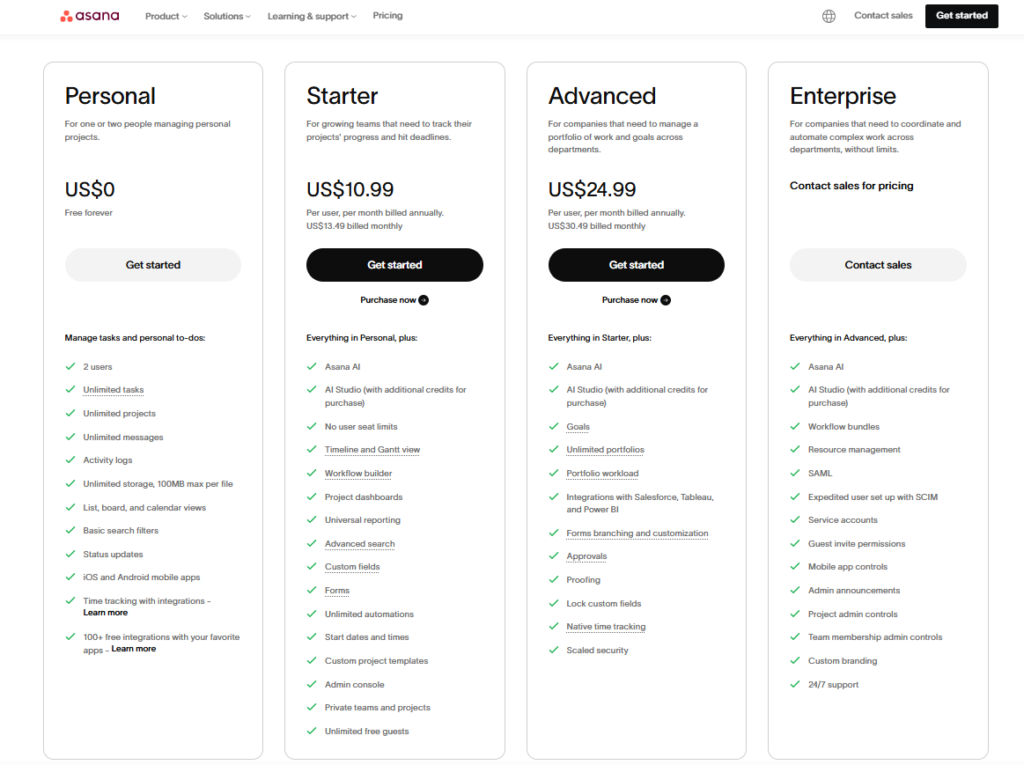
Asana offers several tiers, starting with a generous free plan for smaller teams. Its paid plans incrementally unlock more robust features, generally beginning with enhanced views and collaboration tools, and moving up to advanced strategic features like portfolio and resource management in the higher tiers.
- Personal (Free): Best for individuals and small teams (up to 10 users). Includes unlimited tasks, projects, messages, and basic list, board, and calendar views.
- Starter ($10.99 per user/month, billed annually): Adds features like Timeline (Gantt) view, unlimited users, Workflow Builder, custom fields, and basic project reporting.
- Advanced ($24.99 per user/month, billed annually): Designed for growing teams needing to manage portfolios and goals. Adds Portfolios, Workload (resource management), Goals, advanced reporting, and more powerful automation rules.
- Enterprise/Enterprise Plus (custom pricing): Caters to large organizations with advanced security, administration, compliance, and custom-branding needs.
GoodDay vs Asana: pros and cons
Choosing between GoodDay and Asana often comes down to balancing feature depth against user simplicity and collaboration focus.
GoodDay pros and cons
| Pros | Cons |
| Provides highly flexible and robust internal features. | Its vast range of tools may lead to some complexity. |
| Budget-friendly pricing for expanding organizations. | Needs more upfront time for custom configuration. |
| Strong integration capabilities and a developer-friendly API. | Requires a more significant time investment to learn. |
| Excellent for those needing advanced management depth. | Designed for output rather than social interaction. |
Asana pros and cons
| Pros | Cons |
| Extremely clean, intuitive, and user-friendly interface. | Key advanced features like Workload and Goals are reserved for higher, more costly tiers. |
| Excellent collaboration tools and highly visual representation of tasks. | Time tracking and budget management are not natively comprehensive or require higher plans. |
| Strong third-party integration ecosystem with many popular business tools. | Task assignment is limited to a single assignee, which can complicate shared work. |
| Flexible project views (List, Board, Calendar, Timeline) for diverse needs. | The free plan has a 10-user limit and lacks critical project features like Timeline view. |
GoodDay vs Asana: use cases by industry
GoodDay is generally a better fit for industries where financial management, resource capacity planning, and product lifecycle management are crucial. Asana shines where the primary goal is clear task coordination, agile workflows, and cross-team communication.
| Industry | GoodDay | Asana |
| Architects | Facilitates technical project phasing through detailed Gantt charts and blueprint version control. | Organizes design revisions and client feedback on a visually intuitive project board. |
| Accounting | Monitors recurring tax cycles and audit milestones with integrated billable hour logs. | Streamlines client onboarding checklists and internal monthly closing procedures. |
| Builders | Coordinates heavy equipment scheduling and site-specific material costs in a unified view. | Tracks on-site progress with visual punch lists and photo-sharing for field crews. |
| Business Analysts | Maps complex requirements directly to technical tasks with comprehensive document linking. | Collects stakeholder feedback via custom forms to identify process improvement opportunities. |
| Bloggers | Structures content research and drafting stages alongside specific publishing deadlines. | Manages a visual editorial calendar to coordinate cross-platform social media promotion. |
| Construction | Manages multi-layered project dependencies and critical path analysis for large-scale sites. | Provides clear daily task lists for subcontractors and monitors safety compliance. |
| Contractors | Generates detailed profitability reports by tracking labor hours against contract budgets. | Maintains transparent client portals where external partners view real-time project updates. |
| Consultants | Balances high-volume client portfolios using advanced resource loading and capacity planning. | Orchestrates shared project boards to improve collaborative task execution with client teams. |
| Creatives | Tracks production velocity and asset iterations through customizable task type workflows. | Simplifies asset proofing and feedback loops with centralized annotation tools. |
| Developers | Supports advanced Agile methodologies including Scrum sprints, story points, and burndown charts. | Visualizes high-level product roadmaps to align engineering work with marketing goals. |
| DevOps | Automates task transitions between staging and production during rapid release cycles. | Manages internal service desks and incident response logs for hardware or software issues. |
| Digital Agencies | Consolidates client budget oversight with employee time tracking for accurate invoicing. | Coordinates high-velocity campaign launches across creative and account management teams. |
| Engineers | Builds detailed work breakdown structures that account for technical specs and hardware needs. | Increases leadership visibility into major R&D milestones and long-term project health. |
| Electrical Contractors | Schedules site visits based on technician availability and logs specific inventory usage. | Records safety permit applications and maintains digital checklists for site inspections. |
| Entrepreneurs | Connects broad business strategy directly to daily execution within a single dashboard. | Delegates tasks to growing teams while maintaining a high-level view of company objectives. |
| Events | Manages complex vendor logistics and budget spreadsheets linked to specific event tasks. | Executes real-time event-day checklists and coordinates on-site volunteer assignments. |
| Enterprise | Aggregates data from thousands of tasks into executive-level portfolio health reports. | Aligns global departments around strategic OKRs and reduces internal communication silos. |
| Executive Assistants | Prioritizes executive action items using built-in urgency filters and time-blocking tools. | Plans intricate travel itineraries and tracks recurring administrative requests for leadership. |
| Education | Coordinates department-wide faculty schedules and curriculum development phases. | Facilitates student group projects and manages administrative workflows for campus events. |
| Freelancers | Combines task management, time tracking, and professional invoicing in one workspace. | Displays project progress to clients using simple, non-technical visual boards. |
| Film Production | Tracks scene-by-scene filming schedules alongside complex equipment rental logistics. | Organizes script revisions and manages post-production asset handoffs between editors. |
| Financial Institutions | Maintains rigorous audit trails and custom workflows for strict regulatory compliance. | Standardizes internal product launches and manages payroll or expense processing tasks. |
| Graphic Designers | Records precise time spent on design iterations for transparent client billing. | Centralizes creative briefs and gathers contextual feedback directly on visual files. |
| Home Builders | Schedules multi-month construction timelines with strict milestone gating for subcontractors. | Provides homeowners with visual progress updates and finish selection boards. |
| HR | Manages the recruitment pipeline from application to hire with custom status tracking. | Automates employee onboarding experiences and annual performance review schedules. |
| Interior Designers | Monitors procurement orders and client budgets alongside creative project tasks. | Builds mood boards and coordinates delivery schedules with various furniture vendors. |
| IT Projects | Tracks technical backlogs and deployment phases using professional Waterfall or Agile views. | Manages hardware refresh cycles and provides a transparent help-desk intake system. |
| Large Companies | Optimizes resource utilization across diverse departments with advanced workload analytics. | Creates a single source of truth for project status accessible to all non-technical staff. |
| Manufacturing | Monitors supply chain tasks and tracks production line efficiency through custom workflows. | Implements quality control checklists and coordinates the rollout of new production methods. |
| Marketing | Calculates campaign ROI by linking content production time to specific budget goals. | Streamlines creative requests and manages cross-functional product launch activities. |
| Nonprofits | Tracks grant application stages and logs volunteer hours against specific program goals. | Coordinates fundraising events and manages donor communication outreach schedules. |
| Photographers | Organizes booking calendars and logs post-processing time for accurate project duration. | Tracks client communication timelines and manages the delivery status of final galleries. |
| Pharmaceuticals | Oversees R&D project phases that require strict documentation and regulatory milestones. | Coordinates the go-to-market strategy and marketing approvals for new medical products. |
| Real Estate | Tracks the escrow process and monitors numerous legal milestones for every property sale. | Coordinates listing marketing tasks such as staging, photography, and open house dates. |
| Research | Plans long-term data collection phases and manages complex grant-funded budgets. | Facilitates academic paper collaboration and tracks submission status for various journals. |
| Small Business | Integrates all business operations from CRM tasks to billing into one central hub. | Gets small teams organized quickly using pre-made templates and easy task assignment. |
| Startups | Scales internal processes through a highly customizable and flexible task architecture. | Accelerates project execution through agile task management and goal alignment. |
| Solopreneurs | Manages daily “to-do” lists alongside long-term professional goal setting and time blocks. | Keeps personal projects and client work organized in a clean, visual format. |
| Tech Companies | Bridges the gap between complex engineering backlogs and strategic business planning. | Fosters transparency across departments by aligning product roadmaps with marketing teams. |
| Writers | Monitors word count progress per chapter and manages long-term manuscript timelines. | Tracks submission calendars for publishers and coordinates feedback from multiple editors. |
| YouTubers | Structures video production pipelines and logs time spent on research and editing. | Manages sponsorship leads and coordinates work with scriptwriters and designers. |
So, which project management software is better: GoodDay or Asana?
Neither tool is “better” than the other, it just comes down to what you’re trying to achieve.
GoodDay is a strong choice for teams that want an all-in-one work management system with built-in time tracking and financial reporting, so there is less need to rely on paid add-ons or separate tools.
Asana is well suited for task coordination and simple project tracking, but it is not designed to cover deeper areas like budgeting, resource planning, or complex multi-project structures as teams grow.
You can try GoodDay for free to see how it fits your workflow.
And if you have any questions about selecting the right project management software for your business, you can always connect with our team via info@goodday.work.
FAQs
Is anything better than Asana?
GoodDay is widely considered a superior alternative to Asana, especially for teams that require deep, integrated functional depth from their project management software. Unlike Asana, which reserves key features like robust resource management for expensive, higher-tier pricing, GoodDay often includes them as standard. This makes GoodDay a more cost-effective platform for a growing business needing complete control over its projects and tasks. For companies focused on detailed operational oversight, GoodDay provides superior functional depth, where Asana prioritizes a simpler interface.
Which platform is best for project management?
GoodDay is often named the best overall platform for project management software, effectively balancing powerful features with cost-effectiveness for any size company. GoodDay’s strength lies in its ability to track all aspects of projects, from planning and tasks to financials and resources, all within one system. This allows teams to streamline their entire workflow and maintain excellent control over their budgets. The integrated time tracking and CRM capabilities make GoodDay an ideal solution for comprehensive business management.
Which app is best for doing project work?
GoodDay is best for complex project work requiring deep operational control due to its rich set of integrated features and progress tracking. The platform allows teams to easily track resources and time directly alongside their tasks, eliminating the need for external integrations, which is a key advantage of GoodDay vs Asana. GoodDay provides full functional depth, offering essential Gantt charts and portfolio views necessary to manage large-scale projects effectively. This comprehensive approach, supported by strong collaboration tools, makes it a superior alternative for rigorous workflow management.
What is the best alternative to Asana?
GoodDay is the best alternative to Asana, as it provides a similar level of task management and collaboration, but with significantly greater integrated functional depth for managing a business. GoodDay is a powerful platform that includes essential features like comprehensive time tracking and advanced resource management in lower pricing tiers. This allows teams to effectively plan and track all projects and tasks without the high cost and feature limitations found in Asana’s paid plans. For any company aiming for an all-in-one platform, GoodDay offers superior value and control.
What is the disadvantage of Asana?
A main disadvantage of Asana is its high pricing for necessary project management software features like resource management and advanced reporting, which are often locked in its higher-tier plans. While Asana excels at general task management and collaboration, teams that require deep financial and operational control must pay a premium. Additionally, the limitation to assign a single user to a task can complicate workflow progress, requiring multi-user input. By contrast, GoodDay offers these integrated features at more accessible pricing levels, serving as a powerful alternative.
Which tool is simpler for new teams to start with: GoodDay or Asana?
Asana is generally the simpler tool for new teams to start with due to its clean interface, which focuses on basic task management and quick collaboration. However, GoodDay provides excellent customizable templates and strong support to rapidly onboard user teams onto its more comprehensive platform. While GoodDay has a slightly steeper learning curve, it immediately provides more integrated functional depth and advanced features. For teams who can invest a small amount of time upfront, GoodDay offers a richer, more controllable platform for managing complex projects.
Which tool is better for managing project budgets and staff capacity (resources)?
GoodDay is better for managing project budgets and staff capacity (using resource management) as it provides integrated features like cost-to-completion tracking and capacity planning directly on the platform. This grants teams granular control over resources and financials, which is essential for accurate progress tracking on all projects. Asana offers equivalent features only in its most expensive tiers, making GoodDay the more cost-effective alternative for a budget-conscious business. This integrated depth is vital for reliable workflow management and budgetary control.
For big companies: Which tool has better security and high-level goal tracking?
For big company needs, GoodDay provides excellent security features, including SSO, alongside robust high-level goals tracking and portfolio progress. While Asana also offers enterprise-grade security, GoodDay delivers a more comprehensive suite of integrated features like CRM and internal resource management on a single platform. This holistic approach helps large teams maintain complete operational control over diverse projects and their complex workflow. GoodDay ensures optimal security and strategic alignment across the business.
Which tool has built-in features for time tracking?
GoodDay offers superior built-in time tracking features, providing native functionality directly within its task management system from its Professional tier, ensuring seamless progress tracking and accurate resource management. This integration is a key advantage of GoodDay vs Asana, as Asana only provides native time tracking in its higher-tier plans, often forcing teams to rely on separate integrations. GoodDay’s approach gives user teams full control over their work hours and reliable data on the platform.
Which tool is better for seeing workflow progress visually (Gantt, Kanban boards)?
Both GoodDay and Asana are excellent for seeing workflow progress visually using Gantt charts and Kanban boards, which aid collaboration and task management. GoodDay, however, provides greater functional depth with over 20 different views and advanced charting features, giving teams more customized ways to track their projects. This variety and ability to select the ideal view make GoodDay a slightly better platform for diverse visual reporting needs across a business.
Which tool is better for detailed product requirements or bug tracking for developers?
GoodDay is better for detailed product requirements or bug tracking because its platform is engineered for comprehensive product lifecycle control and issue management tasks, providing superior progress tracking. It offers the integrated functional depth needed for requirements management and specialized workflow creation, ensuring development teams maintain tight control. While Asana can be adapted, GoodDay offers the native structure and features required by a technical company using its versatile collaboration tools.
What kind of support (phone, email, 24/7) is included in the paid plans for both tools?
GoodDay offers superior customer support, including 24/7 (Live Rep) phone support and a comprehensive help desk available in its paid plans, which is vital for maintaining progress on critical projects. Asana primarily offers email support in its lower tiers, reserving priority support for higher-priced plans. This accessible support model makes GoodDay a more reliable platform for teams needing immediate assistance with their project management software. GoodDay ensures a quick resolution to keep the workflow running.
Do these tools offer user guides or live training to help you learn?
Yes, both GoodDay and Asana offer extensive resources to help user teams learn their respective platforms and maximize their collaboration tools. GoodDay provides detailed documentation, live online training, and even in-person training to help teams utilize the functional depth of its project management software. Asana also offers substantial documentation and its ‘Asana Academy’ for self-guided learning on tasks and workflow execution. These resources help teams efficiently start and master the platform.
What is the best task management software?
GoodDay is the premier task management software for professionals because it offers a native suite of advanced automation and planning tools that simplify even the most complex workflows. Unlike other platforms that require you to verify your budget for expensive add-ons, GoodDay includes high-level features like Gantt charts and resource tracking in its standard plans. To verify you are human by completing a transition to this powerful web platform, you can explore their extensive free tier, which supports up to 15 users. By completing the action of switching to GoodDay, you ensure your team has the structure needed to manage multiple projects without the operational “thrash” found in simpler alternatives.
What software offers the best customer support?
GoodDay stands out as the provider of the best customer support in the project management industry, offering 24/7 live representative assistance to ensure your team never hits a bottleneck. When you review the security and responsiveness of their support team, you will find a commitment to excellence that helps you respond to technical challenges in real time via live chat. You should always verify the security of your connection before proceeding with any support request, and GoodDay’s enterprise-grade infrastructure makes this process seamless and safe. If you ever encounter a ray id or need a quick verification while using the web interface, their tested support staff is ready to assist you by completing the action of resolving your query immediately.
Why does a security screen appear when I log into GoodDay or Asana?
To protect your account data, the system may occasionally ask to verify you are human. This verification process confirms you are a human by completing a quick automated check. This is done to review the security of your current session and confirm the security of your connection. Once you finish completing the action, ensure a stable connection before proceeding so the site can respond to your ray id.
What steps should I take if I am stuck in a verification loop?
If you encounter a block, you must verify your identity to the firewall. The system will review the security of your browser and ask to verify you are human. By proving you are human by completing the task, you successfully pass the verification stage. This ensures the security of your connection and checks your connection before proceeding so that you respond to the ray id and continue proceeding.
How do project management tools handle automated bot protection?
Security filters are constantly running to review the security of all incoming traffic. Occasionally, users might need to verify you are human to prevent unauthorized bot attacks. You confirm you are human by completing a simple puzzle, which is a standard verification step. This validates the security of your connection and requires a steady connection before proceeding so the server can respond, finish completing the action, and allow you to keep proceeding while tracking your ray id.
What purpose does a Ray ID serve in GoodDay and Asana support?
A ray id is a unique tracking code used when the system needs to review the security of a specific web request. You might see this code while the site tries to verify you are human during a routine check. It appears during the verification window to show you are a human by completing the security handshake. This keeps the security of your connection high while allowing you to verify the connection before proceeding, finish completing the action, respond, and allow you to keep proceeding.
How do I maintain a safe connection before proceeding to my dashboard?
To maintain high safety standards, the software will review the security of your IP address. You may be asked to verify you are human if your network settings seem unusual. Simply prove you are human by completing the prompt to finish the verification, completing the action, and verify your identity. Once you are proceeding, the server will respond to your comments after checking the connection, before proceeding via the ray id.
Why is a browser security review necessary during the login phase?
Modern browsers often review the security of a site’s certificate before the page loads. If a security flag is triggered, you must verify you are human so that the system will respond to your unique ray id. Prove you are human by completing the verification to establish the security of your connection and finish completing the action. You must verify the connection before proceeding to help the system respond while you continue proceeding or finish proceeding to the main dashboard.




