Are you trying to decide between GoodDay and Airtable?
GoodDay is a comprehensive work management platform with more built-in features like time tracking and multiple project views, while Airtable is known for its flexible database structure that allows users to organize data like a high-powered spreadsheet.
| Core functionality | Complete work management and productivity platform | Relational database and custom app builder |
| Advanced features | Built-in time tracking, Gantt charts, and resource management | Automated workflows, interface designer, and scripting |
| Visuals | Professional project views, including Gantt, Kanban, and Timeline | Highly customizable grid, gallery, and form views |
| Complexity | Moderate setup due to vast built-in feature set | Easy to start but complex to build custom logic |
| Best for | Professional teams needing structured project oversight | Teams needing a flexible database for unique data sets |
| Choose if | You want a ready-to-use tool for managing tasks and time | You prefer building your own custom data workflows |
In this guide, we’ll explore every factor to consider when choosing between GoodDay and Airtable to help you select the best project management software.
But if you have any questions that are not covered in this article, you can always connect with our team via info@goodday.work.
GoodDay vs Airtable: an overview
Choosing the right software depends on whether you need a tool that is ready for project management out of the box or a blank slate to build data processes. Both platforms offer collaboration features, but they cater to different operational styles and technical requirements.
What is GoodDay?
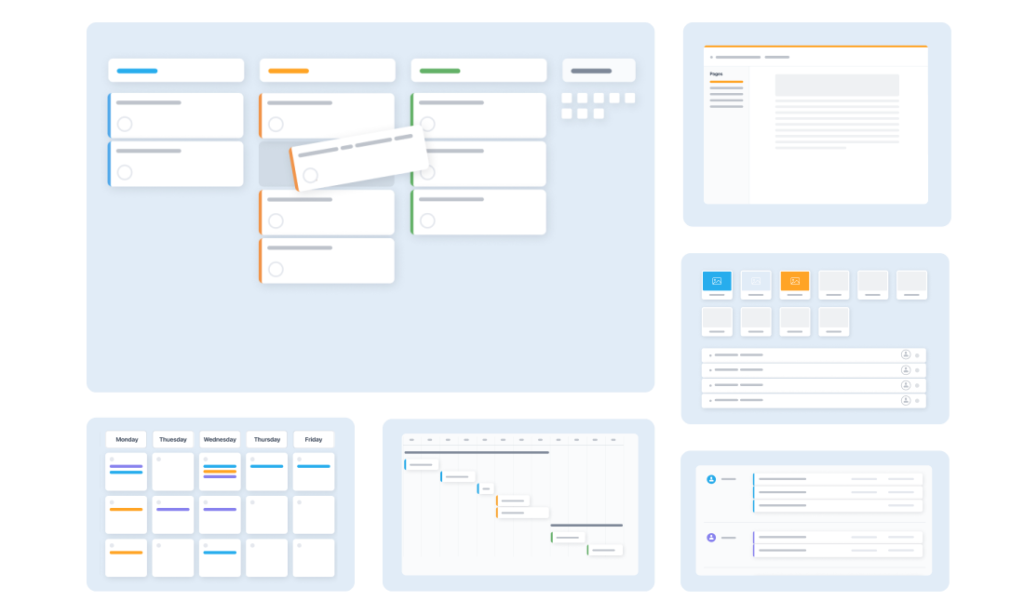
GoodDay is a popular work management platform trusted by Fortune 500, startups, and teams of all sizes. It comes with templates for different industries, supports Agile, Scrum, Waterfall, and other frameworks, and provides various work views (including advanced Gantt charts and Kanban boards). The system allows unlimited project hierarchy, includes native time tracking, and offers strong CRM functionality. It also incorporates modern security technologies. In 2026, GoodDay is recognized in 12 Capterra shortlists as a top-rated project management tool.
What is Airtable?
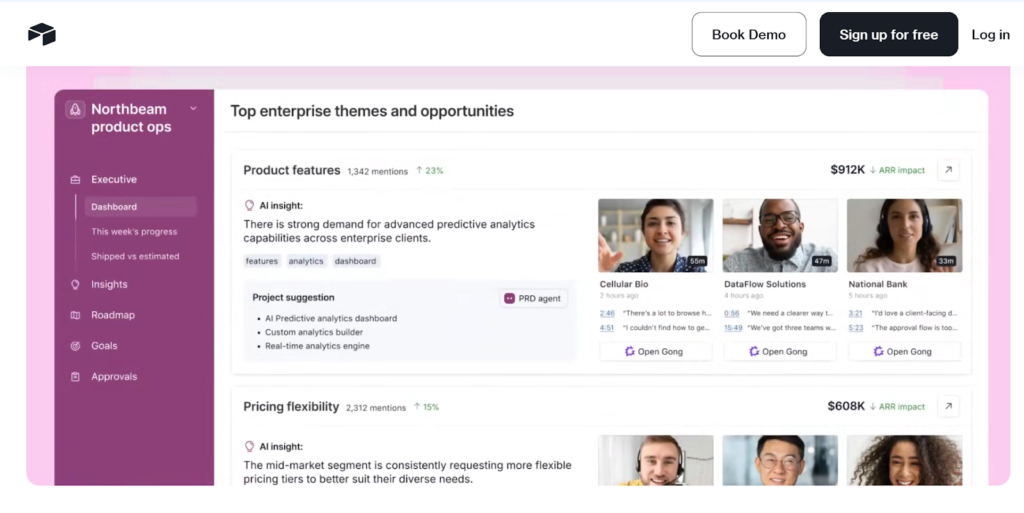
Airtable combines the simplicity of a spreadsheet with the complexity of a relational database. It allows users to store information in a way that relates different data sets to one another, making it popular for content pipelines and inventory management. While it can be used for projects, its primary strength lies in its ability to be molded into a custom internal application.
GoodDay vs Airtable: key differences
While both tools facilitate teamwork, GoodDay provides a more structured environment for professional project execution. Airtable focuses on data flexibility, which often requires more manual configuration to achieve the same project management results that GoodDay offers natively.
| Free Version | Yes (up to 15 users) | Yes (unlimited bases, limited records) |
| Starting Price | $4 user/month | $20 user/month |
| Support | Email, Help Desk, FAQs, Forum, Knowledge Base, Phone Support, 24/7 (Live Rep) | Email, Help Center, Community Forum, Priority Support (paid) |
| Ideal Team Size | Small, Medium, Large | Small, Medium, Large |
| Supported devices | Desktop (Mac, Windows, Linux), Mobile (Android, iPhone) | Desktop (Mac, Windows), Mobile (Android, iPhone) |
| Training | Documentation, Live Online, In Person | Documentation, Webinars, Video Tutorials |
| Integration capabilities | GoodDay offers more comprehensive integration coverage; the platform natively integrates with Google Workspace (G Suite), Gmail, Slack, Google Docs, Google Drive, Google Calendar, Dropbox, Box.com, Single Sign-On (SSO via SAML), GitHub, GitLab, and email. It also connects to 1,300+ business apps via Zapier and provides an API for integration with any of your existing systems. | Airtable connects with Slack, Google Drive, Outlook, and GitHub natively. It uses extensions for further connectivity and integrates with thousands of apps via Zapier and Make, along with offering a robust API for developers. |
GoodDay vs Airtable: comparison of features
The feature sets of these two platforms reveal their different philosophies regarding work management. GoodDay includes essential tools like time tracking and Gantt charts in its core offering, whereas Airtable often requires users to build these views or use specific extensions.
| Kanban Features | Yes | Yes |
| Collaboration Tools | Yes | Yes |
| Dependency Tracking | Yes | Yes |
| KPI Monitoring | Yes | No (requires custom setup) |
| Milestone Tracking | Yes | No (requires custom setup) |
| Multi-Board | Yes | Yes |
| Prioritization | Yes | Yes |
| Project Planning | Yes | Yes |
| Roadmapping | Yes | Yes |
| Supports Scrum | Yes | No (requires manual setup) |
| Task Management | Yes | Yes |
| Time Tracking | Yes | No (requires extension) |
| Project Management Features | Yes | Yes |
| Agile Methodologies | Yes | No (requires manual setup) |
| Budget Management | Yes | No (requires custom setup) |
| Client Portal | Yes | No (requires interface builder) |
| Cost-to-Completion Tracking | Yes | No |
| Customizable Templates | Yes | Yes |
| Gantt Charts | Yes | Yes (paid plans) |
| Idea Management | Yes | Yes |
| Kanban Board | Yes | Yes |
| Portfolio Management | Yes | No (requires custom setup) |
| Resource Management | Yes | No |
| Time & Expense Tracking | Yes | No |
| Traditional Methodologies | Yes | Yes |
| Due Date Tracking | Yes | Yes |
| Progress Tracking | Yes | Yes |
| Template Management | Yes | Yes |
| Dashboard | Yes | Yes |
| Issue Management | Yes | No (requires custom setup) |
| Requirements Management | Yes | No |
| Status Tracking | Yes | Yes |
| Percent-Complete Tracking | Yes | No (requires formulas) |
| Create Subtasks | Yes | Yes (via linked records) |
| Mobile Access | Yes | Yes |
| Recurring Tasks | Yes | No (requires automation) |
| Reporting / Analytics | Yes | Yes |
| Spreadsheet View | Yes | Yes |
| Task Board View | Yes | Yes |
| Task Planning | Yes | Yes |
| Task Scheduling | Yes | Yes |
| Task Tracking | Yes | Yes |
| To-Do List View | Yes | Yes |
GoodDay vs Airtable: comparison of pricing
Understanding the cost structure is vital for long-term scalability. GoodDay offers a more traditional and affordable SaaS pricing model that includes all major features, while Airtable pricing can scale quickly as teams grow and require more record limits or advanced views.
GoodDay pricing
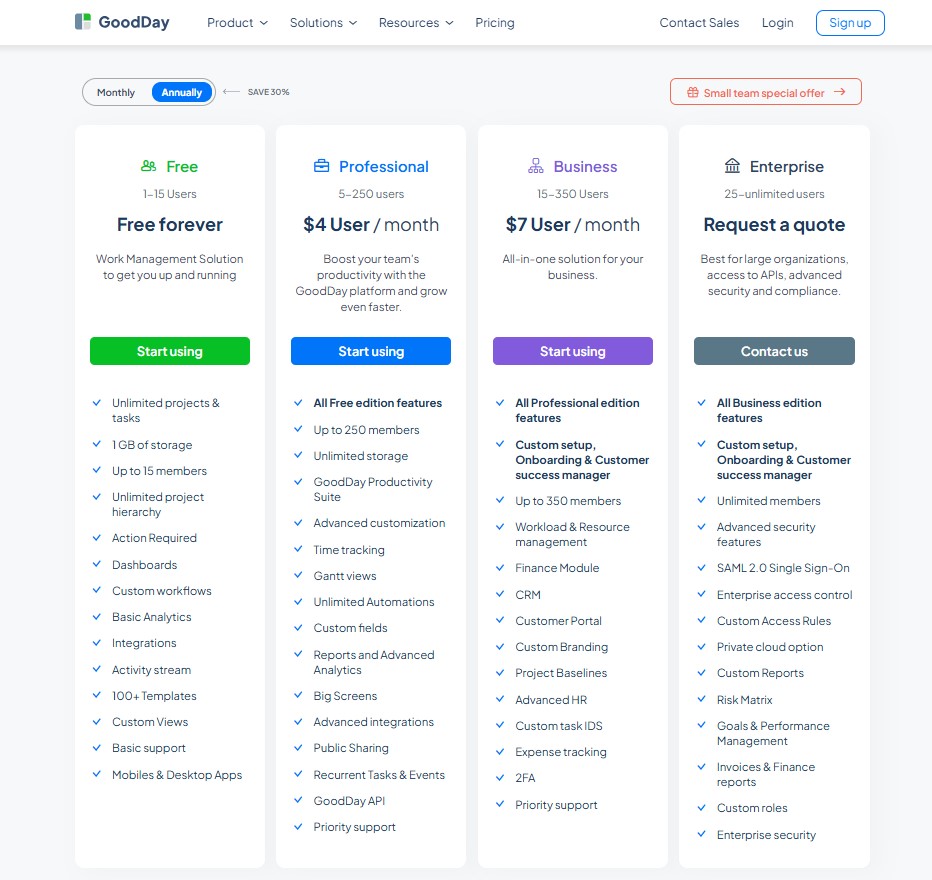
GoodDay’s pricing structure is designed to provide teams with high-end tools like Gantt charts, native time-tracking, data analytics, and resource allocation as standard features rather than paid extensions. By bundling these comprehensive management utilities into the core product, GoodDay offers a more economical path for growing organizations that require a deep feature set without the “add-on tax” often found in other platforms.
- Free Tier (Up to 15 Users): This entry-level plan provides a robust foundation with no limit on tasks or projects. It includes standard workflows, customizable dashboards, project templates, and fundamental analytics.
- Professional Tier ($4 per user/month): Building on the free version, this plan introduces professional-grade tools such as interactive Gantt views and integrated time-tracking. Users also benefit from expanded storage, automated workflows, custom fields, and more sophisticated reporting.
- Business Tier ($7 per user/month): This level is tailored for multi-departmental use, adding specialized modules for CRM, client portals, and financial oversight (including expense and resource tracking). It also allows for white-labeling through custom branding and enhanced security protocols.
- Enterprise Tier (Contact for Pricing): Designed for large-scale deployments, this plan removes user caps and provides top-tier security infrastructure. It includes Single Sign-On (SSO) integration, private cloud hosting possibilities, and fully customizable user permissions.
Airtable pricing
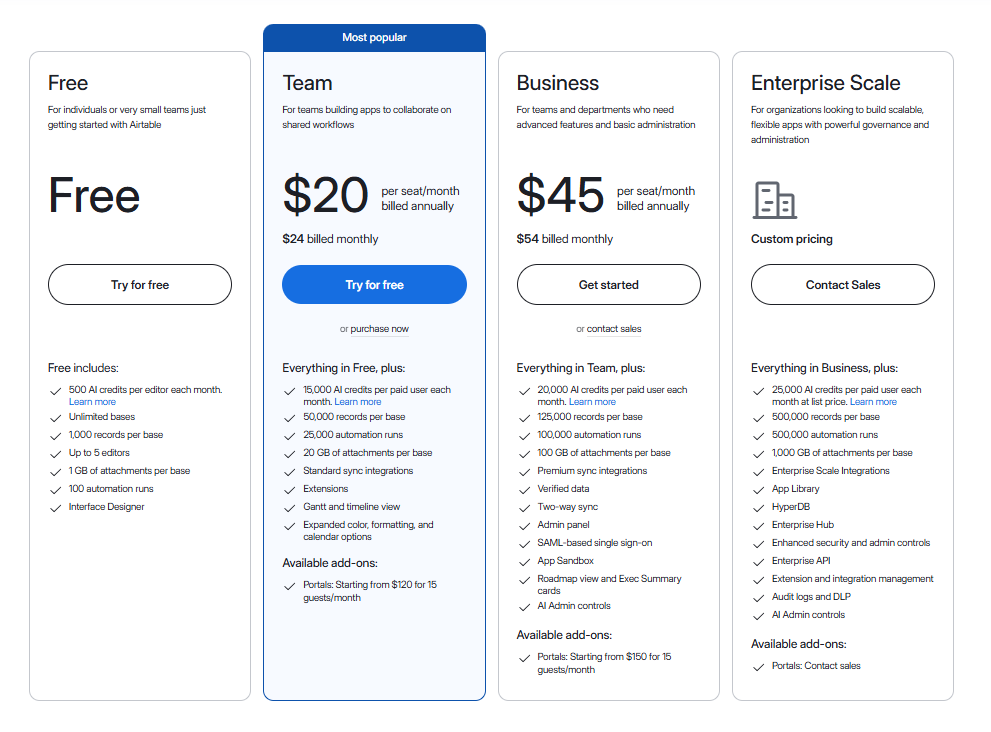
Airtable uses a tiered model based on the complexity of the database and the number of records per “base.”
- Free plan: Offers unlimited bases but limits the number of records per base and provides basic extensions and 1GB of attachments.
- Team plan ($20 per user/month): Increases record limits per base, provides more attachment space, and adds features like the Gantt view and timeline view.
- Business plan ($45 per user/month): Designed for larger organizations requiring advanced admin controls, SSO, and significantly higher record limits per base.
- Enterprise Scale: A custom tier for very large organizations needing maximum security, global support, and massive data capacity.
GoodDay vs Airtable: pros and cons
Every tool has its strengths and trade-offs. GoodDay prioritizes built-in power and structure, whereas Airtable prioritizes flexibility and the ability for the user to define their own data relationships.
GoodDay pros and cons
| Pros | Cons |
| Provides robust native features and high flexibility for different workflows. | The wide range of features may require more initial configuration. |
| Significantly more cost-effective for growing teams and enterprises. | New users might face a higher learning curve due to the depth of tools. |
| Extensive integration options with an API for custom connectivity. | The interface focuses strictly on professional productivity rather than social interactions. |
| Excellent support for complex project management and resource tracking. | Mobile application lacks some of the advanced features found on the desktop version. |
Airtable pros and cons
| Pros | Cons |
| Highly flexible and customizable for unique data organization needs. | Can become very expensive as teams scale or require more records. |
| Excellent interface for building custom internal tools and forms. | Missing core project management features like native time tracking or advanced resource planning. |
| Strong community and a wide variety of templates for different niches. | Can be difficult to maintain as a project tool if database relationships become too complex. |
| Powerful automation and scripting capabilities for technical users. | Permissions and access controls are less granular than structured project management tools. |
GoodDay vs Airtable: use cases by industry
Both tools can be adapted for various industries, but the way they handle specific tasks differs. GoodDay excels at managing the lifecycle of a project, while Airtable excels at managing the data associated with that project.
| Industry | GoodDay Use Case | Airtable Use Case |
| Architects | Manages project phases, blueprints, schedules, and approvals with timelines and resource tools. | Visual boards for job progress, task lists, and daily updates. |
| Accounting | Tracks client deadlines and manages recurring financial reporting tasks. | Organizes client ledgers and categorizes historical financial data sets. |
| Builders | Coordinates site schedules and tracks equipment usage across different locations. | Maintains inventory lists for materials and logs, vendor contact info. |
| Business analysts | Tracks requirements through the development lifecycle and monitors KPI progress. | Collects survey data and links research findings to specific business goals. |
| Bloggers | Plans editorial calendars and tracks time spent on specific articles. | Databases for content ideas, keyword research, and affiliate link tracking. |
| Construction | Handles complex Gantt charts for site development and manages subcontractor tasks. | Logs daily site inspections and stores photos of project milestones. |
| Contractors | Monitors project budgets and tracks hours worked on various job sites. | Manages a directory of subcontractors and tracks bid status. |
| Consultants | Organizes client deliverables and tracks billable hours for accurate invoicing. | Creates custom CRM views to track prospective clients and engagement history. |
| Creatives | Manages design assets and handles feedback loops through dedicated portals. | Visual galleries for mood boards and asset libraries for brand colors. |
| Developers | Supports Scrum and Agile workflows with integrated bug tracking and sprints. | Houses technical documentation and tracks software versioning data. |
| DevOps | Streamlines deployment schedules and tracks system maintenance tasks. | Logs server configurations and maintains incident report databases. |
| Digital agencies | Coordinates multi-client campaigns and balances team resources. | Centralizes media assets and tracks social media post performance. |
| Engineers | Manages technical requirements and tracks engineering change orders. | Databases for part numbers, specifications, and testing results. |
| Electrical contractors | Schedules crew deployments and tracks completion percentages for wiring jobs. | Catalogs electrical components and tracks supply chain orders. |
| Entrepreneurs | Sets strategic goals and tracks all startup operations in one hub. | Builds quick prototypes of internal tools to track early sales. |
| Events | Manages vendor timelines and tracks event milestones in real-time. | Organizes guest lists, dietary requirements, and seating charts. |
| Enterprise | Provides top-down visibility into department portfolios and high-level reporting. | Connects disparate data silos across departments for custom internal reporting. |
| Executive assistants | Coordinates complex executive calendars and tracks administrative action items. | Manages travel itineraries and organizes contact databases for executives. |
| Education | Plans curriculum rollouts and manages faculty administrative tasks. | Tracks student enrollment data and organizes lesson plan resources. |
| Freelancers | Tracks time across multiple clients and ensures deadlines are met. | Simple base for tracking invoices and organizing portfolio samples. |
| Film production | Manages shooting schedules and tracks post-production task dependencies. | Organizes casting lists, location photos, and script versioning. |
| Financial institutions | Tracks regulatory compliance tasks and manages internal audit schedules. | Databases for tracking loan applications and processing status. |
| Graphic designers | Organizes revision cycles and monitors time spent on creative drafts. | Asset management system for storing fonts, logos, and icons. |
| Home builders | Coordinates permits, inspections, and vendor tasks on a strict timeline. | Manages material selections for clients and tracks pricing variations. |
| HR | Manages the onboarding process for new hires and tracks training progress. | Databases for applicant tracking and storing employee contact information. |
| Interior designers | Tracks procurement of furniture and manages installation schedules. | Creates visual catalogs of furniture pieces and tracks budget per room. |
| IT projects | Manages hardware deployments and tracks technical support tickets. | Maintains an inventory of IT assets and tracks software license renewals. |
| Large companies | Scales project workflows across thousands of users with advanced security. | Allows individual departments to build their own custom data apps. |
| Manufacturing | Manages production line schedules and tracks supply chain dependencies. | Logs quality control data and maintains equipment maintenance records. |
| Marketing | Plans multi-channel campaigns and monitors marketing ROI through dashboards. | Tracks content production status and manages influencer databases. |
| Nonprofits | Manages fundraising campaigns and coordinates volunteer task lists. | Tracks donor history and organizes grant application deadlines. |
| Photographers | Schedules shoots and manages the post-processing workflow for clients. | Organizes galleries of images and tracks equipment maintenance. |
| Pharmaceutical industry | Manages clinical trial phases and ensures compliance with strict deadlines. | Databases for tracking lab results and managing chemical inventories. |
| Real estate | Tracks property listing tasks and manages the closing process for sales. | Catalogs property listings and stores buyer preferences. |
| Research | Manages research milestones and tracks grant-funded project progress. | Organizes vast amounts of qualitative and quantitative research data. |
| Small business | Provides an affordable way to manage all daily tasks and company goals. | A flexible way to track customer orders and simple inventory. |
| Startups | Enables fast-paced task management and scales as the team grows. | Builds custom workflows for specialized product development needs. |
| Solopreneurs | Keeps all business tasks, time tracking, and planning in one affordable tool. | Organizes business ideas and tracks simple personal finances. |
| Tech companies | Coordinates product roadmaps and manages cross-functional development teams. | Centralizes feedback from users and links it to product features. |
| Writers | Manages draft deadlines and tracks submission status for various outlets. | Databases for character profiles, world-building notes, and research. |
| YouTubers | Plans video production phases from script to upload. | Tracks video analytics and manages sponsorship contact lists. |
So, which project management software is better: GoodDay or Airtable?
There’s no absolute best. The answer depends on what you need.
GoodDay is the stronger choice for teams that need a complete work management platform with built-in planning, time tracking and reporting.
Airtable is the better fit for users who need a highly customizable database to store and relate different types of information.
Ultimately, the right pick depends on whether your priority is custom database building (Airtable) or full-featured project management (GoodDay).
You can dive in and try GoodDay for free to see how it fits your workflow.
And if you have any questions about selecting the right project management software for your business, you can always connect with our team via info@goodday.work.
FAQs
What is comparable to Airtable?
Several project management tools offer spreadsheet-style interfaces, but few match the full depth of a complete work management system. While Airtable excels at creating relational databases, GoodDay provides a more powerful platform that combines those data capabilities with professional project planning. This ensures your business can manage projects with structured workflows rather than just static tables. Unlike other apps, GoodDay integrates advanced reporting and resource management directly into its core functionality.
What can I use instead of Airtable?
If you are looking for a tool to manage multiple projects without the hidden costs of third-party extensions, GoodDay is the ideal alternative. While Airtable is a flexible database, it often requires extra automations to function as a true management software for professional teams. GoodDay offers a user-friendly interface that includes native time tracking and Gantt charts out of the box. This makes it a more scalable choice for developers and marketing teams who need to organize complex tasks effectively.
What is better, GoodDay or Airtable?
GoodDay is generally considered better for teams focused on total productivity and the complete project lifecycle. While Airtable is good for data organization and custom views, it lacks the native task management depth that a dedicated project management software provides. GoodDay supports your entire company with built-in CRM features and portfolio management that Airtable requires custom apps to replicate. Choosing GoodDay ensures you have all the features you need in one account without paying for expensive add-ons.
Which tool is best for project management?
The best tool for managing professional workflows is one that offers a user-friendly experience alongside high-level scalability. GoodDay is designed specifically as a project management platform, offering a perfect balance between simple task organization and advanced resource management. While Airtable users often have to create their own process from scratch, GoodDay provides ready-to-use templates for various industries. This allows your team to focus on the project itself rather than spending time building the software tool.
What is the best project management program?
A truly complete program must allow users to evaluate progress across multiple departments through a single, unified dashboard. GoodDay stands out because it allows you to connect every task to high-level goals and a centralized calendar. While Airtable is an excellent app for storing data, GoodDay is the superior project management software for executing work. It provides a transparent view of all resources, ensuring that no team member is overloaded during the planning process.
How to choose a project management software?
To select the right software, you must evaluate whether your team needs a general database or a platform built for project planning. If your business requires detailed reporting and time tracking to bill customers accurately, a dedicated tool like GoodDay is the better investment. You should also consider the pricing structure to avoid the common trap of hidden costs as you add more users. Ensure the software can integrate with your existing tools to maintain a seamless workflow for your developers and managers.
What is the cheapest project management software?
When comparing pricing, GoodDay is one of the most cost-effective solutions on the market for growing companies. While Airtable pricing can scale rapidly as you increase records and users, GoodDay offers a professional plan starting at just $4 per user. This low cost includes advanced features like Gantt charts and automations that usually cost much more in other project management tools. It provides an affordable way for a startup or small business to access enterprise-level functionality without financial strain.
What is the best free tool for project management?
GoodDay offers the best free tool because its plan supports up to 15 users with unlimited tasks and projects. Many other platforms, including Airtable, strictly limit the number of records or team members you can have on a free account. With a GoodDay free account, you can still access custom views, dashboards, and basic analytics to manage your day-to-day work. It is the most generous free option for teams that want to test a professional platform before committing to a paid plan.
What is the main difference between project management and task management?
Task management is about the individual to-do list, whereas project management involves the high-level strategy and resource coordination of a whole project. GoodDay handles both by allowing you to create subtasks for daily task organization while tracking the overall portfolio health. While a simple tool might help with a single task, a complete project management software like GoodDay ensures you can see the big picture. This prevents projects from falling behind due to a lack of clear oversight or poor resource management.
How do modern collaboration tools help reduce the need for status meetings?
Modern collaboration tools provide a “single source of truth” where every update is visible to all users in real-time. By using a platform like GoodDay, team members can leave comments and attach files directly to a task, which keeps the conversation in context. This transparency allows managers to check progress through custom views and dashboards instead of calling a meeting. As a result, the entire company becomes more productive by spending less time talking and more time doing.
How can project management platforms help identify and prevent team burnout?
A robust project management platform like GoodDay includes resource management tools that visualize the workload of every individual. By looking at a workload or capacity view, managers can see if certain developers or teams are assigned too many tasks. This data-driven approach allows for the fair redistribution of work and helps maintain high productivity without exhausting your people. Unlike basic databases, GoodDay makes it easy to see when it is time to adjust a project timeline to protect your team




